PBN Link Velocity: How Fast Should You Build PBN Links Without Getting Penalized?
How fast should you build PBN links? It is one of the most common questions in SEO and one of the most misunderstood. Build too slowly and your rankings stall. Build too fast and Google penalizes your site.
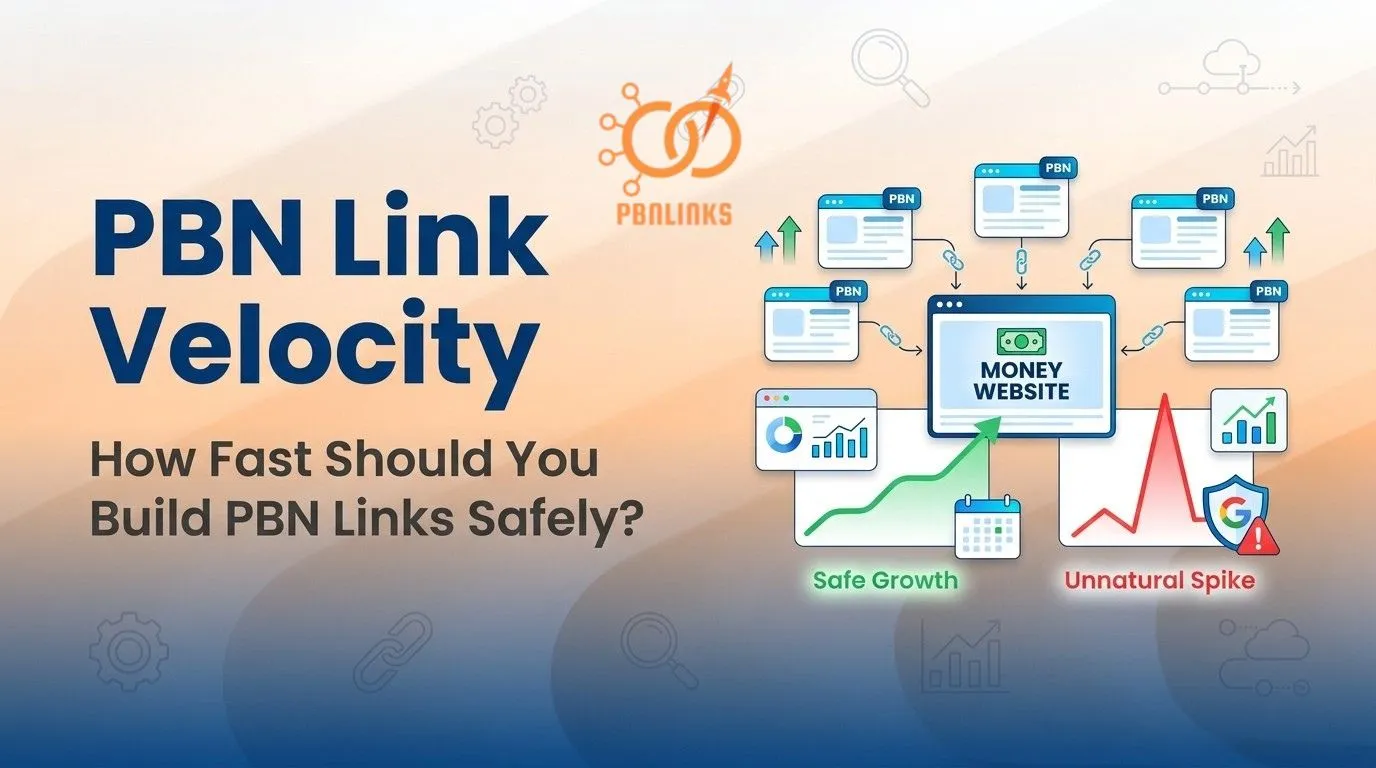
The answer lies in understanding PBN link velocity. This is the rate at which your money site gains new backlinks from a Private Blog Network over time. What matters most is not the number of links you build but how fast you build them and whether that speed looks natural to Google.
This guide covers everything you need to know. You will learn how Google measures backlink growth, what a safe velocity looks like for your site stage, how to calculate your own monthly limit, and how to recover if you have already built links too fast.
What Is PBN Link Velocity?
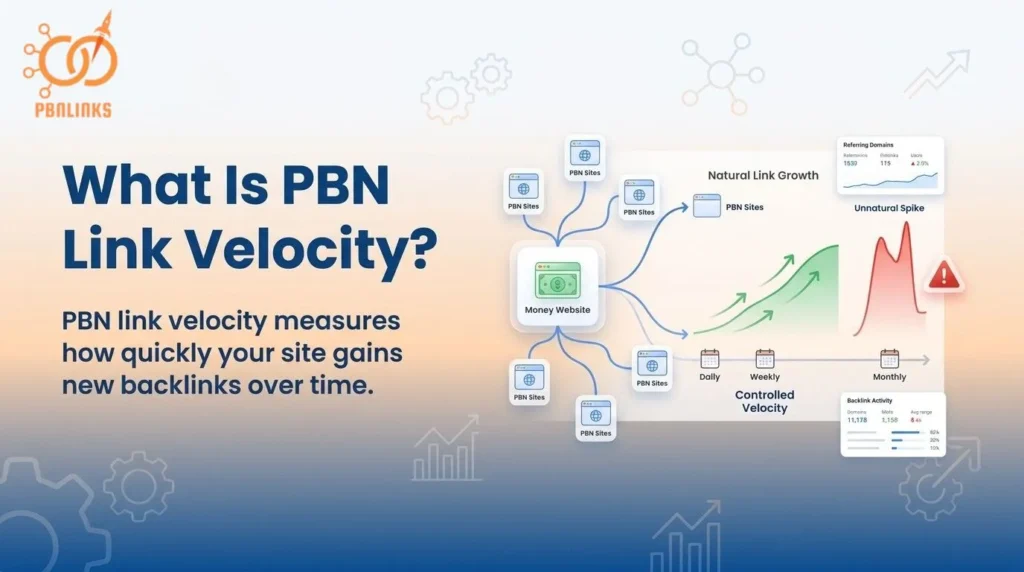
PBN link velocity is a metric that measures how quickly your money site gains new backlinks from a Private Blog Network over a set period of time. It tracks the rate of new referring domains or new PBN links added daily, weekly, or monthly — not the total number of links your site has collected overall.
It is commonly used in PBN link building to monitor link acquisition speed and evaluate whether links are being added at a pace that looks natural to Google. Many SEOs track PBN link velocity as a key control point to ensure their link building activity does not create patterns that trigger spam detection.
A faster velocity is not always better. What matters more is whether your link growth looks consistent and natural relative to your site’s history and your niche’s normal growth rate. A sudden spike in new PBN linking domains — even from high quality sources — can raise a red flag if it falls outside the expected growth pattern for a site like yours.
Safe PBN link velocity comes from adding high quality, relevant backlinks at a controlled and consistent pace — one that mirrors how a real website earns links organically over time.
Why Adding PBN Links Too Fast Gets Websites Penalized
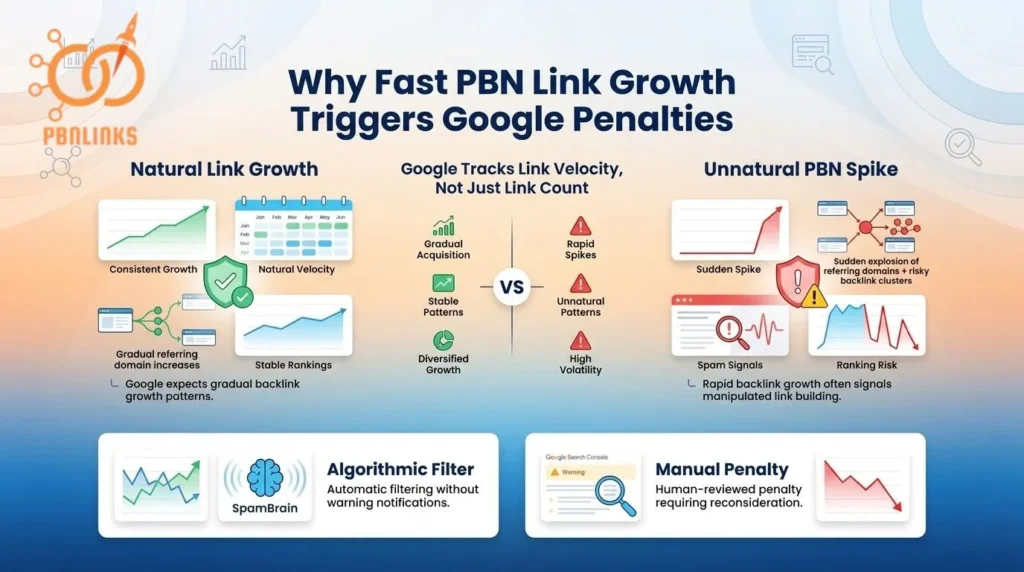
Adding PBN links too fast gets websites penalized because Google does not just count backlinks. it tracks how fast new linking domains point to your site. It then compares that speed against what normal growth looks like for a site of your age, authority, and niche.
When that speed looks out of place, Google flags it. Not because of where the links came from, but because an unnatural growth rate signals that links are being placed deliberately rather than earned organically.
Most PBN users focus entirely on how many links to build. Very few think about how fast to build them. That gap in thinking is where most velocity problems begin.
The number of PBN links you add matters. But the rate at which you add them determines whether those links help your rankings or put them at risk.
The Difference Between an Algorithmic Filter and a Manual Penalty
When Google acts on an unnatural velocity pattern, it does so in one of two ways.
An algorithmic filter is automatic. It is triggered by SpamBrain or Penguin. Your rankings drop with no notification and Google Search Console shows nothing unusual. The links quietly lose their ranking value without any warning.
A manual penalty is different. A human reviewer confirms the problem. Google Search Console sends a manual action notification referencing unnatural inbound links. Your rankings drop sharply and stay down until the issue is formally resolved.
Most velocity problems start as algorithmic. Manual review is triggered only when the pattern is too large or too obvious for automated systems to handle alone.
The One Mistake That Makes PBN Velocity Dangerous
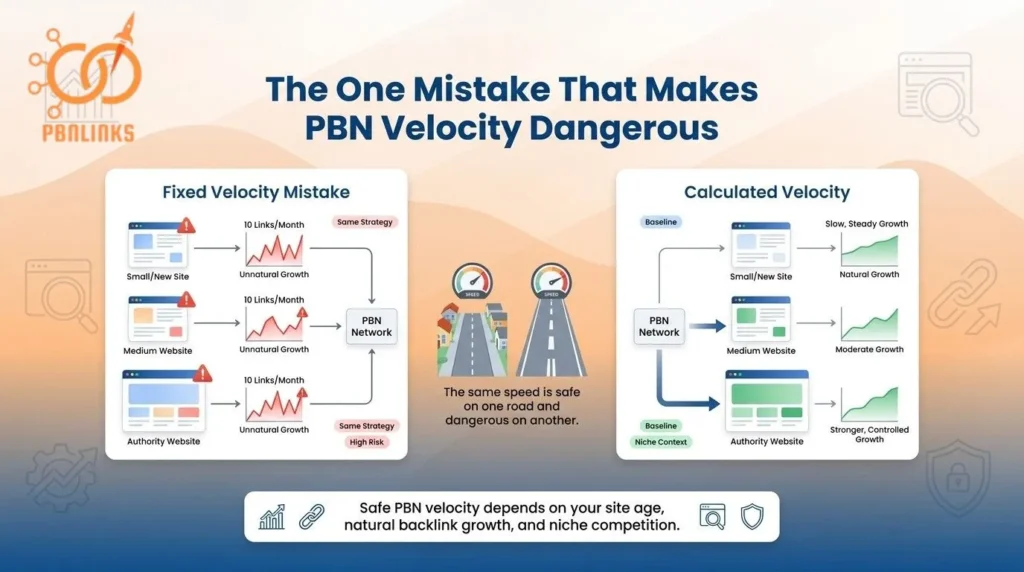
Treating PBN velocity as a fixed number is the single most common mistake in PBN link building. Most SEOs pick a number — 5 links per month, 10 links per month — and apply it to every site they work on. That is dangerous because PBN link velocity risk is never the same for every site.
A fixed PBN velocity number fails because it ignores three things that actually determine your safe limit:
- Your baseline — zero natural referring domain growth means any PBN link creates an immediate spike in your backlink profile
- Your niche norms — a normal PBN link growth rate in one niche looks completely suspicious in another
- Your competitor context — without knowing your niche velocity ceiling, any number you pick is a guess
Your safe PBN velocity is not a number you find in a guide or copy from a forum. It is calculated from your site’s natural referring domain growth rate, your niche ceiling, and what Google already expects from a site at your stage.
Think of it like speed limits on different roads — the same speed that is completely safe on a highway is dangerous on a residential street. Your site’s natural growth rate is the road. Your PBN velocity is the speed. Getting that balance right is exactly what the next section shows you how to do.
How to Find Your Safe PBN Velocity Limit in 3 Steps
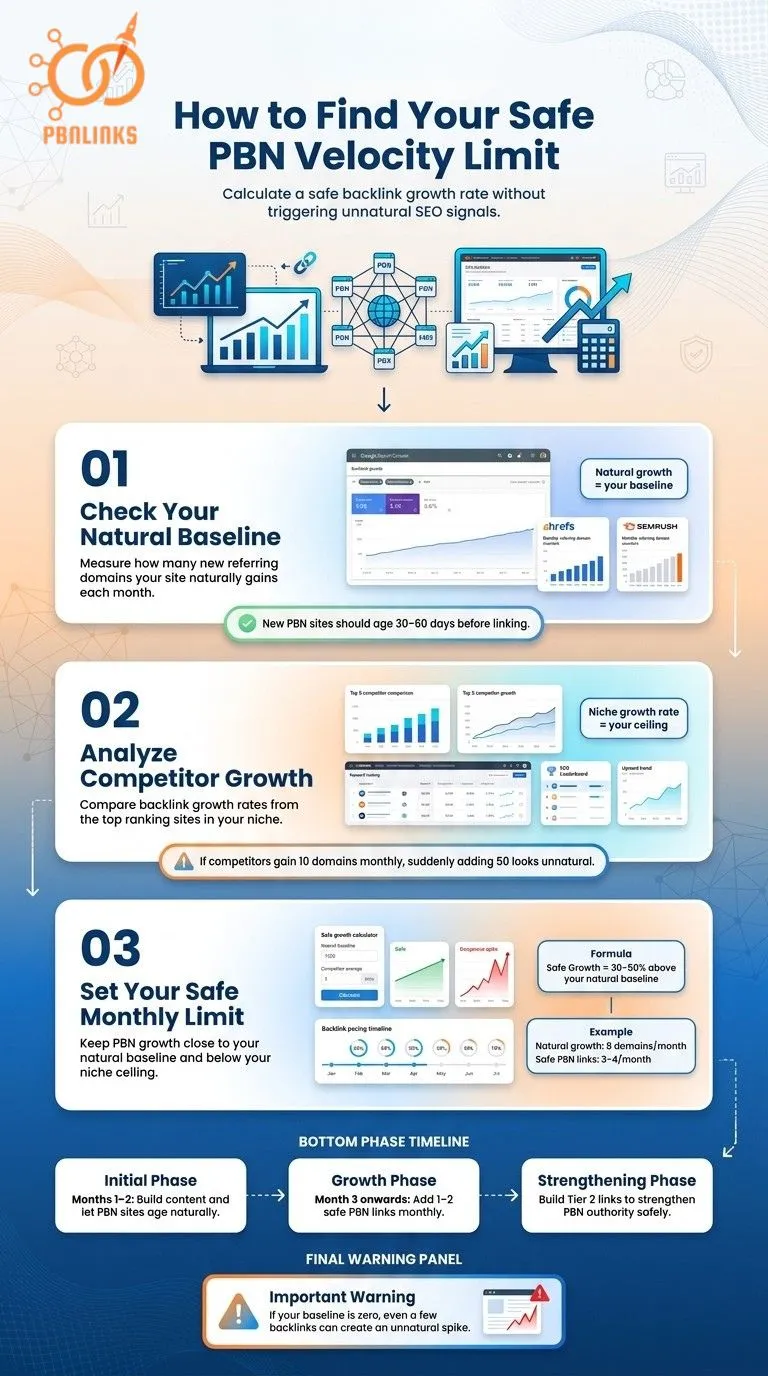
Your safe PBN velocity limit is not a number you guess — it is a number you calculate. It starts with two simple numbers: how fast your site is already growing and how fast your competitors are growing. Once you have both, setting your monthly PBN link limit becomes straightforward.
Step 1 — Check How Many New Linking Domains Your Site Gets Each Month
Open Google Search Console → Links → External Links → check new referring domains discovered in the last 90 days → divide that number by 3. This gives your average monthly referring domain growth rate.
Cross-check this in Ahrefs or SEMrush using the Referring Domains report filtered by the last 3 months. Write this number down. It is your natural baseline — the starting point for every PBN velocity decision you make.
One important rule before moving forward: if you have just built a new PBN site, wait at least 30 to 60 days before linking to your money site. Let the PBN site get indexed, publish a few articles, and establish a basic content history first. Linking too early removes any natural appearance the site might have had.
Step 2 — Check How Fast the Top-Ranking Sites in Your Niche Are Growing
Open Ahrefs or SEMrush and search your main target keyword. Pull the top 5 ranking pages and check the referring domain growth for each site over the last 6 months. Calculate the average monthly new referring domain rate across all 5 sites.
This number is your niche ceiling — the growth speed that looks completely normal in your specific market. If your top competitors gain 10 new referring domains per month on average, targeting 50 in the same period will look unnatural to Google regardless of how strong your PBN links are.
Step 3 — Use These Two Numbers to Set Your Monthly PBN Link Limit
Your monthly PBN link limit should keep your total referring domain growth close to your natural baseline and below your niche ceiling. A simple rule to follow — your PBN links per month should not push your referring domain growth more than 30 to 50 percent above your natural baseline.
For example, if your site naturally earns 8 new referring domains per month, adding 3 to 4 PBN links keeps you within a believable range. Adding 15 in one month creates an obvious spike that falls outside both your baseline and your niche ceiling.
Scale your PBN velocity in three phases:
- Initial phase (months 1 to 2): add zero links from new PBN sites to your money site — let each PBN site age, get indexed, and build a content history first
- Growth phase (month 3 onwards): add 1 to 2 links per PBN site per month using diverse, non-exact match anchor text
- Strengthening phase: add Tier 2 links pointing to your PBN sites — not your money site — to build each PBN site’s authority and allow it to pass more ranking power safely over time
If your baseline is zero or near zero, start with 1 PBN link per month maximum and build from there. Any number looks like a spike when there is no existing growth to absorb it.
How Many PBN Links Per Month Is Safe for Your Site Right Now
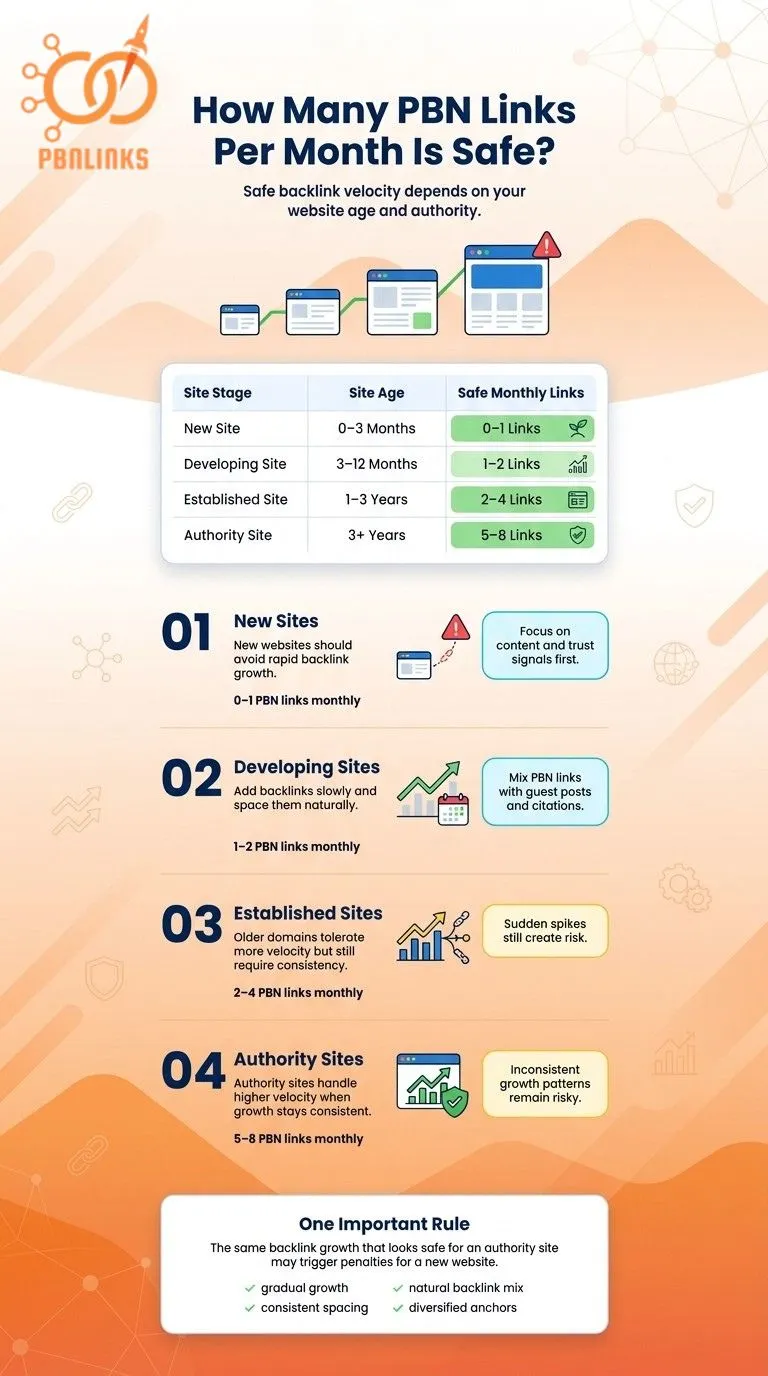
The safe number of PBN links per month is not the same for every site. It depends on your site’s age because Google scrutinizes newer sites far more aggressively than established ones. The same velocity that is completely safe for a three-year-old authority domain can trigger a penalty on a three-month-old site.
| Site Stage | Age | Safe Monthly PBN Links |
| New | 0 to 3 months | 0 to 1 per month |
| Developing | 3 to 12 months | 1 to 2 per month |
| Established | 1 to 3 years | 2 to 4 per month |
| Authority | 3 or more years | 5 to 8 per month |
New Sites (0 to 3 Months) — Why You Should Wait Before Adding Any PBN Links
New sites should avoid PBN links almost entirely in the first two months. Google has no data on your site’s natural growth pattern yet and any link velocity looks abnormal because there is no baseline to compare against.
Spend the first two months building content, social signals, and a few natural citations before touching PBN links. If you must add a PBN link before month three, add one and wait at least four weeks before adding another.
The goal at this stage is not rankings. It is establishing a believable baseline that makes future PBN links look natural when they arrive.
Developing Sites (3 to 12 Months) — How to Build PBN Links Without Outpacing Your Profile
Developing sites can begin adding PBN links carefully but the profile is still thin enough that any spike stands out clearly to Google.
Recommended velocity is one to two PBN links per month, always spaced at least two weeks apart. Mix every two PBN links with at least one natural link from another source such as a guest post, a citation, or a niche edit to keep the profile from looking like it only grows from controlled sources. Keep anchor text very conservative at this stage and stick to branded and generic anchors almost exclusively.
Established Sites (1 to 3 Years) — Where Most SEOs Start Getting Comfortable and Sloppy
Established sites have a real growth history and Google has a clear model of what normal looks like but this is exactly where most SEOs start making mistakes.
Recommended velocity is two to four PBN links per month with consistent spacing. Never cluster multiple links in the same week. The biggest mistake at this stage is assuming site age means the domain can handle anything. A sudden jump from zero to eight links in one month is still a spike regardless of how old the domain is. Point links at a variety of pages and not the same homepage or money page repeatedly.
Authority Sites (3 or More Years) — High Tolerance Does Not Mean Zero Risk
Authority sites can absorb more PBN link velocity because their baseline growth rate is naturally higher but high tolerance does not mean zero risk.
Recommended velocity is five to eight PBN links per month but only if the overall profile is healthy, diverse, and growing consistently. The risk at this stage shifts from velocity to pattern. Erratic month to month variation such as zero links in January and twenty links in February is more suspicious than a consistent steady pace. PBN domain quality matters more than quantity at this stage. Three strong relevant PBN links from aged domains outperform ten weak generic ones.
How to Tell If Your PBN Link Velocity Has Already Hurt Your Rankings
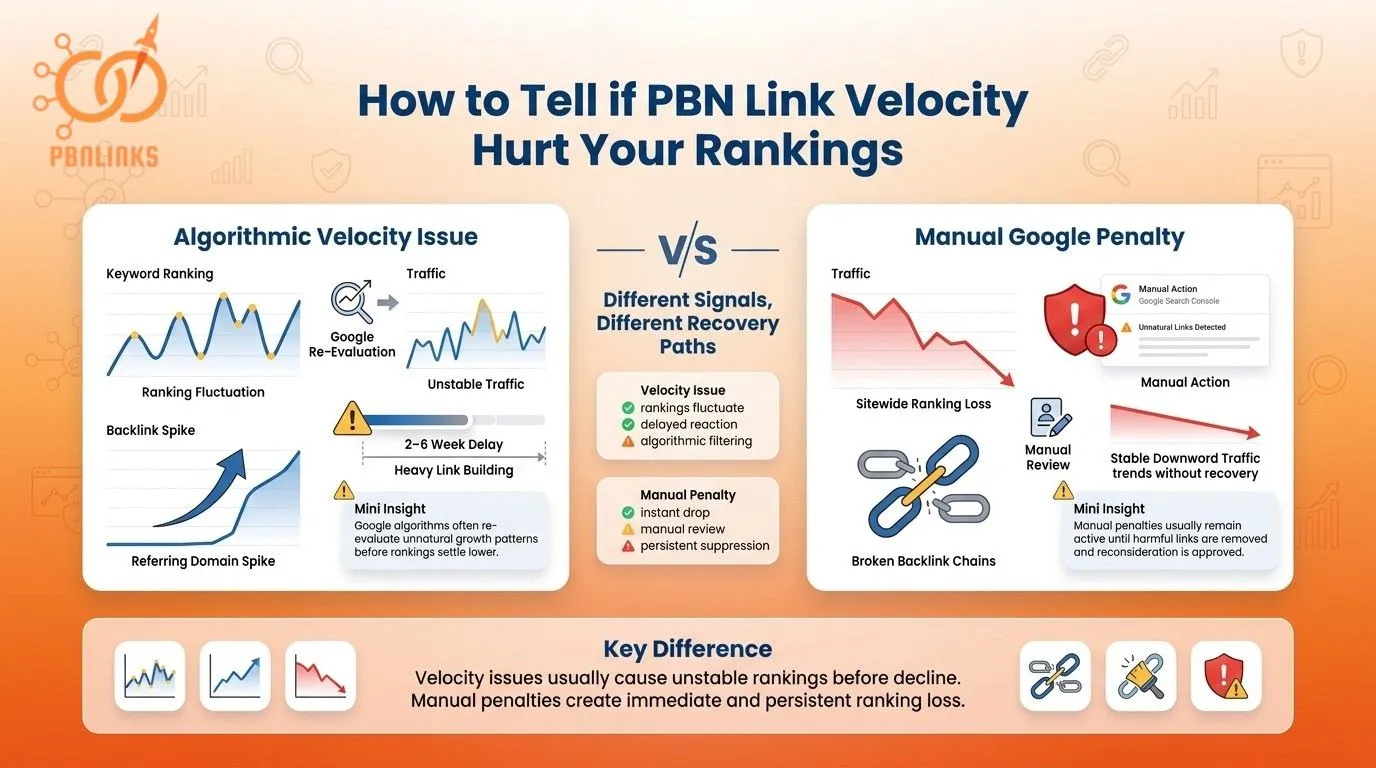
A ranking drop after PBN link building does not always mean velocity caused it. Identifying the real cause before taking action is critical — because fixing a velocity issue looks completely different from fixing a manual penalty. Here is how to tell which one you are dealing with.
It Is Probably a Velocity Issue If:
- Rankings dropped within 2 to 6 weeks of a heavy PBN link building period
- The drop happened around a confirmed Google algorithm update date
- Multiple pages lost rankings at the same time rather than one specific page
- Your Ahrefs or SEMrush referring domain graph shows a clear spike in the same window the drop occurred
A velocity issue rarely causes an instant drop. What you will typically see is rankings moving up and down for 2 to 4 weeks before settling at a lower position. That back and forth movement is a strong sign that Google’s algorithm is re-evaluating your link profile — not that your site has a technical problem.
It Is Probably a Manual Penalty If:
- Google Search Console shows a manual action notification under Security and Manual Actions
- The notification specifically mentions unnatural inbound links
- Traffic dropped sharply and has not recovered through multiple subsequent algorithm updates
- Ranking loss is sitewide and consistent rather than page-specific or fluctuating
A manual penalty behaves very differently from an algorithmic filter. Rankings drop sharply and stay down through every subsequent update without any fluctuation or self-correction. Recovery only happens after the unnatural links are fully removed and a formal reconsideration request is submitted directly to Google.
How to Fix a PBN Velocity Problem and Get Your Rankings Back
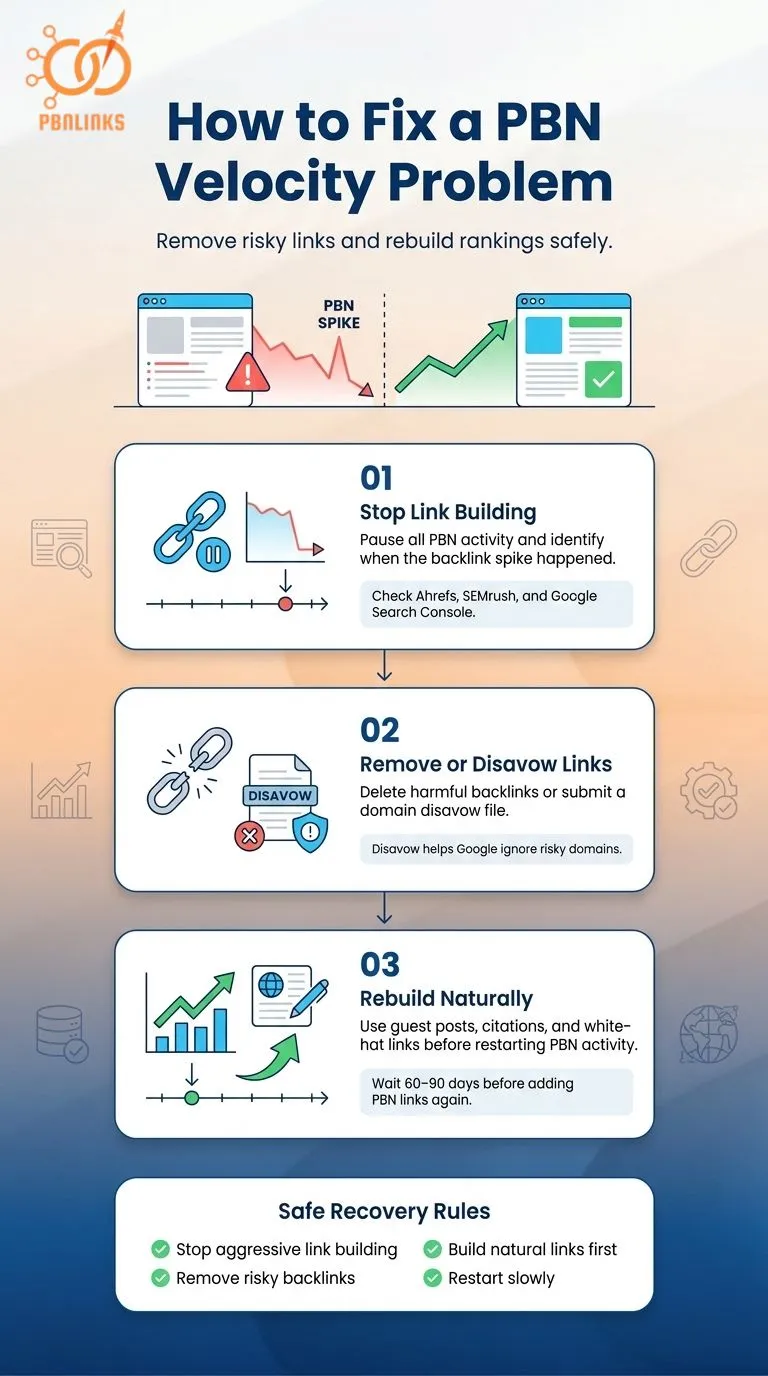
Fixing a PBN velocity problem and recovering lost rankings requires three steps taken in the right order — diagnosing the cause, removing the problem links, and rebuilding the profile with clean signals. Skipping any step or rushing the process extends recovery time and risks repeating the same mistake.
Step 1 — Stop Adding Links and Find the Exact Window That Caused the Drop
Stop all PBN link activity immediately. Adding more links while diagnosing the problem gives Google more unnatural data to act on and always slows recovery down.
Once you have paused, open Ahrefs or SEMrush and pull the Referring Domains report sorted by date. Find the specific month where new domain acquisition spiked above your normal baseline. Compare that spike window against the date your rankings dropped. If the two align within a 2 to 6 week window, velocity is almost certainly the cause.
Then check Google Search Console for manual action notifications under Security and Manual Actions. This single check determines which recovery path to follow. An algorithmic issue and a manual penalty require completely different responses — and confusing the two is one of the most common recovery mistakes SEOs make.
Step 2 — Remove the Links or File a Disavow
If you have direct access to the PBN sites, remove the links from the posts straight away. Direct removal is faster, cleaner, and more reliable than disavowal because it eliminates the link completely rather than simply asking Google to ignore it.
If direct removal is not possible, create a disavow file listing the problematic domains and submit it through Google Search Console. Use domain-level disavowal rather than URL-level where possible — it covers all current and future links from that domain in one entry.
One point many SEOs get wrong: disavowing links does not instantly reset your velocity baseline. Google’s link graph keeps a historical record of your link acquisition pattern. Recovery depends on what your link profile looks like going forward — not on the disavowal alone. Disavowal tells Google to stop counting those links. It does not erase the pattern those links already created.
Step 3 — Rebuild Your Profile Before Adding Any PBN Links Again
After removing or disavowing problem links, focus entirely on white-hat link building. Guest posts, citations, and niche edits replace removed signals with clean natural-looking ones that strengthen your profile without adding new risk. This step is not optional. Rebuilding with clean links gives Google a new and healthier pattern to evaluate your site against.
Wait a minimum of 60 to 90 days before adding any PBN links again — even if rankings start recovering sooner. Early recovery means the algorithm is responding positively. It does not mean it is safe to resume PBN activity. Resuming too early restarts the same pattern that caused the problem in the first place.
When you do resume, use the three-step velocity calculation from earlier in this article to set a new conservative limit. Treat your site as if it is starting from a completely fresh baseline — because the recovery period resets your risk tolerance and the velocity that felt safe before may no longer be appropriate now.
PBN Link Velocity Cheat Sheet — Save This Before You Build Another Link
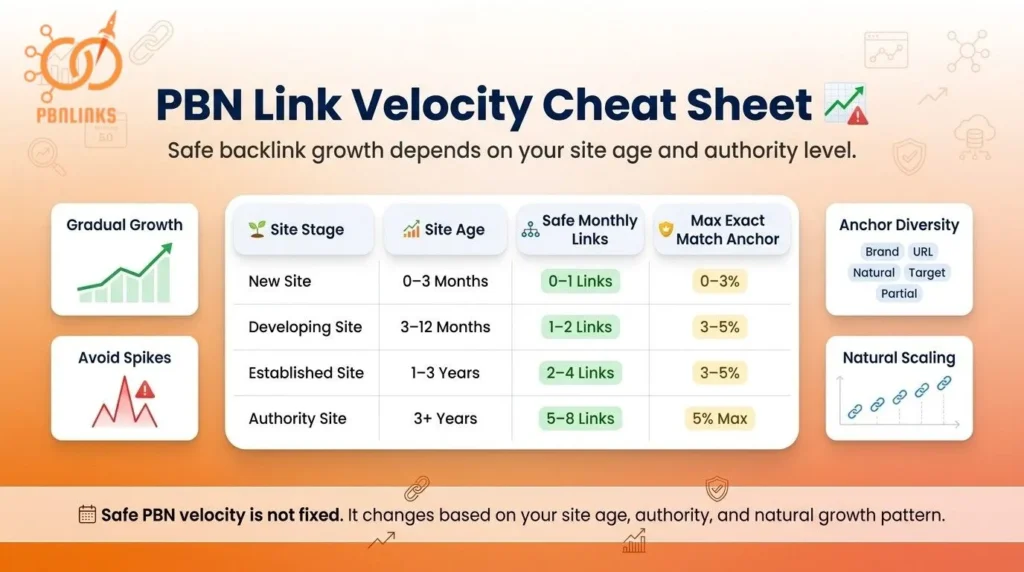
Everything covered in this article comes down to one core principle — safe PBN link velocity is not a fixed number. It is a relative measurement that changes based on your site’s age, natural growth rate, and niche ceiling. The numbers and rules below put that principle into a single reference you can return to every time you plan a new link building campaign.
Safe PBN Velocity by Site Stage
| Site Stage | Age | Safe Monthly Velocity | Max Exact Match Anchor |
| New | 0 to 3 months | 0 to 1 link | 0 to 3% |
| Developing | 3 to 12 months | 1 to 2 links | 3 to 5% |
| Established | 1 to 3 years | 2 to 4 links | 3 to 5% |
| Authority | 3 or more years | 5 to 8 links | 5% maximum |
The 5 Rules Every PBN User Needs to Follow
Rule 1: Calculate your natural baseline before setting any velocity target. The number only makes sense relative to your site’s current referring domain growth rate — never in isolation.
Rule 2: Space PBN links at least 2 weeks apart and never publish on multiple PBN sites in the same week. Indexation clustering creates the same spike pattern as bulk link building — and Google treats both identically.
Rule 3: As your monthly link volume increases, your anchor text must become more conservative. These two variables always move in opposite directions. More links means less aggressive anchors — without exception.
Rule 4: Pause or reduce PBN link activity during confirmed Google core updates and do not resume until rankings have been stable for at least 2 to 3 weeks after the update has fully rolled out.
Rule 5: Never stop link building with a hard cut to zero. Taper down gradually over 2 to 3 months to avoid the reverse velocity signal that tells Google your campaign has ended rather than your site has simply stopped growing.
Conclusion
In conclusion, safe PBN link velocity is never a fixed number. It is a relative measurement that depends on your site’s age, natural growth rate, niche ceiling, and existing backlink profile. Adding PBN links too fast creates unnatural patterns that Google’s spam systems are built to detect. Adding them too slowly or stopping suddenly creates equally suspicious signals.
The rules are straightforward. Calculate your baseline before setting any velocity target. Scale gradually as your site matures. Keep anchor text conservative as link volume increases. Pause during confirmed Google core updates. Taper down gradually rather than cutting link activity to zero overnight.
Velocity does not work in isolation either. Anchor text distribution, indexation timing, and link profile diversity all interact with velocity to either reduce or multiply risk. Managing all of them together is what produces consistent, stable rankings over time.
FAQs About PBN Link Velocity
What does link velocity mean?
Link velocity is a metric that measures how quickly your site gains or loses backlinks over time. It tracks the rate of new referring domains or new links added per day, week, or month. Many SEOs and agencies use link velocity as a key performance indicator to evaluate whether their link building efforts are producing consistent and natural growth.
Can Google detect PBN links?
Yes. Google detects PBN links through unnatural referring domain spikes, over-optimized anchor text, shared hosting, and coordinated publishing patterns. Controlled velocity, diverse hosting, and natural content reduce detection risk but do not eliminate it entirely.
Does building PBN links too fast cause a penalty?
Yes. An unnatural referring domain spike triggers either an algorithmic filter or a manual penalty. An algorithmic filter causes rankings to fluctuate before settling lower. A manual penalty causes a sharp drop that requires a formal reconsideration request to reverse.
How do I calculate my safe monthly PBN link limit?
Find your average monthly referring domain growth in Google Search Console. Then check the same metric for your top 5 niche competitors in Ahrefs or SEMrush. Your monthly PBN limit should not push your referring domain growth more than 30 to 50 percent above your natural baseline.
What anchor text ratio is safe for PBN links?
Exact match anchors should stay at 3 to 5 percent maximum. Branded anchors 30 to 40 percent. Generic anchors 20 to 30 percent. Naked URLs 15 to 20 percent. Partial match 10 to 15 percent. As monthly link volume increases, exact match percentage must decrease proportionally.
Why did my rankings drop after building PBN links slowly?
Gradual PBN link building can still create a velocity spike if Google indexes all links within a short window. Low-authority PBN sites are crawled infrequently, so accumulated posts get recorded simultaneously — making a gradual campaign appear as a bulk link drop in Google’s link graph.
Does disavowing PBN links reset my velocity baseline?
No. Disavowal stops Google from counting those links but does not erase the historical pattern. Google retains a record of past link acquisition behavior in its link graph. Recovery depends on building a clean and natural-looking profile going forward.
How long does recovery from a PBN velocity penalty take?
Algorithmic recovery takes 60 to 90 days after problem links are removed and replaced with clean white-hat links. Manual penalty recovery takes longer and requires a formal reconsideration request submitted through Google Search Console after fully cleaning the link profile.
Should I pause PBN links during a Google core update?
Yes. Pause or reduce PBN activity during confirmed core updates. Google recalibrates link graph signals during rollouts and patterns previously tolerated can be re-evaluated. Resume only after rankings stabilize for 2 to 3 weeks after the update fully rolls out.
Are PBN links still effective in 2026?
Yes, when built on clean aged domains with controlled velocity, diverse anchor text, and a mixed backlink profile that includes white-hat links. PBNs used as the only link building strategy without profile diversity carry the highest detection and penalty risk.