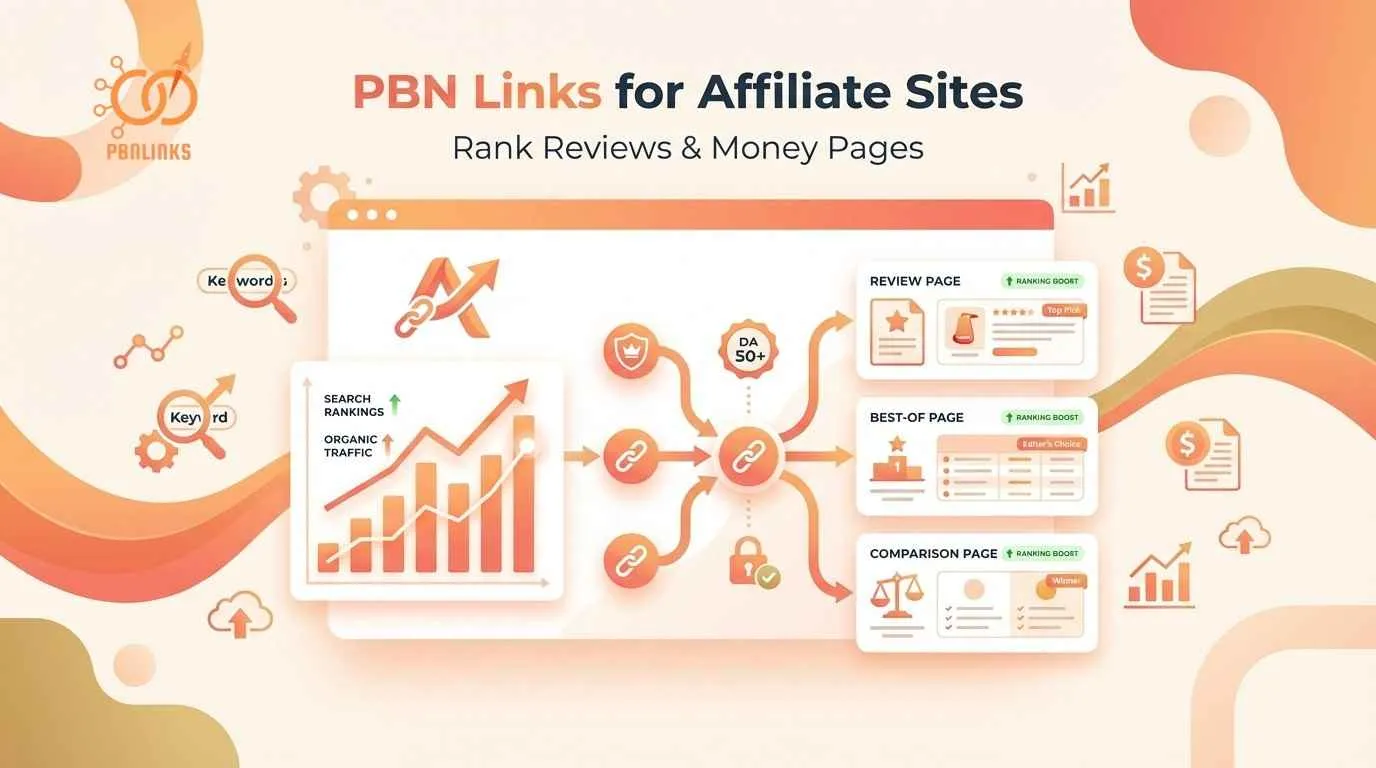
PBN Links for Affiliate Sites: Rank Reviews & Money Pages
You’ve published product reviews and best-of lists on your affiliate site. They’re stuck on page two. No rankings means no clicks and no commissions.
You’ve tried guest posting for natural links. It’s slow, expensive, and doesn’t move the needle. Meanwhile, competitors with worse content rank above you.
PBN links can rank your affiliate pages faster when used correctly. But affiliate sites face unique risks: Google penalties for over-optimization and Amazon Associates bans for suspicious traffic. You need a strategy for commercial keywords that doesn’t trigger penalties.
This guide shows which pages deserve PBN links first, safe anchor text ratios for “best” and “review” keywords, and how many links to build monthly. You’ll learn tiered linking strategies and how to track earnings per click instead of just rankings.
Which Affiliate Pages Deserve PBN Links (And Which Don’t)
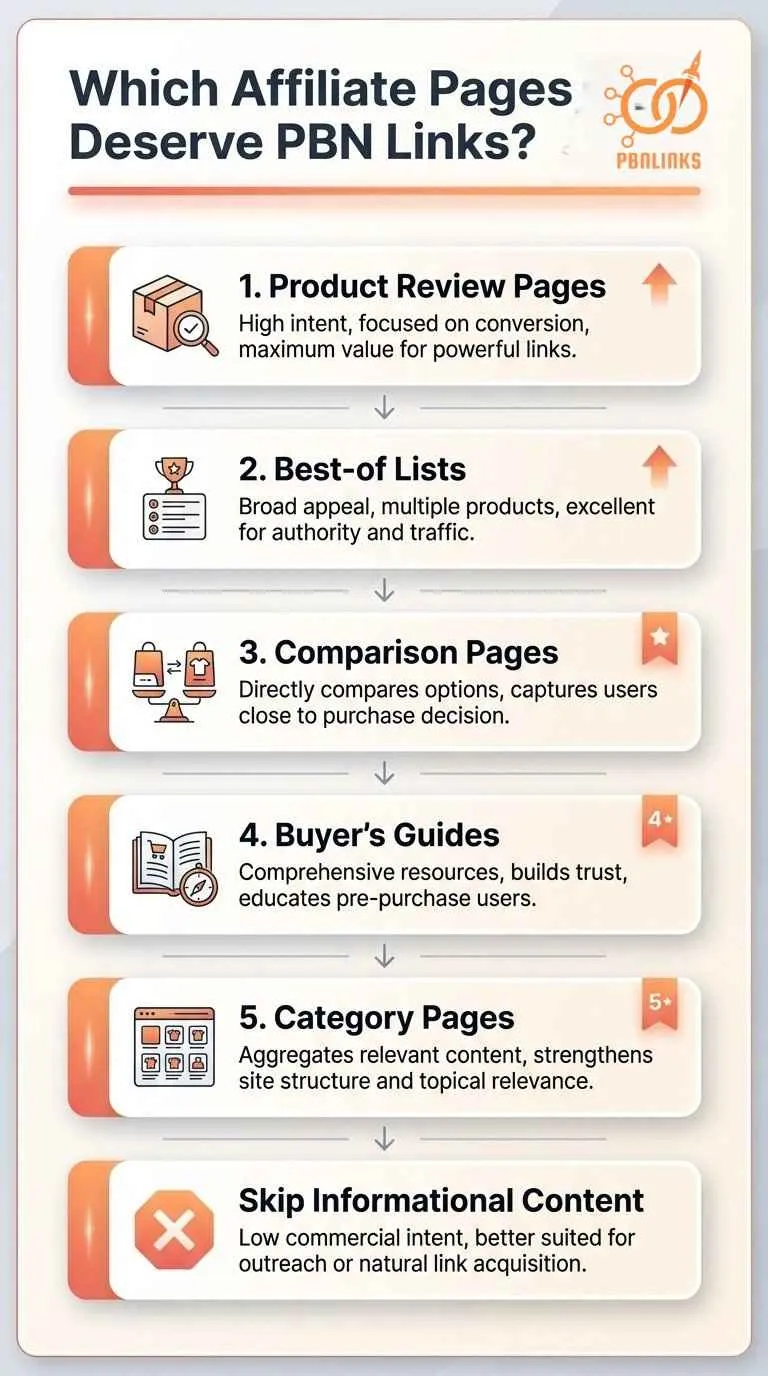
Product reviews, best-of lists, and comparison pages should get most of your PBN links because they target commercial keywords and drive affiliate commissions. Informational content like how-to guides and blog posts work better with tier 2 strategies or no links at all.
Here are the exact page types ranked by priority, plus which ones to skip entirely.
1) Product Review Pages (Individual Reviews)
Individual product review pages are your highest-priority targets for PBN links. These pages target buyer-intent keywords like “[product name] review” or “is [product] worth it” where readers are one click away from purchasing.
Typical link requirements:
- Low competition products: 5-10 PBN links
- Medium competition: 10-20 PBN links
- High competition (popular products): 20-30+ PBN links
Space links over 2-3 months to avoid velocity spikes. At PBN Links Agency, we’ve seen review pages rank within 4-6 weeks when targeting long-tail buyer keywords with moderate competition. Your content needs 1,500+ words with hands-on testing, pros/cons tables, and genuine value before any link building.
Best-of Lists and Roundup Reviews
Best-of lists like “Best Blenders 2024” or “Top 10 Running Shoes for Flat Feet” generate the highest ROI because one visitor clicks multiple affiliate links per page. These roundups face the stiffest competition since every affiliate marketer targets them.
Link requirements by competition level:
- Medium competition: 15-30 PBN links
- High competition (“best headphones,” “best mattress”): 40-60+ PBN links
- Established sites with domain authority: 30-40% fewer links needed
The biggest mistake is building links to thin best-of lists that rehash Amazon top sellers. Your roundup needs comparison tables, testing methodology, specific use-case recommendations, and 2,500+ words minimum.
Comparison Pages (Head-to-Head)
Comparison pages targeting “[Product A] vs [Product B]” keywords sit between reviews and best-of lists in priority. They convert well because readers are in decision mode, but face less competition than broad “best of” terms.
Build 8-15 PBN links per comparison page. The sweet spot is comparing two popular products in the same category: “Vitamix vs Blendtec,” “iPhone 15 vs Samsung S24,” or “Asana vs Monday.com.” Your comparison needs a side-by-side feature table, head-to-head testing results, and a clear recommendation for different use cases—not fence-sitting.
Buyer’s Guides and How-to-Choose Content
Buyer’s guides like “How to Choose a Blender” serve informational intent with commercial overtones. These are tier 2 link targets, not tier 1. Instead of pointing PBN links directly at buyer’s guides, use them as a buffer.
Tier 2 strategy: Build 5-10 PBN links to the buyer’s guide → Guide internally links to your product reviews and best-of lists → Link equity flows to money pages
This passes ranking power while protecting your highest-converting pages from direct PBN footprints. The guide itself needs to educate first: buying criteria, features to look for, common mistakes, budget ranges. Then link naturally to your reviews and roundups as examples.
Category and Collection Pages
Category pages like “Kitchen Appliances” or “Running Gear” are topical authority plays, not direct conversion pages. They organize your site architecture and help Google understand your niche coverage. Use PBN links sparingly—only after covering your money pages.
These pages work best with 3-8 PBN links focused on topical relevance. The real value comes from strong internal linking to your reviews, best-of lists, and comparisons. Think of category pages as hub pages that distribute link equity across your site, not pages that generate commissions directly.
Deal, Coupon, and Seasonal Pages
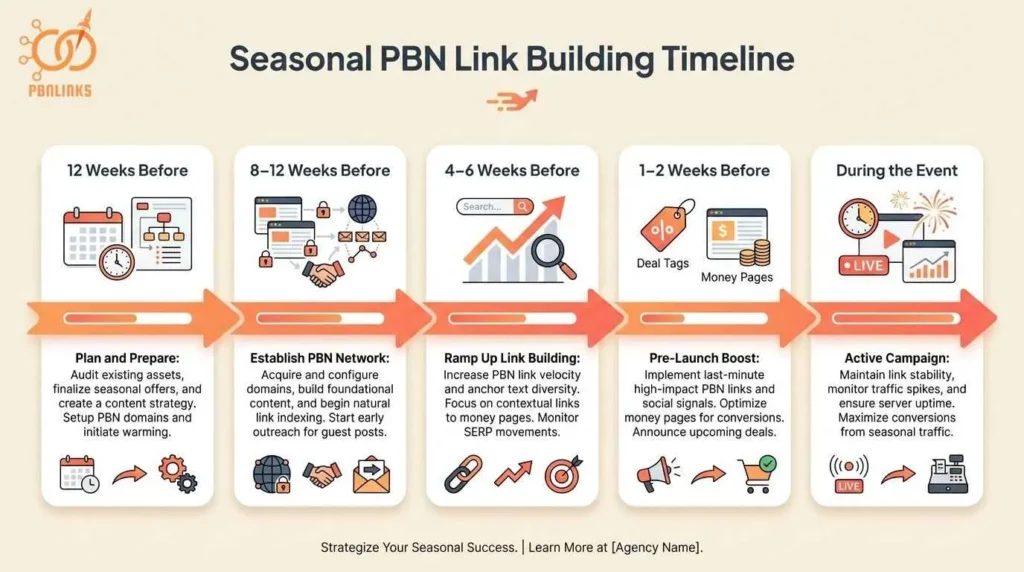
Deal pages targeting “Black Friday [product] deals” or “[brand] coupon codes” are time-sensitive opportunities with narrow ranking windows. You typically have 2-3 months before the event to establish rankings, so link velocity matters more than usual.
Seasonal link timeline:
- 8-12 weeks before event: Build 10-20 links in first month
- 4-6 weeks before: Add 5-10 more links
- During event: Stop building (rankings established)
Google scrutinizes rapid link growth during promotional periods. Don’t dump 30 links in one week right before Black Friday. The ROI on seasonal pages is high but temporary, after the event, rankings drop and traffic disappears.
Supporting Content: When to Skip PBN Links
Purely informational content without affiliate links doesn’t need PBN links at all. Articles like “What is a Blender” or “History of Running Shoes” build topical authority but won’t generate commissions.
Skip PBN links when:
- Zero commercial intent (definitions, history, general FAQs)
- No internal links to money pages
- Low buyer-intent keywords (“what is,” “who invented”)
Use PBN links (tier 2 approach) when:
- Informational post links to buyer’s guide → which links to reviews
- Building a content layer that funnels to money pages
The 80/20 rule applies: 80% of your affiliate income comes from 20% of your pages. Focus your PBN firepower on high-converting money pages, not informational fluff.
How to Anchor Text PBN Links to Affiliate Pages
Anchor text for commercial intent pages is where most affiliate sites get penalized. Use too many exact match anchors like “best blender” and Google flags your site for manipulation. The safe approach balances commercial terms with generic anchors and branded variations.
Here’s the anchor distribution that keeps you safe, plus the biggest mistakes to avoid.
The Safe Anchor Text Formula for Affiliate Pages
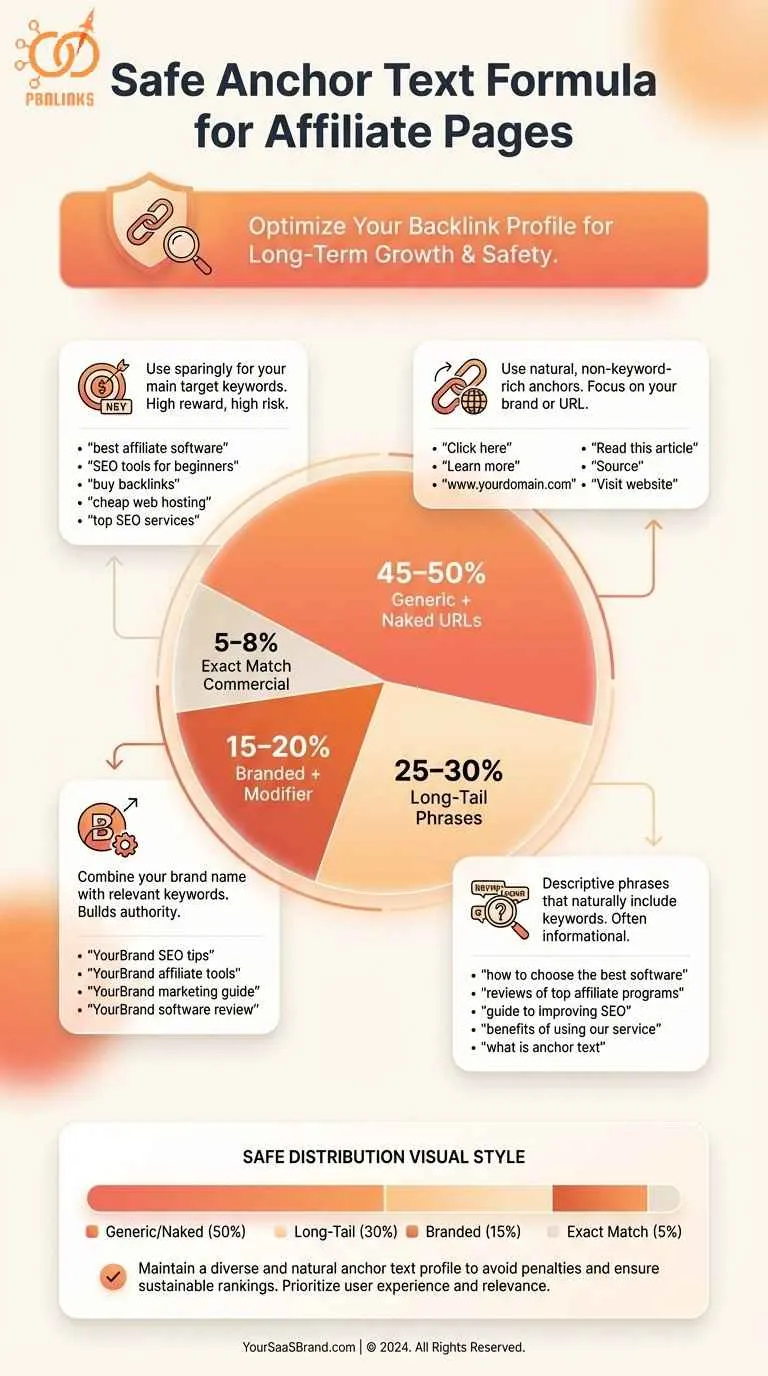
Use this ratio for product reviews, best-of lists, and comparison pages:
Safe anchor distribution:
- Exact match commercial: 5-8% (“best blender,” “Vitamix review”)
- Branded + modifier: 15-20% (“Vitamix blender review,” “KitchenAid comparison”)
- Long-tail phrases: 25-30% (“best blender for smoothies under $100”)
- Generic + naked URLs: 45-50% (“click here,” “read more,” yoursite.com)
For new sites under 1 year old, drop exact match to 3-5% and increase generic anchors to 55-60%. Established authority sites can push exact match to 10% maximum, but never higher.
The biggest mistake is using the same anchor pattern across similar pages: “best blenders” to your blenders page, “best mixers” to your mixers page. Google detects this pattern instantly and penalizes the whole site.
Examples – Good vs Bad Anchor Text Profiles
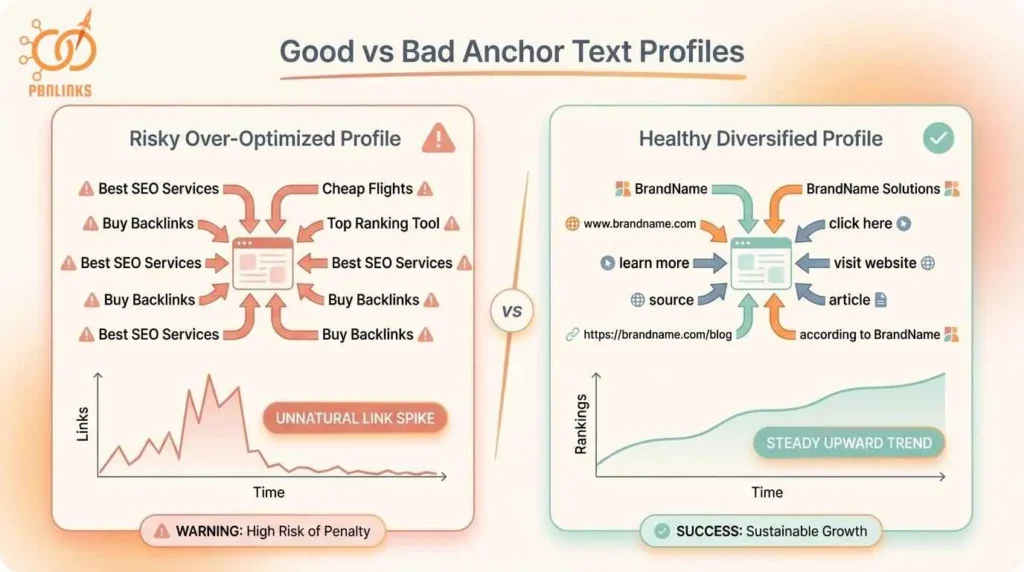
BAD Profile (Gets Penalized): 20 backlinks to “best blenders” page:
- 8 links: “best blenders” (40% exact match – WAY too high)
- 6 links: “best blender 2024”
- 4 links: “top blenders”
- 2 links: generic anchors
This profile screams manipulation. Over 70% commercial anchors triggers penalties.
GOOD Profile (Stays Safe): 20 backlinks to “best blenders” page:
- 1 link: “best blenders” (5% exact match)
- 3 links: “Vitamix blender review,” “KitchenAid blender comparison” (15% branded)
- 6 links: “best blender for smoothies,” “top rated blenders under $200” (30% long-tail)
- 10 links: “click here,” “read the full review,” yoursite.com/best-blenders (50% generic/naked)
This looks natural even though you’re targeting “best blenders.”
What to Do If You Already Over-Optimized
If you already have too many exact match anchors pointing to your money pages, don’t panic and don’t remove links. Removing links creates an unnatural pattern Google also flags.
Recovery steps:
- Add 10-15 new generic anchor links (“click here,” naked URLs) to dilute the exact match percentage
- Build tier 2 links to supporting content that internally links to your over-optimized page
- Wait 3-4 months for the ratio to normalize before building more commercial anchors
At PBN Links Agency, we’ve recovered sites that had 30-40% exact match anchors by adding generic links and waiting. Rankings recovered within 4-6 months without disavowing anything.
How Fast Should You Build PBN Links to Affiliate Sites
Link velocity matters more for affiliate sites because seasonal products and trending items create narrow ranking windows. Your site age and niche competition determine how many links you can safely build each month.
Follow these velocity guidelines to avoid triggering Google’s manipulation filters.
Safe Link Velocity by Site Age
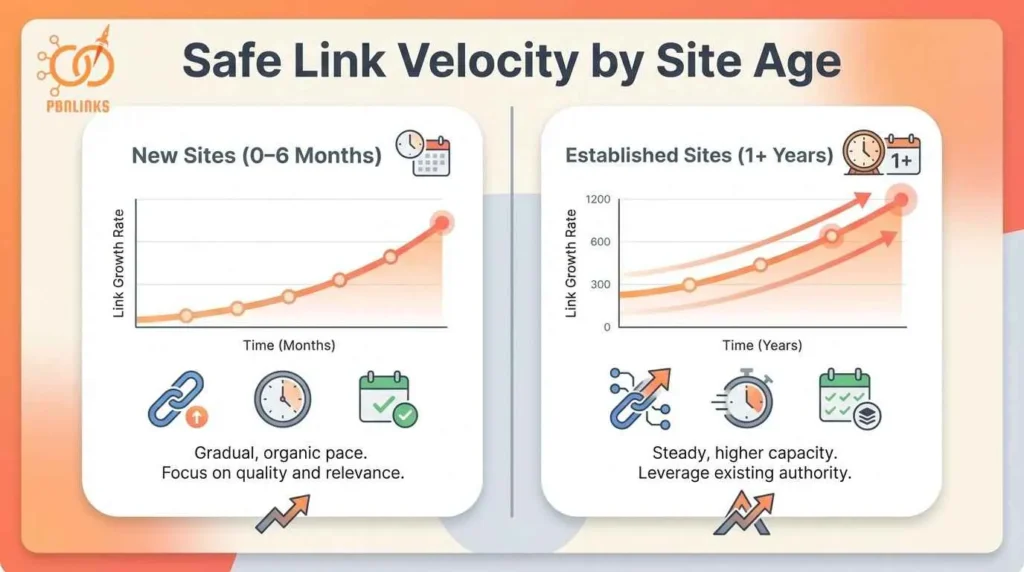
Google scrutinizes new sites more heavily than established ones. Ramp your link building slowly in the first 6 months, then scale once you have trust.
New niche sites (0-6 months old):
- Months 1-2: 2-3 links total per month
- Months 3-4: 5-7 links total per month
- Months 5-6: 8-12 links total per month
- Total after 6 months: 25-35 backlinks
Space links 7-10 days apart. Never add more than 2 links in the same week during your first 6 months.
Established sites (1+ years, 50+ pages, existing backlinks):
- 15-25 PBN links per month consistently
- Can handle seasonal spikes of 30-40 links
- Mix PBN with guest posts and niche edits
The key difference is trust. Established sites can add links faster without red flags, while new sites get flagged for any unusual growth pattern.
Time-Sensitive Content: Seasonal and Trending Products
Seasonal pages and trending products need different velocity strategies than evergreen content.
Seasonal content (Black Friday, Back-to-School):
Build links BEFORE the traffic window:
- 12 weeks before event: Publish + add 5-8 links
- 8-10 weeks before: Add 8-12 more links
- 4-6 weeks before: Add final 5-8 links
- During event: Stop building (rankings established)
Total: 20-30 links over 8-12 weeks
Adding 25 links the week before Black Friday looks manipulative. Front-loading over 3 months looks natural.
Trending products (new releases, viral items):
You have 2-4 weeks before competition ramps up:
- Week 1: Publish + 3-5 links
- Week 2: Add 4-6 links
- Weeks 3-4: Add 3-5 final links
Total: 10-15 links in first month
This is aggressive but necessary for trends. Once 50 other sites target the same product, your window closes. Space links 2-3 days apart minimum even for trends , Google detects clustering regardless of timing.
Monthly Link Budget by Niche Competition
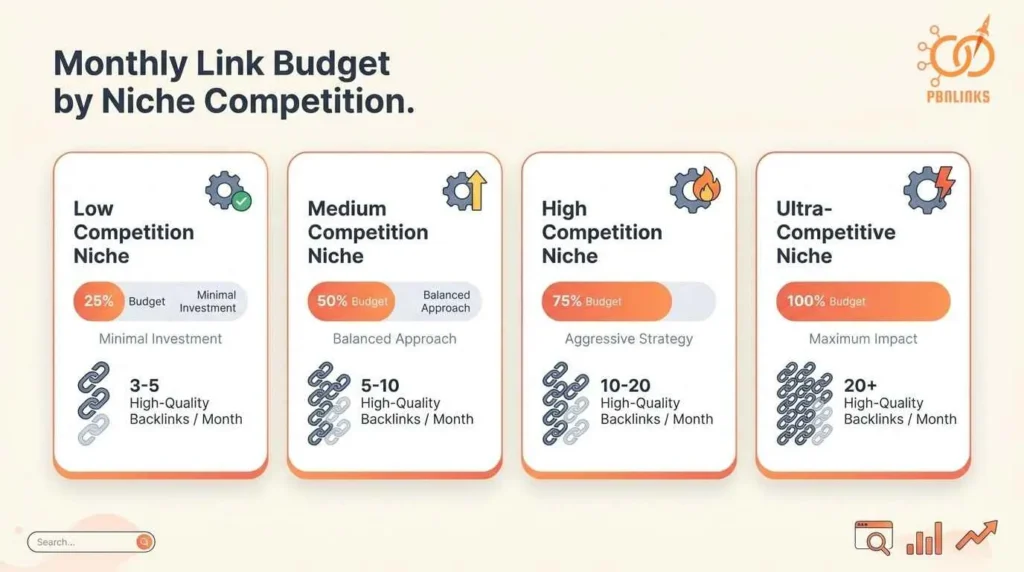
Your niche’s competition level determines how many links you need monthly, regardless of site age.
Niche competition tiers:
| Competition Level | New Sites (0-6mo) | Established Sites (1yr+) | Example Niches |
| Low | 3-5 links/month | 8-12 links/month | Yoga mats for seniors, camping gear for kids |
| Medium | 5-8 links/month | 12-20 links/month | Best blenders, running shoes, laptop reviews |
| High | 8-12 links/month | 20-30 links/month | Mattresses, headphones, fitness equipment |
| Ultra-competitive | 10-15 links/month | 30-50+ links/month | Credit cards, supplements, insurance |
Check your top 10 competitors in Ahrefs. If they average 200+ referring domains, you’re in high competition territory. Build accordingly.
Never double your backlink count in one month (10 links → 20 links). This triggers manual reviews regardless of niche. Grow 20-30% monthly maximum.
Using Tiered Links to Protect Your Money Pages
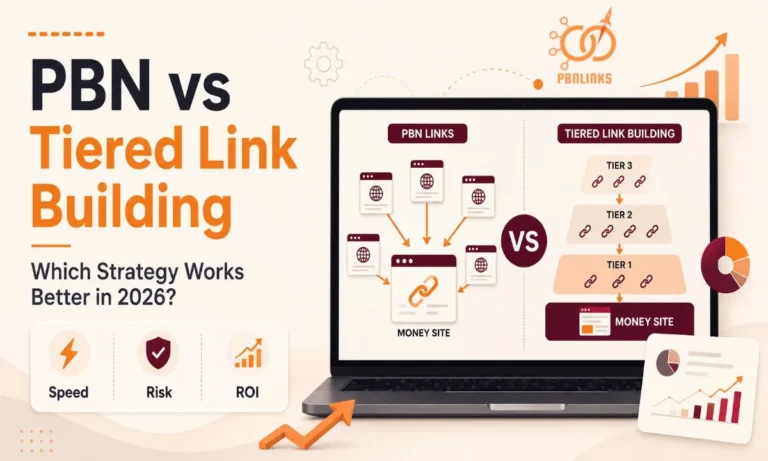
Tiered linking means building PBN links to supporting content instead of pointing every link directly at your money pages. That supporting content then internally links to your product reviews and best-of lists, passing link equity while reducing direct PBN fingerprints on pages that generate revenue.
Use this two-tier structure to balance ranking power with penalty protection.
How Tiered Linking Works (And When to Use It)
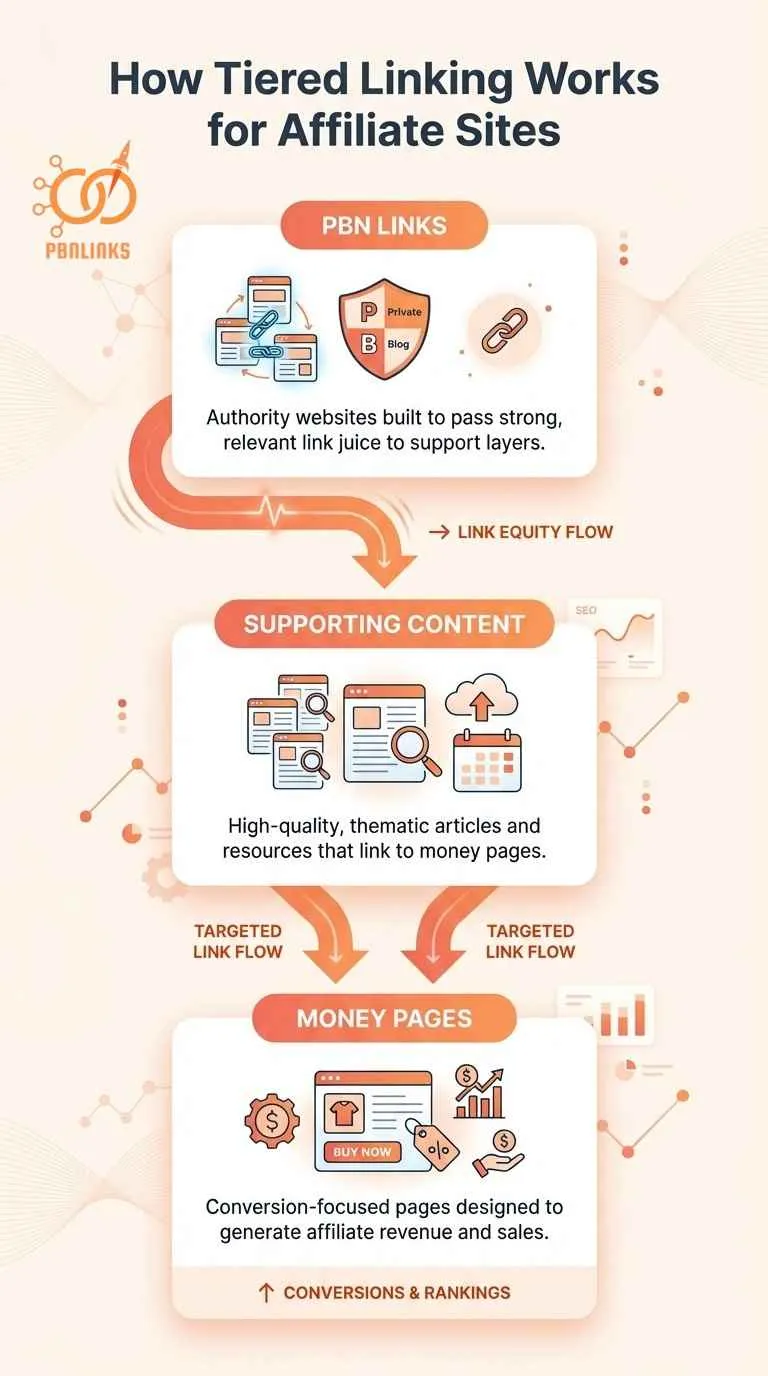
Most affiliate marketers point all their PBN links directly at money pages. This creates footprints Google can detect and puts your revenue pages at maximum risk.
The tiered approach uses two layers
Tier 1 – Direct links to money pages:
- Product reviews, best-of lists, comparison pages
- Use your strongest PBN domains only
- Conservative approach: 30-40% of total PBN budget
- Aggressive approach (established sites): 50-60% of budget
Tier 2 – Links to supporting content that internally links to money pages:
- Buyer guides, how-to-choose articles, category overviews
- Build these with 60-70% of your PBN budget (conservative)
- More relaxed anchor text options
- Each supporting article links to 1-2 money pages
When to use direct tier 1 links:
- Page ranks positions 11-20 (needs final push)
- Established site with 1+ years of trust
- Low-competition keywords
- You have high-quality aged PBN domains
When to use tier 2 strategy:
- New money page on new site (0-6 months old)
- Ultra-competitive keywords (competitors have 100+ backlinks)
- You want to scale without penalty risk
- Mixed PBN quality (some strong, some weak)
Most successful affiliate sites use a hybrid approach: direct links to proven top-5 money pages, tier 2 for new or unproven pages. You don’t have to choose one or the other.
Building Content Clusters That Pass Link Equity
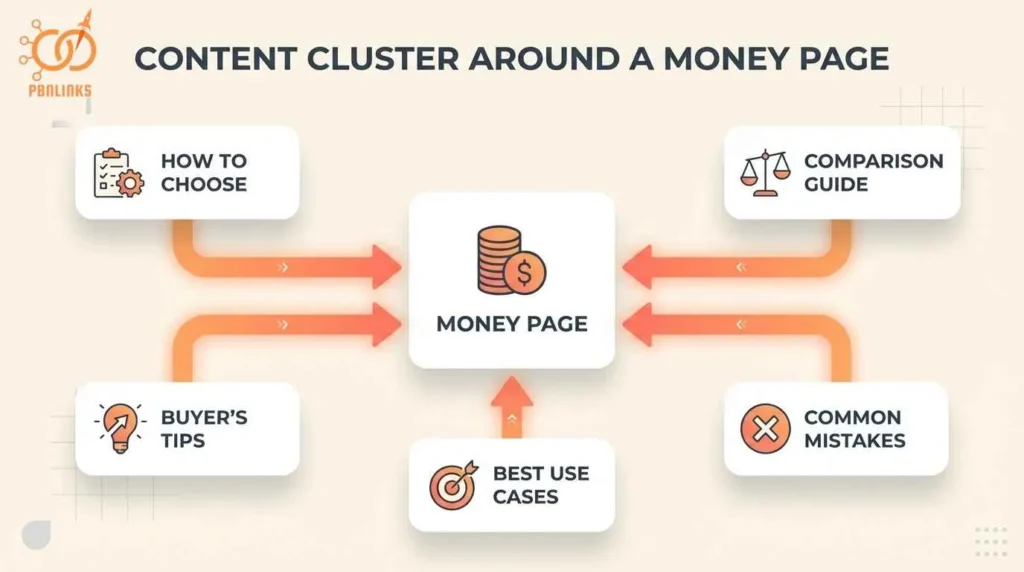
Tiered linking only works if your internal linking structure efficiently passes equity from supporting content to money pages.
Create topical content clusters around each money page
Example cluster for “Best Blenders 2024” (money page):
Supporting articles (tier 2 targets):
- “How to Choose a Blender for Smoothies”
- “Blender vs Food Processor: Which Do You Need?”
- “What Wattage Blender Do You Need?”
Build 5-10 PBN links to each supporting article. Each supporting article links to your “Best Blenders” money page once or twice naturally in the content. Your money page receives link equity from multiple sources without heavy direct PBN exposure.
Internal linking rules:
- Link from supporting content → money pages (tier 2 → tier 1)
- Use 1-2 contextual links per supporting article maximum
- Natural anchor text: “see our full blender buying guide,” “check out the best blenders”
- Don’t link all supporting articles to ALL money pages—keep it focused (1 hub per cluster)
Real example: You build 10 PBN links to “How to Choose a Blender.” That article internally links to “Best Blenders 2024” and “Vitamix 5200 Review.” Both money pages benefit from the tier 2 links without direct PBN fingerprints. Your money page shows 2 direct PBN links + 10 tier 2 links = 12 total backlinks, but Google only sees 2 from your PBN.
At PBN Links Agency, we use 60% tier 2 strategy for sites under 1 year old, then shift to 50/50 direct + tier 2 once they’re established. This balances growth with protection during the vulnerable early months.
Avoiding Penalties from Google and Affiliate Networks
Affiliate sites face dual penalty risks: Google manual actions for unnatural links AND affiliate network bans for terms of service violations. One mistake can cost you months of rankings or thousands in withheld commissions.
Avoid these six critical mistakes that get affiliate sites penalized or banned.
1) Relying 100% on Organic Traffic from PBN-Ranked Pages
The biggest red flag to both Google and affiliate networks is having 100% of your traffic come from organic search. Amazon Associates monitors traffic source diversity—if you’re sending 10,000 clicks monthly with zero email subscribers or social followers, they know something’s off.
Build these traffic sources from day one:
- Email list (exit-intent popups, content upgrades)
- Pinterest pins for every product review
- Reddit or niche forum shares
- YouTube video versions of reviews
Even 500 email subscribers and 1,000 monthly Pinterest visitors make your traffic profile look legitimate to affiliate managers.
2) Using the Same PBN Footprint Across All Your Links
Google detects patterns when your PBN domains share the same hosting, themes, or registration dates. This is the fastest way to trigger a manual review.
Common footprint mistakes:
- Same hosting provider across all PBN domains (shared IPs)
- Identical WordPress themes or site structures
- All domains registered same month, same registrar
- No outbound links to authority sites from PBN posts
Quick fixes: Use different hosts for each domain. Vary themes and content styles. Register domains at different times. Add 2-3 natural outbound links to Wikipedia or news sites in each PBN post.
3) Ignoring Amazon Associates Traffic Pattern Rules
Amazon’s Terms of Service prohibit “artificial traffic generation.” If your site jumps from 500 visitors to 15,000 in one month after building 30 PBN links, that’s a manipulation signal.
What triggers Amazon account reviews:
- Traffic doubles in a single month
- Page ranks #1 within 3 weeks of launch
- 90%+ traffic from one keyword or landing page
- High clicks but low purchase conversions
Amazon can terminate your account without warning and withhold 60-90 days of unpaid commissions. Ramp traffic gradually over 3-6 months and keep organic under 70% of total traffic.
4) Building All Your Links in a 2-Week Burst
Real sites accumulate links gradually over months, not 25 backlinks in 10 days. Clustering all your PBN links in a short window is one of the easiest manipulation patterns for Google to detect.
Safe link velocity:
- Month 1: 3-5 links
- Month 2: 5-8 links
- Month 3: 8-12 links
Space links 5-10 days apart minimum. Use a spreadsheet to track placement dates and avoid accidental clustering.
5) Not Having a Backup Traffic Source Before You Rank
If Google drops your rankings 80%, you need backup revenue. Most affiliate marketers build PBN links first, rank pages, then think about email lists , this is backwards.
Build these WHILE building PBN links:
- Email list (start at 100 visitors/month, not 10,000)
- 20-30 Pinterest pins before first PBN link
- 5-10 YouTube reviews as you write content
- Social media following on one platform
When rankings fluctuate, you still have traffic and income flowing.
6) Assuming Affiliate Networks Don’t Track Your Link Building
Affiliate networks track your traffic sources, conversion rates, and growth patterns. When they see suspicious metrics, they investigate manually.
What they monitor:
- Sudden ranking improvements in competitive niches
- Traffic growth that doesn’t match conversion growth
- Unnatural backlink profiles (Ahrefs data is public)
- Sites with zero social proof or engagement
Build your site like a real business: social media presence, email list, traffic from multiple sources. Act like affiliate managers are watching, because they are. At PBN Links Agency, we’ve seen accounts terminated not for PBN links directly, but for the traffic patterns those links created.
Avoiding Penalties from Google and Affiliate Networks
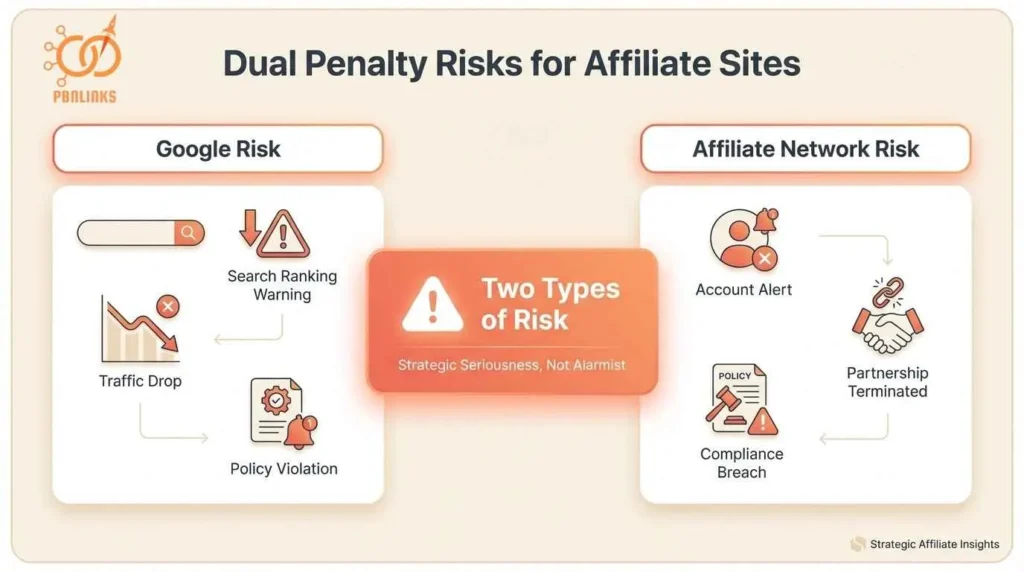
Affiliate sites face dual penalty risks that other niches don’t: Google manual actions for unnatural links AND affiliate network bans for terms of service violations. Understanding how both systems detect manipulation helps you build safer PBN strategies.
Here’s how Google and affiliate networks monitor your site, and what triggers their review processes.
Why Affiliate Sites Face Dual Penalty Risks
Most SEO niches only worry about Google penalties. Affiliate sites have to satisfy two separate watchdogs: Google’s algorithm and your affiliate network’s compliance team.
Google penalties cost you rankings and traffic. A manual action can drop your page 1 rankings to page 5 overnight. This cuts organic traffic 70-90%. Algorithmic demotions happen gradually but have the same effect.
Affiliate network bans cost you money directly. Amazon Associates, ShareASale, and CJ Affiliate can terminate your account and withhold unpaid commissions. That’s usually 60-90 days of earnings gone. They don’t explain why, but sudden traffic spikes and suspicious link patterns are common triggers.
The worst scenario is getting hit by both simultaneously. Your Google rankings drop from a penalty. Your traffic patterns look suspicious to Amazon. They close your account while you’re already bleeding revenue.
How Google Detects PBN Manipulation
Google uses both algorithmic detection and manual review teams to identify unnatural link patterns. The algorithm looks for footprints. Human reviewers investigate sites that trigger automated red flags.
Algorithmic footprint detection
Google’s algorithm analyzes your backlink profile for patterns that natural links wouldn’t create. It compares hosting providers, IP addresses, domain registration dates, site structures, and content similarity across your linking domains. When too many signals align, the algorithm flags your site.
Common patterns it catches: 20 linking domains registered the same month, shared hosting IP blocks, identical WordPress themes, similar content templates, and zero anchor text diversity.
Manual review triggers
Rapid ranking improvements trigger manual investigations. Going from page 5 to page 1 in two weeks raises red flags. Sudden backlink spikes (10 links to 40 links in one month) and competitor spam reports also trigger reviews. Human reviewers look at your entire backlink profile, not just individual links.
At PBN Links Agency, we’ve seen algorithmic demotions reverse when sites add 20-30 white-hat links to dilute PBN percentages. Manual actions require disavowing toxic links and waiting 6-12 months.
How Affiliate Networks Monitor Traffic Patterns
Affiliate networks don’t see your backlink profile. But they monitor traffic quality, conversion rates, and growth patterns that indicate manipulation.
What networks track
They monitor where your traffic comes from: organic vs social vs email. They track how fast your traffic grows month-over-month. They see which landing pages get the most clicks. They compare your click-to-conversion ratios against network averages.
If you’re sending 10,000 clicks with 0.5% conversion while average is 3%, that’s a red flag.
Amazon Associates monitoring
Amazon tracks sudden traffic spikes. Going from 1,000 to 3,000 visitors in 30 days triggers scrutiny. They flag traffic concentrated on single products. They check accounts with 95%+ traffic from organic search.
They also look for social proof. Do you have email subscribers, social followers, or repeat visitors? Or is your site purely an SEO play?
Account review triggers
Unnatural growth patterns trigger reviews. High clicks with low conversions raise flags. Traffic surges matching ranking improvements look suspicious. Sites existing only to rank and collect commissions get investigated.
When your affiliate manager reviews your site, they check quality and content depth. Thin sites with obvious link manipulation get terminated immediately.
Ranking for Keywords That Actually Convert
Ranking on page one doesn’t matter if your affiliate links don’t convert. The real goal of PBN links is driving buyer-intent traffic to pages that generate commissions. You need to target commercial keywords and track earnings per click, not just rankings.
Focus your PBN budget on pages that actually make you money.
Why Buyer Intent Keywords Deserve More PBN Links
Not all keywords convert equally. Buyer intent keywords like “best blender” or “Vitamix review” convert 10x better than informational keywords like “what is a blender” or “how blenders work.”
Buyer intent keywords signal purchase readiness:
- “best [product]” – comparing options
- “[product] review” – researching before buying
- “[product A] vs [product B]” – final decision stage
- “top rated [product]” – looking for recommendations
Informational keywords bring traffic that doesn’t convert:
- “what is [product]” – early research
- “how does [product] work” – learning, not buying
- “[product] definition” – zero commercial intent
A page ranking #1 for “what is a blender” might get 5,000 visits but generate $50 in commissions. A page ranking #5 for “best blenders under $100” gets 800 visits but generates $600 in commissions.
Allocate 80% of your PBN budget to buyer intent keywords. Use the remaining 20% on tier 2 supporting content that internally links to your money pages.
Using EPC to Decide Which Pages Get More Links
Earnings per click (EPC) tells you which pages deserve more PBN links. EPC = total affiliate earnings ÷ total clicks to affiliate links.
Example comparison:
Page A ranks #12 for “best Vitamix blenders”:
- Monthly clicks: 200
- Affiliate link clicks: 40
- Commissions: $120
- EPC: $3.00
Page B ranks #3 for “how to clean a blender”:
- Monthly clicks: 1,500
- Affiliate link clicks: 50
- Commissions: $25
- EPC: $0.50
Page A generates 4x more revenue per click despite ranking lower and getting less traffic. Build PBN links to push Page A from #12 to #5. Don’t waste links on Page B just because it already ranks well.
High-EPC benchmarks by niche:
- High-ticket items (mattresses, laptops): $1-5 per click
- Mid-range products (appliances, tools): $0.30-1.00 per click
- Low-ticket items (accessories, small gadgets): $0.10-0.30 per click
At PBN Links Agency, we prioritize PBN campaigns based on EPC, not traffic volume. A page earning $3 EPC at position #15 is worth more investment than a page earning $0.30 EPC at position #8.
When to Stop Building Links to Low-Converting Pages
Some pages rank well but don’t generate commissions. Stop wasting PBN links on them and redirect your budget to proven winners.
Signs a page doesn’t deserve more links:
- Ranks top 10 but EPC under $0.20
- High traffic but low affiliate link click-through rate
- Informational keyword that doesn’t lead to purchases
- Product no longer popular or commission rate dropped
What to do instead: Use Google Analytics to identify your top 5-10 revenue-generating pages by total earnings. Build 70% of your monthly PBN links to those pages. The other 30% goes to new pages with high-EPC potential.
Don’t fall into the trap of building links to every page equally. Double down on winners. If a page already ranks #3 but only earns $0.15 EPC, it’s maxed out—the keyword itself doesn’t convert well enough to justify more investment.
8 PBN Mistakes That Kill Affiliate Sites
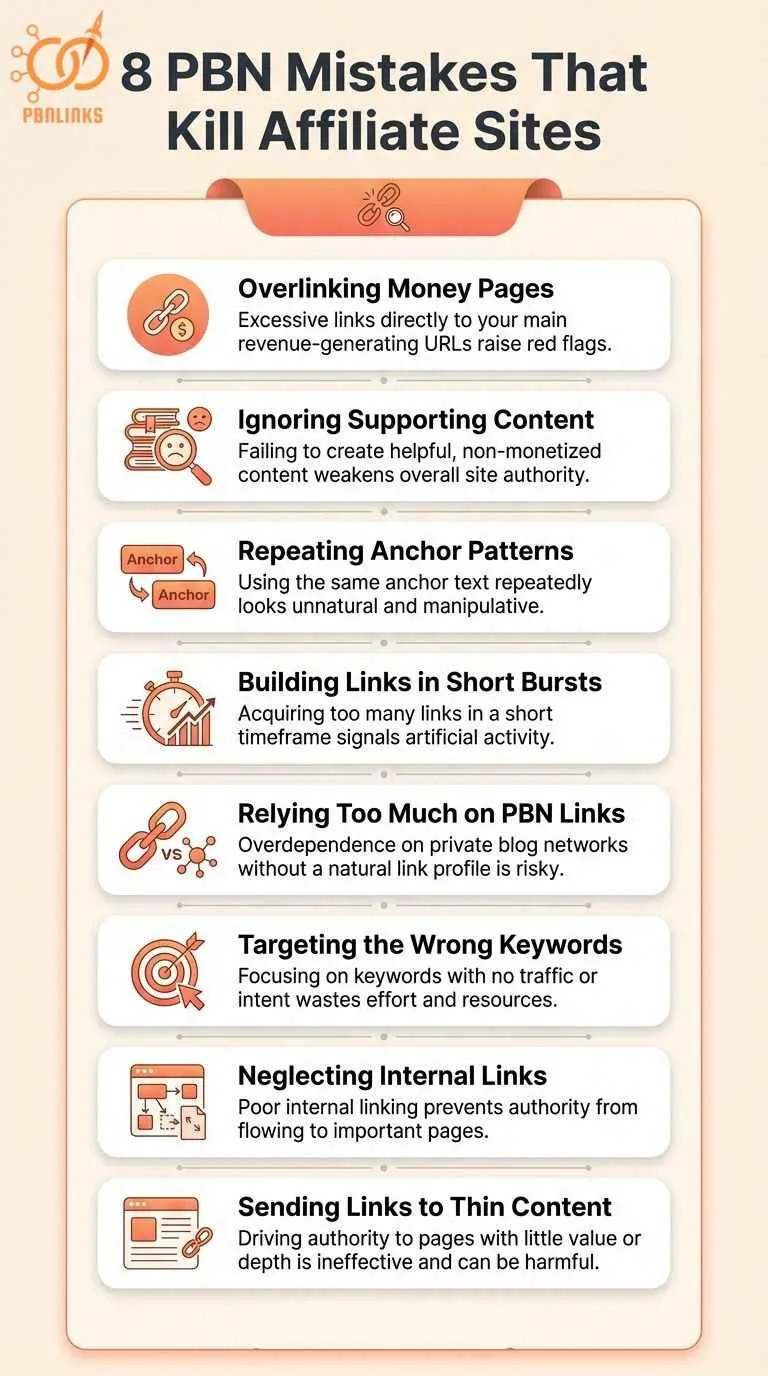
Most affiliate sites fail with PBN links not because the strategy doesn’t work, but because they make tactical mistakes that trigger penalties or waste their link budget. These mistakes range from over-optimization to targeting the wrong keywords to neglecting the basics.
Avoid these eight critical errors that destroy affiliate site rankings and revenue.
1. Overlinking Money Pages (Triggering Google Filters)
Pointing 50+ PBN links at a single product review while the rest of your site has 2 to 3 backlinks each creates an obvious manipulation pattern. Spread links across multiple money pages and supporting content: top money page gets 15 to 20 links maximum, second-tier pages get 8 to 12 each, supporting content gets 3 to 5 each.
2. Ignoring Supporting Content Entirely
Building PBN links only to product reviews while ignoring buyer guides and how-to articles misses the tier 2 strategy that protects money pages. Use 50 to 60% of your PBN budget on supporting content that internally links to reviews. This builds topical authority and passes link equity without direct PBN exposure on revenue pages.
3. Using the Same Anchor Text Pattern Across All Review Pages
Using “best blenders” for your blenders page, “best mixers” for your mixers page, and “best juicers” for your juicers page creates a detectable pattern. Google sees the repetitive structure across all your money pages and flags it as manipulation. Vary your anchor patterns across different pages.
4. Building Links Too Fast to Seasonal Content
Adding 30 PBN links to your “Black Friday laptop deals” page in the week before Black Friday looks manipulative. Front-load seasonal links 8 to 12 weeks before the event: build 10 to 15 links early, add 5 to 8 more as the date approaches, then stop during the actual event.
5. Not Diversifying Beyond PBNs
A backlink profile that’s 100% PBN links is a red flag to both Google and affiliate networks. Mix in guest posts, niche edits, resource page links, and naturally earned social shares. PBN links should represent 30 to 40% of your total backlink profile maximum.
6. Targeting Wrong Keywords (Informational vs Commercial)
Building 20 PBN links to rank for “what is a blender” or “how blenders work” wastes your budget on keywords that don’t convert. Focus 80% of your PBN firepower on buyer intent keywords like “best blenders,” “product review,” and “top rated product.” Informational keywords can rank organically or serve as tier 2 content.
7. Neglecting Internal Linking Before External Links
Building PBN links to isolated pages with no internal link structure wastes link equity. Set up your hub-and-spoke internal linking first: connect supporting content to money pages, link related reviews together, create topical clusters. Then add external PBN links to amplify what’s already working internally.
8. Thin Affiliate Content That Doesn’t Deserve to Rank
PBN links won’t save 500-word reviews that just reword Amazon descriptions with affiliate links inserted. Google’s helpful content system demotes pages that exist only to capture commissions. Build comprehensive 1,500+ word reviews with hands-on testing, comparison tables, pros/cons analysis, and unique buying advice before investing in any links.
Conclusion
In conclusion, PBN links work for affiliate sites when you target buyer intent keywords on product reviews and best-of lists. Use safe anchor text ratios, build links at a natural velocity, and track earnings per click to focus on pages that actually convert. Diversify your traffic sources beyond PBNs and build email lists from day one so you’re not 100% dependent on Google rankings.
At PBNLinks.Agency, we build custom PBN strategies for affiliate sites that generate commissions without triggering penalties , contact us to rank your money pages safely.
FAQS ABout PBN Links for Affiliate Sites
What are PBN links for affiliate sites?
PBN links are backlinks from a private blog network that point to your product reviews and best-of lists to improve rankings. They help affiliate pages rank for commercial keywords like “best blender” or “running shoes review.”
Do PBN links work for affiliate marketing?
Yes, PBN links work when used on high-converting pages like product reviews and best-of lists. They won’t fix thin content that provides no unique value.
Which affiliate pages should get PBN links first?
Product review pages and best-of lists should get PBN links first. Focus on pages already ranking positions 11-20 that need a final push to page one.
What is tiered linking for affiliate sites?
Tiered linking means building PBN links to supporting content that internally links to your money pages. This passes link equity while reducing direct PBN exposure on revenue pages.
How many PBN links does an affiliate site need to rank?
New sites typically need 5-15 PBN links per money page for low-competition keywords. Competitive terms may require 20-50+ links depending on your niche.
Can you get banned from Amazon Associates for using PBN links?
Amazon doesn’t explicitly ban PBN usage, but they prohibit “artificial traffic generation.” Sudden unnatural traffic spikes can result in account termination and withheld commissions.
What percentage of my backlinks should be from PBNs?
Keep PBN links at 30-40% of your total backlink profile. Fill the remaining 60-70% with guest posts and naturally earned links.
What happens if my affiliate site gets a Google penalty from PBN links?
Your rankings drop immediately and traffic can fall 50-90%. Recovery takes 6-12 months after disavowing toxic links.
What anchor text should I use for affiliate product review pages?
Use this ratio: 5-8% exact match, 15-20% branded, 25-30% long-tail, 45-50% generic. Never use “review” or “best” in every anchor.
How fast should I build PBN links to a new affiliate site?
New sites should start with 2-5 PBN links per month for the first 6 months. Established sites can handle 10-20+ links monthly.
How long does it take PBN links to rank affiliate pages?
PBN links take 4-8 weeks to show results for pages ranking 11-30. Pages outside the top 50 may need 3-6 months.
How do I track if PBN links are improving affiliate earnings?
Track earnings per click by landing page using Google Analytics and your affiliate network dashboard. Monitor commission revenue, not just traffic increases.
Do I need PBN links if my affiliate content is high quality?
Yes, quality content won’t rank for competitive keywords without backlinks. PBN links help quality pages compete against established sites.