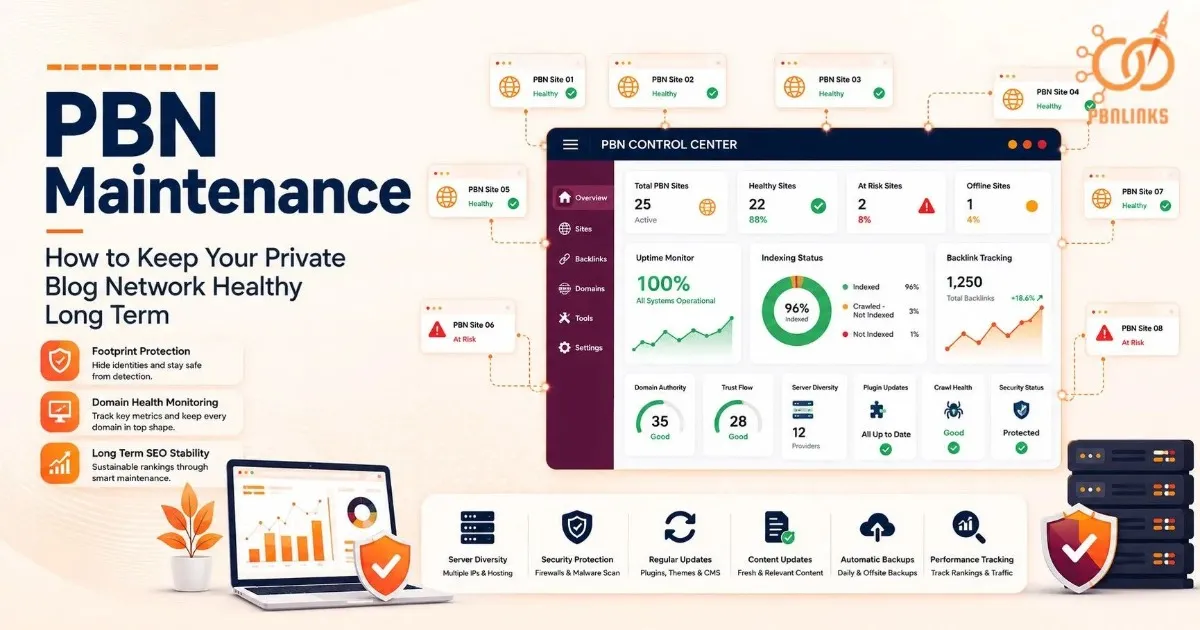
PBN Maintenance: How to Keep Your Private Blog Network Healthy Long Term
Many PBNs do not fail because of bad domains or weak backlinks. They fail because nobody maintains them properly after setup. Sites slowly become inactive, outdated, and easier for Google to detect over time.
Most operators focus heavily on building the network but ignore long term upkeep. Plugins become outdated, links weaken, domains lose trust, and repeated footprints start creating risk. Even strong expired domains can lose SEO value when maintenance stays ignored for too long.
PBN maintenance is also much harder today than it was a few years ago. Google now analyzes link patterns, content quality, footprints, and overall site activity much more carefully through systems like SpamBrain and Helpful Content updates.
This guide explains how to maintain a PBN safely over the long term. You will learn how to manage footprints, links, hosting, monitoring, technical upkeep, domain health, and network scaling more effectively in 2026.
What Is PBN Maintenance?
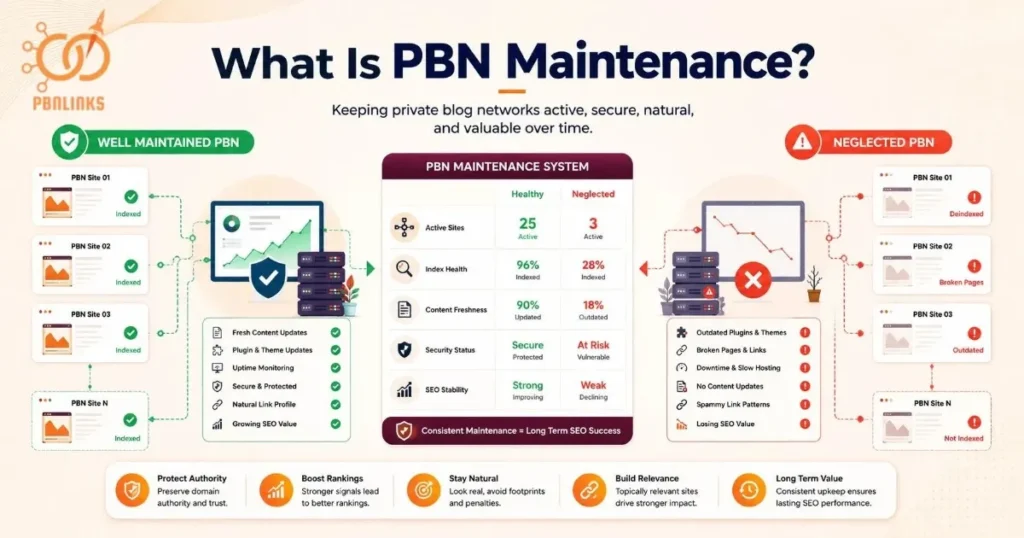
PBN maintenance is the ongoing process of keeping private blog network sites active, updated, stable, and natural looking after they are built. Its purpose is to preserve the authority, trust signals, and long term SEO value of the network.
Many beginners focus heavily on building a PBN but ignore what happens after launch. In reality, setup is only the first stage. A PBN is not a static asset. Search engines continuously reevaluate websites based on quality, activity, freshness, and trust signals.
Without regular upkeep, even strong expired domains can slowly lose value. Content becomes outdated, plugins age, pages break, and inactive sites start looking abandoned. Over time, this weakens the effectiveness of the network.
Private blog network maintenance helps keep PBN sites:
- Active and regularly updated
- Technically stable and secure
- Natural looking to search engines
- Topically relevant within the niche
- Valuable for long term SEO performance
A properly maintained PBN looks like a real, active website. A neglected PBN slowly starts looking artificial to search engines.
How to Hide Your PBN Footprints
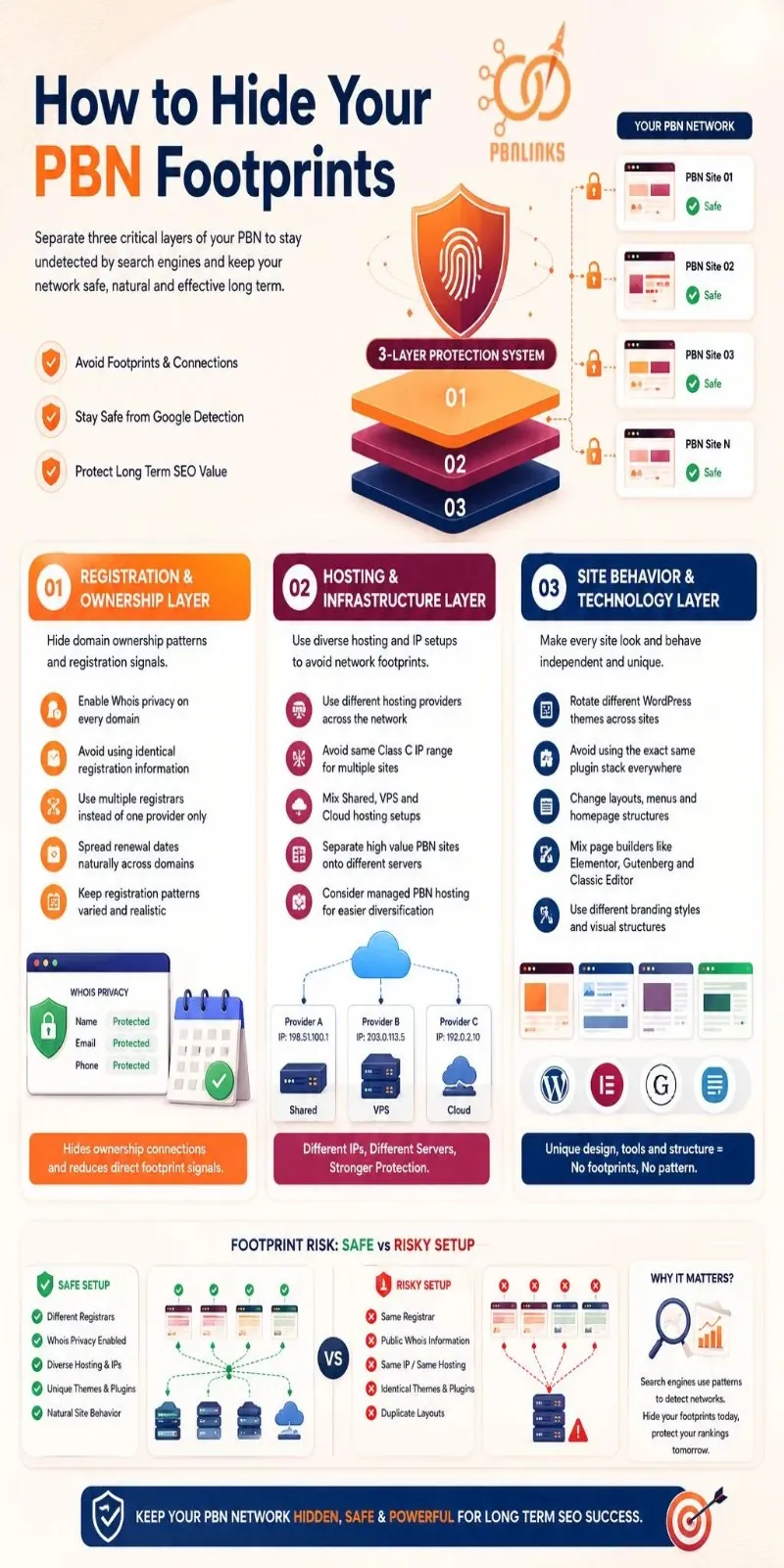
You can hide your PBN footprints by separating three main layers: registration and ownership, hosting and infrastructure, and site level behavior such as themes, plugins, layouts, and tracking setups. These layers create the technical and operational patterns search engines use to identify connected websites.
When multiple PBN sites share the same hosting setup, registration details, WordPress themes, plugins, or tracking patterns, they start leaving behind recognizable footprints. Modern spam detection systems, including Google’s SpamBrain, can group these similarities together and identify the network more easily.
Let’s now discuss the most common areas where PBN footprints appear and how to reduce them safely.
Hosting Diversity and IP Address Separation
Hosting diversity helps prevent multiple PBN sites from appearing connected through the same server infrastructure. One of the biggest mistakes beginners make is hosting every site under one provider or IP range.
- Use different hosting providers across the network
- Avoid placing all sites on the same Class C IP range
- Mix shared hosting, VPS hosting, and cloud hosting setups
- Separate high value PBN sites onto different servers
- Consider managed PBN hosting for easier diversification
A Class C IP is a group of IP addresses that share the same network range. If many PBN sites use the same Class C IP range, search engines may view them as related websites.
Domain Registration and Whois Privacy Setup
Domain registration patterns can reveal ownership connections across a PBN. Whois privacy helps hide public registration details and reduces direct footprint signals.
- Enable Whois privacy on every domain
- Avoid using identical registration information
- Use multiple registrars instead of one provider only
- Spread renewal dates naturally across domains
- Keep registration patterns varied and realistic
Whois data contains information connected to a domain registration. Without privacy protection, ownership details may become publicly visible.
Theme, Plugin, and Page Builder Variation
Using the same WordPress setup across every site creates recognizable patterns that make the network easier to detect. Design and technology diversity help PBN sites appear independent.
- Rotate different WordPress themes across sites
- Avoid using the exact same plugin stack everywhere
- Change layouts, menus, and homepage structures
- Mix page builders like Elementor, Gutenberg, and classic editors
- Use different branding styles and visual structures
One simple rule improves footprint safety immediately:
Do not allow multiple PBN sites to look like copies of each other.
How to Handle PBN Links Correctly
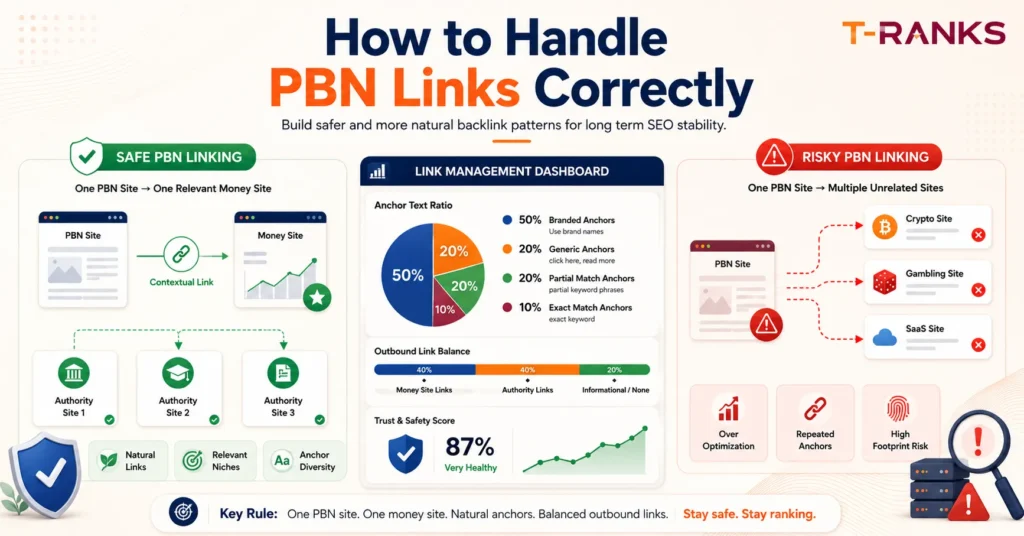
Link management is where most PBN operators make their biggest mistakes. Search engines analyze how outbound links are placed, how often they appear, and whether the overall linking behavior looks natural across the network.
A safer PBN link profile follows three core rules:
- Keep outbound links controlled
- Maintain anchor text diversity
- Balance commercial and neutral links
Let’s discuss how to manage PBN links safely over time.
Why Each PBN Site Should Link to Only One Money Site
Each PBN site should mainly support one money site. Linking the same PBN domain to multiple unrelated projects creates an unnatural outbound pattern that is easier to detect.
A safe pattern is one PBN site consistently linking to one relevant website in the same niche. An unsafe pattern is one PBN domain linking to several unrelated industries like crypto, gambling, SaaS, and local SEO.
- Keep one primary money site per PBN domain
- Avoid linking to unrelated niches
- Maintain niche relevance between both sites
- Limit excessive commercial outbound links
- Keep linking patterns consistent over time
Over linking is a major PBN risk because real websites rarely exist only to push backlinks.
Checking and Balancing Outbound Links Across the Network
An outbound link audit checks how links are distributed across the full PBN network. The goal is to avoid patterns where every article only links to money sites.
A balanced outbound link profile usually mixes commercial links with neutral authority links.
- Review outbound links across all PBN sites
- Check the ratio of money site links to authority links
- Add trusted authority references naturally
- Leave some articles without commercial links
- Vary outbound link placement across the network
A healthy outbound linking pattern may include:
- One contextual link to the money site
- Two or three links to authority sources
- Informational posts with no commercial links
This makes the overall network look more natural to search engines.
Using Anchor Text Naturally and Safely
Anchor text diversity means using different types of clickable text instead of repeating the same keyword every time. Repeated exact match anchors are one of the clearest spam signals in PBN link building.
A healthier anchor text mix usually includes:
- Branded anchors
- Generic anchors like “click here”
- Partial match keywords
- Naked URLs
- Natural contextual phrases
A simple beginner friendly ratio may look like:
- 50% branded anchors
- 20% generic anchors
- 20% partial match anchors
- 10% exact match anchors
Natural anchor text diversity helps reduce repetitive linking patterns and creates a more believable backlink profile.
Technical Maintenance Every PBN Site Needs
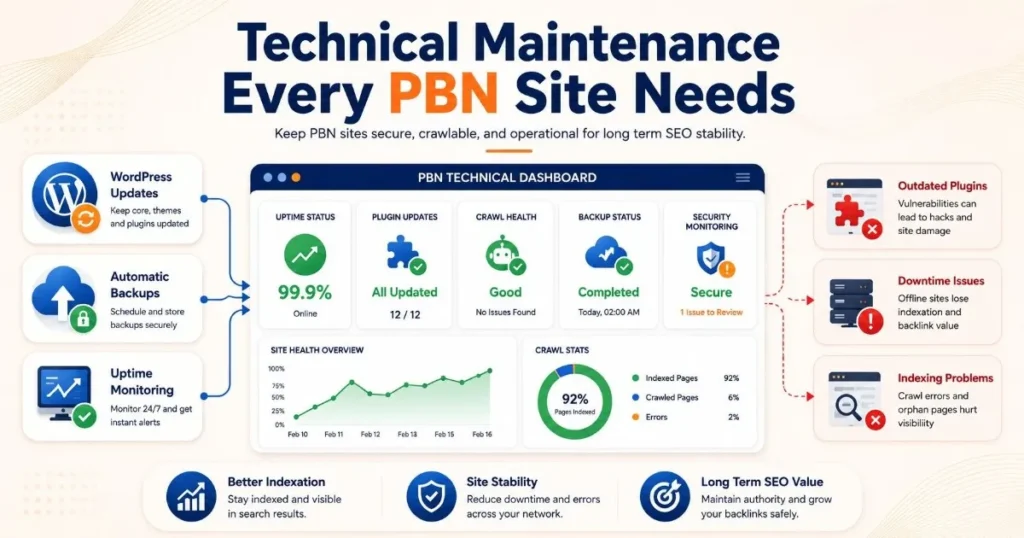
Every PBN site needs regular technical maintenance to stay secure, crawlable, and operational over the long term. Without technical upkeep, even strong domains can lose indexation, authority, and backlink value.
Most technical problems come from outdated software, unnoticed downtime, or crawling issues that slowly weaken the site over time. This is why every PBN operator should consistently manage updates, backups, uptime, and crawl health.
Let’s discuss the core technical tasks every PBN site needs.
Keeping CMS, Plugins, and Themes Updated
Outdated WordPress installs, plugins, and themes are major security risks for PBN sites. Vulnerable software can lead to hacks, malware injections, broken pages, or complete site loss.
- Update WordPress core monthly
- Remove unused plugins and themes
- Replace abandoned or unmaintained plugins
- Test the site after major updates
- Keep plugin stacks lightweight and stable
One simple action you can take this week is reviewing every PBN site for inactive or outdated plugins and removing anything no longer maintained.
Uptime Monitoring and Automatic Backups
Uptime monitoring checks whether a website stays online and accessible. If a PBN site goes offline for long periods without detection, pages may drop from Google’s index and backlinks can lose value.
- Use monitoring tools like UptimeRobot or Better Stack
- Configure automatic daily or weekly backups
- Store backups outside the hosting server
- Monitor downtime alerts regularly
- Fix server issues quickly after alerts appear
Undetected downtime is especially risky when managing multiple PBN sites at once.
Making Sure Google Keeps Crawling Your PBN Sites
Google must continue crawling PBN pages for them to stay indexed and pass SEO value. Crawl budget refers to how often Google visits and scans pages on a website.
Low quality or inactive sites are crawled less frequently over time.
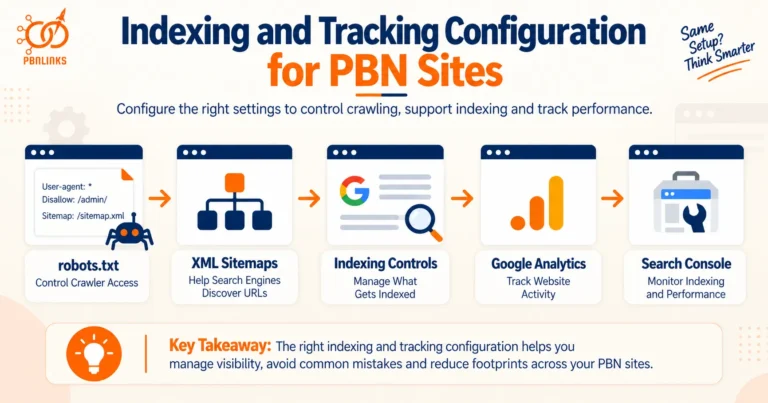
- Submit XML sitemaps through Google Search Console
- Maintain clean internal linking structures
- Update pages periodically
- Fix crawl errors quickly
- Avoid orphan pages with no internal links
Regular crawling helps search engines continue processing updates and maintaining indexation across the network.
How to Monitor PBN Domain Health
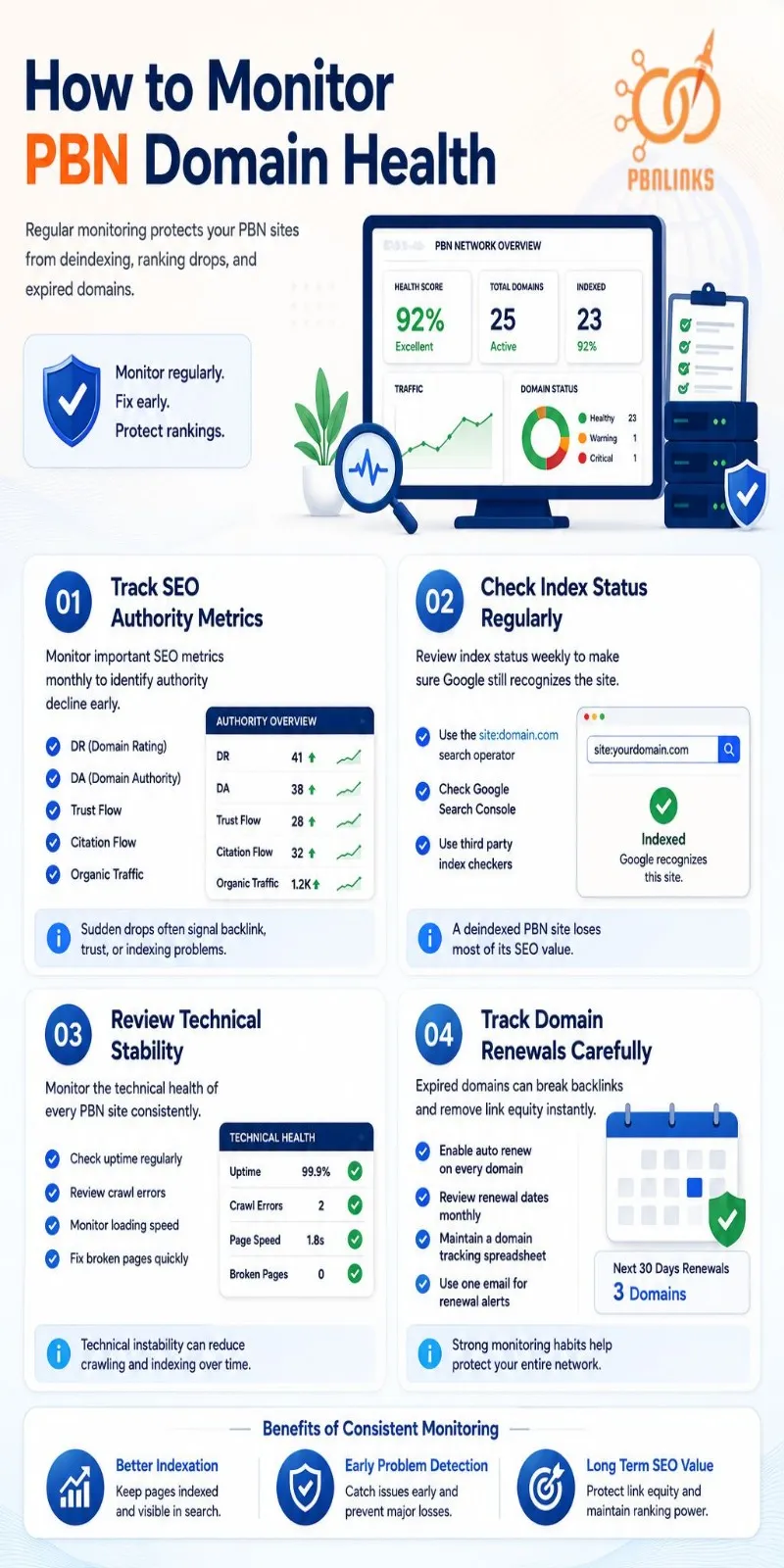
PBN domain health should be monitored regularly to detect problems before they lead to lost rankings, deindexed sites, or expired domains. Even a simple monitoring routine can help protect the long term SEO value of the network.
Follow these core monitoring steps:
1. Track SEO Authority Metrics
Monitor important SEO metrics monthly to identify authority decline early.
- DR (Domain Rating)
- DA (Domain Authority)
- Trust Flow
- Citation Flow
- Organic traffic
Sudden drops often signal backlink, trust, or indexing problems.
2. Check Index Status Regularly
Review index status weekly to make sure Google still recognizes the site.
Simple checking methods include:
- Using the site:domain.com search operator
- Checking Google Search Console
- Using third party index checkers
A deindexed PBN site loses most of its SEO value.
3. Review Technical Stability
Monitor the technical health of every PBN site consistently.
- Check uptime regularly
- Review crawl errors
- Monitor loading speed
- Fix broken pages quickly
Technical instability can reduce crawling and indexing over time.
4. Track Domain Renewals Carefully
Expired domains can break backlinks and remove link equity instantly.
- Enable auto renew on every domain
- Review renewal dates monthly
- Maintain a domain tracking spreadsheet
- Use one email for renewal alerts
Strong monitoring habits help operator
PBN Maintenance Schedule
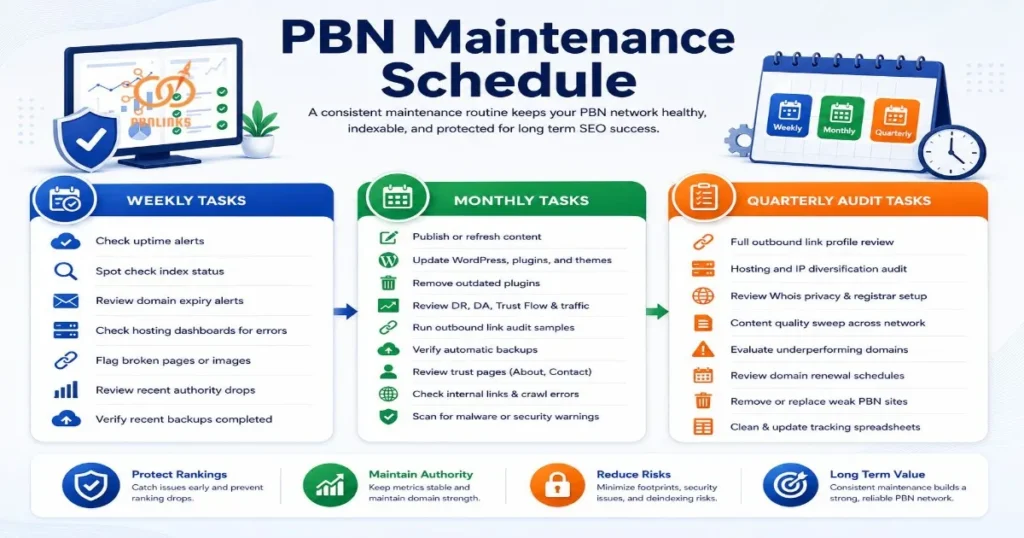
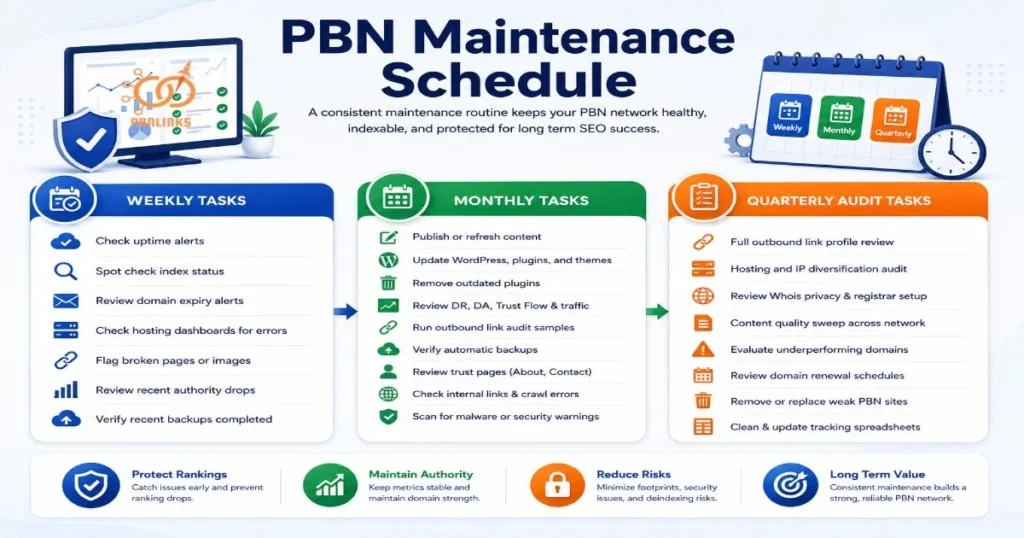
A fixed PBN maintenance schedule is one of the biggest differences between a healthy network and a failing one. Without a routine, operators miss renewals, ignore deindexed sites, overlook technical problems, and slowly lose domain value over time.
Most maintenance tasks naturally fall into three time windows:
- Weekly checks
- Monthly maintenance
- Quarterly audits
Use the following checklist as a repeatable PBN maintenance routine.
| Weekly Tasks | Monthly Tasks | Quarterly Audit Tasks |
| Check uptime alerts | Publish or refresh content | Full outbound link profile review |
| Spot check index status | Update WordPress, plugins, and themes | Hosting and IP diversification audit |
| Review domain expiry alerts | Remove outdated plugins | Domain renewal and registrar audit |
| Check hosting dashboards for errors | Review DR, DA, Trust Flow, and traffic | Content quality sweep across the network |
| Flag broken pages or images | Run outbound link audit samples | Review footprint risks across themes and plugins |
| Review recent authority drops | Verify automatic backups | Evaluate underperforming or risky domains |
| Verify recent backups completed | Review trust pages like About and Contact | Clean and update tracking spreadsheets |
Weekly Maintenance Tasks
- Check uptime monitoring alerts
- Run index status spot checks on important sites
- Review domain expiry notifications
- Check hosting dashboards for server errors
- Flag broken pages, images, or redirects
- Review sudden traffic or authority drops
- Verify recent backups completed successfully
Monthly Maintenance Tasks
- Publish or refresh content across selected sites
- Update WordPress core, plugins, and themes
- Remove outdated or abandoned plugins
- Review DR, DA, Trust Flow, and Citation Flow metrics
- Run a sample outbound link audit
- Verify automatic backup systems are working
- Review About, Contact, and Privacy pages
- Check internal links and crawl errors
- Scan sites for malware or security warnings
Quarterly Network Audit Tasks
- Run a full outbound link profile review
- Audit hosting and IP diversification setup
- Review Whois privacy and registrar distribution
- Audit content quality across all sites
- Evaluate underperforming or risky domains
- Review domain renewal schedules carefully
- Remove or replace weak PBN sites if necessary
- Clean and update tracking spreadsheets and dashboards
Managing PBN Maintenance at Scale
Large PBN networks require systems, tracking tools, and selective delegation to remain manageable. Manual workflows become unreliable once networks grow beyond a small number of sites.
As the network expands, operators need centralized systems to manage monitoring, updates, renewals, and site activity efficiently.
Tools and Systems for Managing 20 to 50 Plus Sites
Centralized tracking systems help operators manage larger networks without manually checking every site daily.
Useful tools include:
- UptimeRobot or Better Stack for uptime monitoring
- Ahrefs, Majestic, or Semrush for bulk metric tracking
- Google Search Console for index monitoring
- Google Sheets or Airtable for centralized management
A structured tracking sheet should organize:
- Domain names and registrars
- Renewal and expiry dates
- Hosting providers and IP ranges
- DR, DA, and Trust Flow
- Index status and crawl issues
- Last content update and last link added
This creates a centralized monitoring system for the entire network.
When to Delegate or Outsource Maintenance Tasks
Some maintenance tasks are safe to outsource, while strategic decisions should remain under owner control.
Tasks commonly delegated include:
- Content publishing
- Plugin and CMS updates
- Uptime monitoring
- Backup verification
- Basic site formatting
Tasks that should remain with the owner include:
- Domain purchases
- Hosting and IP diversification setup
- Link placement strategy
- Anchor text planning
- Outbound link management
For example, a thirty site network may use one writer for content updates and one VA for monitoring tasks, while the owner manages all link and domain decisions.
When to Shut Down a PBN Site
A PBN site should be retired when the risks of keeping it active become greater than its SEO value. Some domains decline to a point where continued maintenance no longer makes operational sense.
Holding weak or flagged sites inside the network can increase footprint risk, waste resources, and reduce overall network quality. Professional PBN management includes knowing when to remove unstable assets instead of trying to save every domain.
Let’s discuss the most common signs that indicate a PBN site should be retired safely.
Signs a PBN Site Is Beyond Recovery
Some warning signs show that a PBN site has lost most of its long term value.
Common retirement signals include:
- Permanent deindexing after multiple recovery attempts
- Severe link decay and authority loss
- Repeated malware or security problems
- Large drops in Trust Flow or organic visibility
- Expired backlinks no longer passing value
- Hosting or footprint issues that expose the network
- Continuous crawl and indexing problems
When several of these signals appear together, the site often becomes more risky than useful.
How to Shut Down a PBN Site Safely
A retired PBN site should be removed carefully to avoid creating unnecessary signals across the network.
Safe shutdown practices include:
- Remove outbound links to money sites first
- Stop publishing new content
- Archive important records and backlink data
- Remove tracking codes and connected assets
- Allow the domain to expire naturally if no longer useful
Do not redirect heavily penalized or deindexed PBN domains directly to active money sites. This can transfer risk instead of preserving value.
Retiring weak domains helps maintain the overall quality and safety of the remaining network.
How Much PBN Maintenance Costs
PBN maintenance usually costs between $15 and $150+ per site each month, depending on quality level and management style. Most operators underestimate long term maintenance expenses because they focus only on domain purchases and setup costs.
As networks grow, maintenance costs increase across hosting, content, monitoring, updates, and operational management. Higher quality networks also require more investment to maintain stable and natural looking sites over time.
Let’s break down the real monthly costs of maintaining a PBN network.
Monthly Cost Breakdown Per Site
The average monthly maintenance cost usually falls into four main categories.
| Category | Low Estimate | High Estimate | Notes |
| Hosting | $2/month | $15/month | Shared hosting is cheaper, diversified hosting costs more |
| Content Updates | $5/month | $80/month | Depends on article quality and publishing frequency |
| Domain Renewal | $1/month | $3/month | Based on yearly renewal cost spread monthly |
| Monitoring Tools | $2/month | $20/month | Covers uptime, metrics, and tracking tools |
Estimated Total Monthly Cost Per Site
- Basic maintenance setup: $15 to $30/month
- Mid quality maintenance: $40 to $80/month
- Higher quality maintenance: $100+/month
Low cost networks usually rely on minimal updates and cheaper infrastructure. Higher quality PBNs invest more in content, hosting diversity, monitoring, and operational stability.
DIY Maintenance vs. Managed PBN Services
PBN maintenance can be handled manually or through managed services. The right option depends on budget, time availability, and experience level.
| Factor | DIY Maintenance | Managed PBN Service |
| Monthly Cost | Lower direct cost | Higher recurring cost |
| Weekly Time Investment | Higher | Lower |
| Control Over Network | Full control | Limited control |
| Technical Responsibility | Handled by owner | Handled by provider |
| Best For | Smaller or experienced operators | Larger or time limited operators |
DIY maintenance suits operators who want full control and are comfortable handling updates, monitoring, and troubleshooting themselves.
Managed PBN services suit operators managing
PBN Maintenance in 2026
PBN maintenance in 2026 is harder than it was a few years ago because Google has become much better at detecting manipulative networks. Older PBN strategies that relied on low quality content, repeated setups, or aggressive linking patterns no longer work as safely as before.
Since 2022, Google’s spam detection systems, including SpamBrain, have improved their ability to identify connected websites. These systems now analyze hosting patterns, outbound links, anchor text behavior, content quality, site activity, and technical similarities across multiple domains.
This means poorly maintained PBNs are easier to detect today. Networks with thin content, inactive sites, repeated footprints, or unnatural linking behavior now carry much higher long term risk than they did in the past.
Recent algorithm updates have also increased the importance of natural website behavior. Google’s Helpful Content systems favor useful and updated content, while Penguin continues monitoring manipulative link patterns and spammy anchor text usage.
For PBN operators, the biggest shift is simple: every site must now look and behave like a real website. Strong maintenance, natural activity, and operational diversity are no longer optional for long term PBN survival.
Common PBN Maintenance Mistakes
Most PBN failures happen because of repeated maintenance mistakes, not one major problem. Many networks slowly lose rankings, authority, and trust because operators ignore small issues for too long.
Below are the most common PBN maintenance mistakes that create long term risk.
Hosting All Sites Under One Provider or IP Range
Using the same hosting environment across the network creates obvious technical footprints. Search engines can connect sites more easily when hosting patterns look identical.
Using the Same WordPress Themes and Plugins Everywhere
Repeated themes, layouts, and plugin stacks make multiple sites look connected. A natural network should show variation across design and site structure.
Ignoring Plugin and CMS Updates
Outdated WordPress installs and plugins create security and stability risks. Old software also increases the chance of malware infections and downtime.
Overusing Exact Match Anchor Text
Repeated exact match anchors create strong manipulation signals. Natural backlink profiles usually contain branded, generic, and partial match anchors instead.
Linking One PBN Site to Multiple Unrelated Money Sites
A single PBN site linking to unrelated industries looks unnatural. Real websites rarely exist only to push commercial backlinks everywhere.
Publishing Low Quality or Inactive Content
Thin, outdated, or inactive content slowly weakens trust and crawl activity. Search engines prefer websites that continue showing realistic updates over time.
Never Checking Index Status
A deindexed PBN site loses most of its SEO value. Ignoring index checks can leave risky domains active inside the network for months.
Forgetting Domain Renewal Dates
Expired domains can instantly destroy backlinks and link equity. In some cases, competitors may even purchase the expired domain.
Using Identical Whois or Registration Details
Repeated ownership information creates direct footprint patterns. Whois privacy and registrar diversification help reduce this risk.
Building Links Too Aggressively Across the Network
Aggressive link velocity makes the network easier to detect. Large spikes in backlinks often create unnatural SEO patterns.
Ignoring Uptime and Technical Problems
Frequent downtime weakens crawling, indexing, and overall site trust. Technical instability also reduces the long term value of the domain.
Keeping Weak or Heavily Flagged Sites Active
Some domains eventually become more risky than useful. Keeping deindexed or heavily damaged sites active can increase risk across the entire network.
Strong PBN maintenance is mostly about consistency and operational discipline. Small improvements made regularly usually create safer long term results than aggressive shortcuts.
Conclusion
In conclusion, PBN maintenance is what keeps a private blog network stable, indexed, and valuable over the long term. Strong maintenance helps protect domain authority, reduce footprint risks, maintain natural link patterns, and preserve the SEO value of the network.
Modern PBN management now requires consistent monitoring, technical upkeep, operational diversity, and realistic website behavior. Search engines have become much better at detecting weak maintenance practices, which means inactive sites, repeated footprints, aggressive anchors, and poor quality content create much higher risk than before.The strongest PBN networks are usually built on consistency rather than shortcuts.
If you want safer and professionally managed PBN strategies designed for long term SEO growth, explore the advanced PBN solutions available at PBNLinks.Agency.
FAQs About PBN Maintenance
What is PBN maintenance?
PBN maintenance is the ongoing process of keeping private blog network sites active, secure, indexed, and natural looking over time.
Why is PBN maintenance important?
PBN maintenance is important because neglected sites slowly lose authority, crawl activity, and SEO value.
Can Google detect poorly maintained PBNs?
Yes, Google can detect poorly maintained PBNs through repeated footprints, unnatural links, weak content, and inactive site behavior.
What are the most common PBN footprints?
The most common PBN footprints include shared hosting, identical Whois details, repeated WordPress themes, matching plugins, and aggressive outbound linking patterns.
How often should I maintain my PBN sites?
Most PBN sites should be checked weekly for uptime and index status, while deeper maintenance tasks should be completed monthly or quarterly.
How can I check if a PBN site is deindexed?
You can check deindexing by using the site:domain.com search operator or reviewing indexing reports inside Google Search Console.
What is a safe anchor text ratio for PBN links?
A safer anchor profile usually relies mostly on branded, generic, and partial match anchors instead of exact match keywords.
How much does PBN maintenance cost per month?
PBN maintenance usually costs between $15 and $150+ per site monthly depending on hosting quality, content updates, and monitoring systems.
When should I shut down a PBN site?
A PBN site should be retired when it shows permanent deindexing, severe authority loss, repeated security problems, or long term instability.
Is PBN maintenance harder in 2026?
Yes, PBN maintenance is more demanding in 2026 because Google’s spam detection systems are more advanced than before.