SSL Certificates and Certificate Transparency Logs as PBN Footprints
You’ve secured every PBN site with HTTPS, spread the network across different hosts, and avoided obvious server footprints. But there is another source of public data that is easy to overlook: Certificate Transparency logs. These logs can preserve information about SSL certificates, domains, issuers, SANs, timestamps, and certificate history.
This matters because PBN SSL Certificate Transparency can reveal technical relationships that are not obvious from the websites themselves. A shared certificate, connected Subject Alternative Names (SANs), similar certificate activity, or historical records can provide clues about how different domains have been configured over time.
Not every SSL similarity is a meaningful footprint. Thousands of unrelated sites can use the same Certificate Authority, while matching certificate dates can result from automated renewals or managed hosting. The real value comes from understanding which certificate relationships are common, which are more distinctive, and when they become more meaningful alongside DNS, IP, hosting, and ASN data.
In this guide, you’ll learn how SSL certificates and Certificate Transparency logs can become PBN footprints, what information CT logs make public, and which certificate signals actually matter. We’ll also examine SANs, certificate issuers, timestamps, historical records, wildcard certificates, CDNs, and the limits of CT data when analyzing relationships between PBN sites.
What Is PBN SSL Certificate Transparency?
SSL certificates are usually discussed as a way to secure websites, but they also contain information that can help connect domains and understand their certificate history. Certificate Transparency makes much of this activity publicly observable. For PBN analysis, that creates another source of technical data worth examining.
To understand why this matters, we first need to look at the two technologies behind it: SSL certificates and Certificate Transparency.
What Is an SSL Certificate?
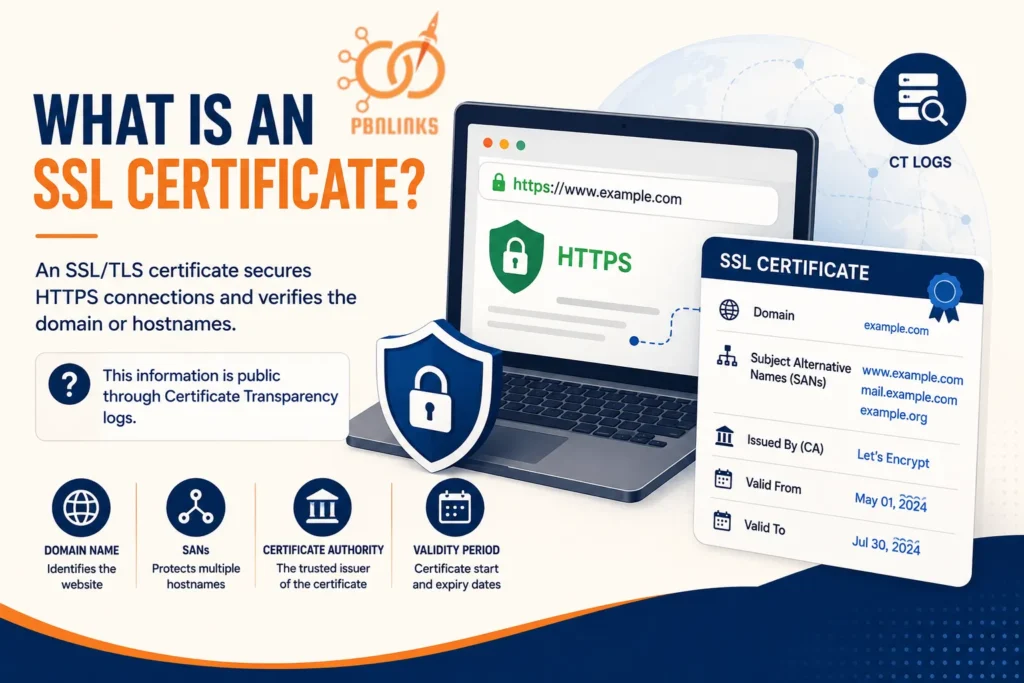
An SSL certificate, technically an SSL/TLS certificate, is a digital certificate that helps create a secure HTTPS connection between a website and its visitors. It also identifies the domain or hostnames the certificate is intended to protect.
Each certificate contains useful details. These can include the domain name, Subject Alternative Names (SANs), the Certificate Authority (CA) that issued the certificate, and the dates for which the certificate is valid.
On one website, these details may not tell you much. But compare certificates across several domains and patterns can start to appear. Domains may share a certificate, appear together as SANs, use similar certificate configurations, or show related activity over time.
That raises an important question: if this information is part of a website’s certificate, how can anyone else find it? This is where Certificate Transparency comes in.
What Is Certificate Transparency?
Certificate Transparency (CT) is an open framework designed to make the issuance of publicly trusted SSL/TLS certificates visible and auditable. Certificates are submitted to public, append only CT logs, creating records that can be checked by domain owners, browsers, security researchers, and anyone else interested in certificate activity.
CT was built to help expose incorrectly or fraudulently issued certificates and improve accountability among Certificate Authorities. But the public nature of these logs also means certificate associated domains, SANs, issuers, validity information, and historical certificate activity can be researched later.
Think of it as a public record of certificate activity. A website owner can replace a certificate, change hosts, or alter the current setup, but certificate entries already recorded in CT logs do not simply disappear with those changes.
Now we have the full picture. An SSL certificate contains information about a domain, while Certificate Transparency makes certificate activity publicly observable. So what happens when we apply that information to a group of PBN sites?
What Does SSL Certificate Transparency Mean for a PBN?
PBN SSL Certificate Transparency means examining public certificate data for patterns and technical relationships between PBN domains. Instead of looking at each website separately, certificate records can be compared to see whether domains share certificates, appear together in SANs, show related timing patterns, or have connections in their certificate history.
The strength of those relationships can vary. Two websites using the same popular CA, such as Let’s Encrypt, may be completely unrelated. Several otherwise unrelated domains appearing on the same certificate is a more specific technical relationship, although it still does not prove that the websites have the same owner.
That distinction is important throughout this guide. CT data can reveal relationships, but relationships need context before they can be treated as meaningful PBN footprints. To see why, we first need to understand how certificates get into CT logs and how those logs actually work.
How Do Certificate Transparency Logs Work?
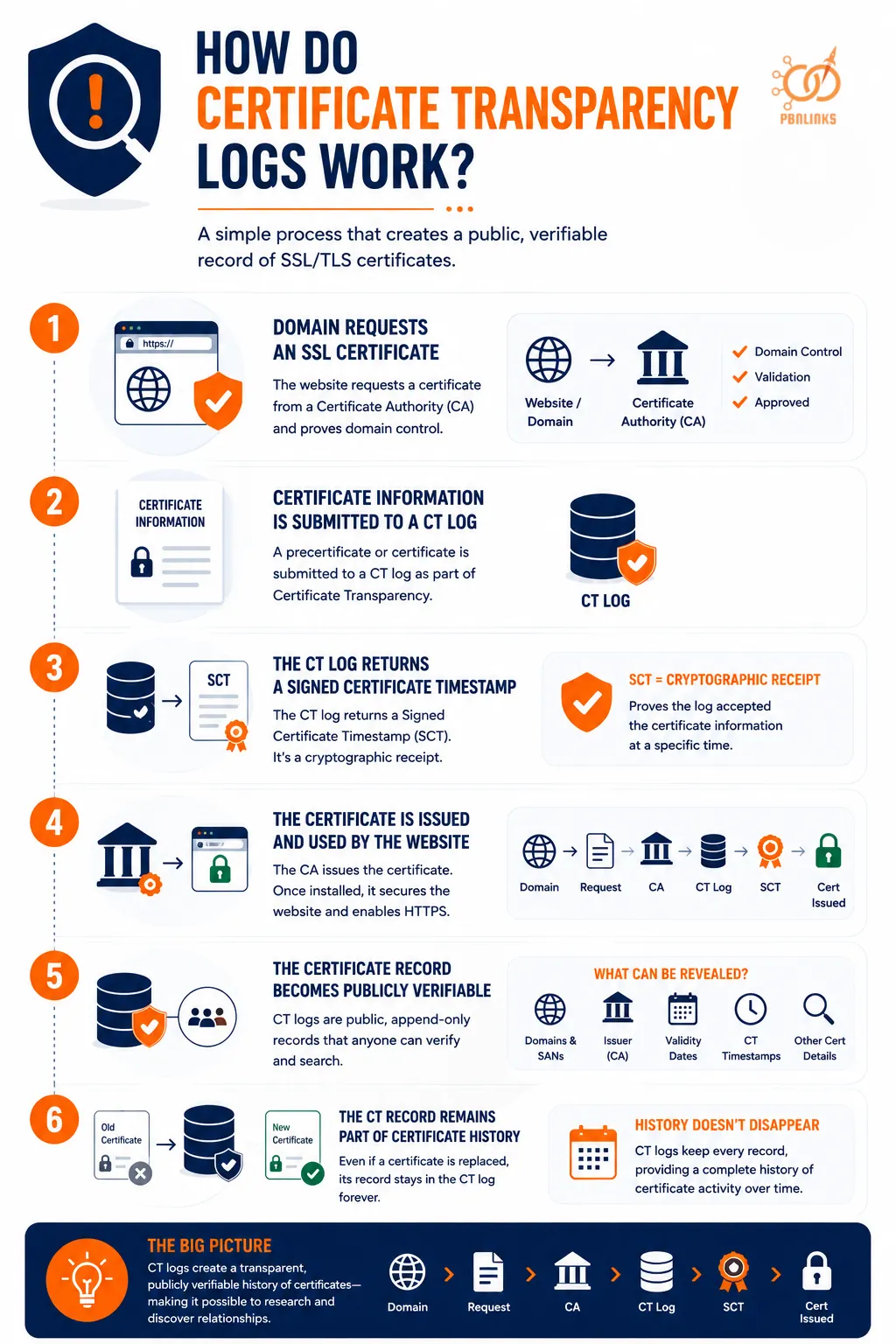
Certificate Transparency logs may sound technical, but the basic process is straightforward. A domain requests an SSL/TLS certificate, certificate information is submitted to a CT log, and the log creates a record that can later be verified and searched.
Here is how the process works step by step.
Step 1: A Domain Requests an SSL Certificate
The process begins when a website needs a publicly trusted SSL/TLS certificate. The domain owner or hosting system requests the certificate from a Certificate Authority (CA) such as Let’s Encrypt.
Before issuing the certificate, the CA must verify that the requester controls the domain. Once that validation is complete, the certificate issuance process can continue.
Step 2: Certificate Information Is Submitted to a CT Log
As part of the Certificate Transparency process, a precertificate or certificate is submitted to a qualifying CT log.
This is the point where certificate activity begins to enter the public CT system. Information associated with the certificate, including the domain identities it covers, can later become available through CT data.
Step 3: The CT Log Returns a Signed Certificate Timestamp
After accepting the submission, the CT log returns a Signed Certificate Timestamp (SCT).
Think of an SCT as a cryptographic receipt. It shows that the CT log received the certificate information and committed to include it in the log.
One distinction is important here. A CT timestamp relates to the certificate’s interaction with the log. It should not automatically be treated as the exact time the final certificate was installed or first used on the website.
Step 4: The Certificate Is Issued and Used by the Website
The Certificate Authority can then complete the certificate issuance process. Once configured on the website or the service handling HTTPS for it, the certificate helps establish secure connections with visitors.
The complete process can be simplified like this:
Domain → Certificate Request → Certificate Authority → Precertificate or Certificate → CT Log → SCT → Certificate Issuance
For PBN analysis, the important part is that the certificate process has now created information that can be examined beyond the website itself.
Step 5: The Certificate Record Becomes Publicly Verifiable
The submitted certificate information is incorporated into the CT log. CT logs are designed as public, append only records, which allows their contents and integrity to be independently checked.
This public visibility is what makes CT data useful for research. Certificate associated domains, SANs, issuers, dates, and other certificate details can be examined and compared across different websites.
For example, if several otherwise unrelated domains appear on the same certificate, CT data may expose that certificate relationship even when nothing on the websites visibly connects them.
Step 6: The CT Record Remains Part of Certificate History
Replacing a certificate does not simply remove an entry that has already been recorded in a CT log. The previous record remains part of the log’s history.
This matters when analyzing PBN domains because the certificate presented today may not show relationships that existed in the past. Historical CT records can provide another view of how certificates and domains were connected over time.
So, the process is not simply website → SSL certificate. The more useful picture is:
Domain → Certificate → CT Logging → Public Record → Certificate History → Relationship Analysis
Now that we know how certificate information reaches CT logs, we can look more closely at what information an SSL certificate actually reveals and which fields matter for PBN footprint analysis.
What Information Can an SSL Certificate Reveal?
Now that we know how certificate information reaches CT logs, the next step is understanding what information is actually associated with an SSL/TLS certificate.
A certificate contains several fields, but they do not all have the same value for PBN footprint analysis. Some identify the domains the certificate covers, some tell us who issued it, and others help distinguish one certificate from another.
Domain Names and Subject Alternative Names
One of the most useful parts of a certificate is the list of identities it is valid for. Modern certificates commonly use the Subject Alternative Name (SAN) field to specify the domain names and hostnames covered by the certificate.
A simple certificate might cover:
example.com
www.example.com
A multi domain certificate could contain:
domain-a.com
domain-b.com
domain-c.com
That difference matters. Seeing a domain and its www version together is completely normal. Finding several otherwise unrelated domains listed on the same certificate can represent a more specific certificate relationship that deserves further investigation.
We will look more closely at SAN relationships later because they are one of the more useful certificate signals for comparing domains.
Certificate Issuer
The issuer identifies the Certificate Authority responsible for issuing the certificate. This might be a widely used CA such as Let’s Encrypt or another publicly trusted certificate provider.
The issuer is easy to compare across websites, but it is also easy to misinterpret. Thousands or millions of unrelated websites can receive certificates from the same major CA, so sharing a certificate issuer does not mean two domains are related.
Issuer information becomes more useful when it is considered alongside other certificate details rather than treated as a footprint by itself.
Certificate Validity Dates
SSL/TLS certificates have a defined validity period. Two important fields are commonly shown as:
Not Before: the date and time from which the certificate is valid.
Not After: the date and time after which the certificate is no longer valid.
These dates can help build a certificate timeline and compare activity across multiple domains. If several sites repeatedly show closely aligned certificate periods, the pattern may be worth examining.
But matching dates alone are not proof of a relationship. Automated certificate issuance, renewals, managed hosting, and bulk configuration changes can produce similar timing across completely unrelated websites.
Certificate Serial Number
A serial number is an identifier assigned to a certificate by the issuing Certificate Authority. It helps distinguish certificates issued by that CA and is also used in certificate management and revocation processes.
For PBN analysis, a serial number is mainly useful for identifying and tracking a particular certificate record. Similar looking serial numbers should not be treated as evidence that domains share an owner.
Certificate Fingerprint
A certificate fingerprint is a cryptographic hash calculated from the certificate. It provides a convenient way to identify a specific certificate.
This makes fingerprints useful when checking whether the exact same certificate appears in different places or when matching a certificate against another data source.
The distinction is important:
Same issuer does not mean same certificate.
Matching certificate fingerprints identify the same certificate data.
That makes a fingerprint more specific for certificate identification than simply comparing the name of the Certificate Authority.
What Do These Certificate Fields Tell Us About a PBN?
The easiest way to understand their value is to compare them side by side.
| Certificate Data | What It Tells You | Value for PBN Analysis |
| SANs | Domains or hostnames covered by the certificate | Can reveal direct certificate relationships |
| Issuer | CA that issued the certificate | Usually weak when used alone |
| Validity dates | When the certificate is valid | Useful for timing and historical comparison |
| Serial number | CA assigned certificate identifier | Useful for identifying and tracking records |
| Fingerprint | Cryptographic identifier for a certificate | Useful for confirming an exact certificate match |
The key point is that certificate data tells us about certificates and the identities associated with them, not the entire infrastructure behind a website. An SSL certificate does not automatically tell us who owns a PBN, where the origin server is hosted, or which ASN the server belongs to.
Those questions require other sources of technical data. Before combining certificate information with DNS, IP, and hosting signals, however, we first need to understand which of these certificate details become publicly visible through Certificate Transparency logs.
What Information Is Publicly Visible in Certificate Transparency Logs?
When an SSL/TLS certificate is submitted to a Certificate Transparency log, information associated with that certificate becomes part of a public record. This means researchers can look up certificate activity without needing access to the website’s hosting account or server.
So, what can you actually find in CT data? The most useful information includes the domains covered by a certificate, SANs, the Certificate Authority that issued it, validity dates, CT timestamps, and historical certificate records.
Domains and SANs
CT data can show the domain names and hostnames associated with a logged certificate. These identities are commonly represented through the certificate’s Subject Alternative Names.
For example, a certificate may cover:
example.com
www.example.com
Or one certificate may contain several different domain names. This becomes useful when comparing PBN sites because domains appearing together on the same certificate can reveal a certificate level relationship.
However, the relationship needs context. A domain appearing with its www version is normal, while several otherwise unrelated domains appearing on the same certificate may deserve closer investigation.
Certificate Issuer
CT data can also show the Certificate Authority that issued the certificate. This allows you to compare whether different domains received certificates from Let’s Encrypt or another CA.
The issuer alone usually tells us very little about a relationship. Popular CAs issue certificates for huge numbers of unrelated websites, so finding the same issuer across several PBN domains should not automatically be treated as a footprint.
Certificate Validity Dates and CT Timestamps
Certificate records also provide useful timing information. A certificate has a validity period showing when it becomes valid and when that validity ends.
CT logs add another type of timing information: when a certificate or precertificate was accepted by the log.
These dates should not be confused:
Certificate validity dates → when the certificate is valid
CT timestamp → when the certificate or precertificate was accepted by the CT log
This distinction becomes important when comparing issuance and renewal patterns across multiple domains. Similar dates may provide context, but they do not prove that the sites were configured together.
Wildcard Certificate Identities
CT data may also show wildcard identities such as:
*.example.com
A wildcard certificate can cover multiple hostnames under a domain without listing every possible subdomain individually. For that reason, a wildcard entry in CT data does not reveal every subdomain that exists on the website.
We will examine wildcard certificates separately later because they need to be interpreted differently from certificates that explicitly list multiple domains as SANs.
Historical Certificate Records
CT data is especially useful because the analysis does not have to stop with the certificate a website uses today. Certificates logged in the past can provide a history of certificate activity associated with a domain.
These historical records may reveal previous certificates, older SAN relationships, former issuers, wildcard identities, and changes in certificate configuration over time.
For PBN analysis, this matters because replacing the current SSL certificate does not erase certificate information that was already recorded in CT logs. A website’s current certificate may show one relationship, while its certificate history tells a much larger story.
In short, CT data can help answer which domains appeared on certificates, which CA issued them, when certificate activity occurred, and how those records changed over time. It does not tell us who owns the sites or prove that they belong to a PBN. To understand that, we need to look at how these individual certificate signals can combine into a broader PBN footprint.
How Can SSL Certificates and CT Logs Become PBN Footprints?
A certificate becomes useful for PBN footprint analysis when its data shows a pattern or relationship across multiple domains. One shared detail may mean very little, but several connected certificate signals can give you a much clearer picture of how a group of websites may be related.
The key is not simply finding similarities. It is understanding how specific those similarities are and whether there is a reasonable explanation for them.
1. The Same Certificate Authority Is Usually a Weak Signal
Suppose ten websites all use certificates issued by Let’s Encrypt. At first glance, that may look like a common setup across the network.
In reality, it tells you very little on its own. Popular Certificate Authorities issue certificates for huge numbers of unrelated websites, and automated hosting platforms can use the same CA across many customers.
So the relationship is:
Same CA → Common similarity → Weak standalone signal
The issuer becomes more useful only when other, more specific relationships appear alongside it.
2. Similar Certificate Timing Can Add Context
Now imagine several domains receiving or renewing certificates around similar times. This creates a more interesting pattern, particularly if it happens repeatedly.
But timing still needs context. Automated renewals, ACME clients, managed hosting, migrations, and bulk configuration changes can cause unrelated certificates to follow similar schedules.
So timing is better treated as supporting evidence rather than proof of a connection.
3. Repeated Certificate Patterns Can Become More Interesting
A single similarity may be common. The picture changes when the same group of domains repeatedly shows several certificate similarities.
For example, you might find similar certificate timing, the same issuer, comparable certificate configurations, and related historical activity across the same sites.
None of those observations automatically proves common ownership. But repeated patterns can give you a stronger reason to investigate whether a broader technical relationship exists.
4. A Shared Certificate or SAN Relationship Is More Specific
The relationship becomes more direct when multiple domains are associated with the same certificate or appear together in its Subject Alternative Names.
Consider the difference:
site-a.com → Let’s Encrypt
site-b.com → Let’s Encrypt
This only shows that both certificates came from the same CA.
Now compare that with:
One Certificate → site-a.com + site-b.com + site-c.com
The second example shows that the domains were represented together on the same certificate. That is a much more specific certificate relationship than simply sharing an issuer.
It still does not prove that one person owns all of the sites. Hosting platforms, CDNs, and other services can sometimes create legitimate shared certificate relationships.
5. Historical CT Relationships Add Another Layer
Current certificates show what is happening now. Historical CT records can show what happened before.
A group of domains may use separate certificates today but have appeared together on an older certificate. You may also find previous SAN relationships, similar changes in issuers, or other certificate activity that is no longer visible in the current setup.
This is why looking only at the certificate currently served by each site can miss useful context.
6. Certificate Evidence Becomes Stronger With Other Infrastructure Data
CT data becomes more useful when certificate relationships line up with independent technical signals.
For example:
Certificate relationship + DNS history + IP relationship + hosting provider + ASN
creates a much broader picture than:
Same Certificate Authority
alone.
This does not turn correlation into automatic proof of ownership. It simply gives you more independent evidence to evaluate the relationship between the domains.
A useful way to think about SSL certificate footprints is as a scale:
Same Major CA → Similar Timing → Repeated Patterns → Shared Certificate or SAN Relationship → Historical Relationship → Corroborated Infrastructure Signals
The further you move along this scale, the more specific the relationship can become. But there is no single SSL field that automatically identifies a PBN.
With that distinction clear, we can now examine one of the most useful certificate relationships in more detail: how Subject Alternative Names can connect multiple domains through the same certificate.
How Can SANs Reveal Relationships Between PBN Domains?
When comparing SSL certificates across PBN sites, Subject Alternative Names (SANs) are worth a closer look. A SAN allows one certificate to cover multiple domain names or hostnames, which means the certificate itself can create a visible relationship between those identities.
The important part is understanding what that relationship actually tells you.
How Do SANs Connect Multiple Hostnames?
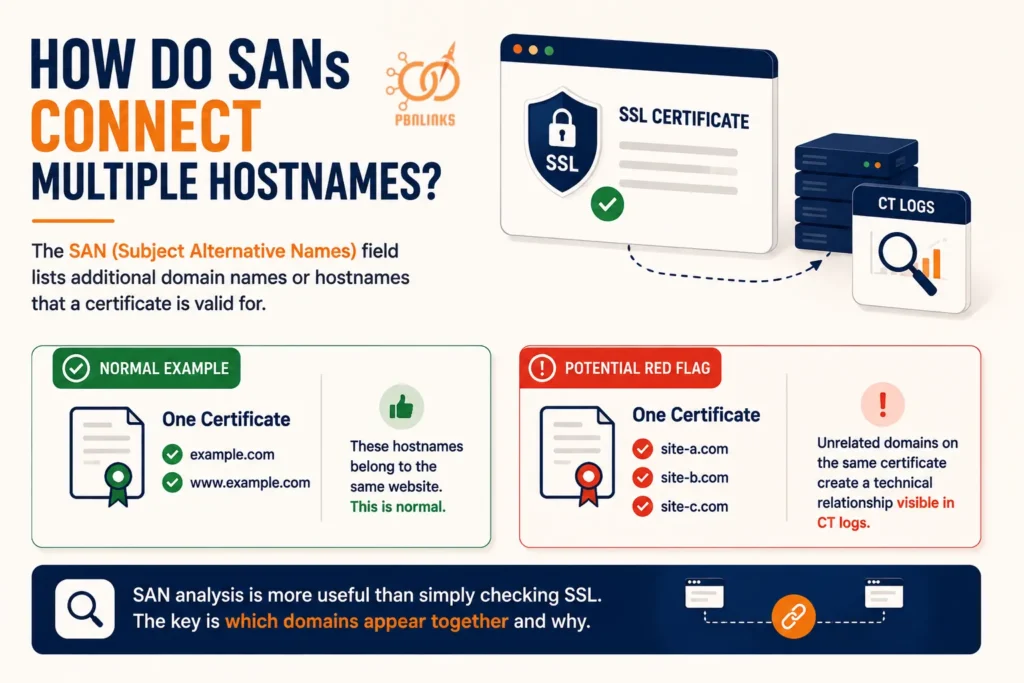
A SAN field lists the additional domain names or hostnames that a certificate is valid for. This is completely normal when the names belong to the same website.
For example:
One Certificate
example.com
www.example.com
There is nothing unusual here. Both names clearly belong to the same site.
Now consider another certificate:
One Certificate
site-a.com
site-b.com
site-c.com
If these are otherwise unrelated websites, their appearance on the same certificate creates a more interesting technical relationship. Certificate Transparency data can make that relationship visible because the domain identities are represented together in the certificate record.
This is why SAN analysis is more useful than simply asking whether several sites use SSL. The real question is which domains appear together and why they were included on the same certificate.
Does a Shared SAN Relationship Mean the Sites Have the Same Owner?
No. Domains appearing on the same certificate do not automatically have the same owner.
There are legitimate reasons why different domains may share a certificate. A hosting platform may manage certificates for multiple sites, a CDN or reverse proxy may handle HTTPS on behalf of its customers, or an organization may intentionally secure several of its domains with one multi domain certificate.
So, finding this:
site-a.com + site-b.com → Same Certificate
shows a certificate level relationship.
It does not automatically establish:
site-a.com + site-b.com → Same Owner
That distinction is important when analyzing PBN footprints. SAN data tells you that domain identities were represented together on a certificate, but you still need context to understand why.
When Does a SAN Relationship Become More Interesting?
A SAN relationship deserves closer attention when it connects domains that otherwise appear unrelated and when other technical evidence points in the same direction.
For example:
Shared Certificate + Related SANs + DNS Relationship + Hosting Relationship
provides more context than:
Shared Certificate
alone.
Historical SAN records can be useful as well. Two domains may use separate certificates today but may have appeared together on an older certificate. That previous relationship can remain visible through historical CT data even after the certificate setup changes.
The practical rule is simple: do not count SANs as footprints just because they exist. Look at which domains they connect, whether that connection has a normal explanation, and whether other infrastructure data supports the relationship.
SANs can therefore provide a fairly specific certificate relationship, but what about something much more common? Next, we need to examine whether using the same Certificate Authority actually creates a meaningful PBN footprint.
Does Using the Same Certificate Authority Create a PBN Footprint?
If several PBN sites use SSL certificates from the same Certificate Authority (CA), it is easy to see that as a common footprint. But in most cases, using the same popular CA is a weak signal on its own because the same provider may issue certificates to huge numbers of unrelated websites.
What matters is the difference between sharing an issuer and sharing an actual certificate.
Why Is Let’s Encrypt a Weak Signal on Its Own?
Let’s Encrypt is a widely used Certificate Authority that provides automated SSL/TLS certificate issuance. Hosting companies, control panels, and ACME clients can request and renew these certificates automatically, often with little manual involvement from the website owner.
Imagine five PBN domains:
site-a.com → Let’s Encrypt
site-b.com → Let’s Encrypt
site-c.com → Let’s Encrypt
site-d.com → Let’s Encrypt
site-e.com → Let’s Encrypt
All five sites share the same certificate issuer, but that does not tell us that they are managed by the same person. Countless unrelated websites can have exactly the same relationship with the CA.
This is why changing Certificate Authorities simply to make every site look different does not necessarily remove a meaningful technical relationship. CA diversity by itself is not the same as infrastructure independence.
Same CA vs Same Certificate
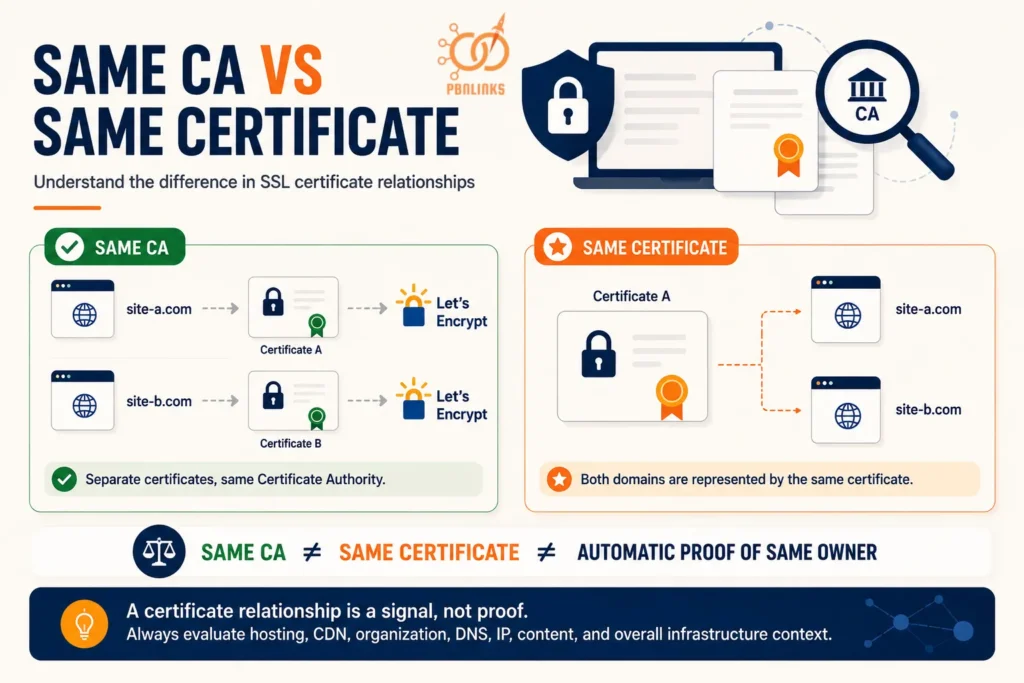
The easiest way to understand the difference is to compare the two situations.
Same CA
site-a.com → Certificate A → Let’s Encrypt
site-b.com → Certificate B → Let’s Encrypt
The websites have separate certificates. The only common point is the organization that issued them.
Now consider:
Same Certificate
Certificate A → site-a.com + site-b.com
Here, both domains are represented by the same certificate. That is a much more specific certificate relationship than simply receiving separate certificates from the same CA.
So, the relationship can be summarized as:
Same CA ≠ Same Certificate
And even:
Same Certificate ≠ Automatic Proof of Same Owner
The first distinction prevents a common false positive. The second prevents a stronger certificate relationship from being treated as proof without considering hosting, CDN, organizational, or other infrastructure context.
When Does the Certificate Issuer Become Useful?
Issuer data becomes more useful when it forms part of a larger and more distinctive pattern.
For example, finding the same popular CA across ten sites may tell you very little. But issuer information combined with closely related certificate timing, recurring SAN relationships, historical certificate connections, or other shared infrastructure signals gives you more context to investigate.
The goal is therefore not to ask, “Do these sites use the same CA?” The better question is, “What other technical relationships appear alongside the shared issuer?”
Certificate Authority overlap is usually one of the weakest certificate similarities by itself. Timing can provide another layer of context, so next we need to examine whether SSL certificate issuance and renewal patterns can reveal relationships between PBN domains.
Can SSL Certificate Timing Reveal PBN Relationships?
Certificate timing can reveal interesting patterns across a group of websites, especially when several domains repeatedly show certificate activity around the same periods. But matching certificate dates alone are not enough to prove that PBN sites are connected.
To use timing correctly, we first need to understand which dates we are comparing and what each one actually represents.
Certificate Issuance and Validity Timing
An SSL/TLS certificate has a validity period that tells us when the certificate becomes valid and when that validity ends. These are commonly shown as:
Not Before: when the certificate becomes valid
Not After: when the certificate expires
When analyzing several PBN domains, these dates can be compared to look for patterns.
For example:
site-a.com → Valid from March 3
site-b.com → Valid from March 3
site-c.com → Valid from March 4
The dates are clearly close, but that similarity does not tell us why it happened. The sites could be related, or they could simply use automated certificate services that happened to issue certificates around the same time.
What About CT Timestamps?
Certificate validity dates should not be confused with Certificate Transparency timestamps.
A CT timestamp relates to when a certificate or precertificate was accepted by a CT log. The certificate’s Not Before and Not After fields describe its validity period.
In simple terms:
Validity dates → when the certificate is valid
CT timestamp → when certificate activity reached the CT log
Keeping these dates separate prevents a common mistake when building certificate timelines. A CT timestamp should not automatically be described as the exact time a certificate was created, installed, or first used by the website.
Can Renewal Patterns Reveal a Relationship?
Renewal history can sometimes be more useful than a single matching date.
Imagine several domains whose certificates repeatedly renew within a similar time window:
First cycle: sites A, B, and C renew together
Second cycle: sites A, B, and C renew together again
Third cycle: the same pattern appears again
A recurring pattern gives you more context than finding one coincidental date match.
Even then, there may be a simple explanation. ACME automation, managed hosting, control panels, CDN services, server migrations, or certificates originally deployed in the same period can produce similar renewal schedules.
When Does Certificate Timing Become Useful?
Timing becomes more useful when it supports other, independent relationships.
Consider these two findings:
Similar certificate dates
versus:
Similar timing + historical SAN relationship + related DNS history + hosting connection
The first is a timing correlation. The second gives you several technical signals that can be investigated together.
This is the right way to use certificate timing in PBN analysis. Look for repeated patterns, understand what caused them, and compare them with other evidence instead of treating matching dates as proof.
Timing tells us when certificate activity occurred, but it does not always show relationships that existed in the past. For that, we need to go further back and examine historical SSL certificate data and previous CT records.
Can Historical SSL Certificate Data Reveal Previous PBN Relationships?
A PBN site can change its SSL certificate, hosting, or other parts of its setup, but that does not mean its earlier certificate activity disappears. Historical Certificate Transparency data can reveal certificate relationships that are no longer visible in a website’s current configuration.
This makes certificate history useful when the certificate you see today tells only part of the story.
What Can Historical Certificate Records Show?
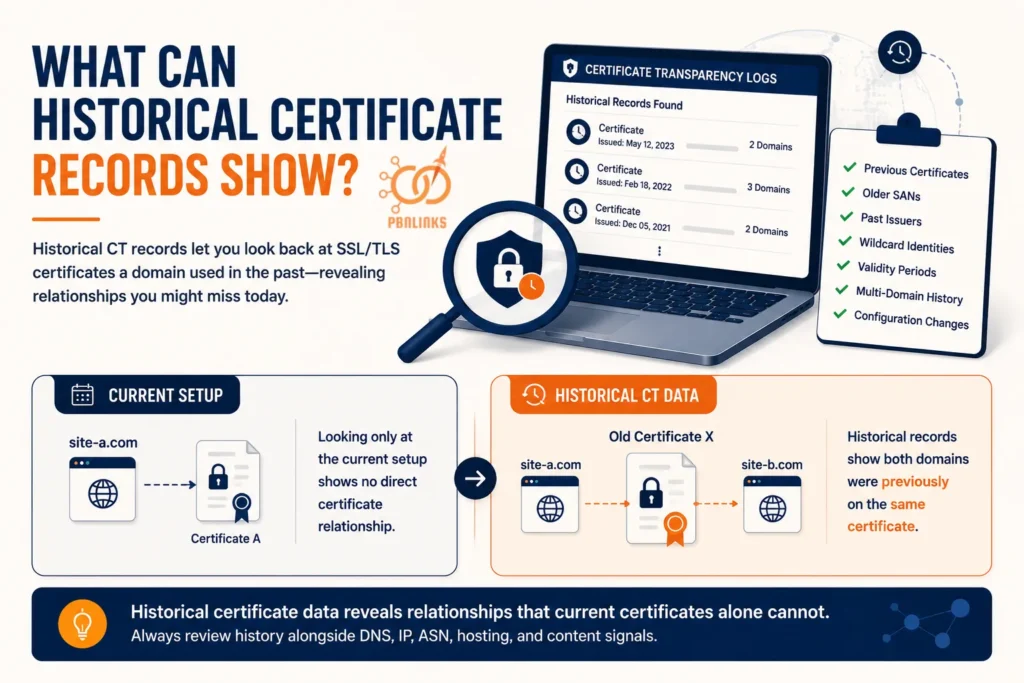
Historical CT records allow you to look back at certificates previously associated with a domain. Instead of examining only the current certificate, you can compare how the certificate setup changed over time.
Depending on the available records, you may find:
- Previous SSL/TLS certificates
- Older SAN relationships
- Past certificate issuers
- Previous wildcard identities
- Earlier validity periods and CT timestamps
- Certificates that once covered multiple domains
- Changes in certificate configuration over time
Consider two PBN domains that use completely separate certificates today:
site-a.com → Certificate A
site-b.com → Certificate B
Looking only at the current setup shows no direct certificate relationship.
Historical CT data, however, might reveal:
Old Certificate X → site-a.com + site-b.com
The current certificates are different, but the historical record shows that both domains were previously represented on the same certificate. That gives you useful context that a current certificate check would miss.
Does Replacing an SSL Certificate Remove Its CT History?
No. Replacing an SSL certificate does not erase certificate entries that have already been recorded in Certificate Transparency logs.
CT logs are designed to be append only. Once certificate information has been incorporated into a log, issuing a new certificate does not simply overwrite or delete the previous logged entry.
For example:
2024 → Certificate A logged
2025 → Certificate B logged
2026 → Certificate C currently used
Certificate C may be the certificate visible today, but the earlier logged certificates can still form part of the domain’s certificate history.
This is why changing certificates should not be confused with removing historical CT records.
Current Certificate vs Historical Certificate Data
The easiest way to understand the difference is to think of the current certificate as a snapshot and historical CT data as a timeline.
| Current Certificate | Historical CT Data |
| Shows the present certificate setup | Shows certificate activity over time |
| Shows current certificate identities | Can reveal previous certificate identities |
| Useful for current relationships | Useful for past relationships |
| Provides one point in time | Provides a longer certificate timeline |
Both views are useful, but they answer different questions.
If you want to know what certificate a site is using now, examine the current certificate. If you want to know how its certificate relationships have changed over time, historical CT records provide the broader view.
How Should Historical Relationships Be Interpreted?
Finding an old relationship does not automatically prove that two domains belonged to the same PBN. Historical certificates still need context, just like current certificates.
A shared hosting service, CDN, certificate management platform, or previous technical configuration may explain why domains appeared together.
The finding becomes more useful when the historical certificate relationship agrees with other evidence, such as:
Historical Certificate Relationship + Historical DNS + IP or Hosting Relationship
This allows you to compare what happened at roughly the same point in time rather than combining unrelated technical records from different periods.
The key principle is simple: do not judge a domain only by the SSL certificate it uses today. Certificate history can preserve relationships that the current setup no longer shows.
Historical records can also contain wildcard identities such as *.example.com. That brings us to the next question: what do wildcard certificates actually reveal in Certificate Transparency logs, and can they hide subdomains?
Do Wildcard SSL Certificates Create PBN Footprints?
A wildcard certificate can make SSL management easier by covering multiple hostnames under the same domain. But because wildcard identities can also appear in Certificate Transparency data, they may reveal part of a domain’s certificate setup.
The key is understanding what a wildcard certificate actually exposes and what it does not.
What Is a Wildcard SSL Certificate?
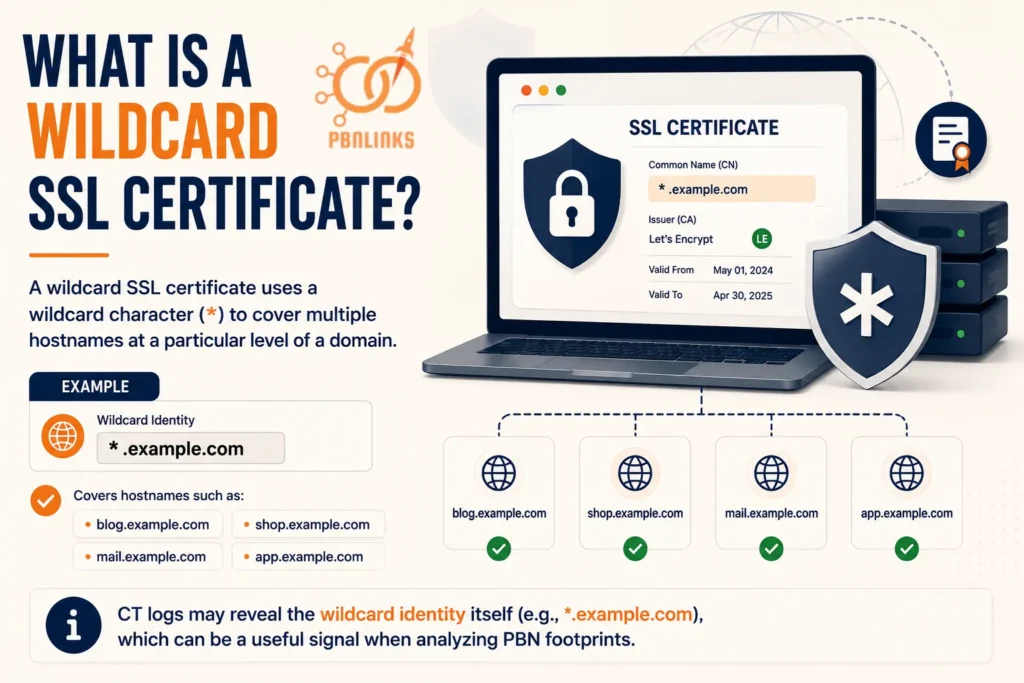
A wildcard SSL certificate uses a wildcard character to cover multiple hostnames at a particular level of a domain.
For example:
*.example.com
can be used for hostnames such as:
blog.example.com
shop.example.com
mail.example.com
Instead of obtaining a separate certificate for each of these hostnames, the wildcard identity allows them to be covered under the certificate’s defined scope.
For PBN analysis, the important point is that CT data may expose the wildcard identity itself, such as *.example.com.
Does a Wildcard Certificate Reveal Every Subdomain?
No. A wildcard certificate does not automatically reveal every subdomain that exists under a domain.
If a CT record contains:
*.example.com
you can see that a wildcard certificate identity exists for that domain. But you cannot conclude from that entry alone that specific hostnames such as:
pbn1.example.com
pbn2.example.com
private.example.com
actually exist.
The wildcard represents a certificate identity pattern. It is not a directory of every subdomain using that certificate.
This distinction is important because otherwise wildcard CT entries can easily be overinterpreted during domain discovery.
Wildcard Certificate vs SAN Certificate
Wildcard and SAN certificates can both cover multiple hostnames, but they represent those identities differently.
| Factor | Wildcard Certificate | SAN Certificate |
| Typical identity | *.example.com | Explicit domain names or hostnames |
| Coverage | Hostnames matching the wildcard scope | Identities specifically listed in the certificate |
| CT visibility | Can expose the wildcard identity | Can expose listed SAN identities |
| Reveals every subdomain? | No | No, only identities represented in the certificate |
| Relationship value | Shows certificate scope around a domain | Can show explicit certificate relationships between listed identities |
For example:
Wildcard
*.example.com
shows a wildcard identity associated with example.com.
By comparison:
SAN Certificate
site-a.com
site-b.com
site-c.com
explicitly represents those different domains on the same certificate.
For PBN footprint analysis, the second example generally provides a more direct certificate relationship between the named domains.
When Can Wildcard Certificates Matter for PBN Analysis?
Wildcard data becomes useful when it helps explain a larger certificate or infrastructure pattern.
For example, historical CT records may show that a domain previously used wildcard certificates, changed certificate configurations, or had other certificate identities associated with it. These observations can then be compared with DNS history and other infrastructure records from the same period.
But a wildcard should not be treated as suspicious simply because it exists. Wildcard certificates have many legitimate uses and are common in normal website and infrastructure management.
The practical takeaway is simple: a wildcard CT entry can reveal certificate scope, but it does not reveal every hostname behind that wildcard or prove a PBN relationship.
There is another factor that can change what certificate you see when visiting a website: a CDN or reverse proxy may terminate HTTPS before traffic ever reaches the origin server. That means we now need to distinguish between edge certificates and origin certificates.
How Do CDNs and Reverse Proxies Affect SSL Certificate Visibility?
When you open a website and inspect its SSL certificate, you might assume you are seeing the certificate installed on that website’s server. That is not always the case. If the site uses a Content Delivery Network (CDN) or reverse proxy, HTTPS may be handled at the network edge before the request ever reaches the origin server.
This creates two different certificate layers that need to be understood when analyzing PBN SSL footprints.
What Is an Edge Certificate?
An edge certificate is the SSL/TLS certificate presented to visitors by a CDN or reverse proxy. It secures the HTTPS connection between the visitor and the CDN edge.
The connection looks like this:
Visitor → CDN Edge → Website
When the visitor connects to the site, the CDN may terminate the HTTPS connection and present its own managed certificate. This is therefore the certificate you may see when inspecting the website through a browser.
For PBN analysis, this matters because several websites using the same CDN can have similar certificate characteristics without sharing the same origin server or owner.
What Is an Origin Certificate?
The origin certificate protects the connection between the CDN and the website’s origin server when HTTPS is also used on that part of the connection.
The full setup can look like this:
Visitor → CDN Edge → Origin Server
with two separate HTTPS connections:
Visitor → Edge Certificate → CDN
CDN → Origin Certificate → Origin Server
The edge certificate and origin certificate do not have to be the same. They may be issued by different certificate authorities, have different validity periods, and serve different purposes.
This is why inspecting only the certificate presented to a visitor may not tell you which certificate is configured at the origin.
Does a CDN Hide SSL Certificate Footprints?
A CDN can change which certificate is publicly presented to visitors, but it should not be treated as automatically hiding all certificate footprints.
The edge certificate may replace the origin certificate from the visitor’s point of view. However, historical CT records may still contain certificates that were publicly logged for the domain before or during its use of the CDN.
An origin certificate may also have a different visibility story depending on how it was issued and whether it was publicly logged. So you should not assume that every origin certificate can be discovered through CT data.
This gives us an important distinction:
Certificate visible in browser ≠ Automatically the origin certificate
and:
CDN usage ≠ Automatic removal of historical CT records
Why Does This Matter for PBN Analysis?
Imagine several PBN sites are behind the same CDN. Looking only at their browser visible certificates may show patterns created by the CDN’s certificate management rather than by the person operating the sites.
That can lead to a false conclusion if the CDN layer is ignored.
The better approach is to ask:
Which certificate am I actually looking at?
Is it an edge certificate presented by the CDN, or does it represent the origin setup you are trying to investigate?
This context becomes especially important when certificate findings are compared with DNS, IP addresses, hosting providers, and historical infrastructure data.
So far, we have covered several things CT data can reveal. But there are also important things it cannot tell you. Understanding those limits is the next step before using Certificate Transparency data for broader PBN infrastructure analysis.
What Can and Cannot Certificate Transparency Logs Reveal?
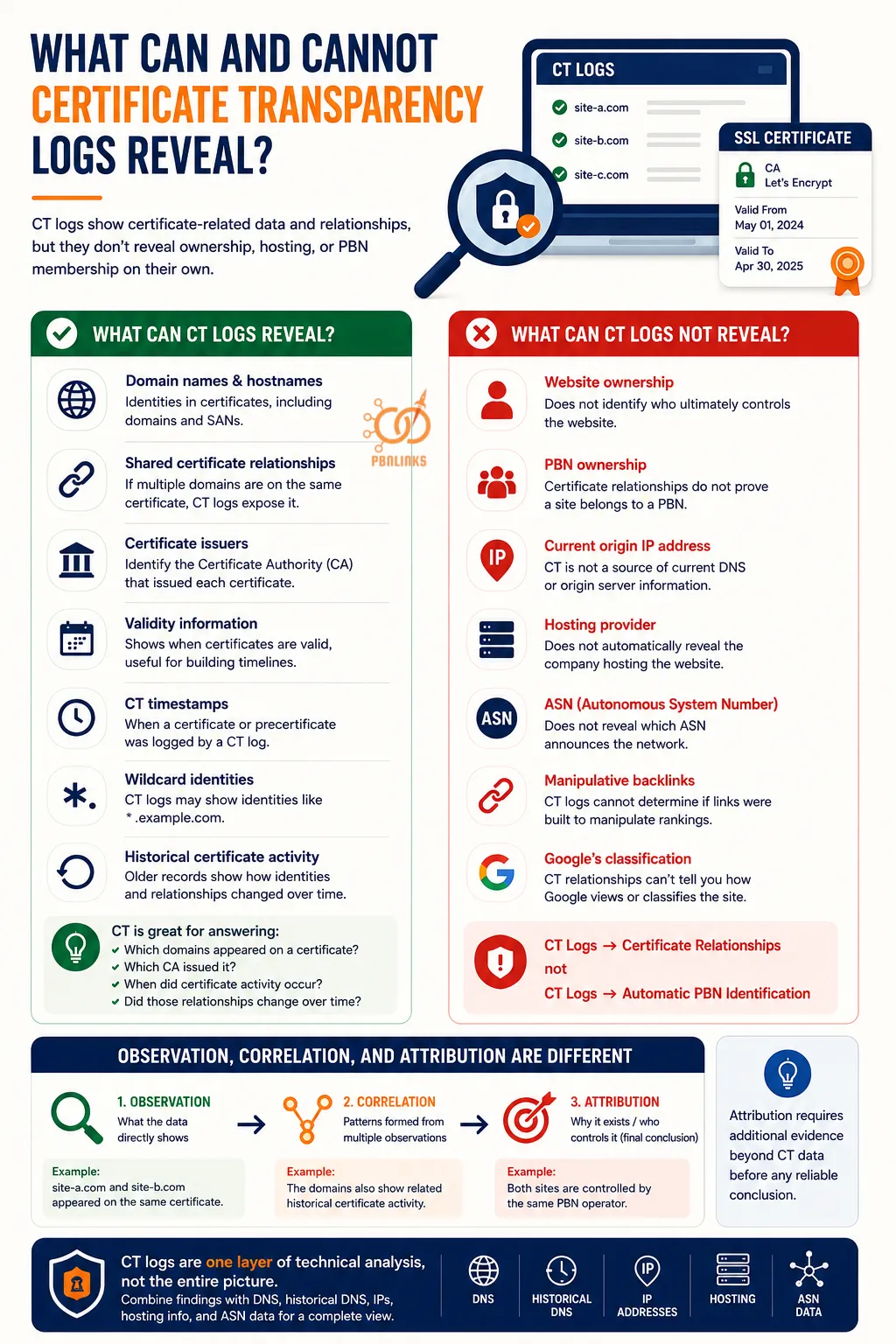
Certificate Transparency logs can reveal a surprising amount about a domain’s certificate history, but they have clear limits. CT logs are good at showing certificate related information and relationships, but they do not automatically reveal who owns a website, where its origin server is hosted, or whether it belongs to a PBN.
Knowing this difference helps prevent normal certificate similarities from being mistaken for stronger evidence.
What Can CT Logs Reveal?
CT data can help you investigate several parts of a website’s certificate activity.
Domain names and hostnames: CT records can show identities associated with logged certificates, including domains and hostnames represented in SANs.
Shared certificate relationships: If multiple domains are represented on the same certificate, CT data can expose that certificate level connection.
Certificate issuers: You can identify the Certificate Authority responsible for issuing a certificate and compare issuers across domains.
Validity information: Certificate records can show when certificates are valid, which helps when building and comparing certificate timelines.
CT timestamps: Logging data can show when a certificate or precertificate was accepted by a CT log. This should not be confused with the exact time a certificate was installed on a website.
Wildcard identities: CT records may contain identities such as *.example.com, although this does not reveal every subdomain that exists beneath the domain.
Historical certificate activity: Older logged certificates can help show how certificate identities and relationships changed over time.
In simple terms, CT is particularly useful for answering questions such as:
Which domains appeared on a certificate?
Which CA issued it?
When did certificate activity occur?
Did those certificate relationships change over time?
What Can CT Logs Not Reveal on Their Own?
The limitations are just as important as the information CT provides.
Website ownership: A certificate relationship does not identify the person or company that ultimately controls each website.
PBN ownership: Several domains appearing together in certificate data does not automatically prove that they belong to one private blog network.
Current origin IP address: CT is a certificate system, not a direct source of current DNS resolution or origin server information.
Hosting provider: A certificate record does not automatically identify the company hosting the website.
ASN: CT data alone does not tell you which Autonomous System announces the network containing a website’s server.
Manipulative backlinks: Certificate Transparency cannot determine whether links between websites were created to manipulate search rankings.
Google’s classification: A CT relationship cannot tell you whether Google considers a group of sites to be a PBN or has taken action against them.
A useful way to remember the difference is:
CT Logs → Certificate Relationships
not:
CT Logs → Automatic PBN Identification
Observation, Correlation, and Attribution Are Different
When analyzing CT data, it helps to separate three stages:
Observation → Correlation → Attribution
An observation is something directly visible in the data. For example, two domains appear on the same certificate.
A correlation appears when several observations form a pattern. The same domains might also have related certificate timing or historical certificate connections.
Attribution goes further by claiming why those relationships exist or who controls the websites. CT data alone usually cannot make that final determination.
For example:
Observation: site-a.com and site-b.com appeared on the same certificate.
Correlation: The domains also show related historical certificate activity.
Attribution: Both sites are controlled by the same PBN operator.
The first statement may be directly supported by certificate data. The second combines related observations. The third requires additional evidence before it can be treated as a reliable conclusion.
That is why Certificate Transparency works best as one layer of technical analysis rather than a complete picture of website infrastructure. To build that broader picture, the next step is to combine CT findings with DNS, historical DNS, IP addresses, hosting information, and ASN data.
How Do CT Logs, DNS, IP Addresses, and ASNs Work Together?
CT logs can show certificate relationships, but they cannot give you the complete infrastructure picture. To investigate connections between PBN domains more accurately, you need to compare certificate data with DNS records, historical DNS, IP addresses, hosting information, and ASN data.
Each source answers a different question. The real value comes from seeing whether several independent signals point toward the same relationship.
Certificate Transparency Data: Certificate to Domain
Certificate Transparency tells you about the certificate side of the relationship.
CT data can help answer questions such as:
- Which domains or hostnames appeared on a certificate?
- Were several domains included in the same SAN list?
- Which Certificate Authority issued the certificate?
- When was the certificate logged?
- What certificate relationships existed in the past?
The basic relationship is:
Certificate → Domain or Hostname
This is useful for identifying certificate connections, but it does not tell you where the website is actually hosted.
DNS Data: Domain to IP Address
DNS provides a different piece of the puzzle. It connects a domain name to the infrastructure used to make that domain reachable.
For example:
site-a.com → 192.0.2.10
This tells you that the domain resolves to that IP address at the time of the lookup.
DNS records can also provide information about nameservers and other services associated with a domain. Comparing these records across multiple PBN sites can reveal infrastructure similarities that certificate data alone cannot show.
Historical DNS: Domain to Previous Infrastructure
Current DNS only shows the present setup. Historical DNS can help show where a domain pointed in the past.
For example:
2024: site-a.com → IP A
2025: site-a.com → IP B
2026: site-a.com → IP C
This becomes particularly useful when compared with historical certificate data.
Suppose two domains use different IP addresses today, but historical records show that they once appeared on the same certificate and resolved to related infrastructure during the same period. That gives you more context than either historical CT or historical DNS could provide alone.
IP and Hosting Data: IP Address to Network Infrastructure
Once you have an IP address, you can investigate the network around it. This may help identify the hosting provider, network range, or other domains associated with the same infrastructure.
The relationship now becomes:
Domain → IP Address → Network or Hosting Infrastructure
However, shared IP addresses need careful interpretation. Many unrelated websites can share the same server or hosting environment, especially on shared hosting platforms.
A shared IP is therefore not automatic proof of common ownership, just as a shared Certificate Authority is not.
ASN Data: IP Network to Autonomous System
An Autonomous System Number (ASN) identifies an autonomous system that announces groups of IP prefixes on the Internet.
This adds another layer to infrastructure analysis:
IP Address → Network Prefix → ASN
If several domains use different IP addresses but those addresses belong to infrastructure announced by the same ASN, you have identified a network level similarity.
Again, context matters. A large cloud or hosting provider can serve thousands of unrelated customers through the same ASN. ASN overlap should therefore be interpreted according to how common the provider is and what other relationships exist.
How Do These Signals Connect?
The clearest picture appears when the different data sources are analyzed together.
For example:
CT Logs → Domains A and B appeared on the same certificate
Historical DNS → Domains A and B resolved to related infrastructure during the same period
IP Data → Their addresses belonged to the same hosting environment
ASN Data → The network prefixes were announced by the same autonomous system
Now you have several layers of technical information supporting the investigation.
The complete relationship can be viewed like this:
CT Logs + DNS + Historical DNS + IP Data + Hosting Data + ASN Data → Broader Infrastructure Relationship Analysis
This does not mean that several matching signals automatically prove common ownership. Large hosting providers, CDNs, shared servers, and managed platforms can create legitimate similarities across unrelated sites.
The goal is to compare independent relationships and understand why they exist, rather than searching for one technical field that supposedly identifies a PBN.
This same principle applies to IP diversity. Different IP addresses do not necessarily mean websites use independent infrastructure, just as different SSL certificates do not necessarily remove certificate relationships.
Once these infrastructure layers are understood, a bigger question remains: can Google use SSL certificates or Certificate Transparency data to detect PBNs?
What SSL Certificate Signals Actually Matter for PBN Footprint Analysis?
By this point, one thing should be clear: not every SSL certificate similarity carries the same weight. Finding the same Certificate Authority across several domains is very different from finding those domains on the same certificate.
A useful PBN SSL analysis therefore focuses on the strength and context of each relationship, rather than simply counting how many certificate details match.
Same Certificate Authority: Weak Signal
Seeing several PBN sites use the same Certificate Authority is usually one of the weakest similarities.
For example:
site-a.com → Let’s Encrypt
site-b.com → Let’s Encrypt
site-c.com → Let’s Encrypt
This tells us that the certificates share an issuer. It does not tell us that the websites share an owner or infrastructure.
Popular CAs and automated certificate services are used across large numbers of unrelated websites. Issuer overlap becomes more useful only when other, more specific relationships appear alongside it.
Similar Certificate Timing: Contextual Signal
Closely matched validity dates, CT timestamps, or recurring renewal patterns can add context to an investigation.
A one time timing match may simply be coincidence. Repeated synchronization across the same group of domains can be more interesting, but automated renewals, managed hosting, migrations, and common certificate management systems can still explain the pattern.
For that reason:
Similar timing → Worth checking
not:
Similar timing → Same PBN owner
Same Certificate or SAN Relationship: More Specific Signal
A relationship becomes more specific when otherwise unrelated domains are represented on the same certificate.
For example:
Certificate A → site-a.com + site-b.com + site-c.com
This is different from three separate certificates that happen to use the same CA. The certificate itself now creates a direct technical relationship between the listed identities.
SAN relationships deserve similar attention because they show which domain names or hostnames were represented together on a certificate.
The context still matters. CDNs, hosting platforms, and legitimate multi domain configurations can produce shared certificates, so a direct certificate relationship is meaningful evidence of association, not automatic proof of ownership.
Matching Certificate Fingerprints: Exact Certificate Match
A certificate fingerprint is particularly useful when you need to determine whether two observations refer to the same certificate.
If certificate fingerprints match, you are not simply looking at two certificates from the same issuer or certificates with similar dates. You are identifying the same certificate data.
That makes fingerprints useful for confirming certificate matches across different observations or research sources.
However, the interpretation still depends on why that certificate was used across the domains involved.
Historical Certificate Relationships: Adds the Time Dimension
Current certificate data can miss relationships that existed months or years earlier. Historical CT records add a time dimension to the analysis.
For example:
Current setup
site-a.com → Certificate A
site-b.com → Certificate B
Historical setup
Old Certificate X → site-a.com + site-b.com
The current setup looks separate, while the historical record reveals a previous certificate relationship.
Historical evidence becomes particularly useful when it can be compared with historical DNS or hosting information from the same period.
Corroborated Infrastructure Relationships: Stronger Context
Certificate evidence becomes more meaningful when independent infrastructure data supports the same relationship.
Consider the difference:
Same CA
versus:
Shared certificate + historical SAN relationship + related DNS history + hosting or network relationship
The second finding contains several independent observations rather than one common similarity.
This does not create automatic proof that the domains have the same owner. It does, however, provide a stronger technical basis for investigating why the relationships exist.
Which SSL Certificate Footprints Deserve the Most Attention?
The signals can be summarized like this:
| SSL or CT Signal | What It Shows | Value on Its Own | Main Limitation |
| Same major CA | Common certificate issuer | Weak | Popular CAs serve many unrelated sites |
| Similar certificate timing | Timing correlation | Contextual | Automation can create similar patterns |
| Recurring timing patterns | Repeated certificate activity | Contextual | Shared services can still explain it |
| Same certificate | Direct certificate relationship | More specific | Does not prove common ownership |
| SAN relationship | Domains represented together | More specific | Legitimate shared configurations exist |
| Matching fingerprint | Same certificate data | Specific for identification | Still requires usage context |
| Historical relationship | Previous certificate association | More useful with context | Past association needs interpretation |
| CT plus DNS, IP, hosting, or ASN evidence | Multiple technical relationships | Stronger context | Correlation still does not equal ownership |
The practical rule is simple: measure relationships, not just certificate differences. Giving every website a different issuer or certificate does not automatically make the underlying infrastructure independent, just as finding one shared SSL characteristic does not automatically identify a PBN.
Once you know which signals deserve attention, the next step is knowing where to find and verify them. That means choosing the right tools for checking SSL certificates, Certificate Transparency records, and certificate history.
What Tools Can You Use to Check SSL Certificates and CT Logs?
Once you know which certificate signals matter, the next step is finding the data. There is no single tool that gives you the complete picture. Some tools search Certificate Transparency records, others inspect the certificate a website currently presents, and infrastructure tools help verify DNS, IP, hosting, and network relationships.
For a proper PBN SSL footprint analysis, it helps to use these tools together rather than relying on one result.
Certificate Transparency Search Tools
CT search tools make public certificate records easier to search by domain or hostname. They can help uncover current and historical certificate entries, SANs, issuers, validity information, and other certificate relationships.
One widely used example is crt.sh, which provides a searchable interface for certificate information found through Certificate Transparency data. Entering a domain can return certificate records associated with that name and related identities represented in those records.
Other certificate search and Internet intelligence platforms can provide similar access to CT derived information, sometimes with additional filtering and infrastructure data.
There is an important distinction here:
CT Log → Stores publicly auditable certificate entries
CT Search Tool → Helps you find and examine information from CT data
In other words, a website that lets you search certificate history is not necessarily operating the underlying CT log you are searching.
SSL Certificate Inspection Tools
CT search tools are useful for history, but you may also want to inspect the certificate currently presented by a website.
Modern web browsers provide built in certificate information through their security and connection details. Depending on the browser, you can inspect fields such as the certificate issuer, SANs, validity period, and other certificate details.
Command line tools such as OpenSSL can provide a more detailed view of the certificate presented during a TLS connection. This is useful when you want to inspect certificate fields directly rather than relying only on a web interface.
The current certificate gives you a present day snapshot:
Domain → Current TLS Connection → Presented Certificate
CT data gives you a broader historical view:
Domain → Logged Certificate Records → Certificate History
Using both helps prevent a current certificate from being mistaken for the domain’s complete certificate history.
SSL Testing Tools
SSL testing services can provide another useful view of a website’s HTTPS configuration. They can help inspect the certificate chain, supported TLS configuration, certificate names, and other security details.
These tools are useful when you need more context about how a certificate is being served, especially when the browser view alone does not provide enough information.
However, an SSL configuration test and a CT history search answer different questions. A security scanner primarily examines the current HTTPS setup, while CT research can reveal certificate activity recorded in the past.
DNS and Infrastructure Research Tools
Certificate data should not be analyzed in isolation when you are investigating broader relationships between domains.
DNS lookup and historical DNS tools can help check:
- Current and previous IP addresses
- Nameservers
- DNS changes over time
- Other domain infrastructure relationships
IP and network research tools can then help identify information such as the network range, hosting or network provider, and ASN associated with an IP address.
This allows you to move from:
Certificate → Domain
to a broader chain:
Certificate → Domain → DNS → IP → Provider → ASN
The purpose is not to find as many matching fields as possible. It is to determine whether independent sources of technical data support the same relationship.
Which Tool Should You Use for Each Check?
A simple way to choose the right tool is to start with the question you are trying to answer.
| What You Want to Check | Tool Type to Use |
| Current SSL certificate | Browser certificate viewer or TLS inspection tool |
| SANs and certificate identities | Certificate viewer or CT search tool |
| Certificate issuer | Certificate viewer or CT search tool |
| Certificate fingerprint | Certificate inspection tool |
| CT records | Certificate Transparency search tool |
| Old certificates | CT search or certificate history tool |
| Previous domain relationships | Historical CT plus historical DNS research |
| Current DNS and IP | DNS lookup tool |
| Previous IP addresses | Historical DNS tool |
| Network or ASN | IP and ASN lookup tool |
The most useful workflow is therefore not “find one PBN checker.” It is to use the right source for each technical question and then compare the results.
Once those tools are available, we can put everything together into the final practical process: auditing SSL certificate footprints across multiple PBN domains step by step.
How Do You Audit SSL Certificate Footprints Across PBN Domains?
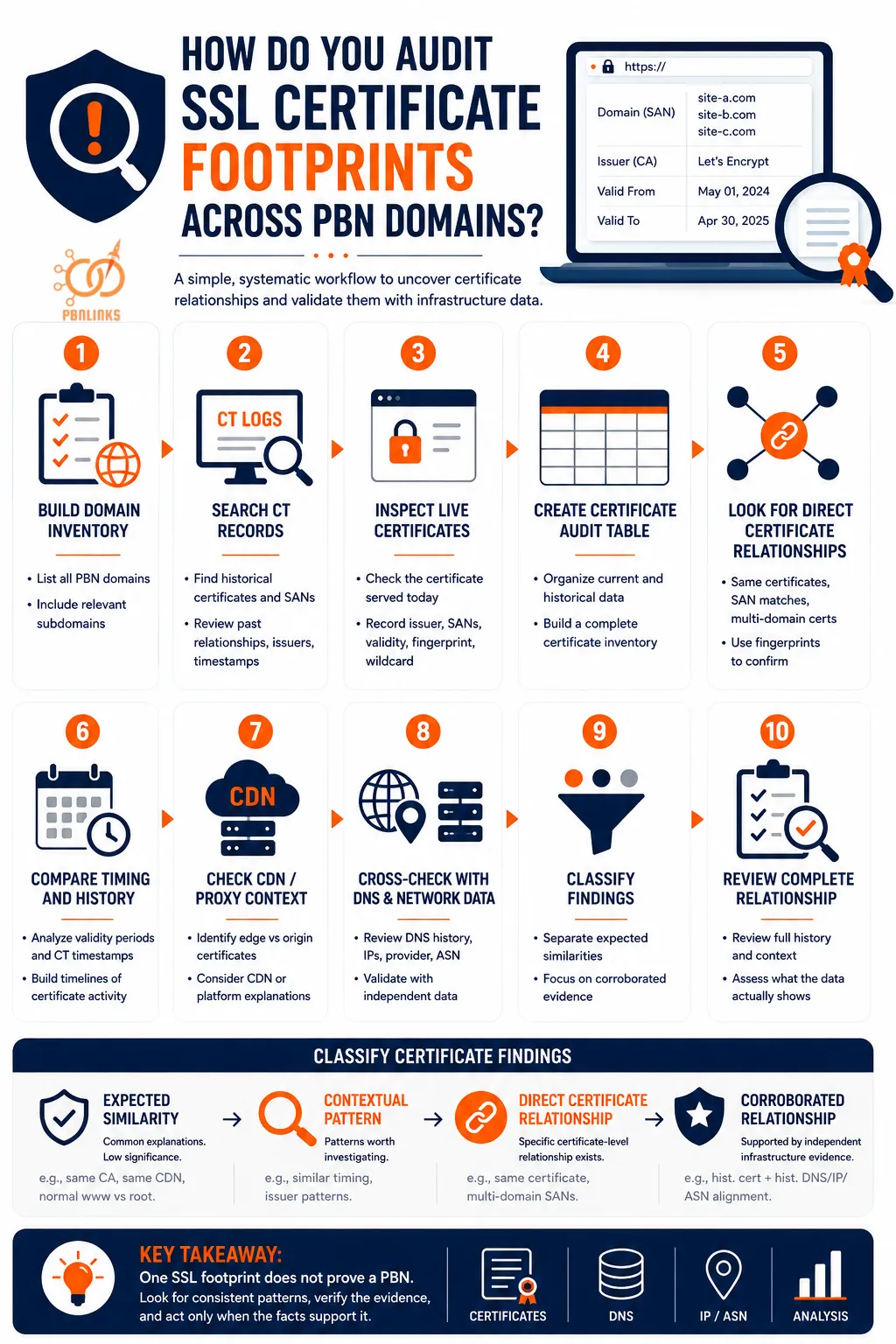
To audit SSL certificate footprints across PBN domains, build a complete domain inventory, examine current and historical certificate data, compare certificate relationships, and then cross check the strongest findings with DNS and network infrastructure.
The key is to work systematically. Checking certificates one domain at a time without recording the results makes broader patterns difficult to see and can cause common SSL similarities to look more significant than they really are.
A useful audit follows this sequence:
Domain Inventory → CT Records → Live Certificates → Certificate Comparison → Historical Analysis → Infrastructure Validation → Relationship Assessment
Step 1: Build a List of Every Domain You Want to Audit
Start with a complete list of the PBN domains you want to compare.
For example:
site-a.com
site-b.com
site-c.com
site-d.com
Include relevant subdomains when they are part of the analysis.
The goal is to create one consistent inventory so every domain goes through the same checks. This is particularly important when auditing a larger group of sites because relationships that look insignificant individually can become easier to recognize when the data is compared side by side.
A spreadsheet works well for this because certificate, CT, DNS, IP, and network data can eventually be brought into the same audit.
Step 2: Search Certificate Transparency Records
Next, search Certificate Transparency data for every domain in your inventory.
CT records can reveal certificate activity that is no longer obvious from the website’s current HTTPS configuration. Depending on the available records and search interface, look for:
- Previous certificates
- Historical SANs
- Wildcard identities
- Multi domain certificates
- Previous certificate issuers
- Validity periods
- CT timestamps
- Older certificate relationships
This is one of the most important parts of the audit because the certificate currently served by a website is only a snapshot of its present configuration.
Certificate Transparency can provide a much longer historical view.
For example, two domains may use completely separate certificates today:
site-a.com → Certificate A
site-b.com → Certificate B
But historical CT data might show:
Certificate X → site-a.com + site-b.com
The current configuration shows separation. The historical record reveals a previous certificate level relationship.
Record these historical relationships rather than judging them immediately. Their significance becomes clearer once they are compared with the rest of the audit data.
Step 3: Inspect the Certificate Being Served Today
After reviewing CT records, inspect what each website actually presents during a current TLS connection.
For every domain, record relevant fields such as:
- Certificate issuer
- Subject
- SANs
- Validity dates
- Certificate fingerprint
- Wildcard identities
- Other certificate details relevant to the audit
This creates an important distinction:
CT records → What certificate activity has been publicly logged
Live TLS inspection → What certificate the endpoint is serving now
These views should not automatically be treated as the same thing.
An old certificate discovered through CT may no longer be served. A domain may have changed issuers, moved behind a CDN, received a new certificate, or changed its SAN configuration since the historical certificate was logged.
Comparing the two views helps answer a more useful question:
What does the certificate configuration look like now, and how has it changed over time?
Step 4: Create a Certificate Audit Table
Now bring the findings together instead of keeping them scattered across CT searches, browser tabs, and SSL inspection tools.
At minimum, your certificate inventory might look like this:
| Domain | Issuer | SANs | Valid From | Valid Until | Fingerprint | Historical Relationship |
| site-a.com | CA A | site-a.com | Date | Date | FP-A | Certificate X |
| site-b.com | CA B | site-b.com | Date | Date | FP-B | Certificate X |
| site-c.com | CA A | site-c.com | Date | Date | FP-C | None found |
For a deeper audit, add fields such as:
CT Timestamp | Wildcard | CDN/Proxy | Current IP | Historical IP | Network Provider | ASN
This transforms a collection of individual certificate checks into a dataset that can actually be compared.
For example, you might notice that two domains have different certificates and different issuers today but share a historical certificate relationship. Another group may share an issuer and similar renewal dates but have no other technical relationship.
Those findings should not receive the same weight.
The purpose of the inventory is therefore not simply record keeping. It gives you a consistent place to compare current certificate data, historical certificate data, and supporting infrastructure evidence.
Step 5: Look for Direct Certificate Relationships First
Once the inventory is built, start with the most specific certificate relationships before spending too much time on common similarities.
Look for:
Domains represented on the same certificate
Matching certificate fingerprints
Unrelated domains appearing in the same SAN list
Historical multi domain certificate relationships
Repeated certificate relationships over time
Then move to weaker contextual similarities such as the same issuer or similar certificate timing.
This order matters.
Suppose 20 domains use Let’s Encrypt. That may simply reflect the widespread use of an automated Certificate Authority.
Now compare that with:
Certificate X → site-a.com + site-b.com + site-c.com
The second observation establishes a much more specific certificate level relationship between the identities represented on that certificate.
Fingerprints can also help distinguish these situations. A matching fingerprint can confirm that two observations refer to the same certificate data rather than merely certificates issued by the same CA.
A useful hierarchy is:
Same major CA → Weak
Similar timing → Contextual
Repeated timing pattern → Worth investigating
Same certificate or SAN relationship → More specific
Historical repeated relationship → More informative
Certificate relationship + independent infrastructure evidence → Stronger context
None of these automatically establishes common ownership. The hierarchy simply helps determine which findings deserve further investigation.
Step 6: Compare Certificate Timing and History
Next, build a certificate timeline for domains with interesting relationships.
For example:
2024 → Domains A and B appear on Certificate X
2025 → Domains A and B receive separate certificates
2026 → Domains A and B use different issuers
Looking only at the current configuration could make the domains appear completely unrelated at the certificate level.
Historical CT data adds the missing time dimension.
Also compare certificate validity periods and CT timestamps for recurring patterns.
Be careful not to confuse the two.
Certificate validity dates → When the certificate is valid
CT timestamp → When a certificate or precertificate was accepted by a CT log
A CT timestamp should therefore not automatically be described as the exact time a certificate was installed on a website.
Repeated timing patterns can still be useful. If the same group of domains repeatedly shows certificate activity around similar periods, the pattern may deserve closer inspection.
But matching dates alone are weak evidence. Automated issuance, ACME clients, managed hosting, control panels, CDN certificate management, bulk migrations, and other shared systems can produce similar timing across unrelated websites.
The better question is not:
Do these dates match?
It is:
Does the timing pattern repeat, and do other independent relationships appear alongside it?
Step 7: Check Whether a CDN or Reverse Proxy Explains the Pattern
Before interpreting certificate similarities, determine which certificate layer you are actually observing.
A CDN protected website may involve separate TLS connections:
Visitor → Edge Certificate → CDN → Origin Certificate → Origin Server
The certificate presented to the visitor may therefore be an edge certificate managed by the CDN rather than a certificate directly associated with the origin server.
This distinction matters when comparing multiple domains.
Several unrelated websites using the same CDN or managed platform can display certificate characteristics influenced by that service. Treating those similarities as direct evidence of common control can produce false positives.
For every interesting certificate relationship, ask:
Which certificate am I actually observing?
Could a CDN, reverse proxy, hosting platform, or automated certificate system explain the similarity?
Does the relationship still look meaningful after that explanation is considered?
This step is important because good footprint analysis does not only search for similarities. It also searches for reasonable alternative explanations.
Step 8: Cross Check Certificate Relationships With DNS and Network Data
Certificate data should now be compared with independent infrastructure sources.
Start with the strongest relationships identified during the certificate audit and investigate the infrastructure around those domains.
Check:
Current DNS
Where does each domain resolve today, and what relevant DNS relationships are visible?
Historical DNS
Where did each domain resolve when the certificate relationship existed?
IP data
Were the domains associated with the same or related IP infrastructure?
Hosting or network provider
Can the relationship be explained by a large shared hosting or cloud provider?
ASN
Are the relevant IP prefixes announced by the same autonomous system?
Historical alignment is particularly useful.
Suppose CT data shows:
March 2024 → Domains A and B appear on Certificate X
Historical DNS then shows that the same domains were associated with related infrastructure during March 2024.
You now have two different technical layers pointing toward a relationship during the same period:
Certificate relationship + historical infrastructure relationship
That provides substantially more context than either observation alone.
However, the same caution still applies. A shared IP, provider, or ASN does not automatically prove common ownership. Large hosting companies, CDNs, cloud platforms, and shared servers can create infrastructure overlap among unrelated websites.
The goal is to determine whether independent technical evidence supports the certificate relationship, not simply to accumulate matching fields.
Step 9: Separate Expected Similarities From Meaningful Relationships
Once the data has been collected, classify the findings instead of treating every match as equally important.
A practical framework is:
Expected Similarity
These are relationships with common technical explanations.
Examples include:
- Same widely used CA
- Normal example.com and www.example.com SAN combination
- Same major CDN
- Same large hosting provider
- Isolated matching certificate dates
These generally provide little value on their own.
Contextual Pattern
These deserve attention but still have plausible alternative explanations.
Examples include:
- Repeated similar renewal timing
- Similar certificate histories
- Recurring issuer patterns
- Wildcard certificate changes
- Several related certificate fields appearing together
These findings may justify deeper investigation.
Direct Certificate Relationship
These establish a more specific relationship at the certificate level.
Examples include:
- Otherwise separate domains represented on the same certificate
- Unrelated domains appearing together in SANs
- Matching certificate fingerprints
- Historical shared certificates
They still do not prove ownership, but they are more specific than common issuer or timing similarities.
Corroborated Technical Relationship
This is where certificate evidence is supported by independent infrastructure data.
For example:
Historical shared certificate + related historical DNS + related network infrastructure during the same period
This provides stronger technical context because several independent observations align.
The progression can be summarized as:
Expected Similarity → Contextual Pattern → Direct Certificate Relationship → Corroborated Technical Relationship
This framework prevents the audit from becoming a simple count of SSL footprints.
Step 10: Review the Complete Relationship, Not One Footprint
Finish by reviewing each interesting domain pair or group as a complete technical history.
A useful investigation path is:
Domain → Current Certificate → SAN → Issuer → Fingerprint → CT History → Timing → CDN Context → Historical DNS → IP → Provider → ASN
Then ask three questions:
1. What relationship can I directly observe?
Separate what the data actually shows from what you think it might mean.
2. What legitimate technical explanation could produce it?
Consider popular CAs, CDNs, shared hosting, automated certificate management, migrations, and other common infrastructure.
3. Does independent evidence support the same relationship?
Look for historical DNS, IP, hosting, network, or other infrastructure data that aligns with the certificate evidence.
This final review is what separates useful PBN SSL footprint analysis from speculation.
A shared CA may mean almost nothing. A historical shared certificate deserves more attention. A historical certificate relationship that also aligns with infrastructure evidence from the same period provides substantially more context.
The complete audit workflow therefore looks like this:
Domain Inventory → CT Search → Live Certificate Inspection → Certificate Inventory → Direct Relationship Analysis → Certificate Timeline → CDN Context → DNS and Network Cross Check → Evidence Classification → Final Relationship Assessment
The goal of a PBN SSL certificate audit is not to prove a PBN from one SSL footprint. It is to reconstruct certificate relationships over time, eliminate patterns with ordinary technical explanations, and determine which relationships remain meaningful when certificate data is compared with independent infrastructure evidence.
FAQs About PBN SSL Certificate Transparency
What is PBN SSL Certificate Transparency?
PBN SSL Certificate Transparency is the analysis of public CT data to identify certificate relationships across PBN domains. It can reveal domains, SANs, issuers, certificate timing, and historical certificate activity, but these signals do not prove common ownership.
Are Certificate Transparency logs public?
Yes. Certificate Transparency logs are publicly auditable, append-only records of certificate activity. They allow certificate information associated with publicly trusted TLS certificates to be monitored and independently examined.
Can CT logs reveal related PBN domains?
Yes, CT data can reveal certificate-level relationships between domains, such as multiple domains appearing on the same certificate or in its SANs. However, a certificate relationship alone does not prove the domains belong to the same PBN operator.
Can CT logs show old SSL certificates?
Yes. CT records can preserve historical certificate entries even after a website starts serving a newer certificate. This makes CT data useful for comparing past SANs, issuers, certificate identities, and relationships with the current configuration.
Does replacing an SSL certificate erase its CT history?
No. Replacing the certificate being served does not remove certificate information already incorporated into Certificate Transparency logs. Historical entries can therefore remain useful when reconstructing earlier certificate relationships.
Does using Let’s Encrypt create a PBN footprint?
Using Let’s Encrypt alone is a weak PBN footprint. Let’s Encrypt is a widely used automated Certificate Authority, so unrelated websites commonly share the same issuer. A shared certificate, SAN relationship, or corroborating infrastructure evidence is more specific.
Can multiple websites use the same SSL certificate?
Yes. One TLS certificate can represent multiple domain names through Subject Alternative Names. Finding otherwise unrelated domains on the same certificate establishes a certificate-level relationship, but it does not by itself prove common ownership.
Can wildcard certificates hide subdomains from CT logs?
A wildcard certificate can avoid listing every covered subdomain individually because an identity such as *.example.com represents a wildcard scope. The wildcard itself may still appear in certificate data, so it should not be treated as making the certificate relationship invisible.
Can Google detect PBNs through SSL certificates?
Google has not publicly documented shared SSL certificates or CT relationships as standalone PBN detection signals. Chrome uses Certificate Transparency for TLS certificate validation and security, but that does not establish that Google Search uses a particular CT footprint to classify PBNs.
What is the best way to audit SSL footprints across PBN domains?
Start with a domain inventory, compare live certificates with historical CT records, and then examine SANs, fingerprints, issuers, timing, and certificate history. Cross check meaningful relationships with historical DNS, IP, hosting, and ASN data before drawing conclusions.