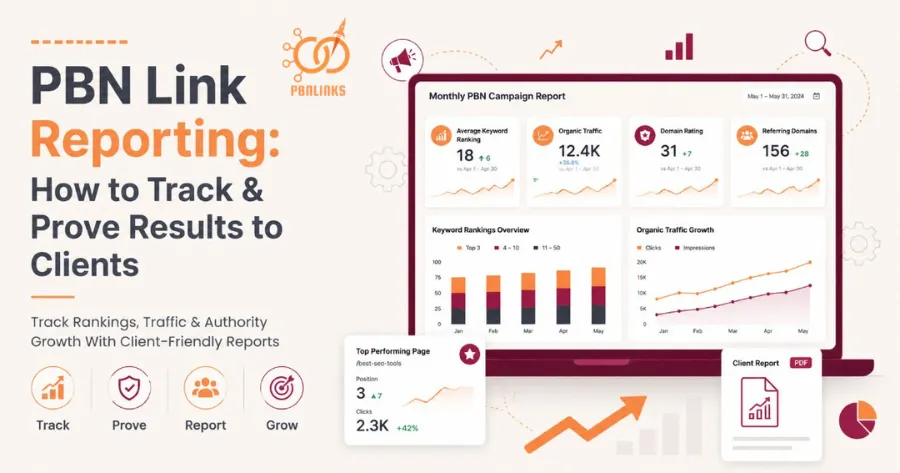
PBN Link Reporting: How to Track & Prove Results to Clients
You placed the PBN links. The campaign is live. Now your client wants proof they are actually working , and a vague update is not going to cut it.
Most agencies lose clients not because the links failed but because they could not present the results in a way that made sense. Clear reporting is what keeps clients confident, campaigns running, and retainers renewed.
This guide covers the exact metrics to track, the tools to use, and how to build client reports that prove PBN results without exposing your network.
What Is PBN Link Reporting and Why It Matters
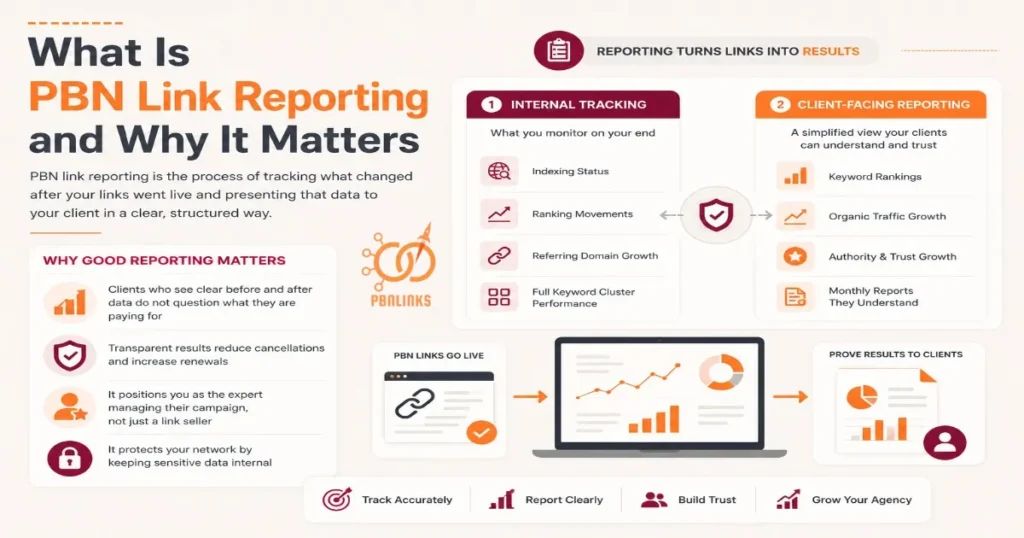
PBN link reporting is the process of tracking what changed after your links went live and presenting that data to your client in a clear, structured way.
Most agencies skip this or do it poorly — they place links, wait a few weeks, then send a vague update with no real data. That is how you lose clients. Not because the links did not work, but because you could not prove that they did.
There are two layers to PBN reporting:
- Internal tracking — indexing status, referring domain growth, and ranking movements across your full keyword cluster. This is what you monitor on your end.
- Client-facing reporting — a simplified, clean version of that data presented in a way a non-SEO client can understand and trust.
Mixing the two up is a costly mistake. Showing a client raw Ahrefs data with PBN domain names visible is both confusing and a serious network security risk.
Good reporting matters because:
- Clients who see clear before and after data do not question what they are paying for
- Transparent results reduce cancellations and increase renewals
- It positions you as the expert managing their campaign , not just a link seller
- It protects your network by keeping sensitive data internal
The Metrics That Actually Matter in a PBN Link Report
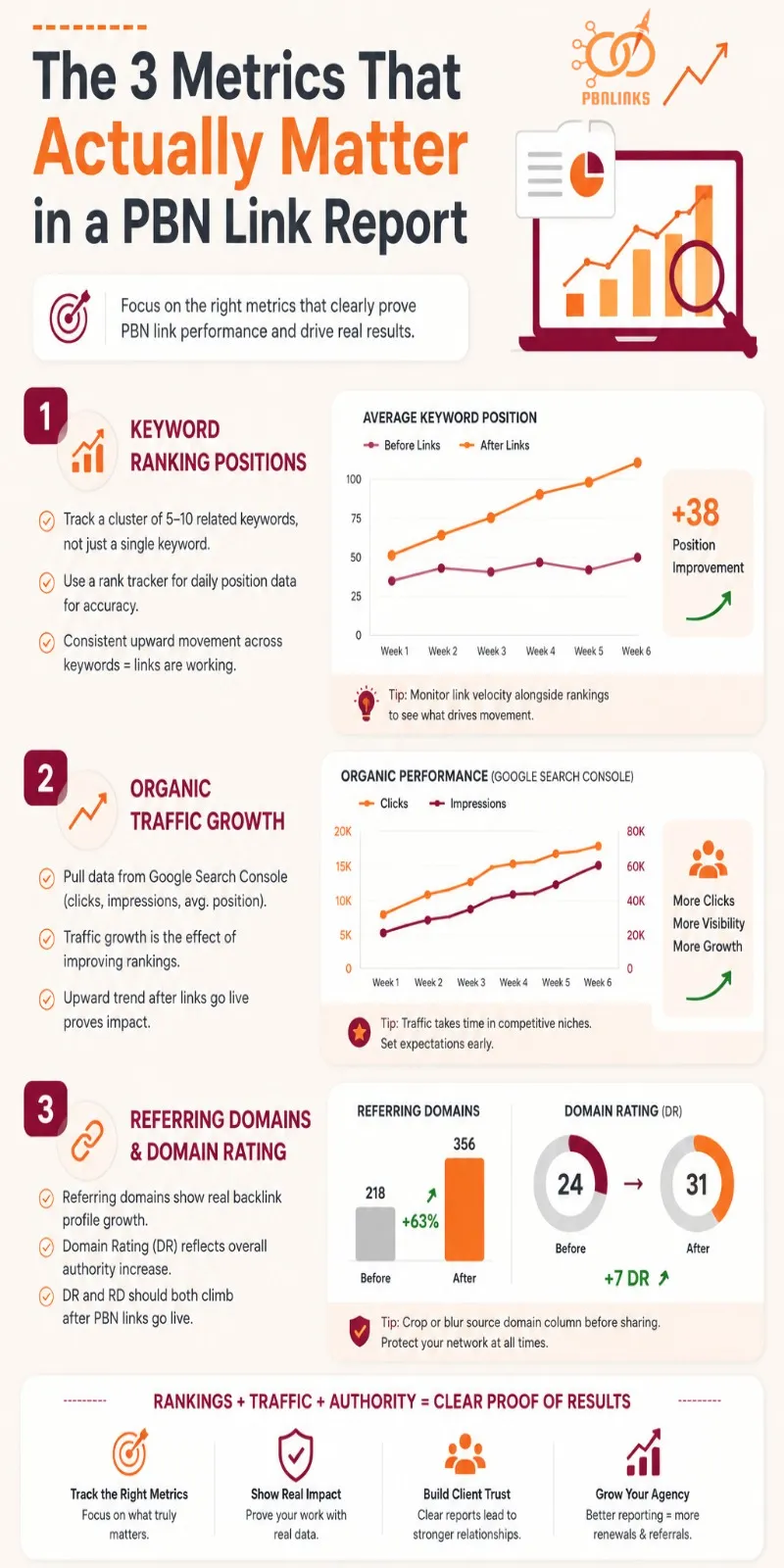
Not every SEO metric belongs in a client report. Tracking the wrong numbers wastes your time and confuses clients. Focus on these three , they directly reflect PBN link performance and are simple enough for any client to understand.
Keyword Ranking Positions
This is the number your client cares about most — where their target keywords sat before the links went live and where they sit now.
The mistake most people make is tracking a single keyword. Rankings fluctuate daily and one keyword tells an incomplete story. Track a cluster of 5 to 10 related keywords instead. When multiple keywords move in the same direction over the same period, that is a clear and defensible signal the links are working.
Use a rank tracker for daily position data ,Google screenshots alone are unreliable because personalisation and location skew what you see. Monitoring your PBN link velocity alongside ranking movement also helps you understand how the pace of link building is influencing results over time.
Organic Traffic Growth
Rankings improving is the cause. Organic traffic growth is the effect. Showing both together makes your case undeniable.
Pull traffic data directly from Google Search Console. It shows organic clicks, impressions, and average position over time ,and because it comes from Google itself, clients trust it more than any third party tool.
A clear upward trend in clicks and impressions in the weeks after links went live is hard for any client to argue with. For competitive niches, traffic movement takes longer to appear so set that expectation early before the client starts asking questions at the 30 day mark.
Referring Domains and Domain Rating
This metric shows the client that their backlink profile is genuinely growing in strength. Referring domains is the count of unique websites linking to their site. Domain Rating is Ahrefs’ measure of how powerful that profile is overall.
After PBN links go live both numbers should increase. Pull a before and after snapshot from Ahrefs and show the DR climbing a move from 24 to 31 over 60 days is a concrete, visual proof point that real authority is being built.
When preparing this screenshot always crop or blur the source domain column before sharing anything with a client. Keeping PBN domain names out of client reports is not optional , it is how you protect your network.
Best Tools for PBN Link Tracking and Reporting
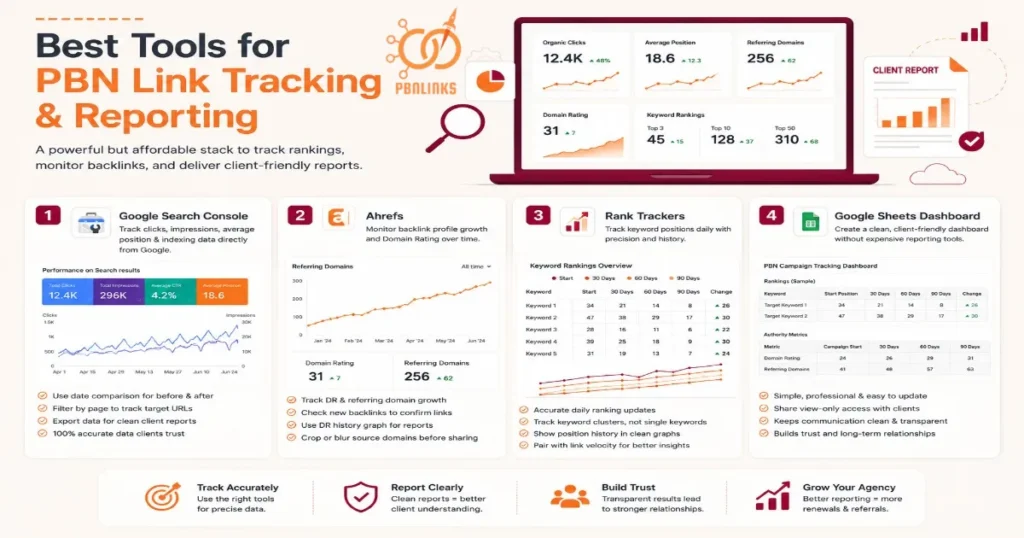
You do not need an expensive reporting stack to track PBN results properly. These four tools cover everything — from daily ranking data to backlink growth to a clean client-facing dashboard.
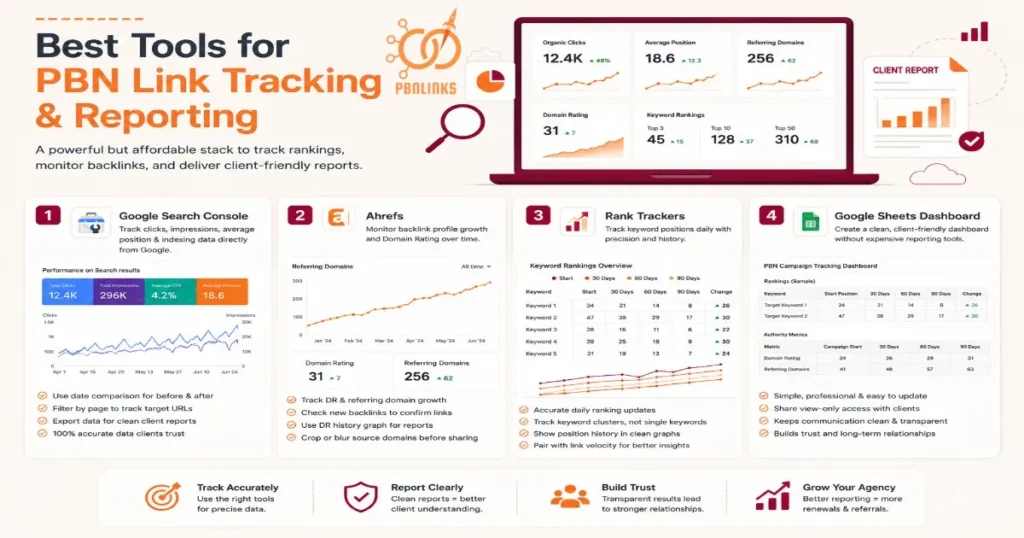
Google Search Console
This is the first tool to set up for every client campaign and it is free.
Google Search Console shows organic clicks, impressions, average position, and which pages are indexed. Because the data comes directly from Google, clients trust it more than anything pulled from a third party tool. It also lets you confirm which pages on the client’s site are being crawled — useful for spotting any indexing issues early.
For PBN campaign reporting, use the date comparison feature to show the period before links went live against the period after. Here is exactly how to set it up:
GSC Reporting Setup:
- Go to Search Console → Performance → Search Results
- Set date range to cover your full campaign period
- Click “Compare” and select the period before links went live
- Filter by page to isolate the specific URLs you are building links to
- Export the data and drop it into your client report
That single comparison view gives you a clean before and after traffic story without any extra work.
Ahrefs
Ahrefs is your primary tool for tracking backlink profile growth and Domain Rating changes over time.
Here is the setup process for a client campaign:
Ahrefs Campaign Setup:
- Add the client’s domain as a new project in Ahrefs
- Record the current DR and referring domain count on campaign start date
- Set a monthly reminder to screenshot the referring domains graph
- Check the “New Backlinks” tab to confirm PBN links are being picked up
- Use the DR history graph for a clean visual to drop into client reports
The referring domains graph is particularly powerful for reports — it shows a clear upward curve as links are indexed that any client can read without SEO knowledge.
Rank Trackers
Google Search Console shows average position but it is not precise enough for daily keyword tracking. A dedicated rank tracker fills that gap.
For PBN campaigns AccuRanker is the most reliable for daily accuracy. Mangools SERPWatcher is a solid cheaper alternative for smaller budgets. Both let you track a keyword cluster daily and generate a position history graph that is clean enough to paste directly into a client report.
The most important step is setting up your keyword cluster before the first link goes live. Without a clean baseline you have nothing to compare against and no way to prove movement. Pair your rank tracking data with your PBN link velocity schedule so you can show clients exactly when links went live and how rankings responded.
Google Sheets Dashboard
You do not need a paid reporting platform to give clients a professional view of their campaign. A well structured Google Sheet is enough for most agencies.
Here is a simple template structure you can copy right now:
PBN Campaign Tracking Sheet — Tab 1: Rankings
| Keyword | Start Position | 30 Days | 60 Days | 90 Days | Change |
| Target keyword 1 | 34 | 21 | 14 | 8 | +26 |
| Target keyword 2 | 47 | 38 | 29 | 17 | +30 |
Tab 2: Authority Metrics
| Metric | Campaign Start | 30 Days | 60 Days | 90 Days |
| Domain Rating | 24 | 26 | 29 | 31 |
| Referring Domains | 41 | 48 | 57 | 63 |
Share view-only access with your client so they can check progress at any time without emailing you for updates. It keeps communication clean, reduces back and forth, and gives clients a sense of transparency that builds long term trust.
How to Check If Your PBN Links Are Indexed
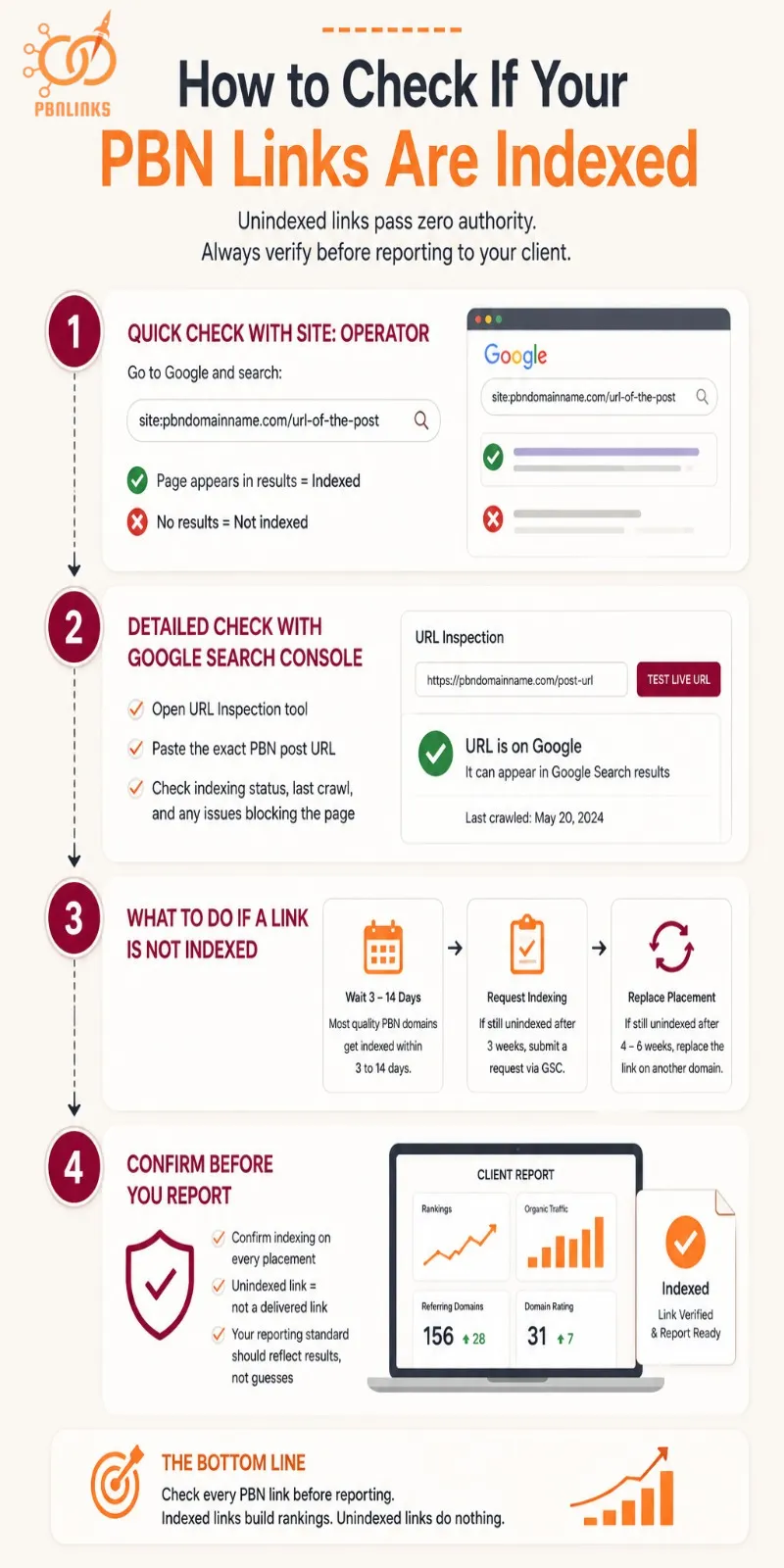
Before you report anything to a client, check this first. An unindexed PBN link passes zero authority to the money site. It does not matter how strong the domain is or how clean the placement looks ,if Google has not indexed that page, the link is not doing anything for rankings yet.
This is the step most people skip. The links are live but not indexed and reporting before confirming indexing creates client concerns that were completely avoidable.
Use the site: operator for a quick manual check
Go to Google and search:
site:pbndomainname.com/url-of-the-post
If the page appears in results it is indexed. If nothing comes back it is not. Run this check for every PBN URL before building your report. It takes two minutes per link and removes all guesswork.
Use Google Search Console for a detailed status check
If you have Search Console access to the PBN site, use the URL Inspection tool. Paste the exact URL of the post containing your link and Google will tell you whether the page is indexed, when it was last crawled, and whether anything is blocking it. Not every PBN setup allows GSC access on the network side — in that case the site: operator check above is your primary method.
What to do when a link is not indexed
Do not panic and do not report it to the client yet. Quality PBN domains built the right way as covered in our guide on how to build PBN links ,typically get indexed within 3 to 14 days depending on their crawl frequency.
If a link is still unindexed after 3 weeks, request indexing via Google Search Console on the PBN domain. If it remains unindexed after 4 to 6 weeks, the link should be replaced with a placement on a different domain in the network.
At PBN Links Agency we confirm indexing on every placement before it is included in a client report ,a link that is not indexed is not a delivered link and your reporting standard should reflect that.
The Before vs After Framework — How to Prove PBN Results
The single biggest mistake in PBN reporting is starting to track after the links go live. Without a clean baseline captured before the first link was placed you have nothing to compare against and no way to prove the results are real.
This framework gives you a repeatable process that makes your results undeniable at every stage of the campaign.
What to Record Before Links Go Live
Before the campaign starts open your tracking sheet and record the following for every target URL:
- Current position for each keyword in your target cluster
- Monthly organic clicks and impressions from Google Search Console
- Current Domain Rating and referring domain count from Ahrefs
- Current anchor text distribution — knowing the ratio before you start helps you plan link placements without over-optimising. Use our anchor text optimization guide to get this right from day one
- Date the baseline was captured
That last point matters more than most people realise. Clients forget what their site looked like before you started. A dated snapshot removes any dispute about where things stood at the beginning of the campaign.
How to Track Results at 30, 60, and 90 Days
Update every metric in your tracking sheet at each interval and compare it against the baseline. Here is what to focus on at each stage:
30 days — Do not draw conclusions yet. Confirm all links are indexed. Look for early impression growth in GSC even if clicks have not moved yet. Some ranking fluctuation at this stage is normal — links are being processed and positions are still settling.
60 days — This is where real movement should start showing. Keyword positions should be trending upward across your cluster. DR and referring domains should show clear growth in Ahrefs. If nothing has moved by day 60 go back and verify indexing on every link, check the anchor text distribution for over-optimisation, and assess whether the domain quality is strong enough for the competition level you are targeting.
90 days — Your strongest reporting point. You now have three clean data points across every metric and trends are clear and defensible. For high competition campaigns this is also the point where you can make a confident recommendation about whether to add more links or shift strategy.
How to Show the Results to Your Client
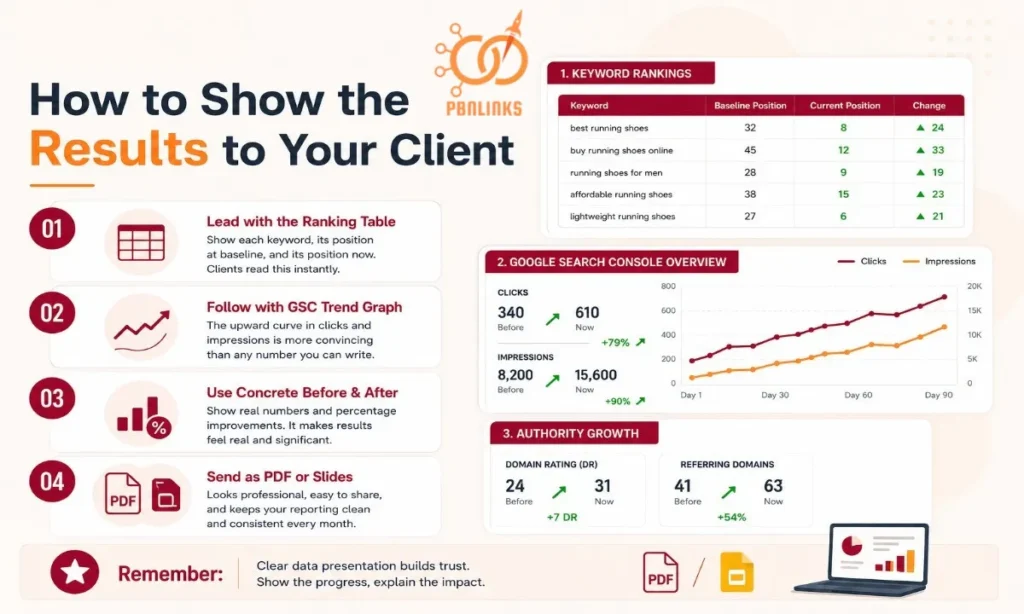
Raw data does not tell the story on its own, how you present it does.
Lead with the ranking table. Show each keyword, its position at baseline, and its position now. Clients read this instantly and it anchors everything else in the report. Follow it with the GSC trend graph the visual upward curve in clicks and impressions is more convincing than any number you can write.
Use concrete before and after figures wherever possible. “Your Domain Rating grew from 24 to 31” is stronger than “your DR improved.” “Organic clicks increased 43% since campaign launch” lands better than “traffic went up.” Percentage improvements make results feel real and significant even to clients who do not understand SEO.
Send the report as a PDF or a shared Google Slides link. It looks professional, it is easy to forward to a business partner or boss, and it keeps your data presentation clean and consistent every month.
How to Report PBN Results Without Exposing Your Network
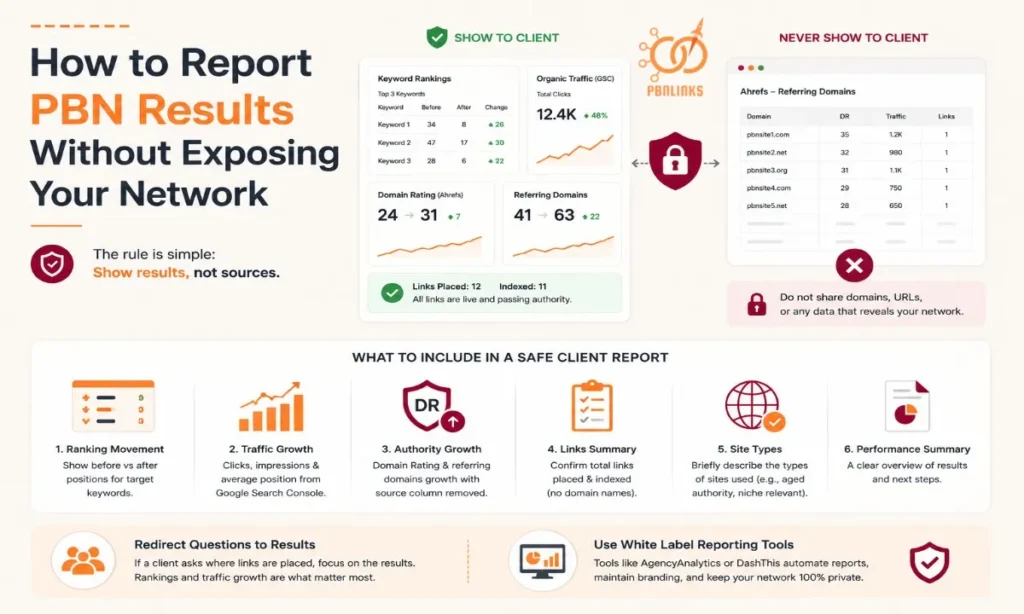
This is the most sensitive part of PBN client reporting and the part most agencies get wrong. Sharing too much information does not build trust with your client. It puts your entire network at risk.
The rule is simple. Show results, not sources. Your client hired you to improve their rankings and that is exactly what your report should focus on. They do not need to know which domains their links came from and showing them that information creates more problems than it solves.
Avoid sharing PBN domain names, URLs, or any screenshot that shows the linking domain column from Ahrefs or any other tool. One curious client who searches those domains can expose your entire network and it only takes one.
Here is what to include in a safe client report instead:
- Keyword ranking movement shown as a before and after table
- Organic clicks and impressions growth from Google Search Console
- Domain Rating and referring domain count changes from Ahrefs with the source column removed
- A written note confirming how many links were placed and indexed without referencing domain names
- A brief summary of the types of sites used such as aged authority domains relevant to the client niche
If a client asks which sites their links are on, redirect the conversation to results. Tell them placements were made on aged authority domains relevant to their niche and that the ranking and traffic data in the report is the real measure of performance. Most clients are satisfied with this when the results are clearly laid out in front of them.
For agencies managing multiple clients it is worth looking into white label reporting platforms. Tools like AgencyAnalytics or DashThis pull data from Google Search Console and Ahrefs automatically and display it in a branded dashboard your client can access any time. They look professional, keep reporting consistent across campaigns, and ensure nothing sensitive ever appears in what the client sees.
PBN Reporting Timeline: Setting the Right Expectations
Timeline is the number one source of client frustration in PBN campaigns. Not because the links do not work but because the client expected results in two weeks and nobody corrected that expectation before the campaign started.
Set the timeline before the campaign launches, not after the client starts asking questions. The competition level of the target keywords determines how long results take to appear and your client needs to understand that from day one.
Low Competition Niches: Results in 2 to 4 Weeks
In low competition niches PBN links can produce visible ranking movement within 2 to 4 weeks of going live and being indexed. Keywords with minimal authoritative sites competing for them respond quickly because there is less resistance to push through.
At this level a small number of well placed links on strong aged domains is often enough to move a page from position 20 into the top 10. Rankings also tend to hold more steadily here because competing sites are not actively building links in response to your movements.
Your 30 day report in this scenario will have the strongest data to show and is the easiest conversation to have with a client.
Medium Competition: Results in 6 to 8 Weeks
Medium competition keywords take longer to respond because the sites already ranking have decent backlink profiles of their own. Your links need time to be indexed, processed by Google, and weighed against what competitors already have in place.
The first clear movement typically appears between weeks 5 and 8. The 30 day report in this scenario will usually show impression growth and minor position shifts rather than dramatic ranking changes. Setting this expectation upfront helps your client understand what early progress looks like so the first report feels like a step forward rather than a slow start.
High Competition: Results in 3 Months or More
In high competition niches 3 months is a realistic minimum before significant ranking movement appears. The sites already on page one have strong backlink profiles, established domain authority, and in many cases years of trust signals built up behind them.
Campaigns targeting competitive finance keywords for example require more links, more time, and a stronger overall strategy than lower competition targets. Our finance PBN links are built specifically for this level of competition with domain metrics and niche relevance matched to what it actually takes to move rankings in that space.
Be upfront with your client about the timeline in competitive niches. Give them early indicators to watch while rankings are still building.
Impression growth in Google Search Console, Domain Rating improvements, and referring domain increases all show the campaign is moving in the right direction. These early signals keep the client confident while the bigger ranking movements develop over the following months.
How to Build a PBN Client Report: Section by Section
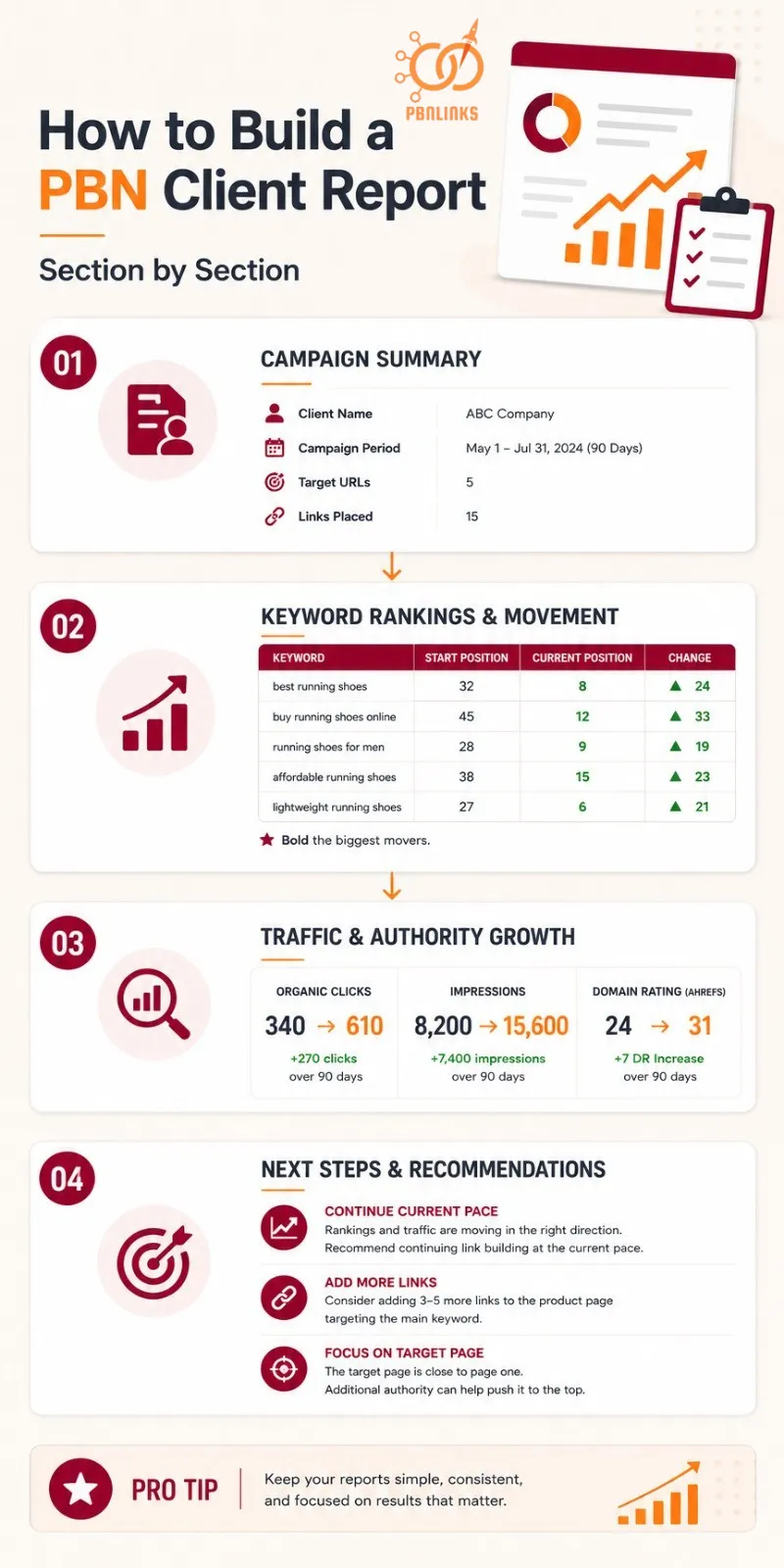
A professional client report does not need to be complicated. It needs to be clear, consistent, and focused on the metrics that matter.
Start with a one paragraph campaign summary at the top. Include the client name, campaign period, target URLs, and total number of links placed. This gives the client immediate context before they look at any data.
Keyword Rankings and Movement
This is the first thing your client will read so make it the clearest part of the report.
Show a simple table with each target keyword, its position at campaign start, and its current position. Add a change column showing how many positions it moved and bold the biggest movers so they catch the eye immediately.
Stick to the keyword cluster agreed on at the start of the campaign. Adding new keywords mid-report to pad out the results undermines your credibility if the client notices.
Traffic and Search Visibility
Follow the rankings table with traffic data pulled directly from Google Search Console.
Show total organic clicks and impressions comparing the period before the campaign against the current period. A simple before and after figure is enough. “Clicks increased from 340 to 610 over 90 days” is all a client needs to see.
Add the Domain Rating before and after figures from Ahrefs directly below. Keep the screenshot cropped to the DR number only.
Next Steps and Recommendations
Close every report with a short recommendation section. This is where most agencies miss a real opportunity to add value and strengthen the client relationship.
Tell the client what the data suggests should happen next. If rankings are moving well recommend continuing at the current pace. If movement is slower explain which pages would benefit from additional links and why.
For example: “Based on the 90 day data we recommend adding 3 to 5 more links to the product page targeting your main keyword. It has moved from position 24 to 14 and is close to breaking into page one.” That kind of specific guidance shows expertise and gives the client a clear reason to continue the campaign.
How to Handle Difficult Client Conversations About PBN Results
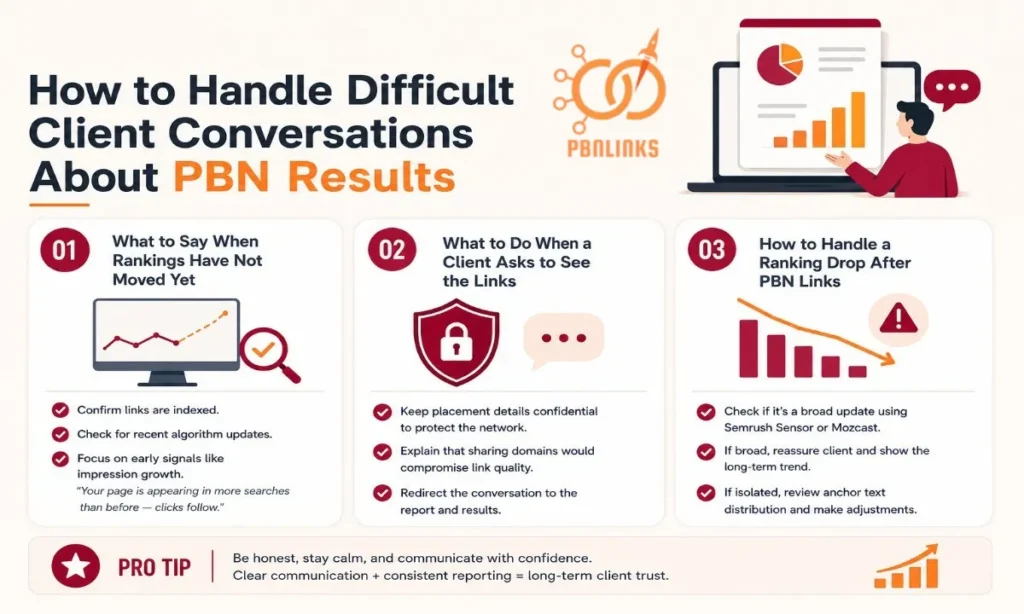
Not every client conversation is straightforward. Rankings fluctuate, results take time, and clients ask uncomfortable questions. Knowing how to handle these moments professionally is what separates agencies that retain clients from those that constantly replace them.
What to Say When Rankings Have Not Moved Yet
Before responding check two things. Confirm all links are indexed and check whether a recent algorithm update has affected rankings broadly across the niche.
Then be honest without being alarming. Tell the client that link processing takes time and that the impression growth already showing in Google Search Console is an early positive signal. Something like “your page is appearing in more searches than before — clicks follow as positions improve” is a clear and reassuring way to frame it for a client who is not familiar with SEO.
What to Do When a Client Asks to See the Links
Do not make it a big moment. Stay calm and redirect confidently.
Tell the client that specific placement details are kept confidential as part of how the network is managed safely and that sharing domain names would compromise the quality of the links they are receiving.
Then bring the conversation straight back to the report. Point to the ranking movement and traffic data. Most clients ask out of curiosity rather than distrust and a confident redirect paired with strong results is usually enough.
How to Handle a Ranking Drop After PBN Links
First check whether the drop is isolated to your client or part of a broader movement. Tools like Semrush Sensor or Mozcast will show you quickly if a Google algorithm update is affecting rankings across the board.
If it is a broad update reassure the client that fluctuations during updates are normal and that rankings typically stabilise within 2 to 4 weeks. Show them the longer term trend to put the dip in context.
If the drop appears isolated review the anchor text distribution on the affected page. Over-optimisation is one of the most common causes of ranking drops after link building. Use our anchor text optimization guide to audit the ratio and identify what needs adjusting. Once you have a clear diagnosis share it with the client in plain language so they understand what happened and what is being done to correct it.
Conclusion
PBN link reporting is not just an admin task at the end of a campaign. It is how you prove your value and build a business that grows on renewals and referrals.
The process comes down to four things. Capture a clean baseline before links go live. Track the right metrics at 30, 60, and 90 days. Present results in a way any client can understand. And handle difficult conversations with transparency and confidence.
Done consistently this turns every PBN campaign into a trust building exercise that clients want to continue.
If you are ready to run campaigns worth reporting on ,buy PBN links built to the standard that actually moves rankings and gives you results your clients can see.
Frequently Asked Questions About PBN Link Reporting
What is PBN link reporting?
PBN link reporting is the process of tracking what changes after your links go live and presenting that data to your client in a clear structured way. It covers keyword rankings, organic traffic, Domain Rating changes, and indexing status.
How do I know if my PBN links are indexed?
Use the site: operator in Google to check each placement URL. If the page appears in results it is indexed. If nothing shows after 3 weeks request indexing via Google Search Console.
What metrics should I include in a PBN client report?
Focus on three core metrics. Keyword ranking positions tracked across a cluster, organic clicks and impressions from Google Search Console, and Domain Rating plus referring domain growth from Ahrefs.
How long does it take to see results from PBN links?
It depends on competition level. Low competition niches can show movement in 2 to 4 weeks. Medium competition takes 6 to 8 weeks. High competition niches need 3 months or more before significant ranking shifts appear.
Can I show clients which domains their links are on?
No. Sharing PBN domain names with clients puts your entire network at risk. Report on results only — ranking movement, traffic growth, and authority improvements. Keep all placement details internal.
What tools do I need to track PBN link results?
Google Search Console for traffic and indexing data
Ahrefs for backlink profile and Domain Rating tracking
AccuRanker or Mangools for daily keyword position tracking
Google Sheets for a clean client facing dashboard
Why have my rankings not improved after PBN links?
Check indexing first — an unindexed link passes zero authority. Then review your anchor text distribution for over-optimisation. If both look clean assess whether the competition level of your target keywords requires more links or stronger domain metrics than what is currently in place.
How do I explain PBN results to a client who does not understand SEO?
Focus on outcomes not process. Tell them their site is appearing in more searches, ranking higher for the keywords that matter, and receiving more organic traffic than before the campaign started. Use plain numbers and percentage improvements rather than technical terminology.
How often should I send PBN reports to clients?
Monthly is the standard for most campaigns. Send a 30 day check-in, a 60 day progress update, and a full 90 day performance report. For clients in competitive niches a short bi-weekly ranking update between full reports keeps them informed and confident.
Is PBN link reporting different from regular link building reporting?
The metrics tracked are largely the same but PBN reporting requires extra care around what you share. Unlike guest post reporting where you can show the live placement URL directly, PBN reporting must keep source domains confidential while still demonstrating clear campaign results.