
Images, Stock Photos and Metadata as PBN Network Footprints
There are many PBN footprints people worry about, but image-related footprints are often overlooked or misunderstood. Most attention goes to hosting, IPs, themes, plugins, and other obvious network signals. Yet reused stock photos, repeated filenames, shared image sources, and matching metadata can also create PBN image footprints across multiple sites.
The key is not to overthink every shared image or technical detail. A common stock photo, a standard WordPress upload path, or the same image format does not automatically reveal a network. The real concern starts when several unusual similarities keep appearing across the same group of sites.
This is where many people make mistakes. In trying to remove every possible footprint, they create another repeated pattern. If every site uses the same naming system, strips metadata in the same way, relies on the same optimizer, and follows the same image workflow, that consistency can become a footprint of its own.
This guide explains how image reuse, stock-photo sourcing, reverse image search, EXIF, IPTC and XMP metadata, filenames, image hashes, WordPress media patterns, and CDN structures can contribute to PBN image footprints. It also separates real risks from common myths and shows how to review image workflows without creating unnecessary patterns.
What Are PBN Image Footprints?
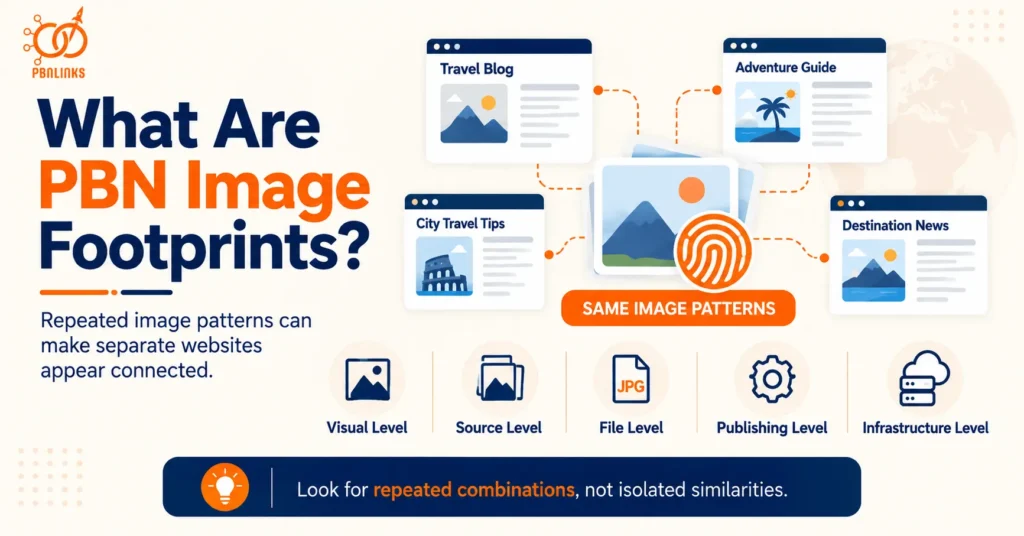
PBN image footprints are repeated visual, technical, or publishing patterns in images that can make separate websites appear connected. These patterns may come from the image itself, the file behind it, the way it is sourced, or the way it is processed and uploaded.
In simple terms, an image footprint is not just about using the same picture twice. It is about repetition. If several websites keep using the same uncommon stock images, similar filenames, identical dimensions, matching metadata, or the same image-processing setup, those similarities can start to form a recognizable pattern.
This is what makes PBN image footprints different from normal image reuse. The web is full of shared assets. Thousands of websites use the same stock libraries, WordPress upload paths, WebP files, and optimization tools. Those things are common and usually mean very little on their own.
The concern becomes stronger when the same group of sites shares several less-common image habits at the same time. For example, the sites may use images from the same narrow source, follow the same naming structure, publish the same dimensions, remove metadata in the same way, and serve files through similar media setups.
That repeated workflow is more important than any single image.
Another useful way to think about it is this: a PBN footprint is usually not one obvious clue. It is a collection of small similarities that begin to make different sites look as though they were managed through the same process.
Image footprints can therefore appear at several levels:
- visual level — the same or very similar images appear across sites
- source level — sites repeatedly use the same stock libraries or image collections
- file level — filenames, dimensions, hashes, formats, or metadata follow similar patterns
- publishing level — images are compressed, converted, named, and uploaded in the same way
- infrastructure level — similar image URLs, media subdomains, CDNs, or delivery methods are used
This is why image footprints should not be reduced to EXIF data alone. EXIF is only one part of the picture. Filenames, image reuse, stock sourcing, metadata, file properties, WordPress processing, and hosting patterns can all contribute to the same broader issue.
The most important rule is simple: look for repeated combinations, not isolated similarities.
A single stock photo does not prove anything. A matching image size does not prove anything. A shared WordPress path does not prove anything. But when several unusual image patterns keep appearing across the same sites, the relationship becomes more noticeable.
Visible Image Similarities Across Multiple Sites
Visible image footprints are the patterns you can notice directly on the page.
These may include the same featured images, repeated stock photos, identical illustrations, similar crops, or the same visual templates across different domains.
The stronger concern is not one shared image. It is repeated visual behavior across several sites.
Embedded and File-Level Image Signals
Some image footprints are hidden inside the file or publishing setup.
These may include:
- EXIF, IPTC, and XMP metadata
- repeated filename structures
- matching image dimensions
- similar compression or conversion settings
- repeated image URLs
- shared CDN or media-delivery patterns
These signals are usually more useful when they appear together rather than individually.
Isolated Similarities vs Repeated Network-Wide Patterns
The difference between a normal similarity and a meaningful footprint is repetition.
Two unrelated websites can easily use the same stock photo or image format. That is normal.
But if the same sites repeatedly share the same images, naming conventions, metadata treatment, dimensions, and processing methods, the pattern becomes harder to dismiss as coincidence.
So the main question is not:
“Do these websites share an image?”
The better question is:
“Do these websites repeatedly share the same image-sourcing, processing, and publishing habits?”
That is what defines the real idea behind PBN image footprints.
How Reused Images Create Patterns Across PBN Sites
Reused images can create PBN footprints when the same visual assets, or slightly modified versions of them, keep appearing across multiple sites in the same network. The issue is not that an image has been used more than once. Image reuse is common across the web. The concern is the pattern created when the same sites repeatedly rely on the same visual material.
Think about a network of ten websites. Each site has different content and a different design, but several of them use the same featured images, the same stock photos, or the same illustrations. Some files may have different names. Others may have been resized or cropped. To a normal visitor, the sites may still look separate. But from an image-analysis perspective, the repeated visual source can become another point of similarity.
This is why simply changing the filename or dimensions of an image does not automatically make it a new visual asset. The underlying picture may still be recognizable. Modern reverse image and visual-matching tools can often identify modified versions of the same source image, especially when the core visual content remains unchanged.
The real risk comes from systematic reuse. If one site shares one image with another, that is usually insignificant. If several sites repeatedly share the same image sources, featured photos, crop styles, and placement habits, the pattern becomes much clearer.
It is also worth separating normal reuse from network-wide repetition. A popular stock image may appear on hundreds of unrelated websites. That does not make those websites connected. But if a group of sites repeatedly uses the same uncommon images from the same narrow source, that is a different situation.
In practical terms, reused images can create patterns in several ways:
- the exact same file appears on multiple domains
- the same source image is renamed before upload
- one image is resized into different dimensions
- the same photo is cropped in slightly different ways
- color or compression changes are applied to the same visual
- the same stock-photo collection appears across several sites
- identical graphics, charts, screenshots, or illustrations are reused
The important question is not whether every reused image is dangerous. It is whether the reuse is frequent, distinctive, and repeated across the same group of websites.
Exact Image Reuse Across Different Domains
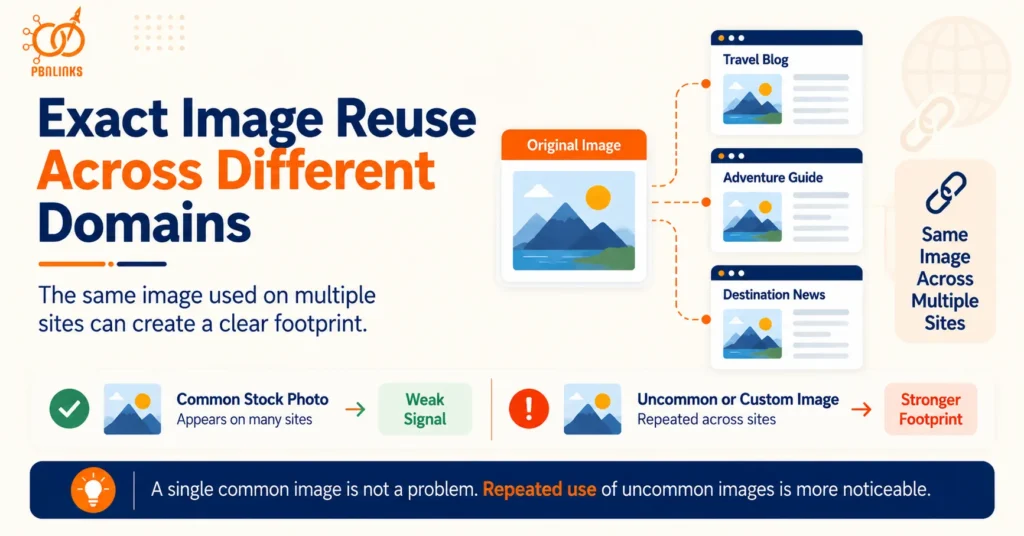
Exact reuse is the most obvious form of image similarity.
This happens when the same photo, graphic, screenshot, or illustration is uploaded to more than one site with little or no change. The filename may be different, but the underlying visual asset remains the same.
This is especially noticeable when the image is uncommon. A generic business handshake photo means very little. A niche illustration or custom graphic appearing across several unrelated-looking sites is much easier to connect.
Cropped, Resized and Edited Versions of the Same Source Image
Reusing an image does not always mean uploading an exact copy.
The same source image can be:
- cropped
- resized
- compressed
- recolored
- converted to another format
- slightly edited
- placed inside a different layout
These changes may alter the file, but they do not always remove the visual relationship between the images.
That is why visual uniqueness should not be judged only by file size, dimensions, or format. Two files can be technically different while still being visually derived from the same original image.
Renamed Files and Persistent Visual Similarity
Renaming an image changes the filename, not the image itself.
For example:
seo-guide.jpg
and
best-seo-strategy-2026.webp
may still contain the exact same picture.
This matters because filenames are only one layer of the asset. The visual content, image structure, and other properties can remain closely related even after the name changes.
So changing filenames may improve organization or image SEO, but it should not be confused with creating a genuinely different visual asset.
The broader lesson is simple: image reuse becomes a footprint when the same visual sources and editing habits repeat across a network, not merely because two websites happen to share one picture.
Stock Photos and Repeated Image-Sourcing Patterns
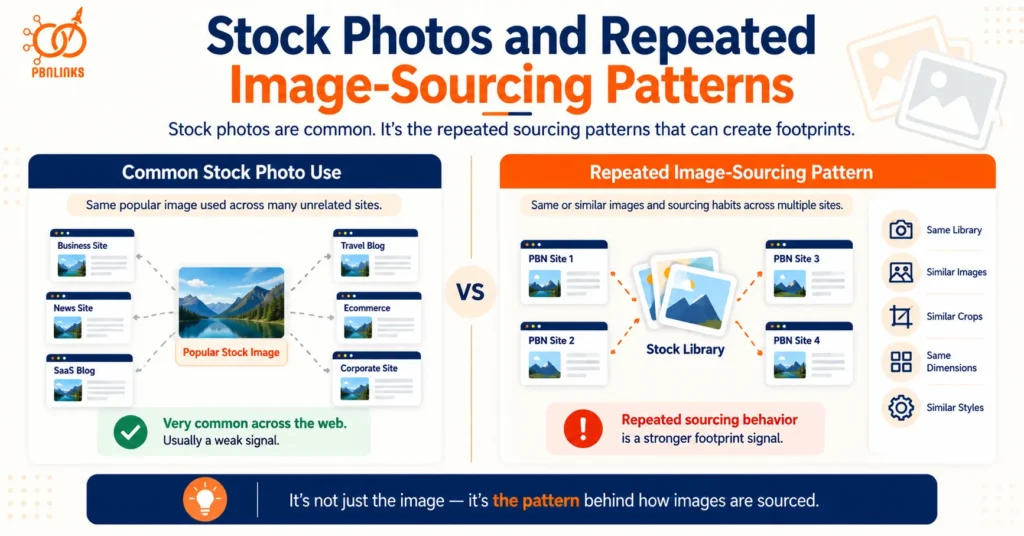
Stock photos do not automatically create PBN image footprints. They become more relevant when the same network repeatedly uses the same uncommon images, similar collections, or the same image-sourcing habits across multiple sites.
This distinction is important because stock photography is normal across the web. Businesses, publishers, blogs, SaaS sites, and ecommerce stores all use stock images. The same popular image can therefore appear on many unrelated websites without suggesting any connection between them.
The footprint starts to become more noticeable when the pattern is not just about one shared image. Several sites may repeatedly choose images from the same small library, the same photographer, or the same visual collection. They may also use similar crops, dimensions, placements, and article-image styles. At that point, the sourcing process itself begins to look consistent across the network.
This means the real issue is not simply stock-photo reuse. It is repeated image-sourcing behavior. The more predictable that behavior becomes across otherwise separate sites, the more it can contribute to a broader PBN image footprint.
Common Stock Photography and Normal Web-Wide Reuse
Popular stock images are reused constantly.
A generic office scene, laptop photo, healthcare image, handshake, or business meeting may appear across hundreds of websites. That kind of reuse has very little value as a connecting signal because the image is already common across the web.
The first question should therefore be whether the image is widely distributed or unusually concentrated across a particular group of sites.
Repeated Use of Unusual or Niche Stock Assets
The situation changes when the same uncommon or niche images repeatedly appear across several domains.
A rare stock photo used across multiple sites is more distinctive than a generic image found everywhere. The same applies when different images come from the same narrow collection or photographer.
The pattern may therefore develop from:
same source → similar image style → repeated selection habits
This is more informative than focusing on one duplicate photo alone.
Recurring Stock Libraries, Collections and Image Sources
The next layer is the source itself.
Using a major stock platform is normal. But repeatedly sourcing images from the same small library, niche collection, asset pack, or photographer can create a recognizable pattern when it happens across many sites.
The exact images do not need to be identical. A network can still develop visual consistency because the underlying source and selection process remain the same.
Network-Wide Image Selection and Sourcing Habits
The strongest pattern is often the workflow behind the images.
If several sites consistently use the same type of hero image, similar aspect ratios, the same number of images per article, the same placements, and the same editing style, the network can develop a recognizable visual signature.
None of these choices is a footprint by itself. The concern is their repeated use across supposedly independent sites.
So instead of asking:
“Are stock photos safe for PBN sites?”
A better question is:
“Do these sites repeatedly source, select, and publish stock images in the same way?”
That is the more useful way to evaluate stock photography as part of PBN image footprints.
Reverse Image Search and Visual Similarity Detection
Reverse image search matters for PBN image footprints because changing an image file does not always remove the visual connection to its original source. A photo can be renamed, resized, compressed, cropped, or converted into another format and still remain recognizable as the same underlying image.
This is important when several sites appear visually different but repeatedly use images from the same sources. Looking only at filenames would miss that relationship. The files may have different names and dimensions, yet the visual content can still point back to the same original asset.
Reverse image search works in the opposite direction from a normal Google search. Instead of entering words and looking for images, you start with an image and look for other places where that image, or a related version of it, appears online. Google Lens can return similar images and websites containing the image or a similar image. TinEye is designed to find exact and altered copies of a source image.
This makes reverse image search useful when reviewing PBN image footprints. It can help answer questions such as:
- Does this image appear on another site in the network?
- Was the same source image reused with another filename?
- Does the image come from a common stock library?
- Are several sites using modified versions of the same visual?
- Is an apparently unique image actually based on an existing asset?
The point is not that every reverse-image match represents a footprint. Popular stock photography can produce many legitimate matches. What matters is whether reverse searches uncover the same unusual visual sources repeatedly across the same group of sites.
Exact Image Matching Across Websites
The simplest case is an exact or near-exact match.
Suppose one site uploads:
local-seo-guide.jpg
and another uploads the same image as:
digital-marketing-tips.webp
The filenames suggest two different files, but the visual itself may still be the same.
A reverse image search can help find other pages where that visual appears. This is why filenames should not be treated as the identity of an image. They are only one layer of information attached to it.
Exact reuse becomes especially noticeable with assets that are less likely to appear naturally across unrelated sites, such as:
- custom illustrations
- niche photographs
- original charts
- screenshots
- branded graphics
- uncommon stock images
The more distinctive the asset, the more useful a repeated match becomes when examining cross-site patterns.
Detection of Cropped, Resized and Modified Images
Exact copies are only part of the picture.
An image can be modified before it is uploaded to another website. Common changes include:
- cropping
- resizing
- compression
- color adjustment
- slight rotation
- format conversion
- adding text or overlays
These changes can create a technically different file without producing a genuinely different visual.
TinEye, for example, says its image-recognition technology can identify altered copies that have been cropped, resized, color-adjusted, edited, or slightly rotated. It creates a digital image fingerprint rather than relying on the filename or embedded metadata.
That makes an important distinction clear:
different file does not always mean different image.
This is why simply resizing or cropping the same source photo across several sites should not be confused with creating independent visual assets.
Visual Similarity Beyond Exact File Matching
This leads to a broader concept: visual similarity.
Two image files can have different:
- filenames
- dimensions
- compression levels
- file sizes
- formats
and still represent the same underlying picture.
At the same time, we should not treat every image-search system as doing exactly the same thing. TinEye primarily looks for exact or altered versions of the same image rather than completely different photos that happen to show the same subject. Google Lens has broader visual-search capabilities and can also return similar images and related visual results.
That distinction matters when auditing a network.
A reverse-image match can show that the same visual asset has been reused. A visually similar result may simply show that two images share a subject, composition, or appearance. Those are not automatically the same type of evidence.
So, as with other PBN image footprints, context matters.
Google Lens, TinEye and Other Visual Search Methods
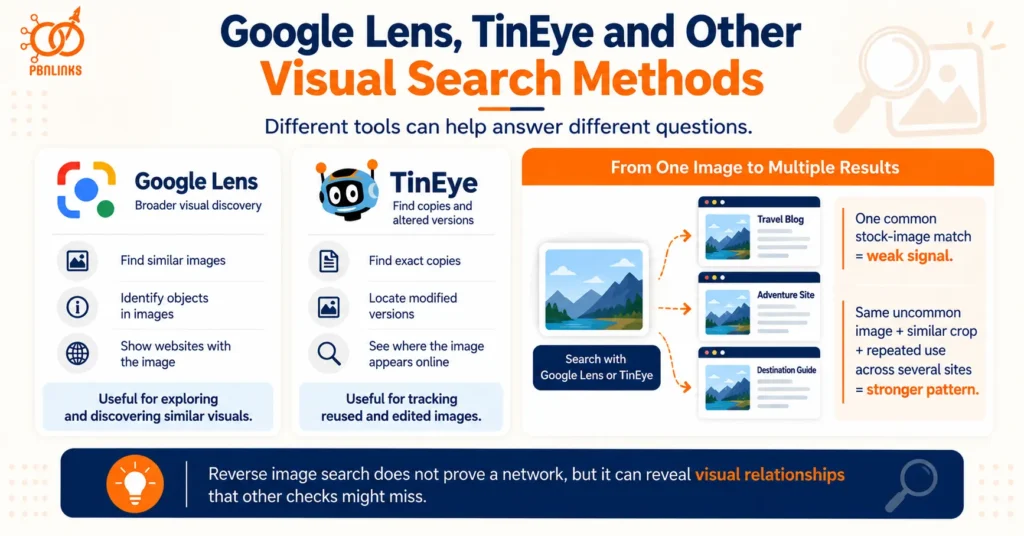
Different tools can help answer different questions.
Google Lens is useful for broader visual discovery. Google says Lens results can include similar images, information about objects in an image, and websites that contain the image or a similar image.
TinEye is more focused on locating copies and altered versions of a specific image. It can also help identify where an image has appeared online and whether modified versions exist.
For a PBN image audit, the tools are most useful when they reveal repeated behavior rather than one isolated match.
For example:
one common stock-image match
is usually not very informative.
But:
the same uncommon source image + similar crop + repeated use across several sites
creates a much clearer pattern.
The same principle applies throughout this article. Reverse image search is not a magic test that proves two websites belong to the same network. It is a way to uncover visual relationships that filenames, metadata, or surface-level inspection may miss.
And once those relationships are visible, the next question is what information may still exist inside the files themselves. That brings us to EXIF, IPTC, and XMP metadata.
EXIF, IPTC and XMP Metadata in PBN Images
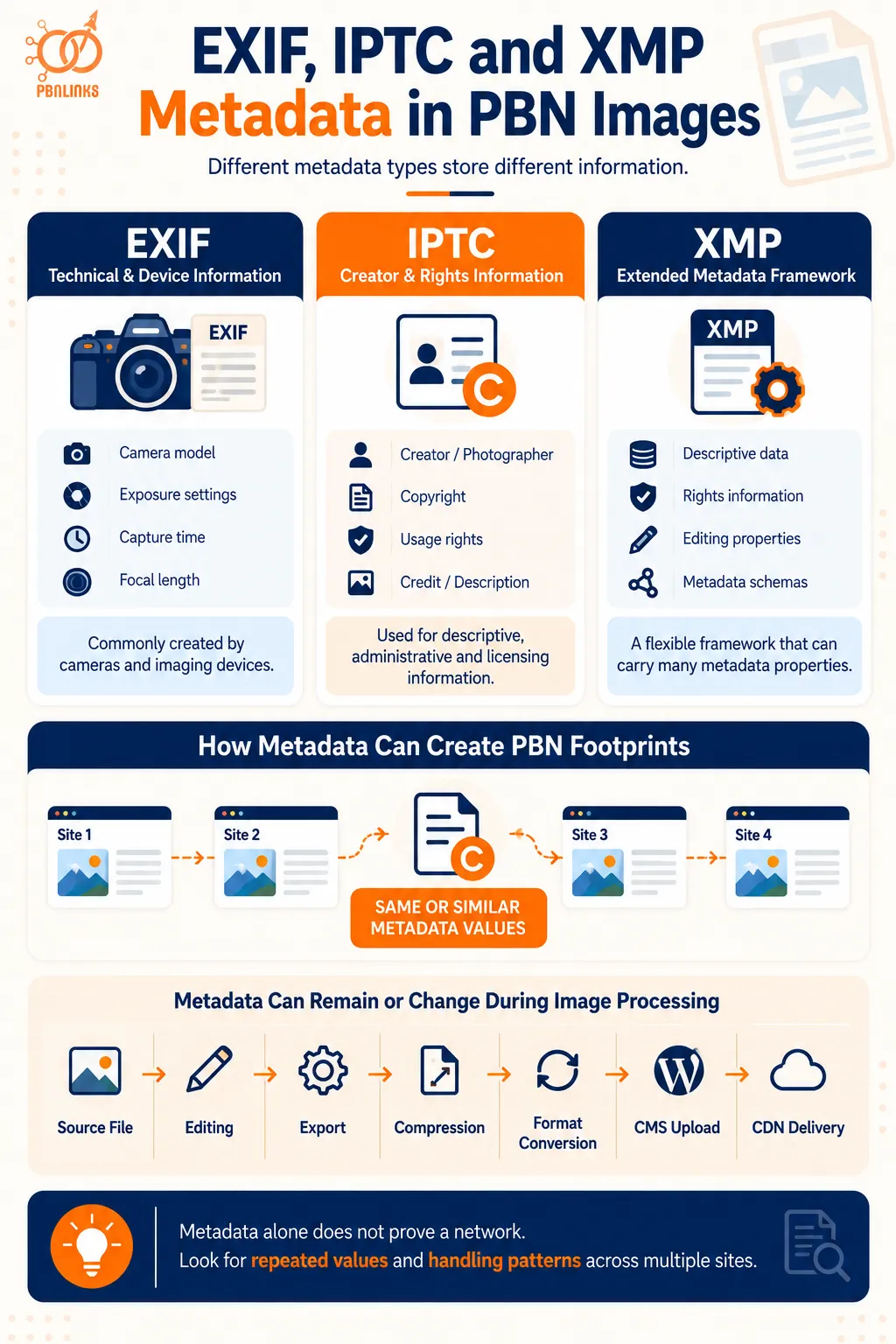
Image metadata is information stored with an image that describes how it was created, who created it, how it can be used, or how the file has been handled. In a PBN, metadata becomes relevant when similar information or the same handling process keeps appearing across several sites.
This is where people often oversimplify the subject. Image metadata is not just EXIF. A file can contain different types of information through EXIF, IPTC, and XMP, and each serves a different purpose. IPTC describes photo metadata as covering descriptive, rights, and administrative information, while XMP provides a framework that can carry many of those metadata properties.
That distinction matters when looking at PBN image footprints. One image containing camera information means very little. The same is true for a copyright field or an editing-software reference. The pattern becomes more interesting when multiple sites repeatedly publish files with the same unusual metadata values, creator details, processing history, or metadata-handling habits.
Metadata should therefore be treated as another layer of an image footprint. It sits alongside image reuse, stock-photo sourcing, filenames, visual similarity, and publishing patterns. It should not be treated as a standalone test for whether websites belong to the same network.
Technical and Device Information Stored in EXIF
EXIF is the metadata people usually think of first.
It is commonly associated with technical information created by cameras and imaging devices. Depending on the image and device, this can include details such as the camera model, exposure settings, focal length, capture time, and other technical fields.
WordPress itself can read several EXIF values from supported image files, including camera model, aperture, focal length, ISO, shutter speed, copyright information, and timestamps.
For PBN analysis, the important issue is not simply whether EXIF exists. It is whether unusual EXIF values repeat across multiple sites.
For example, several sites may repeatedly publish original-looking photographs that contain the same camera model, creator information, or processing details. That does not prove common ownership. But it can add another similarity when the sites already share other image or website patterns.
Creator, Copyright and Licensing Information in IPTC
IPTC metadata serves a different purpose.
It is widely used for descriptive, administrative, copyright, creator, and licensing information. Fields can identify the photographer, describe the image, record copyright ownership, provide credit information, or explain usage rights.
This is especially important because IPTC metadata is not merely hidden technical baggage. Google explicitly supports several IPTC fields in Google Images, including creator, credit, copyright, licensing information, and digital source type. Google says embedded IPTC metadata can travel with an image from page to page when it remains intact.
That means a blanket rule such as “remove all metadata from every image” is too simplistic.
Some metadata has a legitimate purpose. Copyright, attribution, and licensing information may need to remain attached to an image. Google also recommends retaining important rights and identification metadata where possible.
From a footprint perspective, the better question is whether the same unusual creator, credit, copyright, or administrative values keep appearing across sites that are meant to operate independently.
Extended Image Information Stored Through XMP
XMP is often mentioned alongside IPTC, but the two are not the same thing.
XMP is a metadata framework originally developed by Adobe and later standardized through ISO. IPTC uses XMP as one of the technical ways its metadata properties can be stored inside image files.
In practical terms, XMP can carry a wider set of structured information about an image and its workflow. That may include descriptive data, rights information, editing-related properties, and fields defined by different metadata schemas.
This is why simply checking for “EXIF data” does not give a complete picture of an image file. Relevant information may also exist in IPTC or XMP fields.
For PBN image footprints, the same principle still applies. The presence of XMP is not unusual. What matters is whether several sites repeatedly carry the same distinctive values or appear to process image metadata in exactly the same way.
Metadata Retention During Uploading, Compression and Format Conversion
Metadata does not always remain unchanged from the original file to the published image.
An image may pass through several stages before it appears on a page:
source file → editing → export → compression → format conversion → CMS upload → CDN delivery
Different tools can treat metadata differently during that process. Some information may remain embedded. Other fields may be changed or removed.
This is why it is risky to assume either that all metadata survives or that all metadata disappears automatically.
WordPress, for example, can read EXIF and IPTC information from image files, but the final metadata present in a served image depends on the file and the processing workflow around it.
The more useful approach is to inspect the actual published files rather than rely on assumptions about what a CMS, optimizer, or conversion tool normally does.
Repeated Metadata Patterns Across Multiple Sites
The strongest metadata footprint is usually not one field. It is consistency.
Suppose several sites repeatedly show:
- the same creator or copyright value
- the same unusual editing-software information
- similar timestamp patterns
- the same IPTC credit information
- identical metadata-cleaning behavior
- the same combination of fields being retained or removed
Individually, these details may have innocent explanations. Together, they can reveal that the images are passing through a similar workflow.
This is the key point: metadata footprints are often about how images are handled, not just what information happens to be stored inside one file.
So rather than asking:
“Does this image contain EXIF data?”
A better question is:
“Do these sites repeatedly preserve, remove, or populate image metadata in the same way?”
That makes metadata useful as part of a broader PBN image footprint analysis, while avoiding the mistake of treating EXIF, IPTC, or XMP as proof on their own.
Image Filenames, Hashes and File-Level Patterns
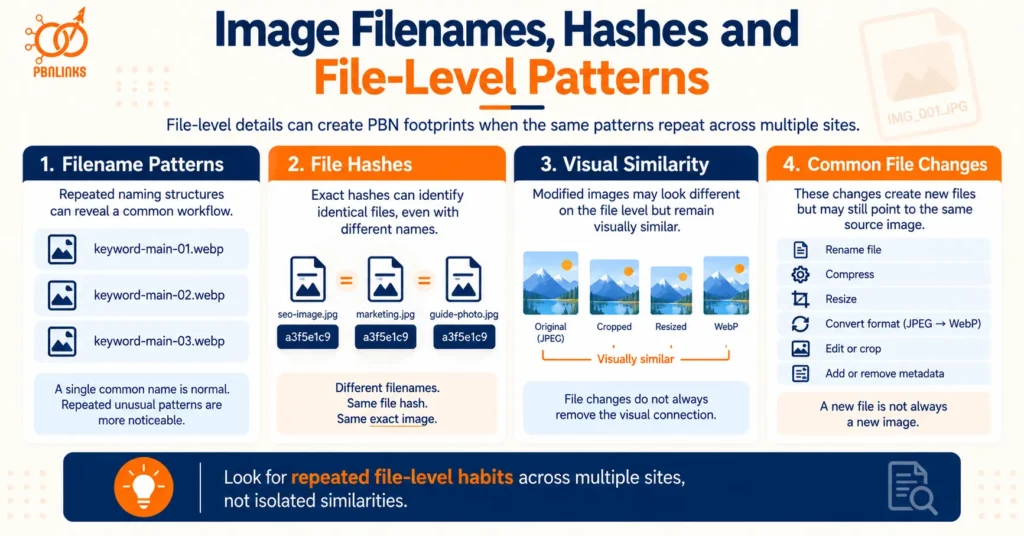
Image filenames, file hashes, and other file-level properties can create PBN image footprints when the same patterns keep appearing across multiple sites. These signals are different from visible image reuse because they relate to how the image file is named, identified, processed, or stored.
This layer is easy to overlook. Two websites may use different images on the page, yet their files can still follow the same unusual naming system or processing routine. The same prefixes, numbering style, dimensions, export settings, or file-handling habits may appear again and again.
The important point is not that filenames or hashes are automatically footprints. A filename such as seo-guide.jpg is too common to mean anything. Likewise, JPEG, PNG, and WebP are standard formats used across the web. What matters is whether several less-common file-level habits repeat across the same group of sites.
This is also where filenames and image identity need to be separated. Renaming a file changes its label. It does not necessarily change the image itself. And changing the image file may produce a different exact hash while the visual content remains recognizably similar.
Repeated Filename Structures and Naming Conventions
Image filenames are usually created in one of three ways: manually, automatically by a CMS or tool, or during an export and publishing workflow.
A single filename tells us very little. The pattern becomes more useful when several sites repeatedly follow the same unusual naming structure.
For example, a network might consistently use patterns such as:
- keyword-main-01.webp
- keyword-main-02.webp
- keyword-main-03.webp
Or it may use the same prefixes, suffixes, dates, abbreviations, or numbering rules across different domains.
The actual words do not have to be identical. What can repeat is the method used to generate them.
This is similar to image sourcing. The footprint is often not one filename but the workflow behind hundreds of filenames.
Common descriptive names should not be overinterpreted. Google itself recommends descriptive filenames because they can provide clues about an image’s subject. So similarity becomes more meaningful only when the naming convention is unusually specific and repeated across multiple sites.
Cryptographic Hashes and Exact File Matching
A cryptographic hash can be thought of as a digital fingerprint calculated from the contents of a file.
When two files are bit-for-bit identical, an exact hash comparison can show that they are the same file. NIST describes traditional hash-based matching as exact comparison: either two files are identical at the bit level or they are not.
This can be useful when the same original image file has been uploaded to several domains.
For example, imagine the same JPEG is uploaded unchanged to three websites:
Site A: seo-image.jpg
Site B: marketing-guide.jpg
Site C: ranking-tips.jpg
The filenames are different, but if the underlying file has not changed, its exact file identity can still match.
This shows why changing filenames alone does not create a different image file.
Perceptual Hashes and Visual Similarity
Exact hashes have an important limitation.
If you resize, recompress, crop, or otherwise modify an image, its file data changes. That means a traditional exact hash may also change, even though the image still looks very similar.
This is where approximate or perceptual matching becomes relevant.
NIST distinguishes exact matching from approximate matching, which is designed to assess relationships between files even when they are not bit-for-bit identical.
In image analysis, the same broad idea is useful for distinguishing:
exact file match
from
visually related image
That distinction matters for PBN image footprints because networks do not always reuse an image without modification. A source image may be resized, converted to WebP, compressed, or cropped before being published elsewhere.
The file may now be technically different while the visual relationship remains.
File Changes That Do Not Eliminate Image-Level Similarity
This leads to one of the most common misunderstandings around image footprints:
changing a file is not the same as creating a new visual asset.
An image may be:
- renamed
- compressed
- resized
- converted from JPEG to WebP
- slightly cropped
- exported again
- given new metadata
and still clearly originate from the same source image.
These changes can affect filenames, file sizes, exact hashes, and metadata. But they do not necessarily remove the underlying visual relationship.
This is why file-level analysis works best when several layers are considered together:
filename pattern + exact file identity + visual similarity + processing behavior
No single layer tells the whole story.
The same principle applies to PBN analysis more broadly. A common filename means little. A different file hash does not automatically mean a unique image. And a visually similar image does not, by itself, prove that two sites are connected.
What matters is whether the same file-handling habits repeatedly appear across multiple sites.
Once those file-level patterns are understood, the next layer is where and how the images are actually published: WordPress media structures, image URLs, thumbnails, CDNs, and hosting infrastructure.
WordPress, Image URLs and Infrastructure Patterns
WordPress, image URLs, CDNs, and media-delivery settings can contribute to PBN image footprints when the same customized setup keeps repeating across multiple sites. The important word here is customized. Many WordPress image patterns are standard across millions of websites and mean very little on their own.
WordPress normally stores uploaded media inside its uploads directory and can organize files into year and month folders. It also generates image variants for responsive display and can use srcset to provide different image sizes for different screens. These are normal CMS behaviors, not evidence that two websites belong to the same network.
The same applies to CDNs, WebP files, responsive images, and common image optimization methods. Google itself supports images hosted through CDNs and recommends responsive image techniques for performance and usability. A site using a CDN or srcset is therefore doing something completely ordinary.
The footprint becomes more interesting when several otherwise unrelated sites share the same less-common configuration. That may include custom upload structures, identical thumbnail dimensions, the same media subdomain format, the same unusual conversion rules, or the same image-delivery workflow.
In other words, the infrastructure itself is rarely the problem. Repeated implementation choices are what create the pattern.
WordPress Upload Paths and Media Library Structures
By default, WordPress commonly places media inside an uploads directory. It can also organize those uploads using year and month folders such as:
/wp-content/uploads/2026/09/
WordPress allows this behavior to be changed. Upload paths and URLs can be customized, and the standard directory structure can be overridden.
That distinction matters.
Seeing /wp-content/uploads/ on five websites is not meaningful because it is a normal WordPress pattern. But suppose several independent-looking sites all use the same unusual custom media directory, naming structure, or URL convention. That similarity is more specific.
The useful comparison is therefore:
common WordPress default = weak signal
versus:
same unusual custom configuration across many sites = more distinctive pattern
The same principle applies to the organization of media files. If several sites consistently use the same custom folder rules, URL structure, or media-handling setup, the repeated implementation may tell you more than WordPress itself.
Thumbnails, Image Dimensions and Responsive srcset Generation
WordPress does not always serve one image file at one size.
It can generate multiple versions of an uploaded image and use responsive-image markup to help browsers choose an appropriate version. WordPress includes functions for building srcset values from available image sizes, and developers can customize those responsive-image settings.
This means that repeated thumbnail sizes are not automatically unusual.
Many sites may produce similar common sizes simply because they use WordPress defaults, popular themes, or widely installed plugins.
What becomes more interesting is a highly specific set of dimensions repeated across multiple sites.
For example, imagine several sites consistently generate:
- the same unusual featured-image dimensions
- the same custom thumbnail sizes
- identical aspect ratios for article images
- the same responsive breakpoints
- the same number of derivative image files
One shared dimension means little. A repeated custom sizing system across many sites can reveal a more consistent publishing process.
Image dimensions should therefore be interpreted like filenames and metadata: look for the pattern behind them, not one matching value.
Repeated Image Optimization and Format-Conversion Workflows
Images often pass through several technical steps before they reach the browser.
A typical workflow may look like:
upload → resize → compress → convert → generate variants → cache → serve
There is nothing unusual about this. Image optimization is standard web practice, and Google recommends balancing image quality with performance. Google also supports common formats including JPEG, PNG, WebP, SVG, and AVIF.
The potential footprint comes from applying the same highly specific workflow everywhere.
For example, multiple sites may consistently:
- convert every JPEG into the same format
- use identical quality settings
- produce the same custom dimensions
- follow the same filename changes
- retain or remove metadata in the same way
- generate the same derivative files
None of these actions is suspicious by itself.
The question is whether several sites repeatedly produce the same technical output because they are being processed through the same workflow.
This is another reason not to think about PBN image footprints as one setting. The recognizable pattern is often the combination of several settings.
CDNs, Media Subdomains and Shared Image Hosting
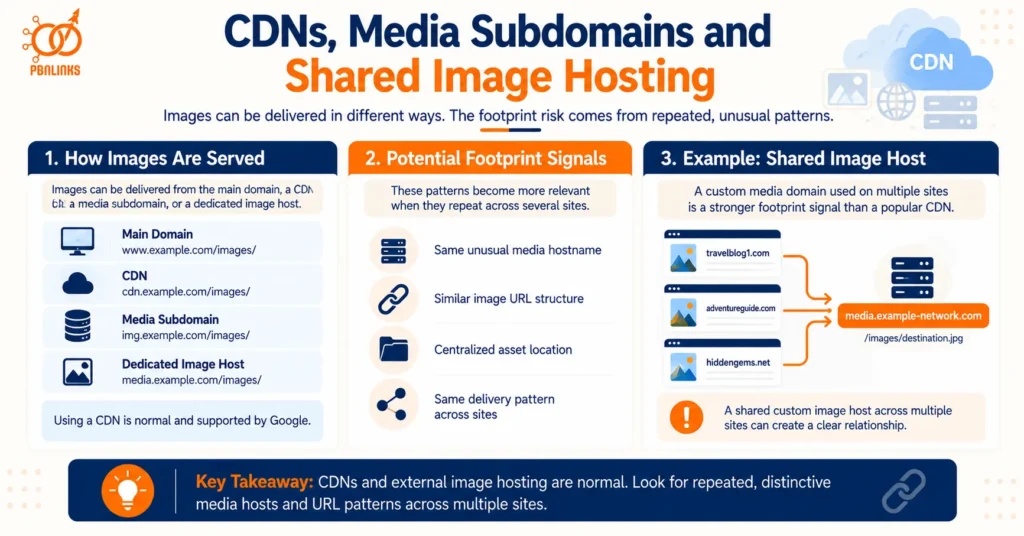
Images do not always need to be served directly from the website’s main domain.
A site may use a CDN, dedicated media host, or separate image subdomain to deliver files. Google explicitly supports CDN-hosted images and even allows image sitemaps to reference images hosted on other domains.
So using a CDN is not a footprint.
The more useful questions are:
- Do several sites use the same unusual media hostname?
- Do image URLs follow the same custom structure?
- Are files being served from the same centralized asset location?
- Do several sites share the same distinctive delivery pattern?
Google Images even provides a src: search operator that can return pages referencing a particular image URL. That demonstrates why the actual image URL can be useful when tracing where a hosted asset appears across domains.
Again, context matters.
A widely used CDN provider means very little. Thousands of unrelated websites may use the same service.
A custom image host such as:
media.example-network.com
serving assets to several supposedly independent sites would be a much more direct relationship than those sites simply using the same popular CDN company.
Common CMS Defaults vs Unusual Cross-Site Configuration Patterns
This is the most important distinction in this section.
Many technical image similarities exist because websites use the same software. WordPress sites naturally share WordPress behaviors. Popular themes create similar thumbnail sizes. Common optimization plugins may produce similar formats. CDNs serve huge numbers of unrelated domains.
Treating every one of these similarities as a footprint leads to false conclusions.
A better way to evaluate infrastructure patterns is to ask three questions:
- Is this behavior common across the wider web?
- Is the configuration customized enough to be distinctive?
- Does the same distinctive configuration repeat across several of the same sites?
The more specific and repeated the answer becomes, the more useful the pattern is.
This is why WordPress, image URLs, and infrastructure patterns should be evaluated as part of the wider PBN image footprint, not as standalone proof of a network. A common CMS tells you very little. A repeated custom image workflow can tell you much more.
How to Evaluate Which PBN Image Footprints Actually Matter
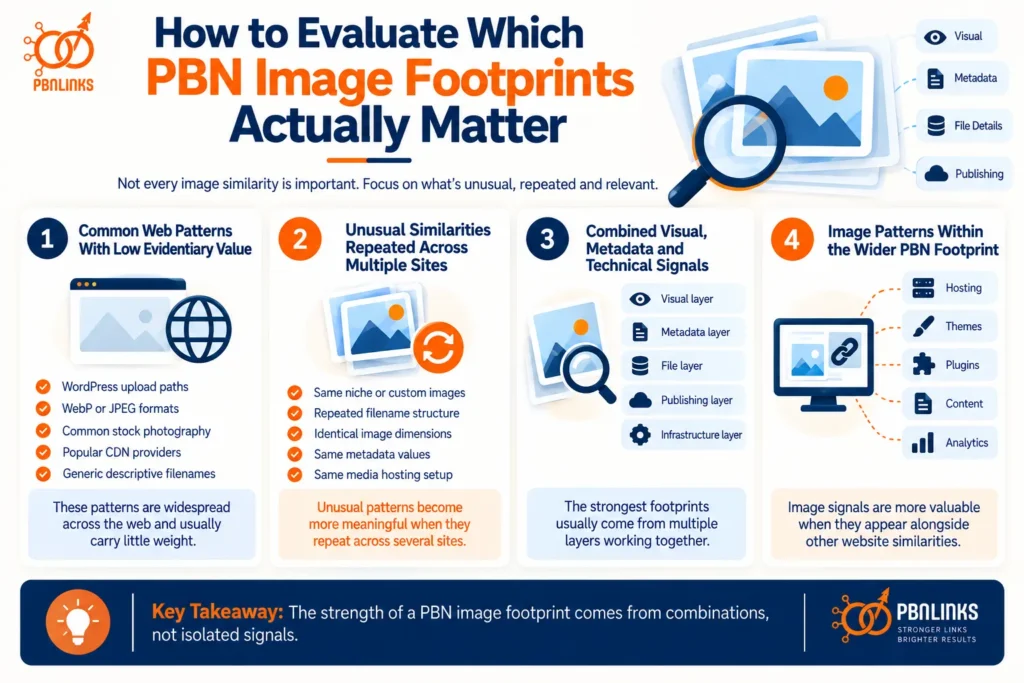
Not every image similarity across PBN sites has the same value. Some patterns are so common across the web that they tell you almost nothing. Others become more meaningful when they are unusual, repeat across several sites, and appear alongside other shared signals.
This is where many people go wrong with PBN footprints. They see one matching image, one shared filename, or one common WordPress setting and assume they have found something important. In reality, most individual image signals are weak on their own.
A better way to judge PBN image footprints is to look at three things:
- how common the pattern is across the wider web
- how specific or unusual the pattern is
- how often the same pattern repeats across the same group of sites
The more unusual and repeated the pattern becomes, the more attention it deserves.
For example, two sites using WebP images tells you almost nothing. Two sites using the same popular stock photo also tells you very little. But if several sites use the same uncommon images, similar filenames, identical metadata treatment, matching image dimensions, and the same custom media workflow, the overall pattern becomes much harder to dismiss as coincidence.
That is the main principle to keep in mind:
the strength of a footprint usually comes from combinations, not isolated signals.
Common Web Patterns With Low Evidentiary Value
Some similarities appear everywhere because websites use the same technologies, platforms, and best practices.
Examples include:
- WordPress upload paths
- WebP or JPEG image formats
- standard srcset behavior
- common stock photography
- popular CDN providers
- widely used image optimization plugins
- generic descriptive filenames
- standard image dimensions
These patterns are too common to carry much weight by themselves.
If ten sites all use WordPress, that does not tell you they belong to one network. If several sites use Cloudflare or the same large stock-photo platform, that is also not enough to establish a meaningful connection.
The mistake is treating ordinary web behavior as if it were unique.
Unusual Similarities Repeated Across Multiple Sites
The analysis becomes more useful when the pattern is less common.
That might include:
- the same niche or custom images appearing across several domains
- a repeated custom filename structure
- identical unusual image dimensions
- the same metadata values
- the same narrow stock-photo collection
- repeated custom upload paths
- the same unusual media-hosting setup
- identical image-processing rules
One of these signals can still have an innocent explanation.
But when several of them appear across the same group of sites, the repeated workflow becomes much more noticeable.
This is why frequency matters.
A footprint seen once may be coincidence.
A footprint seen repeatedly across many sites is a pattern.
Combined Visual, Metadata and Technical Signals
The strongest image-level patterns are usually layered.
Imagine several websites that share:
Visual layer:
the same uncommon stock-photo style
Metadata layer:
the same creator or software information
File layer:
the same filename structure and dimensions
Publishing layer:
the same conversion and compression workflow
Infrastructure layer:
the same custom media or CDN pattern
Each layer may be weak when viewed alone.
Together, they tell a much clearer story about how the sites are being managed.
This is also why focusing on one footprint at a time can be misleading. The real pattern often sits across several layers of the image workflow.
Image Patterns Within the Wider PBN Footprint
Image footprints should also be viewed in context with the rest of the website.
A group of sites may already share other similarities in areas such as:
- hosting
- themes
- plugins
- analytics or tracking
- content structure
- internal linking
- outbound linking
- publishing frequency
- author setup
If repeated image patterns appear alongside several of these similarities, they become part of a broader network profile.
That does not mean one image pattern proves common ownership. It means the image layer adds another piece to the overall picture.
The most useful way to think about this is similar to assembling a puzzle.
One piece tells you very little.
Several pieces that fit together begin to show the image.
So when evaluating PBN image footprints, avoid asking whether one signal is “safe” or “unsafe.” Instead, ask whether the same unusual visual, metadata, file, and publishing patterns keep appearing across the same sites.
That is the difference between a normal web similarity and a pattern that deserves closer attention.
AI-Generated Images, Metadata and Image Provenance
AI-generated images can create PBN image footprints through repeated visual styles, generation methods, embedded metadata, and provenance information. AI itself is not the footprint. The pattern comes from how AI images are created, processed, and published across multiple sites.
This is an important distinction. AI-generated visuals can reduce the need to reuse the same stock photo across a network. Each site can technically publish a different image. But if those images are produced with the same prompts, layouts, dimensions, visual style, editing process, and publishing workflow, the sites may still develop a recognizable image pattern.
AI images can also carry information beyond what appears on the page. Metadata may describe the creation system, editing history, creator details, or digital source of an image. Newer provenance technologies can go further by recording how an asset was created or modified. This means AI image footprints can exist at both the visual level and the file-information level.
The practical lesson is the same as with other PBN image footprints: do not focus only on whether an image is unique. Look at whether the same production process keeps repeating across the network.
AI-Generated Image Patterns Across PBN Sites
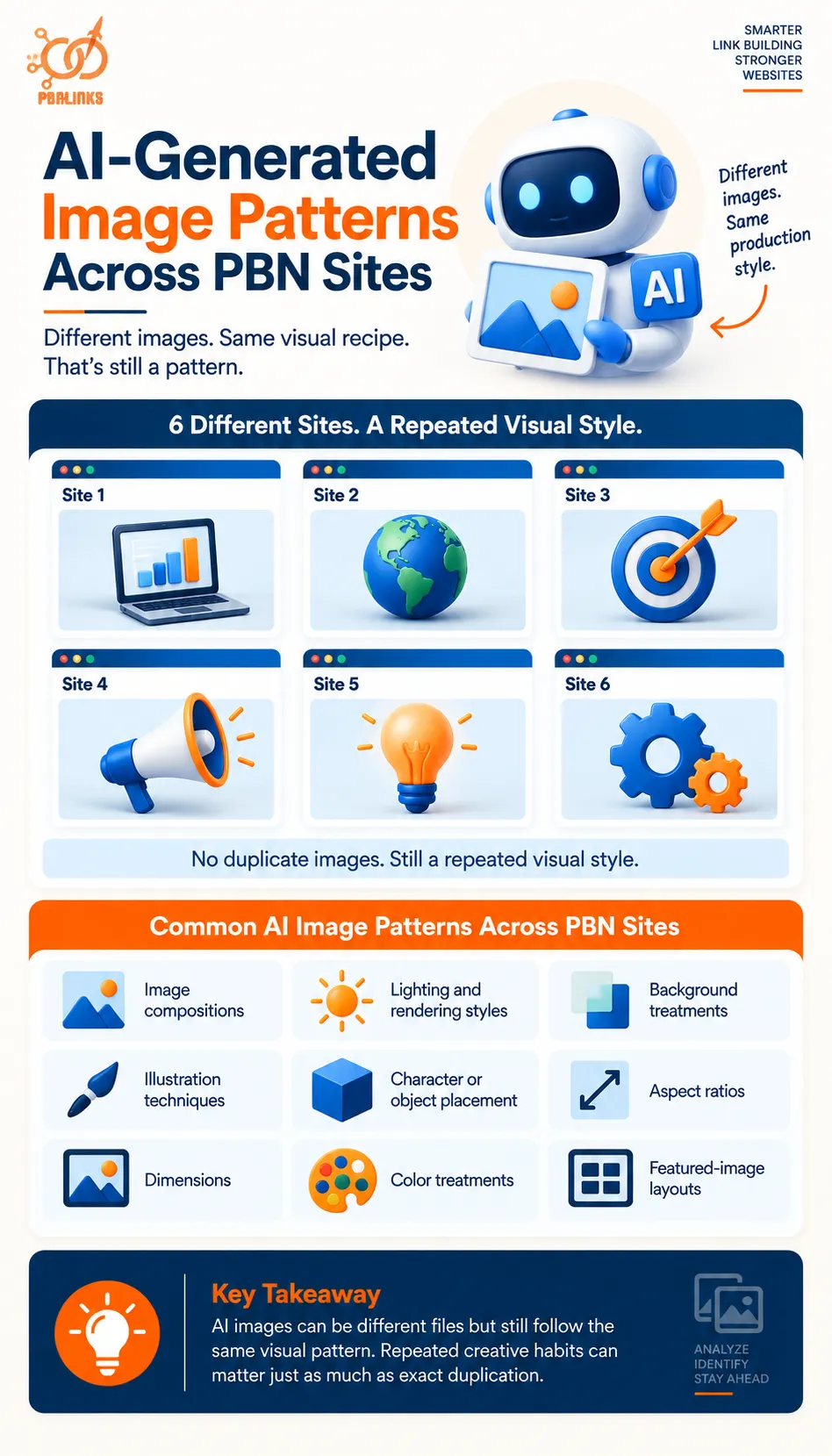
AI-generated files can be different from one another while still looking as though they came from the same production system.
This can happen when several sites repeatedly use similar:
- image compositions
- lighting and rendering styles
- background treatments
- illustration techniques
- character or object placement
- aspect ratios
- dimensions
- color treatments
- featured-image layouts
Imagine six sites using six completely different images. None of the files has been reused. But every image contains a centered 3D object, the same soft lighting, a minimal background, identical framing, and the same 16:9 layout.
There is no duplicate image.
There is still a repeated visual recipe.
That is why image uniqueness should not be measured only by whether the files are different. From a network perspective, repeated creative habits can matter just as much as exact duplication.
Common AI styles should not be overinterpreted either. Many publishers use similar generators and popular prompting styles. The pattern becomes more notable when distinctive visual choices consistently repeat across the same group of sites.
Metadata Attached to AI-Generated Images
AI-generated images may also contain metadata describing how the asset was created or handled.
Depending on the tool, file, and publishing workflow, this information can include details related to:
- the AI system used
- software or application information
- AI system version
- generation or prompt information
- creator information
- copyright or licensing details
- digital source type
- later editing or processing
Modern photo-metadata standards have expanded to accommodate AI-related information. This makes metadata increasingly relevant when evaluating how synthetic images move through a publishing workflow.
But metadata should not be treated as a permanent fingerprint.
An AI-generated image may pass through:
generation → editing → export → compression → format conversion → WordPress upload → CDN delivery
Information can be retained, changed, or removed at different points in that chain.
This is why the published file matters more than assumptions about what the original AI generator added.
The more useful footprint appears when several sites repeatedly preserve, populate, or remove AI-related metadata in the same way.
Image Provenance and Content Credentials
Image provenance describes where a digital asset came from and what happened to it during its creation or editing history.
This goes beyond basic metadata.
Technologies such as C2PA and Content Credentials are designed to attach verifiable provenance information to digital media. Depending on the credential and workflow, this can provide information about how an image was created, which tools were involved, or whether later modifications were made.
That creates another layer to consider with AI-generated images.
The key issue for PBN analysis is not whether one image contains Content Credentials. Provenance technologies are becoming more widely used and have legitimate purposes.
The more relevant question is whether several supposedly independent sites repeatedly publish images with the same distinctive creation or provenance patterns.
Creation Information
Provenance may help describe the origin of an asset, including whether it was captured, generated, or created through another digital process.
Editing History
Some provenance systems can also record later changes or actions performed on the asset.
Repeated Provenance Patterns
When similar creation and editing information consistently appears across several sites, it can become another element of the wider image-production pattern.
Again, provenance should support the analysis rather than become proof by itself.
When AI Images Become a PBN Image Footprint
Using AI-generated images across several sites does not automatically connect those sites.
The pattern becomes more useful when different layers begin to overlap.
For example:
Visual pattern:
The sites repeatedly use the same distinctive AI aesthetic.
Generation pattern:
Images appear to follow similar composition and production rules.
Metadata pattern:
Files preserve or remove the same information.
File pattern:
Dimensions, formats, and naming conventions are consistently similar.
Provenance pattern:
Images carry similar creation or editing information.
Publishing pattern:
The files pass through the same optimization and delivery workflow.
Any one of these similarities may have a normal explanation. Several recurring together create a much clearer production pattern.
This is the key point for AI-generated images, metadata and image provenance: AI may produce different images, but it does not automatically produce independent workflows.
When the same visual decisions, metadata handling, provenance practices, and publishing methods repeat across multiple sites, AI imagery can become another layer of the wider PBN image footprint.
How to Audit Images Across a PBN Network
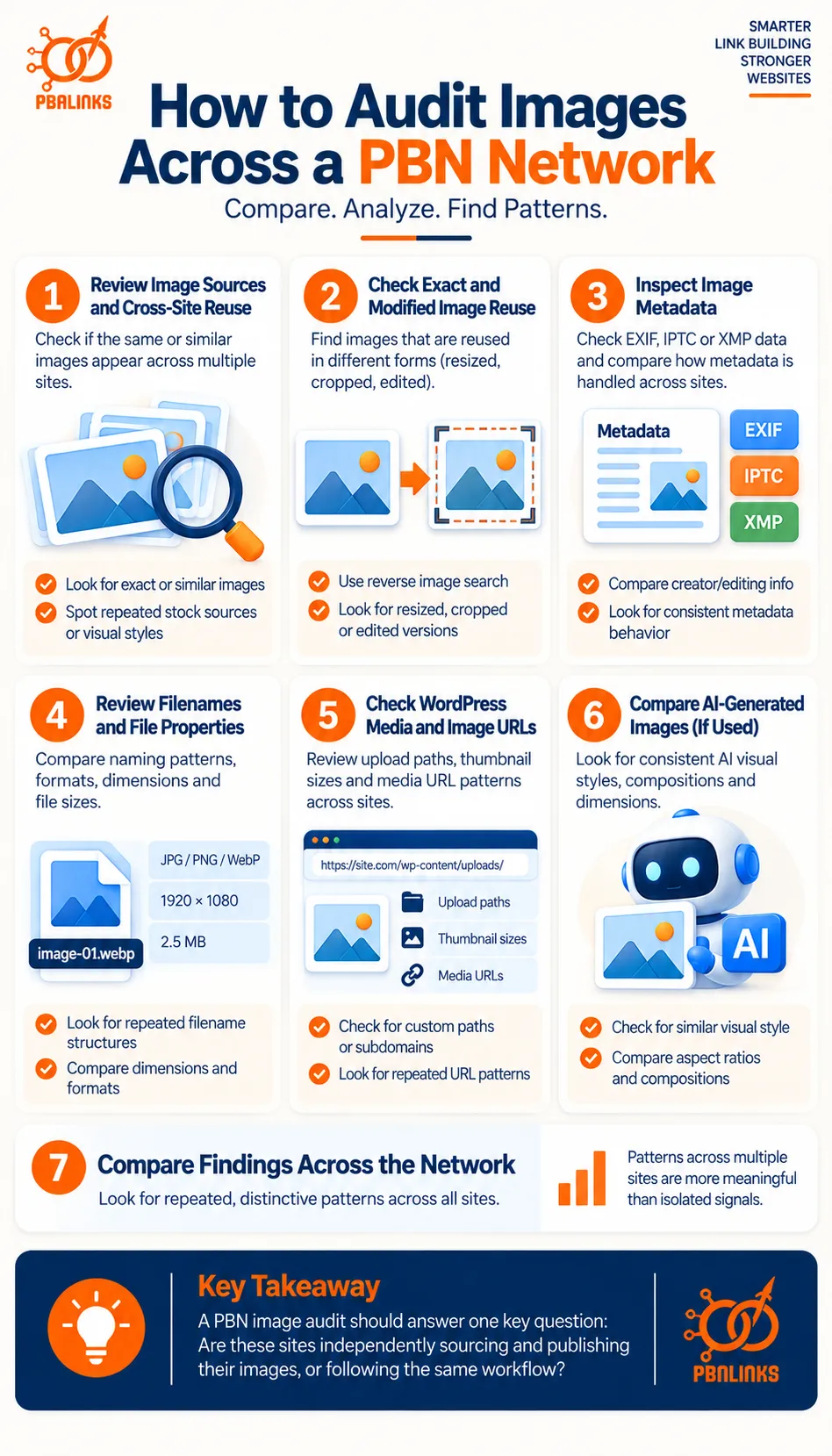
A PBN image audit compares images across multiple sites to identify repeated visual, metadata, file, sourcing, and publishing patterns. The aim is to find whether supposedly independent sites are following the same image workflow.
A proper audit should look beyond duplicate photos or EXIF data alone. Image sources, filenames, dimensions, metadata, WordPress processing, URLs, and delivery methods can all contribute to PBN image footprints when the same patterns keep repeating.
The best approach is to start with visible image reuse, then move into the technical layers behind each file.
Step 1: Review Image Sources and Cross-Site Reuse
Start with the images visitors can actually see.
Review featured images and important in-content visuals across several sites side by side. The purpose is to identify whether the network repeatedly uses the same photographs, stock assets, illustrations, screenshots, charts, or other distinctive visuals.
Pay particular attention to:
- exact image reuse across domains
- uncommon stock photos appearing on several sites
- images taken from the same narrow collection
- repeated illustrations or graphic templates
- similar crops and visual treatments
- the same type of image used in the same page position
One duplicate image is not enough to tell you much. Popular stock photography can naturally appear across hundreds of unrelated websites.
The more useful finding is a repeated sourcing pattern. If several sites repeatedly choose images from the same narrow library, photographer, visual collection, or design style, the audit has identified a shared habit rather than one accidental match.
Record those repeated assets and sources before moving to the next stage.
Step 2: Check Exact and Modified Image Reuse
The next step is to determine whether apparently different images actually come from the same source.
A reused image may not look identical at first glance. It could have been:
- renamed
- resized
- cropped
- compressed
- recolored
- converted to another format
- placed inside a new layout
- given a text or graphic overlay
This is where reverse image search and visual-matching tools become useful.
Run suspicious or distinctive images through tools such as Google Lens or TinEye. The goal is to see where else the asset appears and whether modified versions of the same original image can be found.
Do not treat every match equally.
A generic stock image with hundreds of results has little value as a PBN footprint. An uncommon image, custom graphic, or niche photograph appearing repeatedly across several network sites is much more useful.
At this stage, record both exact duplicates and modified versions of the same source image.
Step 3: Inspect EXIF, IPTC and XMP Metadata
Once visual reuse has been checked, move inside the files.
Image metadata can contain information about how an image was created, described, edited, or licensed. Depending on the file, relevant fields may include:
- camera or device information
- capture dates and timestamps
- editing software
- creator or photographer details
- copyright information
- credit information
- descriptions and captions
- licensing information
- other EXIF, IPTC, or XMP properties
The purpose is not simply to ask whether metadata exists.
Instead, compare how metadata behaves across the network.
For example, do several sites repeatedly contain the same creator field? Do files show the same unusual editing information? Is metadata consistently retained on every site or removed in exactly the same way?
Those repeated handling patterns can be more useful than one individual metadata value.
Also inspect the files that are actually being served on the website. Do not assume that metadata present in the original image survived editing, optimization, WordPress processing, or CDN delivery.
Step 4: Review Filenames, Formats, Dimensions and File Properties
Next, compare the structure of the files themselves.
Start with filenames.
Look for recurring:
- prefixes
- suffixes
- numbering systems
- keyword structures
- abbreviations
- date formats
- export naming conventions
Normal descriptive filenames should not be overinterpreted. Names such as seo-guide.jpg or marketing-tips.webp are common.
What matters more is a distinctive naming formula repeated across several domains.
Then compare other file properties, including:
- JPEG, PNG, WebP, AVIF, or other formats
- image width and height
- aspect ratios
- file sizes
- compression behavior
- repeated conversion patterns
Again, a common format is not a meaningful footprint.
The useful signal appears when the same unusual combination of naming, dimensions, format, and processing choices repeatedly shows up across the network.
Step 5: Check WordPress Media and Image URL Patterns
After examining the file itself, look at how the image is published.
Review image URLs and WordPress media behavior across the sites.
Check for:
- standard or customized upload paths
- media directory structures
- generated thumbnail sizes
- responsive srcset versions
- repeated image URL patterns
- custom media subdomains
- CDN hostnames
- image-format conversion
- identical optimization behavior
This step requires context.
A standard /wp-content/uploads/ path is normal for WordPress. It tells you almost nothing. The same applies to common responsive images or popular CDN services.
A custom structure becomes more interesting when it repeats.
For example, if several sites share the same unusual media directory, custom thumbnail dimensions, URL naming pattern, or image-delivery setup, that can indicate a common implementation workflow.
Record customized patterns separately from normal CMS defaults.
Step 6: Compare AI-Generated Images and Provenance Where Relevant
If the network uses AI-generated visuals, add another inspection layer.
Compare whether several sites repeatedly use the same:
- AI visual style
- image composition
- aspect ratio
- lighting approach
- character or object placement
- generation pattern
- metadata treatment
- provenance information
Also inspect available AI-related metadata or Content Credentials where they exist.
The aim is not to determine whether an image was made with AI and label that as a footprint. AI image use is increasingly common.
The more useful question is whether several sites appear to use the same AI production workflow.
That might mean different images are being generated, but the same style, dimensions, metadata handling, and publishing process continue to repeat.
Step 7: Compare the Findings Across the Entire Network
The final step is the most important.
Do not judge each finding separately. Put the results next to each other and look for overlap.
A simple audit table can help:
| Image Pattern | Site A | Site B | Site C |
| Same uncommon image source | Yes | Yes | Yes |
| Similar filename convention | Yes | Yes | No |
| Matching custom dimensions | Yes | Yes | Yes |
| Same metadata handling | Yes | Yes | Yes |
| Similar media URL structure | No | Yes | Yes |
| Same visual style | Yes | Yes | Yes |
The purpose of this table is not to produce a mathematical “footprint score.” It is to make repeated behavior easier to see.
Give more attention to patterns that are:
Distinctive — they are not extremely common across the wider web.
Repeated — they appear on several sites rather than once.
Combined — visual, metadata, file, and publishing similarities appear together.
For example:
same common stock platform
is weak.
But:
same uncommon stock collection + same filename convention + same custom dimensions + same metadata treatment + same media setup
deserves much more attention.
The final audit should therefore answer one broader question:
Are these websites independently sourcing and publishing their images, or are they repeatedly producing the same visual and technical patterns through a shared workflow?
That is the most useful way to audit images across a PBN network without overreacting to ordinary similarities or overlooking stronger combinations of PBN image footprints.
Best Practices for Image Sourcing and Publishing on PBN Sites
Good image sourcing for PBN sites is not about removing every possible footprint. It is about choosing relevant visuals, using legitimate sources, and avoiding the same image-production habits across an entire network. Each site should have an image workflow that fits its own topic, audience, and content rather than following one fixed network-wide template.
The following practices help keep images useful, properly sourced, and less repetitive across different PBN sites.
Choose Images That Match the Content and Search Intent
Start with relevance rather than uniqueness.
Every image should have a clear reason for appearing on the page. It might explain a process, support an example, illustrate a service, show data, or make a complex topic easier to understand.
For example, a technical SEO article may benefit more from a diagram, screenshot, or comparison graphic than from a generic photo of someone using a laptop.
This approach also creates natural variation. When image selection is driven by the actual topic, different sites and pages are less likely to end up using the same visual formula.
The first question should therefore be:
“What visual would genuinely improve this page?”
Once that is clear, sourcing becomes much easier.
Use a Mix of Appropriate Image Sources
After deciding what type of visual the page needs, choose the most appropriate source.
Depending on the content, that may include:
- original photography
- licensed stock images
- custom illustrations
- screenshots
- diagrams and charts
- branded graphics
- AI-generated visuals
There is no need to use every source on every site. The goal is simply to avoid making one stock library, visual style, or production method the default for an entire network.
A local business site may benefit from real service or location photographs. A technical blog may rely more heavily on screenshots and diagrams. An informational publication may naturally use licensed editorial or stock imagery.
Those differences should come from the needs of the site, not artificial randomization.
Use Stock Photos Selectively
Stock photography is useful, but it should not become the automatic answer for every image requirement.
Popular stock photos can appear across hundreds of websites. That is normal. The larger issue for a PBN is repeatedly choosing the same uncommon assets, collections, photographers, or visual styles across several sites.
Before publishing a stock image, consider:
- whether it fits the specific page
- how widely the image is already used
- whether another network site already uses it
- whether it comes from a collection used repeatedly elsewhere
- whether a more useful original or custom visual would work better
The aim is not to avoid stock photography. It is to avoid a predictable stock-photo sourcing pattern.
Create Original Visuals When They Add Real Value
Original visuals are especially useful when they explain something that a stock image cannot.
Examples include:
- process diagrams
- comparison graphics
- original screenshots
- charts
- custom illustrations
- photographs created specifically for the site
Their main advantage is informational value, not simply the fact that they are “unique.”
For example, a graphic showing:
image source → editing → optimization → WordPress → CDN
can explain an image workflow much better than a generic SEO stock photo.
However, custom images can still create patterns if every network site uses the same design template, dimensions, layout, typography, and illustration style.
Original content should therefore be site-specific as well as file-specific.
Review Image Licensing and Attribution Before Publishing
Image sourcing also has a legal and editorial side.
Before uploading an image, verify that the site has the right to use it. Depending on the source and license, you may need to consider:
- commercial-use permission
- attribution requirements
- photographer or creator credit
- copyright restrictions
- modification rights
- redistribution limitations
Do not assume that an image is free to use simply because it appears in Google Images or can be downloaded from another website.
Keep a clear record of where important assets came from and what usage rights apply to them.
This protects the site while also creating a more professional publishing process.
Review Metadata Instead of Automatically Removing It
Metadata should be handled intentionally.
Some image files may contain EXIF details such as camera or software information. Others may contain IPTC or XMP fields related to the creator, copyright, description, or licensing.
Not all of this information should automatically be removed.
For example, legitimate copyright or attribution information may have a useful purpose. Other fields, such as unnecessary location or processing details, may deserve review depending on the image.
A sensible publishing workflow should therefore check:
- what metadata is present
- why it is present
- whether it has a legitimate purpose
- whether the same metadata treatment is being repeated across every site
The goal is informed handling, not blanket metadata removal.
Keep Filenames and Image Processing Natural to Each Site
The same principle applies to filenames, dimensions, compression, and format conversion.
Good filenames should describe the image clearly. But every site does not need to follow an identical naming formula such as:
keyword-feature-01.webp
keyword-feature-02.webp
keyword-feature-03.webp
Likewise, there is nothing wrong with WebP, standard image dimensions, compression, or responsive images. Problems arise when every site follows the same highly specific configuration without any editorial reason.
Let the requirements of the individual website determine:
- filename conventions
- image dimensions
- aspect ratios
- image formats
- compression settings
- featured-image treatment
Natural differences should come from the site itself.
Build Site-Specific Image Workflows
This brings all the previous practices together.
The strongest approach is to give each site an image workflow that makes sense for its niche and publishing style rather than operating every domain from one rigid image template.
For example:
Local business site
Real service photos, local imagery, team or location visuals.
Technical website
Screenshots, diagrams, interface examples, and process graphics.
Editorial blog
Licensed photography, charts, illustrations, and topic-specific visuals.
Data-focused site
Charts, tables, maps, and explanatory graphics.
This type of variation is not random. It comes naturally from different audiences and content requirements.
That is the key principle behind better PBN image sourcing:
standardize quality, not every implementation detail.
Images should be relevant, properly licensed, useful to readers, and professionally prepared. But the sourcing, design, processing, and publishing choices should reflect the individual site rather than expose one repeated workflow across the whole network.
Conclusion: PBN Image Footprints Are About Repeated Patterns, Not One Image
In conclusion, PBN image footprints are created by repeated visual, metadata, file-level, sourcing, and publishing patterns across multiple sites. One shared stock photo, common WordPress path, or matching filename usually means very little on its own. The stronger concern is when several unusual similarities appear together and keep repeating across the same network.
Image reuse, stock-photo sourcing, reverse image search, EXIF, IPTC, XMP, filenames, hashes, WordPress processing, CDNs, AI-generated visuals, and provenance can all contribute to the wider pattern. The most reliable approach is to evaluate these signals in context and distinguish normal web behavior from repeated workflows that make separate sites look centrally managed.
A strong image strategy should focus on relevance, quality, proper licensing, sensible metadata handling, and site-specific publishing decisions. Avoid overengineering the process or applying the same “anti-footprint” rules everywhere, because that consistency can create another pattern of its own.
If you want to build a stronger and more natural PBN setup, review your image workflow alongside your hosting, content, linking, and technical footprints. PBNLinks.agency can help you plan and manage PBN links with a broader focus on relevance, network quality, and safer implementation.
Frequently Asked Questions About PBN Image Footprints
What Are PBN Image Footprints?
PBN image footprints are repeated visual, metadata, file, sourcing, or publishing patterns that appear across multiple sites in a network. They become more meaningful when several unusual similarities repeat together rather than when one common image characteristic appears on its own.
Can Google Detect the Same Image on Multiple Websites?
Google can recognize and surface the same or visually similar images across different websites. Google Lens can return websites containing an image or a similar image. However, Google does not publicly state that one duplicated image alone identifies common ownership or triggers a PBN penalty.
Do Stock Photos Create PBN Image Footprints?
No, stock photos are not a PBN footprint by themselves. Popular stock images appear across many unrelated websites. The stronger pattern comes from repeatedly using the same uncommon images, narrow collections, photographers, or sourcing habits across several sites.
Does Renaming an Image Make It Unique?
No, renaming an image only changes its filename, not the underlying visual asset. Reverse-image systems can identify images independently of their filenames, so the same picture may remain recognizable after being renamed.
Can Cropped or Resized Images Still Be Found With Reverse Image Search?
Yes, modified versions of an image can still be found by some reverse-image systems. TinEye says it can identify copies that have been cropped, resized, color-adjusted, edited, or slightly rotated.
Does WordPress Automatically Remove EXIF Metadata?
No, you should not assume WordPress removes all EXIF metadata automatically. WordPress can read EXIF and IPTC fields such as camera, timestamp, credit, copyright, and caption data. What remains in the final served image depends on the file and processing workflow.
Does Image Metadata Improve Google Rankings?
No, you should not assume WordPress removes all EXIF metadata automatically. WordPress can read EXIF and IPTC fields such as camera, timestamp, credit, copyright, and caption data. What remains in the final served image depends on the file and processing workflow.
Does Image Metadata Improve Google Rankings?
There is no documented Google ranking boost simply from adding EXIF metadata. Google does support certain IPTC fields for creator, copyright, credit, and licensing information, and it can use supported C2PA metadata in “About this image.”
Should Every PBN Site Use Completely Unique Images?
No, every image does not need to be completely unique. The better goal is relevant imagery and independent sourcing habits. Problems are more likely to arise from repeated network-wide combinations of the same assets, naming rules, dimensions, metadata handling, and processing workflows.
Can AI-Generated Images Create PBN Image Footprints?
Yes, AI images can contribute to footprints when the same visual style, generation process, metadata, dimensions, or publishing workflow repeats across multiple sites. AI-generated images are not inherently a footprint; the repeated production pattern is what matters.
What Tools Can Be Used to Check PBN Image Footprints?
Google Lens and TinEye are useful for checking image reuse and modified copies, while metadata viewers can inspect EXIF and IPTC information. Google Images also supports src: and imagesize: operators for checking indexed image URLs and dimensions.