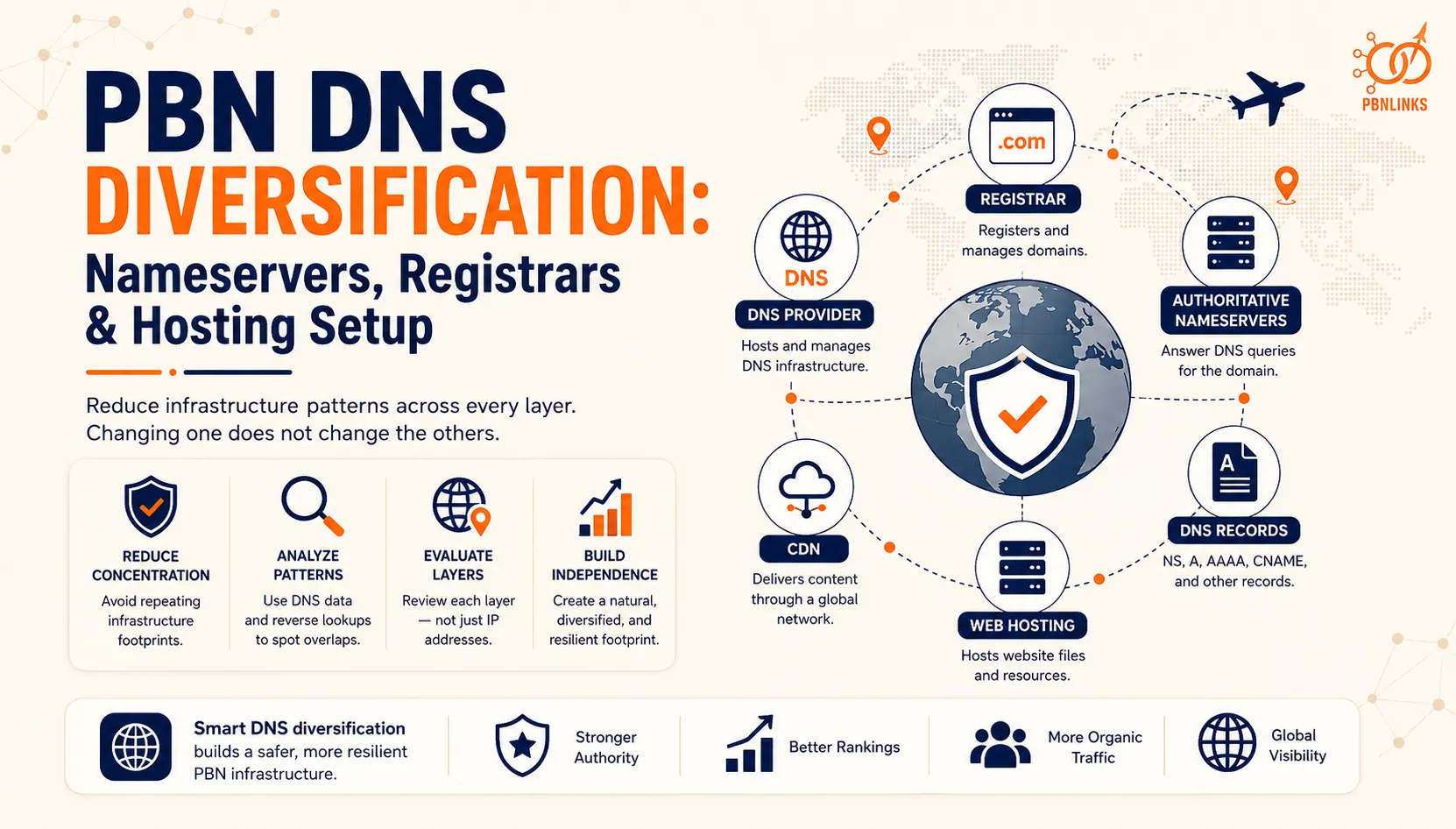
PBN DNS Diversification: Nameservers, Registrars & Hosting Setup
You can put every domain on a different IP address and still leave obvious infrastructure patterns behind. If the same nameservers, DNS provider, registrar setup, or hosting relationships keep appearing across multiple sites, those similarities can make the domains easier to associate with one another.
PBN DNS diversification is about understanding and reducing concentration across these infrastructure layers. It involves more than changing nameservers or registering domains with different companies. Registrars, DNS providers, authoritative nameservers, DNS records, CDNs, and web hosts perform different functions, and changing one does not automatically change the others.
Nameservers deserve particular attention because they are publicly queryable through DNS. A reverse nameserver lookup may also show other domains that a third party dataset has observed using the same nameserver. However, shared infrastructure alone does not prove common ownership, especially when the provider serves large numbers of unrelated websites.
The key is understanding what each layer exposes and how repeated patterns should be interpreted together. This guide explains registrar default and custom nameservers, registrar and hosting relationships, reverse NS lookups, relevant DNS records, historical DNS data, and the common infrastructure patterns practitioners should understand when evaluating a network.
What Is PBN DNS Diversification?
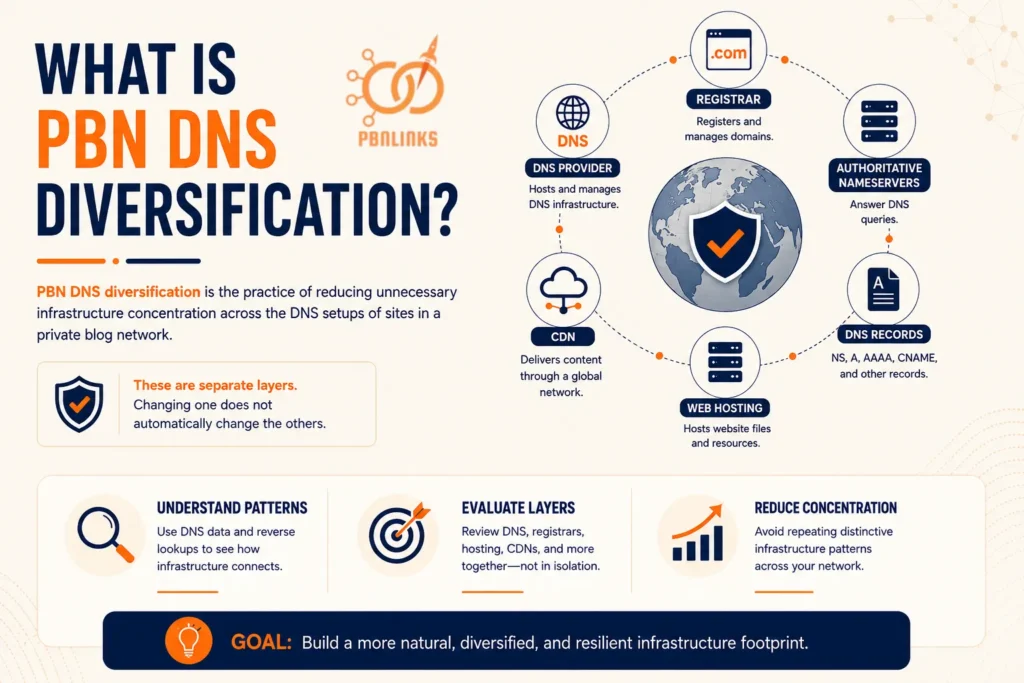
PBN DNS diversification is the practice of reducing unnecessary infrastructure concentration across the DNS setups of sites in a private blog network. It focuses on how domains use nameservers, DNS providers, registrars, hosting infrastructure, and related services rather than looking only at IP addresses.
The important point is that these are separate technical layers. Two domains can use different registrars but the same DNS provider, or different nameservers while still pointing to related hosting infrastructure. This is why DNS diversification needs to be understood as part of the broader infrastructure picture.
What DNS Diversification Actually Covers
DNS diversification primarily concerns the infrastructure involved in resolving domain names and the patterns that can be observed across multiple domains.
This can include:
- Authoritative nameservers
- DNS providers
- NS records
- A and AAAA records
- CNAME records
- Other relevant DNS configuration
- Repeated infrastructure relationships across domains
Registrar and hosting information should also be reviewed alongside DNS because they can provide additional context, even though they are not the same thing as DNS.
The purpose is not to make every technical value unique. Common infrastructure is normal across the web. The more useful question is whether a group of domains repeatedly shares distinctive infrastructure patterns that make the relationship worth investigating further.
Why Different Nameservers Alone Do Not Mean Complete Diversification
Using different nameserver hostnames does not automatically mean two domains have completely separate infrastructure.
For example, two domains might show different nameservers while their websites ultimately resolve through related hosting infrastructure. The reverse is also possible: two unrelated sites can share the same major DNS provider while being hosted independently.
This is why nameservers should not be evaluated in isolation. Registrar relationships, DNS records, hosting, CDNs, and historical infrastructure can provide additional context.
There is also no universal number of nameservers, registrars, DNS providers, or IP addresses that makes a network “safe.” DNS diversification is better understood by examining infrastructure relationships and concentration across multiple layers rather than relying on a fixed formula.
How Do Registrars, DNS Providers, Nameservers, and Hosting Differ?
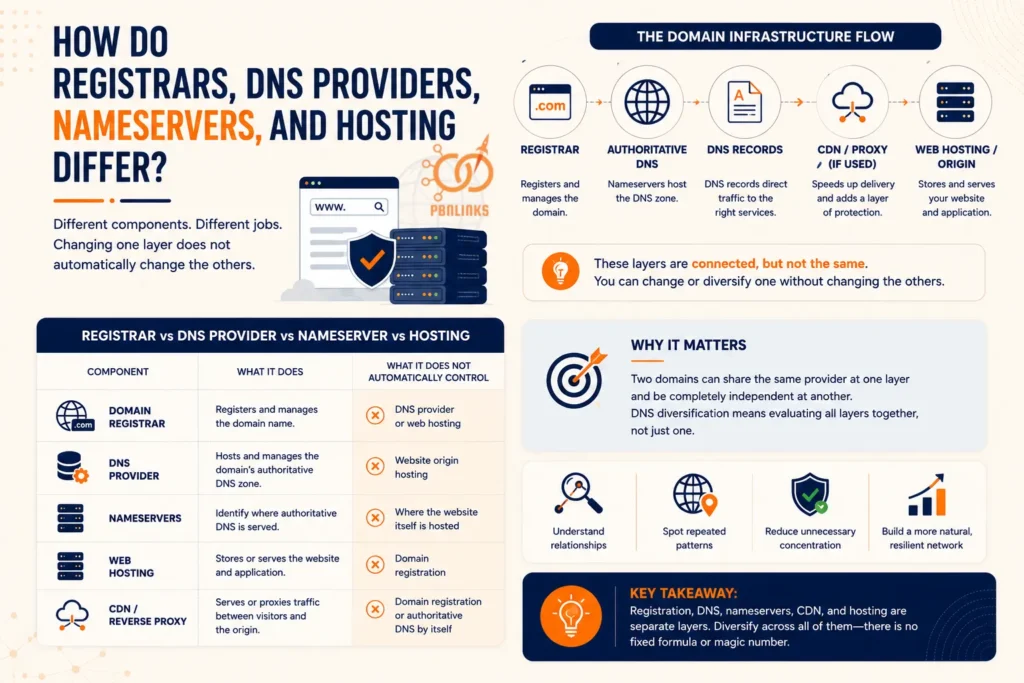
A domain registrar, DNS provider, nameserver, and web host perform different jobs. They may sometimes be provided by the same company, which is why these terms are often confused, but each represents a separate part of a website’s infrastructure.
Understanding the difference matters because changing one layer does not automatically change the others. For example, transferring a domain to another registrar does not necessarily change its DNS provider, nameservers, or web hosting.
Registrar vs DNS Provider vs Nameserver vs Hosting
| Component | What It Does | What It Does Not Automatically Control |
| Domain Registrar | Registers and manages the domain name | DNS provider or web hosting |
| DNS Provider | Hosts and manages the domain’s authoritative DNS zone | Website origin hosting |
| Nameservers | Identify where authoritative DNS is served | Where the website itself is hosted |
| Web Hosting | Stores or serves the website and application | Domain registration |
| CDN / Reverse Proxy | Serves or proxies traffic between visitors and the origin | Domain registration or authoritative DNS by itself |
The important point is that these components can be connected without being the same service. A domain might be registered with one company, use another provider for DNS, route traffic through a CDN, and host the actual website somewhere else.
Domain Registrar
A domain registrar is the company through which a domain name is registered and managed. It handles functions such as registration, renewal, transfers, and registrant information according to the policies that apply to the domain.
Registrars often provide additional services such as DNS management, privacy services, email, and hosting. Using those services is optional. A domain can remain registered with one company while its DNS and website are managed elsewhere.
DNS Provider
A DNS provider hosts and manages the authoritative DNS zone for a domain. The records stored in that zone help direct requests to the services associated with the domain.
These can include NS, A, AAAA, CNAME, MX, and TXT records.
The DNS provider does not have to be the registrar. This means two domains registered with different companies can still use the same DNS provider, while domains at the same registrar can use completely different DNS services.
Authoritative Nameservers
Authoritative nameservers answer DNS queries using the records configured for a domain’s DNS zone. The nameservers assigned to a domain can generally be queried publicly.
For example:
ns1.example-dns.com
ns2.example-dns.com
These nameservers tell DNS resolvers where authoritative information for the domain can be obtained. They do not necessarily reveal where the website itself is hosted.
This distinction becomes important when analyzing nameserver patterns across multiple domains.
Web Hosting
Web hosting is the infrastructure responsible for storing or serving the website’s files and application. DNS records help direct visitors toward the infrastructure that ultimately delivers the website.
Two domains can therefore use the same DNS provider while being hosted on different servers or with different hosting companies.
The opposite is also possible. Domains using different DNS providers may still point to the same or related hosting infrastructure.
CDN or Reverse Proxy
A content delivery network (CDN) or reverse proxy can sit between visitors and the website’s origin server. In this configuration, public DNS records may resolve to CDN or proxy infrastructure rather than directly to the origin server.
As a result, the publicly visible IP address may belong to the CDN rather than the underlying web host. Shared CDN infrastructure also does not by itself establish that two websites share ownership or an origin server.
A simple way to understand the functional relationship is:
Registrar → Authoritative DNS → DNS Records → CDN or Reverse Proxy if used → Web Hosting or Origin
This does not mean every layer needs a different provider. The important distinction for PBN DNS diversification is that registration, DNS, nameservers, CDN infrastructure, and web hosting are separate layers. Changing or diversifying one of them does not automatically diversify the others.
Why Can Nameservers Become a PBN Footprint?
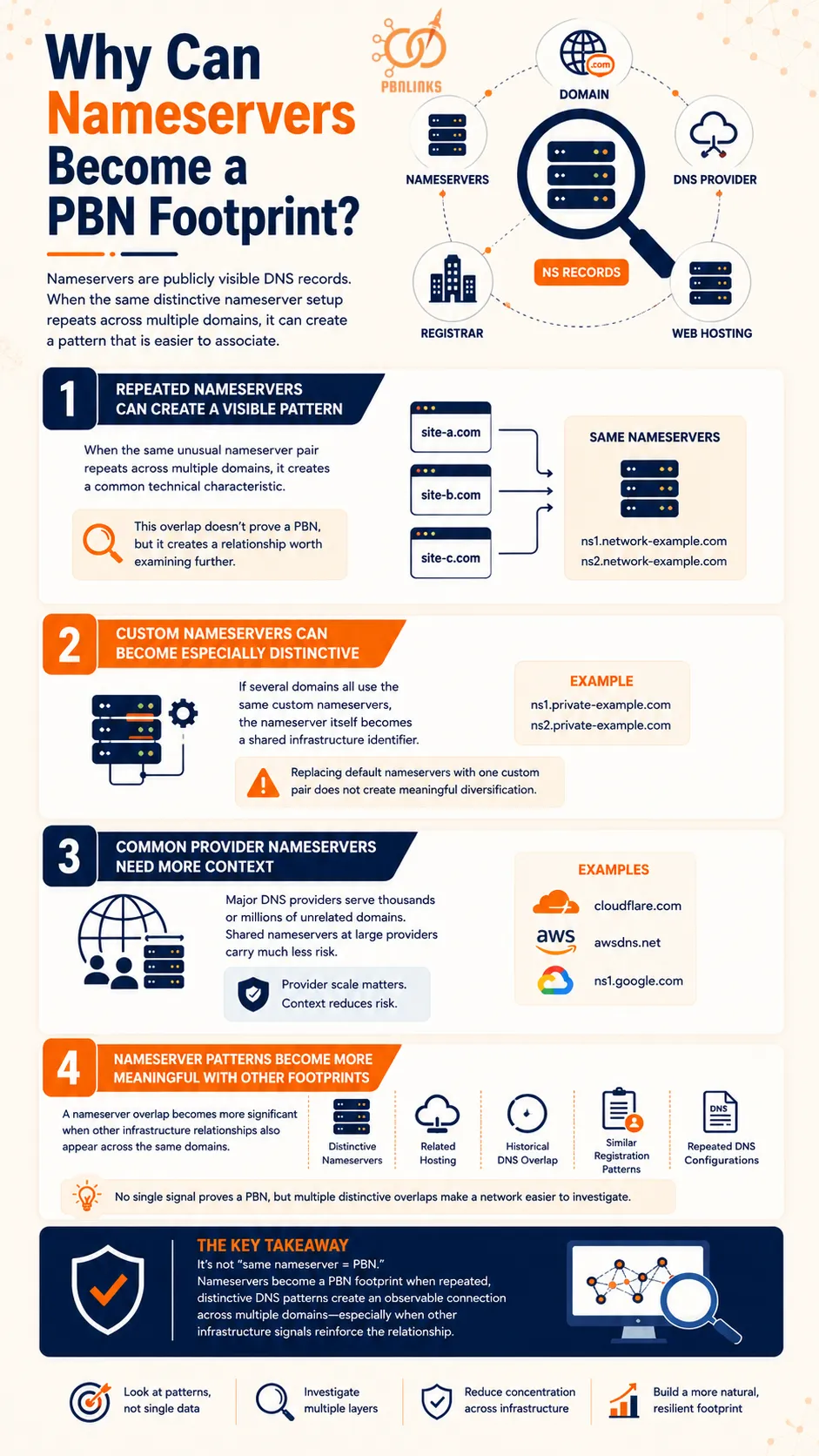
Nameservers can become a PBN footprint because they are publicly visible DNS records that can reveal infrastructure shared across multiple domains. If many PBN sites repeatedly use the same distinctive nameserver setup, that pattern can make the sites easier to associate with one another.
The risk is not simply that two websites share a nameserver. Large DNS providers serve huge numbers of unrelated domains. The stronger concern is repeated and distinctive nameserver patterns across a group of sites, especially when other infrastructure similarities appear alongside them.
Repeated Nameservers Can Create a Visible Pattern
Every domain using authoritative DNS has nameservers associated with it. When the same unusual nameserver pair repeatedly appears across multiple PBN domains, it creates a common technical characteristic that can be observed through DNS lookups.
For example:
site-a.com → ns1.network-example.com
site-b.com → ns1.network-example.com
site-c.com → ns1.network-example.com
This does not prove the three sites belong to one PBN, but it creates a relationship worth examining further.
The more distinctive the nameserver infrastructure is, the more useful that overlap can become for identifying a cluster of potentially related domains.
Custom Nameservers Can Become Especially Distinctive
Custom nameservers may appear more independent than standard provider nameservers, but repeatedly using the same custom nameservers across a network can create an obvious common pattern.
For example, if several domains all use:
ns1.private-example.com
ns2.private-example.com
the custom nameserver itself becomes a shared infrastructure identifier.
This is why simply replacing registrar default nameservers with one custom nameserver pair does not necessarily create meaningful DNS diversification.
Common Provider Nameservers Need More Context
Shared nameservers are much less informative when they belong to a major DNS provider serving large numbers of unrelated customers.
Two unrelated websites can legitimately use the same DNS service without sharing ownership, hosting, content, or any other relationship.
Provider scale therefore matters. A nameserver shared across a very large customer base usually provides less evidence of a specific relationship than an unusual nameserver repeatedly appearing across a small cluster.
Nameserver Patterns Become More Meaningful With Other Footprints
A nameserver overlap becomes more significant when other infrastructure relationships also appear across the same domains.
For example, a group might share:
- Distinctive nameservers
- Related hosting infrastructure
- Historical DNS overlap
- Similar registration patterns
- Repeated DNS configurations
None of these individual signals automatically proves that the sites form a PBN. But several distinctive overlaps can make the relationship between the domains easier to investigate.
The main issue is therefore not simply “same nameserver = PBN.” Nameservers become a PBN footprint when repeated, distinctive DNS patterns create an observable connection across multiple domains, particularly when other infrastructure signals reinforce that relationship.
Registrar Default vs Custom Nameservers: What Is the Difference?
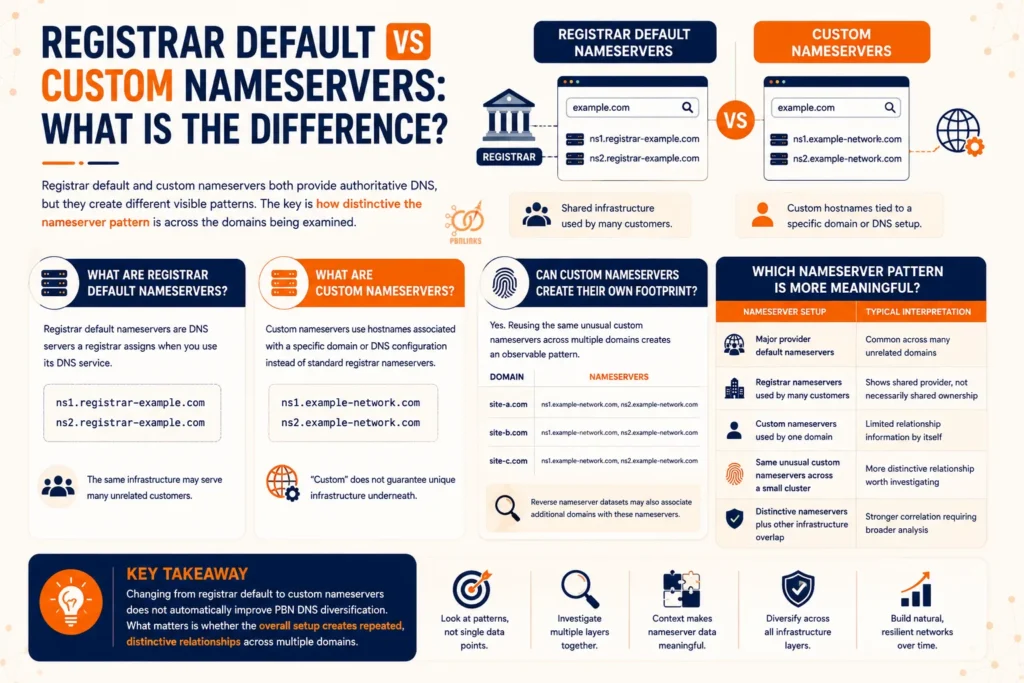
Registrar default and custom nameservers can both provide authoritative DNS, but they create different visible patterns. Registrar default nameservers usually belong to infrastructure shared across many customers, while custom nameservers use hostnames associated with a particular domain or DNS setup.
For PBN DNS analysis, the important question is not simply which option looks more unique. It is how distinctive the nameserver pattern is across the domains being examined.
What Are Registrar Default Nameservers?
Registrar default nameservers are DNS servers a registrar assigns when a domain uses its DNS service. A domain might receive nameservers similar to:
ns1.registrar-example.com
ns2.registrar-example.com
The same infrastructure may serve many unrelated customers. Because of this, two domains sharing a large registrar’s default nameservers do not automatically have a meaningful relationship beyond using the same service.
Default nameservers can still show provider concentration across a group of domains, but that pattern needs context before drawing conclusions.
What Are Custom Nameservers?
Custom nameservers use hostnames associated with a specific domain or DNS configuration rather than the standard nameserver hostnames supplied by a registrar or DNS provider.
For example:
ns1.example-network.com
ns2.example-network.com
Custom nameservers are sometimes called private or vanity nameservers, although those terms can have slightly different technical meanings depending on the setup.
Using a custom hostname does not necessarily mean the underlying DNS infrastructure is unique. The hostname can still ultimately depend on shared servers or another provider.
Can Custom Nameservers Create Their Own Footprint?
Yes. A custom nameserver can become a distinctive footprint when the same unusual hostname is repeatedly used across multiple domains.
For example:
| Domain | Nameservers |
| Site A | ns1.example-network.com, ns2.example-network.com |
| Site B | ns1.example-network.com, ns2.example-network.com |
| Site C | ns1.example-network.com, ns2.example-network.com |
The domains now share an easily observable DNS characteristic. A reverse nameserver dataset may also associate additional domains with those nameserver hostnames, depending on its coverage.
This is why custom does not automatically mean diversified.
Which Nameserver Pattern Is More Meaningful?
Neither registrar default nor custom nameservers are inherently proof of a PBN. Their significance depends on how common the infrastructure is, how distinctive the pattern is, and whether other signals support the relationship.
A useful comparison is:
| Nameserver Setup | Typical Interpretation |
| Major provider default nameservers | Common across many unrelated domains |
| Registrar nameservers used by many customers | Shows shared provider, not necessarily shared ownership |
| Custom nameservers used by one domain | Limited relationship information by itself |
| Same unusual custom nameservers across a small cluster | More distinctive relationship worth investigating |
| Distinctive nameservers plus other infrastructure overlap | Stronger correlation requiring broader analysis |
The key takeaway is that changing from registrar default nameservers to custom nameservers does not automatically improve PBN DNS diversification. What matters for infrastructure analysis is whether the overall setup creates repeated, distinctive relationships across multiple domains.
Does Using Different Registrars Improve PBN DNS Diversification?
Using different registrars can reduce registrar concentration across a group of domains, but it does not automatically create PBN DNS diversification. A registrar controls domain registration, while authoritative DNS, nameservers, and web hosting can be provided by completely different companies.
This means domains registered with different registrars can still share the same DNS provider, nameserver infrastructure, CDN, or hosting environment. Registrar diversity should therefore be evaluated as one infrastructure layer rather than treated as complete diversification.
Registrar Diversification Is Only One Infrastructure Layer
A registrar manages functions such as domain registration, renewal, transfers, and registrant information. It does not necessarily operate the DNS or server that hosts the website.
For example:
| Domain | Registrar | DNS Provider | Web Host |
| Site A | Registrar A | Provider X | Host 1 |
| Site B | Registrar B | Provider X | Host 1 |
| Site C | Registrar C | Provider X | Host 2 |
The registrars are different, but all three domains still use the same DNS provider, while two also share the same web host.
Looking only at the registrar column would therefore give an incomplete picture of the infrastructure relationships.
Different Registrars Can Still Use the Same DNS Provider
Domains do not have to use the DNS service supplied by their registrar. A domain registered with one company can delegate its authoritative DNS to another provider.
As a result:
Different registrar → same DNS provider
is entirely possible.
The reverse is also true:
Same registrar → different DNS providers
Two domains registered with the same company can use completely different authoritative DNS infrastructure.
This is why registrar and DNS concentration should be analyzed separately.
Registrar Resellers Can Complicate the Picture
The company or website where a domain was purchased is not always the underlying accredited registrar. Some domain sellers operate as resellers of another registrar’s services.
This means two apparently different domain sellers may ultimately rely on the same registrar infrastructure. Registration data available through sources such as RDAP can provide additional context about the registrar responsible for a domain.
However, a common registrar still does not prove that domains share ownership. Popular registrars manage very large numbers of unrelated domains.
Does Transferring a Domain Change Its DNS?
Not necessarily. A registrar transfer changes the company responsible for managing the domain registration, but the existing nameservers can often remain in place.
For example:
Before transfer
Registrar A → DNS Provider X → Host Y
After transfer
Registrar B → DNS Provider X → Host Y
Only the registrar has changed. The DNS provider, nameservers, and hosting can remain the same.
This distinction is important because simply spreading domains across different registrars can create the appearance of variation at one layer while leaving other infrastructure relationships unchanged.
For PBN DNS diversification, registrar choice should therefore be treated as one part of the broader infrastructure picture. Different registrars can reduce registrar concentration, but they do not by themselves establish DNS or hosting diversity.
What Does a Reverse Nameserver Lookup Reveal?
A reverse nameserver lookup reveals domains that a DNS dataset has observed using a particular nameserver. Instead of starting with a domain to find its authoritative nameservers, the process starts with a nameserver and searches for domains associated with it.
For example, a standard NS lookup may show that site-a.com uses ns1.example-dns.com. A reverse NS lookup starts with ns1.example-dns.com and looks for other domains observed using that nameserver. This makes it useful for identifying shared DNS infrastructure across multiple sites.
How Does a Reverse Nameserver Lookup Work?
The process is straightforward:
- Start with the nameserver hostname you want to investigate.
- Search the hostname in a reverse nameserver database or DNS research tool.
- The service checks its collected DNS data for domains associated with that nameserver.
- Review the returned domains for repeated or distinctive infrastructure patterns.
- Compare relevant matches with other available DNS and hosting information.
For PBN analysis, this can reveal domains sharing the same nameserver, additional sites associated with distinctive custom nameservers, and possible infrastructure clusters that may not be obvious when each domain is checked separately.
What Do Reverse NS Results Actually Prove?
A reverse NS match shows an observed nameserver relationship, not proof of common ownership or PBN membership. If an uncommon custom nameserver appears across a small group of domains, that pattern may deserve further investigation. If the nameserver belongs to a major provider serving many unrelated customers, the overlap is much less distinctive.
Reverse nameserver databases also have limitations because they are generally built from third-party DNS observations. Results can be incomplete, outdated, or include historical associations. For that reason, reverse NS data is best used as a discovery signal and interpreted alongside current DNS records, historical DNS, hosting relationships, and other relevant infrastructure evidence.
Which DNS Records Can Reveal Shared Infrastructure?
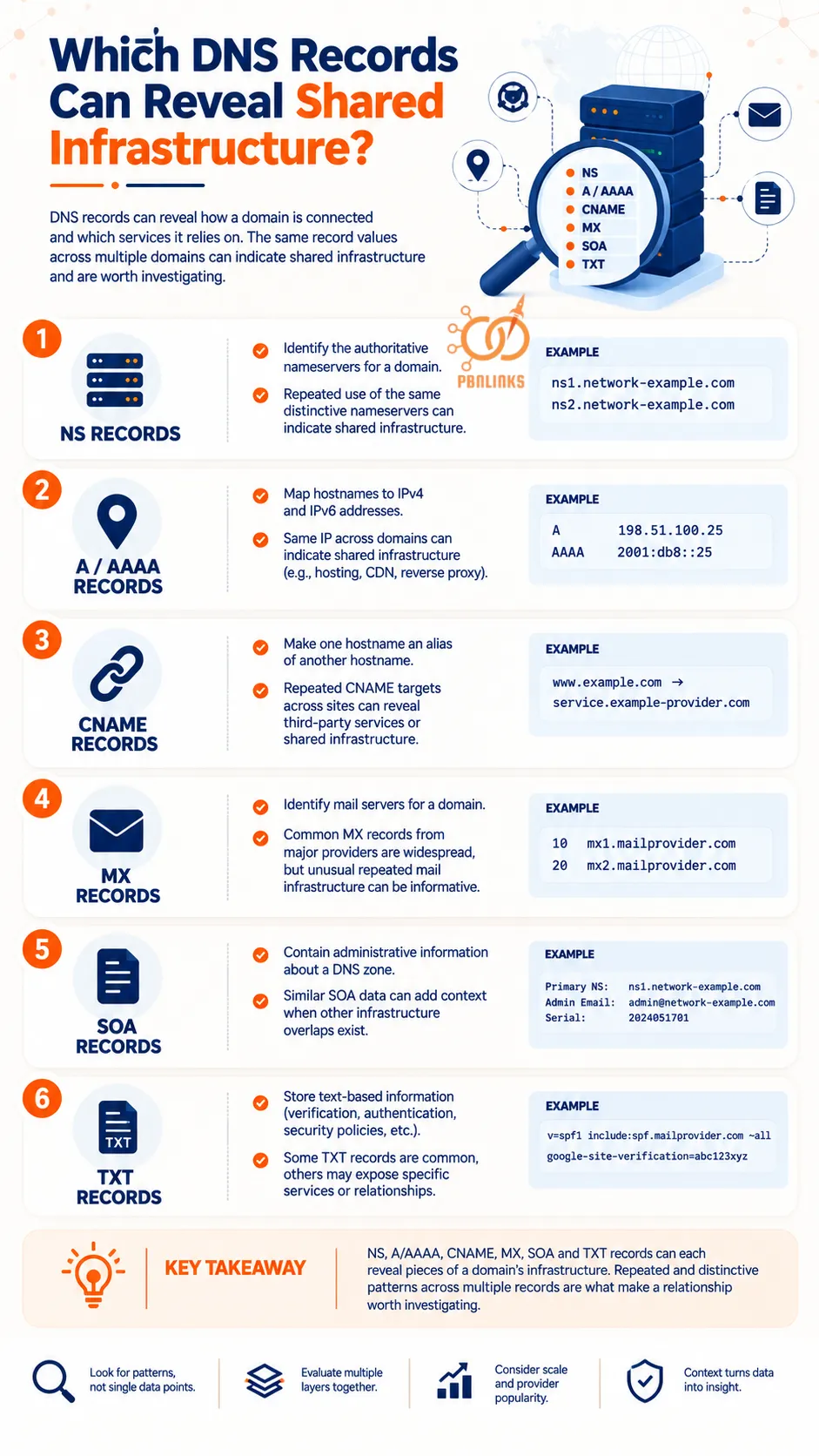
DNS records can reveal more than the nameservers assigned to a domain. Depending on the record type, they can show where a domain resolves, which services handle its email, whether it relies on another hostname, and other technical relationships that may appear across multiple sites.
For PBN analysis, the goal is not to treat every matching DNS record as a footprint. The useful approach is to look for repeated and distinctive patterns across several records, then determine whether those similarities have a normal explanation or deserve further investigation.
NS Records
NS records identify the authoritative nameservers responsible for a domain’s DNS. If multiple domains repeatedly use the same distinctive nameserver infrastructure, the overlap can create an observable relationship.
Shared NS records from a major DNS provider are much less distinctive because large numbers of unrelated websites may use the same service.
A and AAAA Records
A records map hostnames to IPv4 addresses, while AAAA records map them to IPv6 addresses. They can therefore provide information about the network infrastructure to which a domain currently resolves.
If several domains resolve to the same IP address, they share that network endpoint at that time. However, this does not prove common ownership because shared hosting, CDNs, reverse proxies, and other services can legitimately place unrelated websites on shared IP infrastructure.
CNAME Records
A CNAME record makes one hostname an alias of another hostname. For example:
www.example.com → service.example-provider.com
CNAME records can reveal third-party services or infrastructure relationships used by a domain. Repeated distinctive CNAME targets across several sites may provide useful context when examining broader infrastructure patterns.
MX Records
MX records identify the mail servers responsible for receiving email for a domain. Multiple domains may use identical MX infrastructure because they rely on the same email provider.
For that reason, common MX records from large services provide limited evidence of a relationship. More unusual repeated mail infrastructure may be more informative when combined with other signals.
SOA Records
The SOA record contains administrative information about a DNS zone, including the primary nameserver and values used to coordinate DNS updates and caching.
Similar SOA data can provide additional context when examining domains that already share other infrastructure characteristics. As with other DNS records, a matching SOA value alone should not be treated as proof that sites belong to the same network.
TXT Records
TXT records store text-based information commonly used for domain verification, email authentication, security policies, and third-party service configuration.
Some TXT records are extremely common, while others may expose specific services or verification relationships. Their significance therefore depends on what the record contains and how widely that configuration is used.
The key is to interpret these records together rather than individually. NS, A/AAAA, CNAME, MX, SOA, and TXT records can each reveal pieces of a domain’s infrastructure, but repeated patterns become more meaningful only when their context and distinctiveness are considered.
Is DNS Diversification the Same as Hosting Diversification?
No. DNS diversification and hosting diversification are separate infrastructure concepts. DNS determines how a domain and its services are resolved, while web hosting provides the infrastructure that actually serves the website.
This distinction matters because domains can look different at the DNS layer while still sharing hosting infrastructure. The opposite can also happen: multiple sites can use the same DNS provider while their websites are hosted on completely different servers.
Different Nameservers Can Still Point to the Same Hosting Infrastructure
Changing nameservers does not necessarily change where a website is hosted. Two domains can use different authoritative DNS providers while their A or AAAA records ultimately direct web traffic to the same server or related hosting infrastructure.
For example:
Site A → DNS Provider A → Host X
Site B → DNS Provider B → Host X
The DNS providers are different, but the hosting relationship remains.
This is why different nameserver hostnames should not automatically be interpreted as complete infrastructure diversification.
Shared DNS Can Serve Sites on Different Hosts
The reverse situation is equally possible. Multiple domains can use the same major DNS provider while their websites resolve to different hosting environments.
For example:
Site A → DNS Provider X → Host A
Site B → DNS Provider X → Host B
The shared DNS provider creates one common infrastructure relationship, but it does not establish that the websites share a server or owner. This is especially important when the DNS provider serves a large customer base.
Why Different IP Addresses Do Not Tell the Whole Story
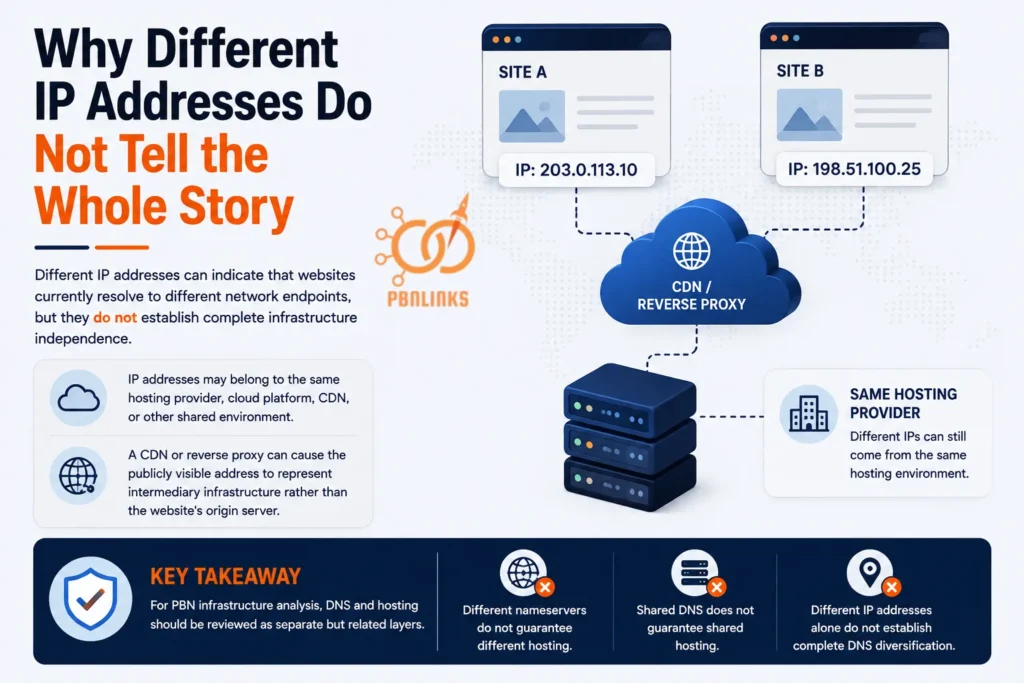
Different IP addresses can indicate that websites currently resolve to different network endpoints, but they do not establish complete infrastructure independence.
IP addresses may belong to the same hosting provider, cloud platform, CDN, or other shared environment. A CDN or reverse proxy can also cause the publicly visible address to represent intermediary infrastructure rather than the website’s origin server.
For PBN infrastructure analysis, DNS and hosting should therefore be reviewed as separate but related layers. Different nameservers do not guarantee different hosting, shared DNS does not guarantee shared hosting, and different IP addresses alone do not establish complete PBN DNS diversification.
How Do CDNs and Reverse Proxies Affect DNS and Hosting Visibility?
A CDN or reverse proxy sits between visitors and a website’s origin server, changing which infrastructure is publicly visible. Instead of connecting directly to the web host, visitors may first connect to servers operated by the CDN or proxy provider.
This matters when analyzing PBN infrastructure because a DNS lookup may show the CDN’s network rather than the server where the website is actually hosted. Understanding the request path makes this distinction much clearer.
CDN and Reverse Proxy Request Flow
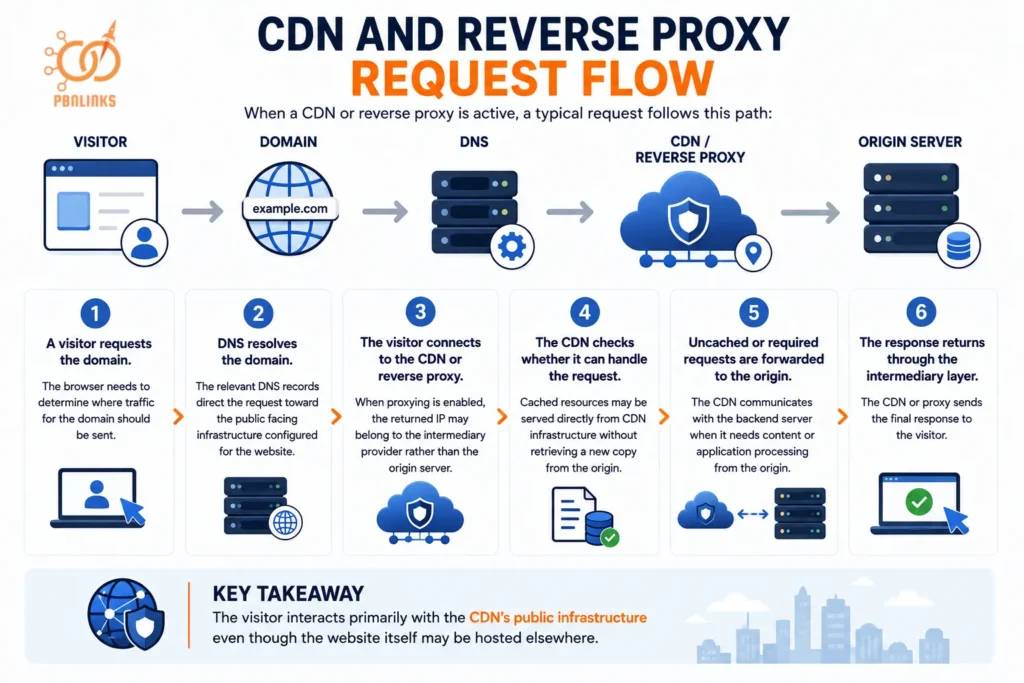
When a CDN or reverse proxy is active, a typical request follows this path:
Domain → DNS → CDN or Reverse Proxy → Origin Server
Here is how the process works step by step:
- A visitor requests the domain. The browser needs to determine where traffic for the domain should be sent.
- DNS resolves the domain. The relevant DNS records direct the request toward the public facing infrastructure configured for the website.
- The visitor connects to the CDN or reverse proxy. When proxying is enabled, the returned IP may belong to the intermediary provider rather than the origin server.
- The CDN checks whether it can handle the request. Cached resources may be served directly from CDN infrastructure without retrieving a new copy from the origin.
- Uncached or required requests are forwarded to the origin. The CDN communicates with the backend server when it needs content or application processing from the origin.
- The response returns through the intermediary layer. The CDN or proxy sends the final response to the visitor.
The visitor therefore interacts primarily with the CDN’s public infrastructure even though the website itself may be hosted elsewhere.
Public IP and Origin Server Visibility
This request flow explains why the IP returned during a public DNS investigation may not be the website’s origin IP.
For example:
example.com → CDN IP → Origin Server
The CDN IP is publicly reachable, while the origin server sits behind it. Two domains resolving through the same CDN network can therefore have completely different origin servers.
The reverse is also important. Different CDN IP addresses do not necessarily prove that two sites have different origin hosting because large CDN networks can route traffic through many addresses and edge locations.
Shared CDN Infrastructure Across Domains
Large CDN providers serve substantial numbers of unrelated websites. Multiple domains can therefore share provider infrastructure, IP ranges, or other public facing characteristics without having the same owner or origin host.
This makes provider scale important when interpreting the pattern. Shared infrastructure from a widely used CDN usually provides much less evidence of a specific relationship than a distinctive infrastructure configuration repeatedly appearing across a small group of domains.
CDN Layer and Origin Hosting Layer
For infrastructure analysis, the CDN and origin should be treated as separate layers:
DNS layer: Determines where the domain’s traffic is directed.
CDN or proxy layer: Receives public traffic and may cache, filter, or forward requests.
Origin hosting layer: Runs or stores the backend website and responds when the intermediary needs the origin.
For PBN DNS diversification, this distinction prevents a common mistake: treating the public facing IP as direct proof of the underlying hosting setup. A CDN can change what infrastructure is visible from the outside, but shared CDN infrastructure does not by itself prove shared hosting, common ownership, or PBN membership.
Can Historical DNS Reveal Previous Infrastructure?
Yes. Historical DNS data can reveal nameservers, IP addresses, and other DNS records that were previously observed for a domain. A current DNS lookup mainly shows the present configuration, while historical or passive DNS datasets may preserve earlier observations.
For example, a domain may currently use ns1.new-provider.com but previously have used ns1.old-provider.com. Historical A or AAAA records may also show IP addresses the domain resolved to before moving to its current infrastructure. This can reveal relationships that are no longer visible from current DNS records alone.
Depending on the provider and available observations, historical DNS data may include:
- Previous nameservers
- Historical A and AAAA records
- Earlier CNAME targets
- Historical MX records
- Approximate periods when particular records were observed
Changing a registrar, nameserver, DNS provider, or hosting environment does not necessarily erase historical observations already collected by third-party services. However, these databases are not complete records of every DNS change, so missing data does not prove that a configuration never existed. For PBN analysis, historical DNS is most useful for identifying previous infrastructure relationships that can then be evaluated alongside current DNS and hosting data.
How Should Shared DNS Infrastructure Be Interpreted?
Shared DNS infrastructure should be treated as evidence of a technical relationship, not automatic proof that domains have the same owner or belong to the same PBN. Many unrelated websites use the same registrars, DNS providers, nameservers, CDNs, and hosting platforms, so the context of the overlap matters.
The first factor to consider is how common the infrastructure is. If two domains use nameservers operated by a major DNS provider serving a large customer base, the overlap may provide little evidence of a specific relationship. A distinctive custom nameserver appearing across a small group of domains can be more informative because the pattern is less common.
The second factor is whether multiple infrastructure patterns overlap. For example, a group of domains might share:
- The same distinctive nameservers
- Historical DNS relationships
- Related hosting infrastructure
- Similar registration patterns
- Repeated DNS configurations
Several distinctive overlaps can provide stronger evidence that the domains are operationally related than any single match alone. Even then, the evidence should be interpreted carefully because shared services, hosting migrations, resellers, and other normal technical arrangements can produce similarities.
The practical rule is simple: the more common a shared infrastructure element is, the less it usually tells you about a specific relationship. The more distinctive and repeated the pattern becomes across multiple infrastructure layers, the more useful it becomes for further investigation. Shared DNS should therefore be treated as correlation evidence rather than a standalone test for identifying a PBN.
How Do You Audit DNS and Infrastructure Patterns Across Multiple Domains?
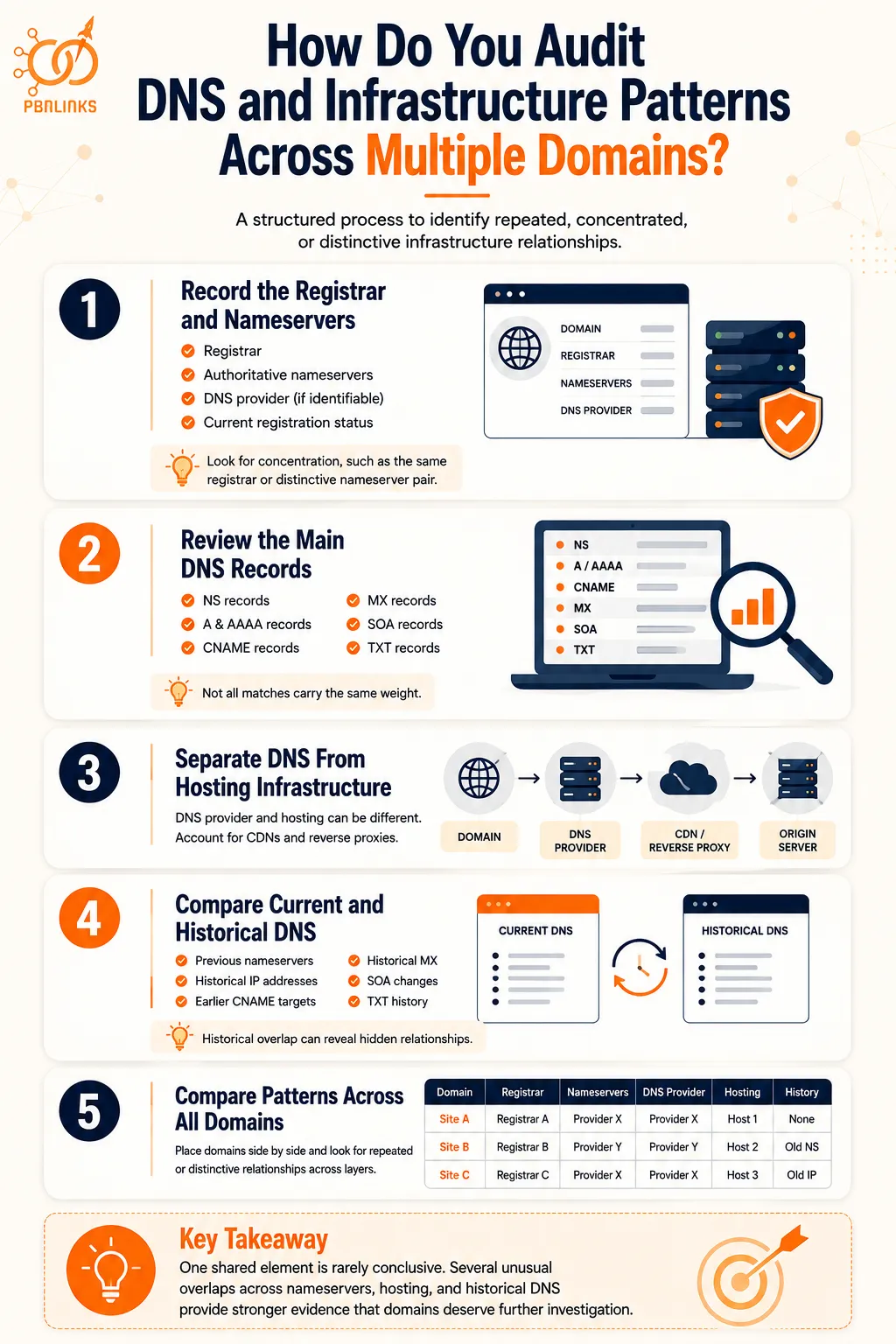
A DNS infrastructure audit compares the same technical information across multiple domains to identify repeated, concentrated, or distinctive relationships. The goal is to examine each infrastructure layer separately and then compare the findings as a whole.
A structured process makes the audit easier to follow and prevents one shared nameserver, IP address, or registrar from being treated as conclusive evidence on its own.
Step 1: Record the Registrar and Nameservers
Start with the basic registration and DNS information for every domain. Record the domain registrar and current authoritative nameservers in a consistent format.
For each domain, collect:
- Registrar
- Authoritative nameservers
- DNS provider, where identifiable
- Current registration status
Keep the registrar and DNS provider in separate fields. A domain can be registered with one company while using another company for authoritative DNS.
At this stage, look for obvious concentration, such as many domains using the same registrar or the same distinctive nameserver pair.
Step 2: Review the Main DNS Records
Next, examine the DNS records that provide additional information about the domain’s infrastructure.
Review relevant:
- NS records
- A and AAAA records
- CNAME records
- MX records
- SOA records
- Relevant TXT records
Do not treat every matching record equally. A common MX record from a major email provider, for example, may tell you much less than an unusual CNAME or nameserver pattern appearing across a small group of domains.
Step 3: Separate DNS From Hosting Infrastructure
Determine where the website appears to resolve and keep that information separate from the authoritative DNS provider.
For example:
Site A → DNS Provider X → Host A
Site B → DNS Provider Y → Host A
The domains use different DNS providers but still share hosting infrastructure.
Also account for CDNs and reverse proxies. If proxying is enabled, the publicly visible IP may belong to the intermediary provider rather than the origin server.
Step 4: Compare Current and Historical DNS
Current DNS shows only part of the infrastructure picture. Where historical data is available, compare the present setup with previously observed records.
Look for:
- Previous nameservers
- Historical A and AAAA records
- Earlier CNAME targets
- Historical MX infrastructure
- Previous IP relationships
Historical overlap can reveal relationships that are no longer visible in current DNS. However, historical DNS datasets can be incomplete, so missing records should not be treated as proof that a previous relationship never existed.
Step 5: Compare Patterns Across All Domains
Once the data is collected, place the domains side by side and look for patterns across multiple infrastructure layers.
A simple comparison table can make those relationships easier to identify:
| Domain | Registrar | Nameservers | DNS Provider | Hosting | Historical Overlap |
| Site A | Registrar A | Provider X | Provider X | Host 1 | None found |
| Site B | Registrar B | Provider Y | Provider Y | Host 2 | Shared old NS |
| Site C | Registrar C | Provider X | Provider X | Host 3 | Shared old IP |
Focus on how distinctive and repeated each relationship is. Sharing a major registrar or DNS provider may be completely normal, while several unusual overlaps across nameservers, hosting, and historical DNS can provide stronger evidence that the domains deserve further investigation.
The purpose of the audit is not to calculate an arbitrary PBN footprint score or decide that one shared record proves a network. It is to identify infrastructure concentration, understand how the domains are technically related, and distinguish common provider overlap from more distinctive patterns.
What Are the Most Common PBN DNS Diversification Mistakes?
The most common PBN DNS diversification mistakes happen when one infrastructure change is treated as complete diversification. Changing a registrar, nameserver, or IP address affects only part of the setup, while other DNS and hosting relationships may remain unchanged.
Another mistake is assuming that every shared technical signal proves a connection. Common infrastructure is normal across the web, so both concentration and distinctiveness need to be considered when interpreting DNS patterns.
Changing Registrars but Keeping the Same DNS Infrastructure
Moving domains across different registrars changes the registration layer, but it does not automatically change authoritative DNS.
For example:
Registrar A → DNS Provider X
Registrar B → DNS Provider X
The registrars are different, but both domains still rely on the same DNS provider. Registrar diversification should therefore not be confused with DNS diversification.
Assuming Different Nameserver Labels Mean Different Infrastructure
Different nameserver hostnames do not necessarily mean the underlying infrastructure is independent.
Nameservers can ultimately belong to related provider infrastructure, while domains using the same major DNS service may still be otherwise unrelated. The visible hostname should therefore be considered together with the provider and broader infrastructure context.
Reusing Distinctive Custom Nameservers
Custom nameservers are not automatically more diversified than provider default nameservers.
If the same unusual pair appears repeatedly across a small group of domains, the custom nameserver itself creates a visible common characteristic. A reverse NS dataset may also make other domains associated with that nameserver easier to discover.
Treating Major Shared Providers as Proof of a Connection
Large registrars, DNS platforms, CDNs, email providers, and hosting companies can serve enormous numbers of unrelated websites.
Finding two domains on the same widely used infrastructure therefore does not establish common ownership or PBN membership. Provider scale should always be considered before deciding how meaningful an overlap is.
Looking Only at IP Addresses
An IP address represents only one part of the infrastructure picture. Domains on different IPs can still share nameservers, DNS providers, hosting companies, CDNs, or historical infrastructure.
The opposite is also possible. Unrelated sites can share an IP because of shared hosting or intermediary services.
Ignoring Historical DNS
Reviewing only current records can miss previous infrastructure relationships.
A domain may have changed nameservers, DNS providers, or hosting, while third-party historical DNS services retain earlier observations. Historical data can therefore provide useful context that is no longer visible in the current configuration.
The key mistake is treating PBN DNS diversification as a checklist of individual values that simply need to look different. DNS, registration, CDN, and hosting are separate but connected layers. A useful infrastructure assessment considers how those layers relate, how distinctive the overlaps are, and whether multiple patterns point toward the same relationship.
Conclusion
In conclusion, PBN DNS diversification is about understanding how infrastructure relationships appear across nameservers, DNS providers, registrars, hosting, CDNs, and historical DNS data. Changing one part of the setup does not automatically diversify the others.
Nameservers can create visible patterns, particularly when distinctive custom infrastructure is repeated across multiple domains. Registrar diversity alone does not guarantee DNS diversity, and different nameservers do not necessarily mean different hosting. Reverse nameserver lookups and historical DNS data can also reveal relationships that are not obvious from a domain’s current configuration.
At the same time, shared infrastructure should not be treated as automatic proof of a PBN. Major DNS providers, registrars, CDNs, and hosting platforms serve large numbers of unrelated websites. The most useful assessment comes from examining how distinctive the patterns are and whether multiple infrastructure signals point toward the same relationship.
If you manage multiple domains and want to understand where DNS and hosting patterns are concentrated, start with a complete infrastructure audit before making changes. Review the registrar, nameservers, DNS records, hosting, CDN layer, and historical DNS together so your decisions are based on evidence rather than assumptions.
FAQs About PBN DNS Diversification
What is PBN DNS diversification?
PBN DNS diversification means reducing unnecessary infrastructure concentration across a network’s DNS setup. It involves understanding nameservers, DNS providers, registrars, hosting, and related infrastructure rather than assuming one changed value makes domains independent.
Are nameservers publicly visible?
Yes. A domain’s authoritative nameservers can generally be retrieved through public DNS queries. They identify where authoritative DNS is served but do not by themselves reveal ownership or prove that domains are related.
Can using the same nameservers create a PBN footprint?
Yes, repeated distinctive nameservers can create an observable infrastructure pattern across multiple domains. However, shared nameservers from a large provider are common and do not by themselves prove that sites belong to a PBN.
Are custom nameservers better than registrar default nameservers?
Not necessarily. Custom nameservers can become more distinctive when the same unusual nameserver pair is reused across several domains. Registrar default nameservers may be shared by many unrelated customers.
Does using different registrars create DNS diversification?
No. Different registrars reduce registrar concentration but do not automatically change authoritative DNS. Domains at different registrars can still use the same DNS provider, nameservers, CDN, or hosting infrastructure.
Does transferring a domain to another registrar change its nameservers?
Not necessarily. A registrar transfer and a nameserver change are separate operations, and existing nameservers can often remain configured after a transfer.
What does a reverse nameserver lookup reveal?
A reverse nameserver lookup can identify domains that a third-party dataset has observed using a particular nameserver. It is useful for finding shared DNS infrastructure, but the results do not prove common ownership.
Can historical DNS reveal old nameservers and IP addresses?
Yes, historical or passive DNS datasets may contain previously observed nameservers, IP addresses, and other DNS records. Coverage varies between providers, so historical DNS should not be treated as a complete record of every configuration.
Is DNS diversification the same as hosting diversification?
No. DNS and web hosting are separate infrastructure layers. Domains can use different DNS providers while sharing hosting, or use the same DNS provider while being hosted on different infrastructure.
Does changing nameservers remove previous DNS footprints?
No, not necessarily. Changing nameservers updates the current DNS delegation, but historical DNS services may retain earlier observations. A current configuration change does not automatically erase DNS data previously collected by third parties.