Themes, Plugins and CMS Fingerprints Across a PBN Network
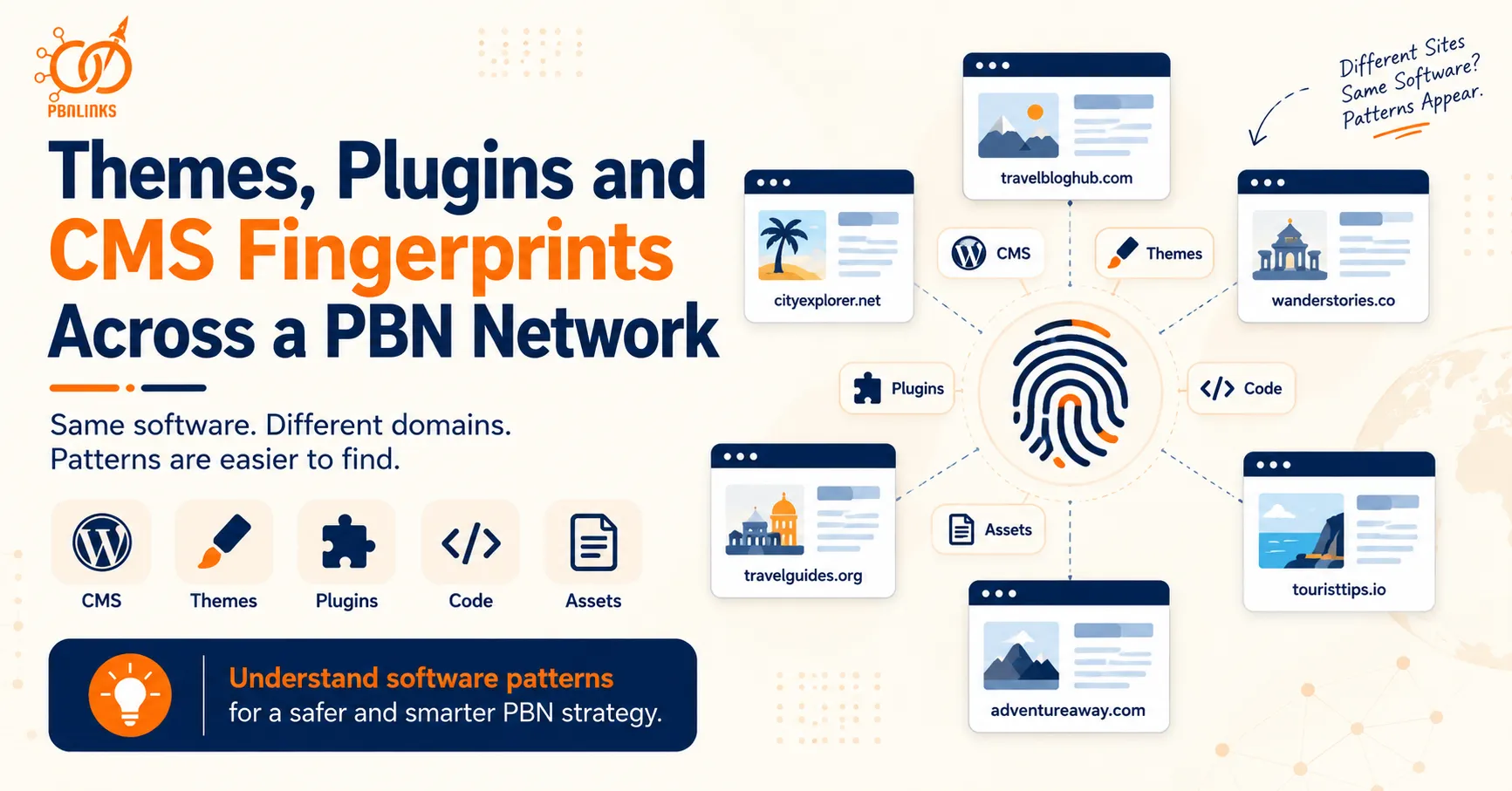
You may use different domains, hosting providers, IP addresses, and designs across your PBN sites. But if the same CMS, themes, plugins, and software setup keep appearing across the network, those similarities can create patterns that are easier to compare.
That is the issue behind PBN theme plugin fingerprints. Websites can reveal clues about their software through source code, CSS and JavaScript files, public asset paths, headers, cookies, and other visible data. Tools such as BuiltWith and Wappalyzer can use these clues to identify parts of a site’s technology stack.
However, finding the same software does not automatically mean two websites belong to the same PBN. WordPress is widely used, and popular themes, page builders, SEO plugins, and caching tools naturally appear across unrelated sites. A repeated and less common combination of technologies can provide much more context than one popular theme or plugin.
In this guide, we’ll examine how CMS, theme, and plugin fingerprints appear across PBN sites, what technology detection tools can reveal, how historical software data can preserve earlier patterns, and which similarities actually matter when evaluating a PBN network.
What Are PBN Theme Plugin Fingerprints?
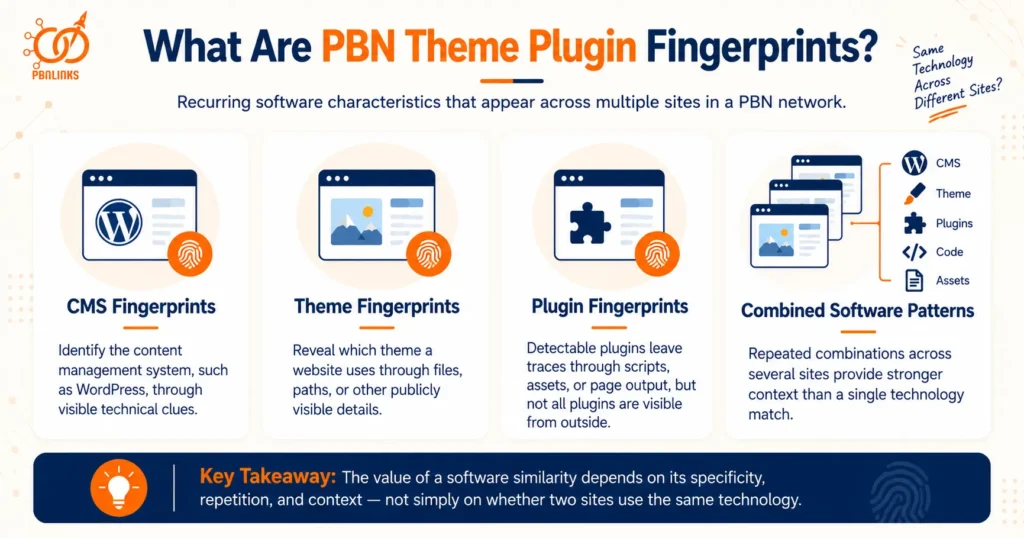
PBN theme plugin fingerprints are recurring software characteristics that appear across multiple sites in a PBN network. They can come from the CMS a site uses, its theme, detectable plugins, and combinations of technologies that repeat across different domains.
Not every software match has the same value. A common CMS or popular plugin may appear across millions of unrelated websites, while a less common combination repeated across several sites can provide more useful context.
CMS Fingerprints
A CMS fingerprint is a technical characteristic that can indicate which content management system powers a website. WordPress, for example, can leave recognizable clues in the publicly visible resources a site loads.
Identifying the same CMS across several sites is usually a very broad similarity. WordPress is widely used, so a WordPress match alone says little about whether the sites are connected.
Theme Fingerprints
A theme fingerprint is information that can indicate which theme a website uses. Depending on the site and theme, recognizable details may appear in publicly accessible files, paths, or other website output.
The significance depends partly on how common the theme is. Finding the same widely used theme across several sites may reveal little, while a less common theme repeated across the same group of domains can provide additional context.
Plugin Fingerprints
A plugin fingerprint is an observable characteristic associated with a plugin running on a website. Some plugins leave visible traces through the resources or page output they generate.
However, not every installed plugin is necessarily detectable from outside the website. A plugin may be present without exposing enough public information for a detection tool to identify it.
Individual Technologies vs Combined Software Patterns
One shared technology is different from a repeated software combination.
Two sites using WordPress and the same popular plugin may have little significance. If several sites repeatedly show the same theme, multiple matching plugins, and other similar software characteristics, the combined pattern can become more distinctive.
This is the key principle behind PBN theme plugin fingerprints: the value of a software similarity depends on its specificity, repetition, and context, not simply on whether two sites use the same technology.
How Do Websites Reveal Their CMS, Themes and Plugins?
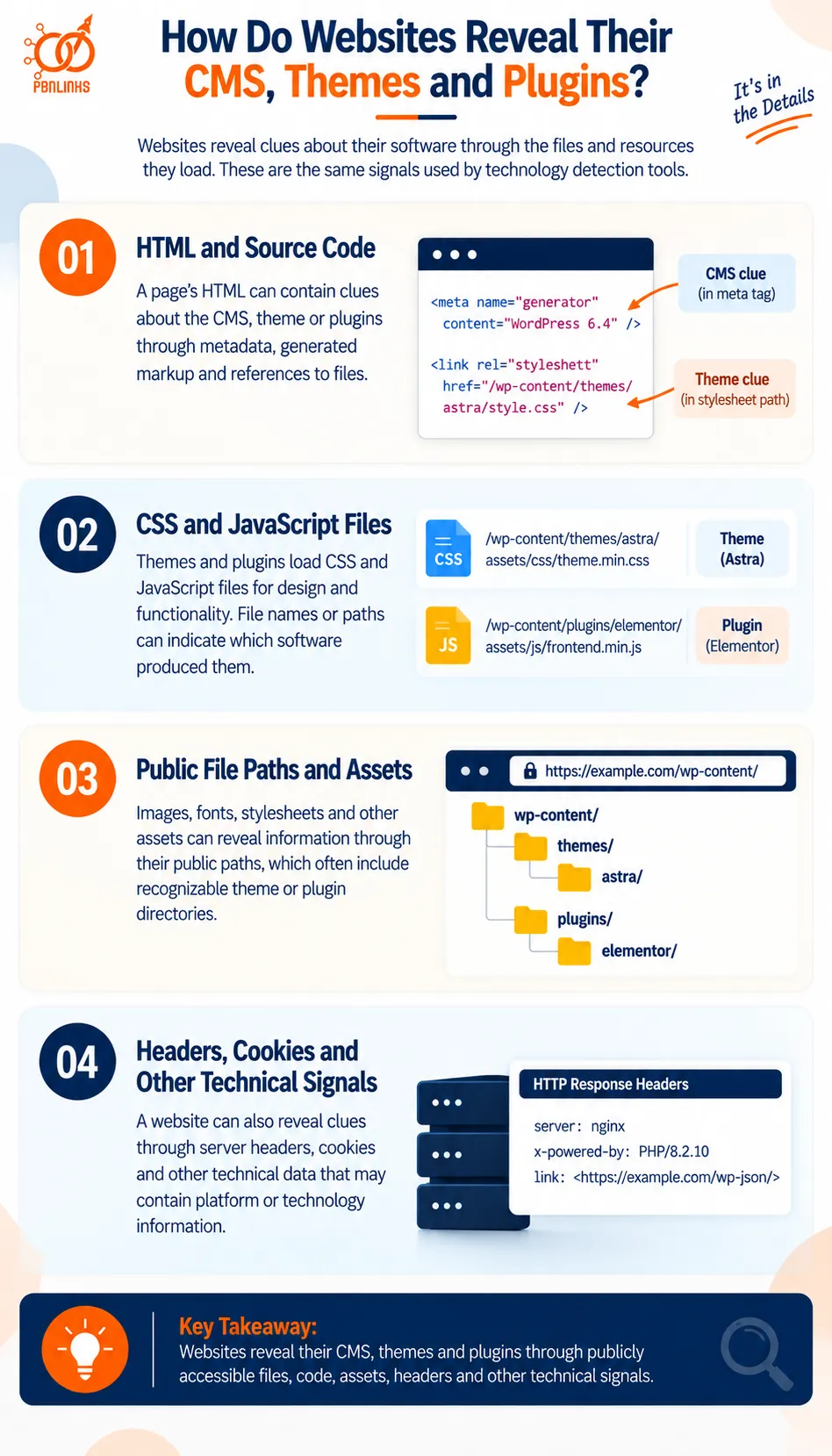
A website does not need to display the name of its CMS, theme, or plugins directly for some of that information to become visible. The files and resources loaded in a visitor’s browser can contain clues about the software running behind the site.
These clues are also what technology detection tools can use to identify parts of a website’s software setup. However, what is detectable depends on what the site actually exposes publicly.
HTML and Source Code
A page’s HTML can contain information that points toward the CMS or other technologies being used. This may include generated markup, metadata, references to scripts and stylesheets, or other recognizable elements.
For WordPress sites, the source can sometimes contain references associated with WordPress itself or with particular themes and plugins. One clue alone may not identify the complete setup, but several consistent clues can make the technology easier to recognize.
CSS and JavaScript Files
Themes and plugins often load CSS and JavaScript resources needed for design or functionality. The URLs, filenames, directories, or contents of these resources can sometimes indicate which software produced them.
For example, a plugin that loads a publicly accessible script from its own directory may leave an observable clue even though visitors never see the plugin name on the page itself.
Public File Paths and Assets
Images, fonts, stylesheets, scripts, and other assets can also reveal information through their public paths. Standard WordPress installations commonly use recognizable content locations, although WordPress allows aspects of these locations to be customized.
This means a familiar path can support CMS, theme, or plugin identification, but the absence of that path does not prove the technology is absent.
Headers, Cookies and Other Technical Signals
Software can also leave clues outside the visible page content. HTTP headers, cookies, metadata, and other responses from the website may contain characteristics associated with particular platforms or technologies.
Different detection methods therefore rely on different signals. A CMS might be identified from one set of clues while a theme or plugin is recognized from another.
The important point is that software fingerprinting is based on observable website output, not access to the site’s private admin area. This also explains why detection is not always complete or perfectly accurate. With that foundation clear, the next question is how these signals can reveal a specific WordPress theme.
How Are WordPress Themes Detected?
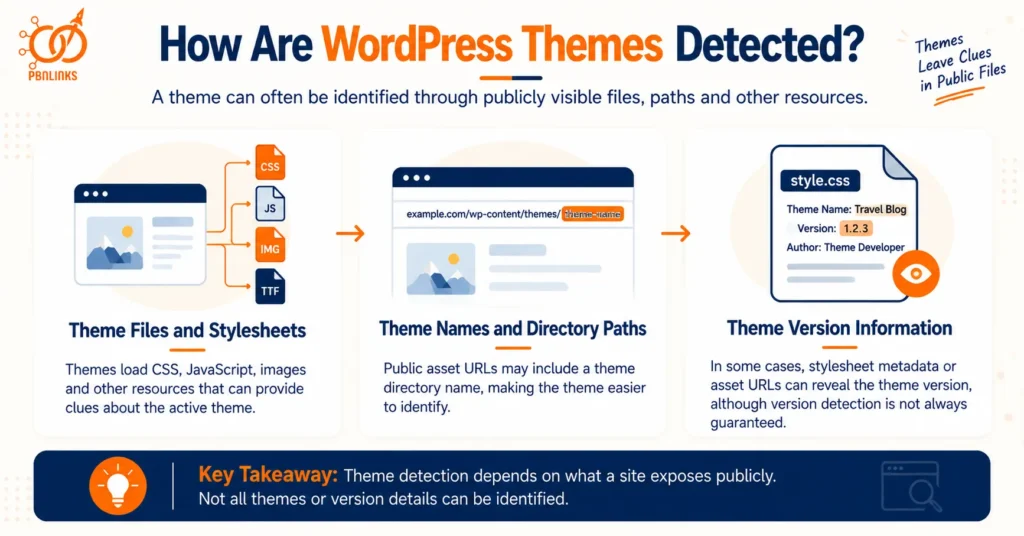
A WordPress theme can sometimes be identified without access to the site’s dashboard. When a theme loads stylesheets, scripts, images, fonts, or other public resources, those files can contain clues about the theme being used.
Theme detection is not always complete, especially when a site is heavily customized. The important point for PBN theme plugin fingerprints is whether enough observable information remains to identify the theme or compare its characteristics across multiple sites.
Theme Files and Stylesheets
WordPress themes commonly load CSS files and other resources needed to control the site’s appearance. These resources can provide useful clues because they may be served from directories associated with the active theme.
A theme’s stylesheet can also contain metadata or other identifiable information. However, what is visible depends on the theme and how the website has been configured.
Theme Names and Directory Paths
Theme related URLs can sometimes include a directory name associated with the theme. For example, publicly loaded assets may reference a path within the site’s WordPress content directory.
This can make a theme easier to identify, but a recognizable directory name should not be treated as the only method of theme detection. Paths can be changed, assets can be optimized, and custom configurations may reduce or alter the information that is directly visible.
Theme Version Information
In some cases, publicly loaded theme resources can expose information that helps identify a theme version. Version details may appear in stylesheet metadata, asset URLs, or other publicly accessible output.
Version detection is not guaranteed. A tool may identify the theme without reliably identifying its exact version, so theme name and theme version should be treated as separate findings.
Visual Similarity vs Technical Theme Fingerprints
Two websites that look similar do not necessarily use the same WordPress theme. Different themes and page builders can produce similar layouts, while two sites using the same theme can look very different after customization.
A technical theme fingerprint is based on observable software characteristics rather than appearance alone. For PBN analysis, this distinction matters because visual similarity and confirmed theme similarity represent different types of evidence.
Even when the same theme is detected across several sites, the match needs context. A widely used theme is a much broader similarity than a less common theme combined with other recurring software patterns.
How Are WordPress Plugins Detected?
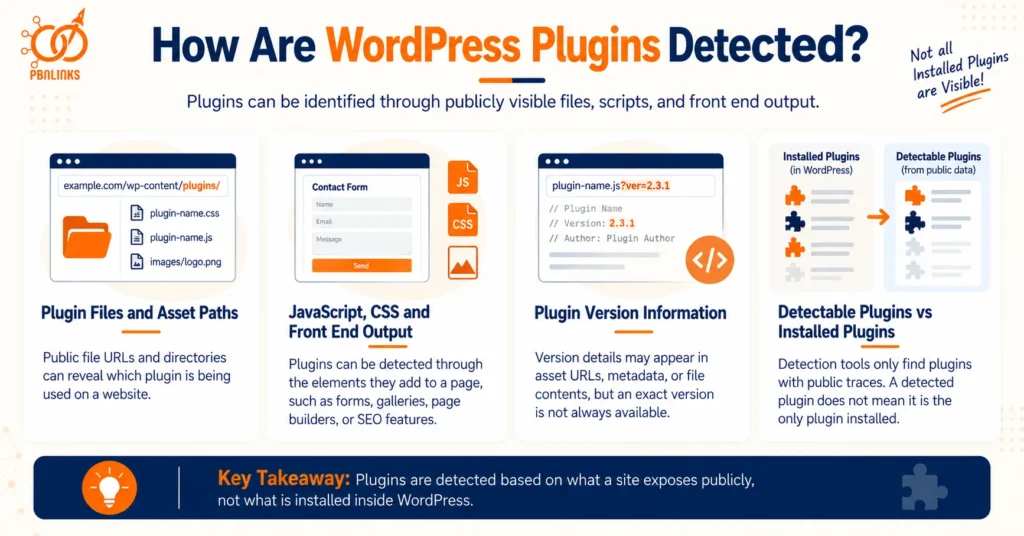
WordPress plugins can sometimes be identified from the public resources and output they add to a website. A plugin may load scripts, stylesheets, images, or other files that contain recognizable clues about the software being used.
However, plugin detection has an important limitation: what can be detected from outside a website is not necessarily the same as what is installed inside WordPress. Some plugins leave clear public traces, while others may expose very little.
Plugin Files and Asset Paths
Many plugins use their own files to provide features on the front end of a website. When those files are publicly loaded, their URLs or directory paths can sometimes indicate which plugin they belong to.
For example, a stylesheet or script may be loaded from a location associated with a particular plugin. These visible resources can provide a useful fingerprint without revealing anything from the private WordPress dashboard.
JavaScript, CSS and Front End Output
Plugins can also reveal themselves through the content they generate. Contact forms, page builders, galleries, SEO features, caching tools, and other plugins may add recognizable HTML, CSS, JavaScript, or other elements to a page.
Detection tools can look for these characteristics when identifying website technologies. The exact clues vary by plugin, which is why some plugins are much easier to detect than others.
Plugin Version Information
In some cases, publicly accessible plugin resources can contain clues about the version being used. Version information may appear in asset URLs, metadata, file contents, or other exposed resources.
An exact version cannot always be determined reliably. Detecting a plugin and detecting its specific version are two separate findings, and the second may not always be possible.
Detectable Plugins vs Installed Plugins
This is the most important limitation to understand. A technology detection tool normally identifies plugins from evidence that is publicly observable from the website.
If a plugin does not produce detectable front end output or its identifying information is not exposed, it may not appear in the results even though it is installed.
For this reason, a detected plugin can indicate that the site exposes characteristics associated with that software, but a list of detected plugins should not automatically be treated as a complete list of everything installed on the site.
This distinction becomes especially important when comparing multiple PBN sites. Before treating matching plugins as a network pattern, we first need to understand what tools such as BuiltWith and Wappalyzer can actually detect and where their limitations begin.
What Can BuiltWith and Wappalyzer Reveal?
BuiltWith and Wappalyzer are technology detection tools that can identify software and services used by websites. They analyze publicly observable signals rather than accessing a site’s WordPress dashboard or private admin area.
For PBN theme plugin fingerprints, these tools are useful because they make it easier to compare technologies across domains. However, their results should be treated as observed technology data, not a complete record of everything installed on a website.
BuiltWith Technology Detection
BuiltWith can identify a wide range of website technologies, including content management systems, analytics tools, frameworks, hosting related technologies, and some WordPress plugins.
BuiltWith also provides technology usage and historical information for supported technologies. This can be useful when comparing sites because a technology that is no longer detected today may have appeared in previously collected data.
The important limitation is that BuiltWith depends on technologies leaving signals it can identify. A missing technology in a BuiltWith report does not necessarily prove that the software is not installed or used.
Wappalyzer Technology Detection
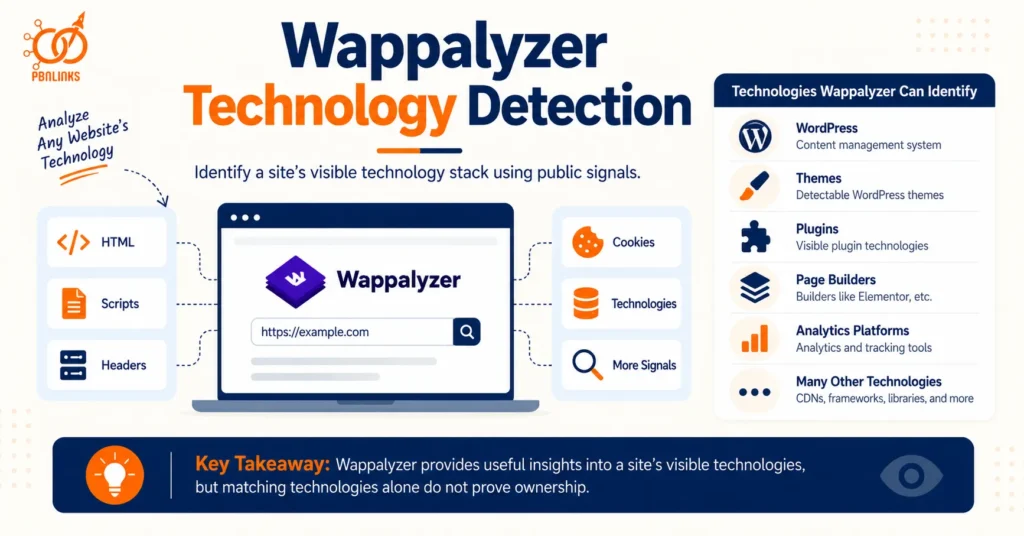
Wappalyzer identifies website technologies using observable signals such as HTML, scripts, headers, cookies, and other characteristics. Its technology database includes WordPress as well as detectable WordPress themes, plugins, page builders, analytics platforms, and many other technologies.
This makes Wappalyzer useful for quickly building a picture of a site’s visible technology stack. When several domains are being compared, recurring technologies can then be examined for broader patterns.
Again, detection should not be confused with proof of ownership. Two sites showing the same technologies may simply use popular software that appears across many unrelated websites.
What Technology Detection Tools Can Miss
Neither BuiltWith nor Wappalyzer should be treated as a complete inventory of a WordPress installation. A theme, plugin, or other technology may be missed when it does not leave a recognizable public signal or when the available evidence is insufficient for the tool to identify it.
Results can also differ between detection tools because they may use different fingerprints, technology databases, and detection methods.
For PBN analysis, these tools are therefore most useful as starting points for identifying observable software patterns. The real question is not simply whether two sites have matching technologies, but how common those technologies are and whether the same combinations repeatedly appear across the network.
Can Reusing Themes and Plugins Create PBN Footprints?
Yes, reusing themes and plugins can create observable similarities across PBN sites. However, the presence of the same software does not automatically mean the sites are connected. The value of the pattern depends on how common the technology is and what other similarities appear with it.
The important distinction is between a widely used technology appearing naturally across many websites and a more specific software combination repeating across the same group of domains.
Same Theme Across Multiple Sites
Using the same WordPress theme across several PBN sites creates a technical similarity when that theme is externally detectable. But the strength of that similarity depends heavily on the theme itself.
If the sites use a popular theme installed across many unrelated websites, the match provides little information on its own. A less common theme appearing repeatedly across a smaller group of domains can be more distinctive, especially when other software characteristics also match.
Theme reuse should therefore be judged by how common the theme is and what additional patterns appear alongside it, rather than simply counting how many sites use the same theme.
Same Plugins Across Multiple Sites
The same principle applies to WordPress plugins. Popular SEO, caching, security, forms, and page builder plugins naturally appear across large numbers of unrelated websites.
Finding one common plugin across several sites is therefore usually a weak similarity. If multiple detectable plugins repeatedly match across the same domains, the combined pattern can provide more context.
Even then, the results need careful interpretation because detection tools may identify only the plugins that leave recognizable public signals.
Repeated Theme and Plugin Combinations
A combination of technologies can be more informative than any individual match.
Consider the difference:
Site A and Site B both use WordPress and one popular SEO plugin.
That combination is likely to appear across many unrelated websites.
Now consider several domains repeatedly showing the same theme, same page builder, same group of plugins, and another less common technology. The complete software pattern is more specific because multiple characteristics are recurring together.
This does not prove common ownership. It simply makes the relationship more useful to investigate than a single theme or plugin match.
Configuration Patterns Beyond the Software Names
Software fingerprints are not limited to the names of themes and plugins. The way technologies are implemented can also create recurring characteristics across websites.
For example, several sites may show similar combinations of front end resources, theme customizations, page builder output, or other publicly observable implementation patterns.
These similarities still need context. Common defaults can naturally repeat across unrelated websites, while less common configurations appearing consistently alongside the same software stack can provide a more distinctive cross site pattern.
The key point is that PBN software analysis should not ask only, “Do these sites use the same theme or plugin?” It should ask, “How specific is the complete pattern, how consistently does it repeat, and what other evidence supports the relationship?”
Can Historical Technology Data Reveal Previous Themes and Plugins?
Yes. A website may use one theme or plugin stack today while older technology records show that it previously used something different. This matters for PBN theme plugin fingerprints because changing a site’s current software does not necessarily remove every record of what was publicly visible in the past.
Historical technology data can therefore add another layer to cross site analysis. Instead of comparing only what several domains use now, it may be possible to examine whether they also shared software patterns at earlier points in time.
Current vs Historical Technology Data
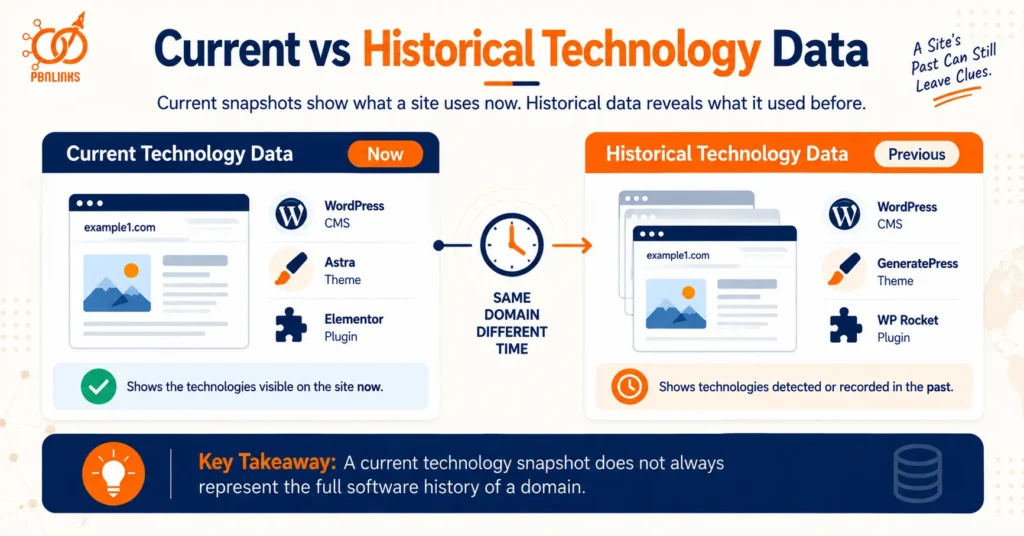
Current technology detection focuses on what can be observed on a website now. Historical data looks at technologies that were detected or recorded during previous observations.
For example, two sites may currently use different themes, but historical records could show that both previously exposed the same theme or other technologies.
This distinction matters because a current technology snapshot does not always represent the full software history of a domain.
Previous Themes and Plugins
When a website changes its theme or replaces a plugin, the previous software may no longer be detectable from the current version of the site. However, earlier technology observations can sometimes preserve evidence that it was previously present.
This can be useful when several domains show similar changes over time. A previous theme or plugin match is not proof that the sites are connected, but repeated historical similarities can provide additional context when combined with other evidence.
Archived Website Code and Assets
Historical clues can also come from archived versions of webpages. Services such as the Wayback Machine may preserve older pages containing HTML, asset references, scripts, stylesheets, or other resources associated with software that was used at the time.
Archive coverage is not complete, and some resources may not have been captured. Still, when older code or assets are available, they can help confirm how a website’s visible technology changed over time.
Why Software Changes May Not Erase Historical Observations
Replacing a WordPress theme, removing a plugin, or changing part of the technology stack affects what a website exposes now. It does not necessarily remove information that was already collected by technology databases or web archives.
Historical records are not guaranteed to exist for every site or every technology. Their value depends on what was observable, when it was recorded, and whether enough information was preserved.
For PBN analysis, this means software fingerprints should not always be treated as a current snapshot. A recurring pattern that appears across both present and historical data can provide more context than a similarity observed only once.
Can Custom Themes and Plugins Still Create Fingerprints?
Yes. Custom themes and plugins can still create detectable fingerprints if they produce distinctive code, files, assets, or front end output. Custom software is not automatically invisible simply because it is not listed in a public theme or plugin directory.
In some cases, repeatedly using the same custom software across multiple sites can create a more distinctive pattern than using a widely available WordPress theme or plugin.
Custom Does Not Mean Invisible
A custom WordPress theme may not expose a recognizable commercial theme name, but the website still needs to deliver resources to visitors. Its HTML, stylesheets, JavaScript, images, fonts, directory structures, and other public assets can contain recurring characteristics.
The same applies to custom plugins. If a plugin produces visible front end output or loads identifiable resources, parts of its implementation may be observable even if a detection tool cannot attach a known product name to it.
The important distinction is between identifying software by name and recognizing a recurring technical pattern. A tool may not know what a custom component is called while its public characteristics can still be compared across sites.
Repeated Code and Asset Patterns
Custom software can become more distinctive when the same implementation details appear repeatedly.
For example, several sites might expose similar:
- custom CSS or JavaScript files
- asset filenames and directory structures
- HTML markup generated by custom components
- front end resources or implementation patterns
Any one similarity may have an ordinary explanation. When several less common characteristics repeatedly occur together across the same group of domains, the overall pattern becomes more useful for comparison.
Reusing the Same Custom Software Across Sites
Reusing one custom theme or plugin across multiple sites can save development time, but it can also reproduce the same observable characteristics across those domains.
This does not mean shared custom software proves that the sites have the same owner. Developers, agencies, templates, and reusable code can create legitimate similarities across unrelated websites.
For PBN theme plugin fingerprints, the important question remains the same: how unusual is the pattern, how consistently does it repeat, and is it supported by other independent technical evidence?
That distinction leads to the most important part of the analysis: determining which CMS, theme, and plugin similarities actually carry meaningful weight and which are simply common web technologies.
Which PBN Theme Plugin Fingerprints Actually Matter?
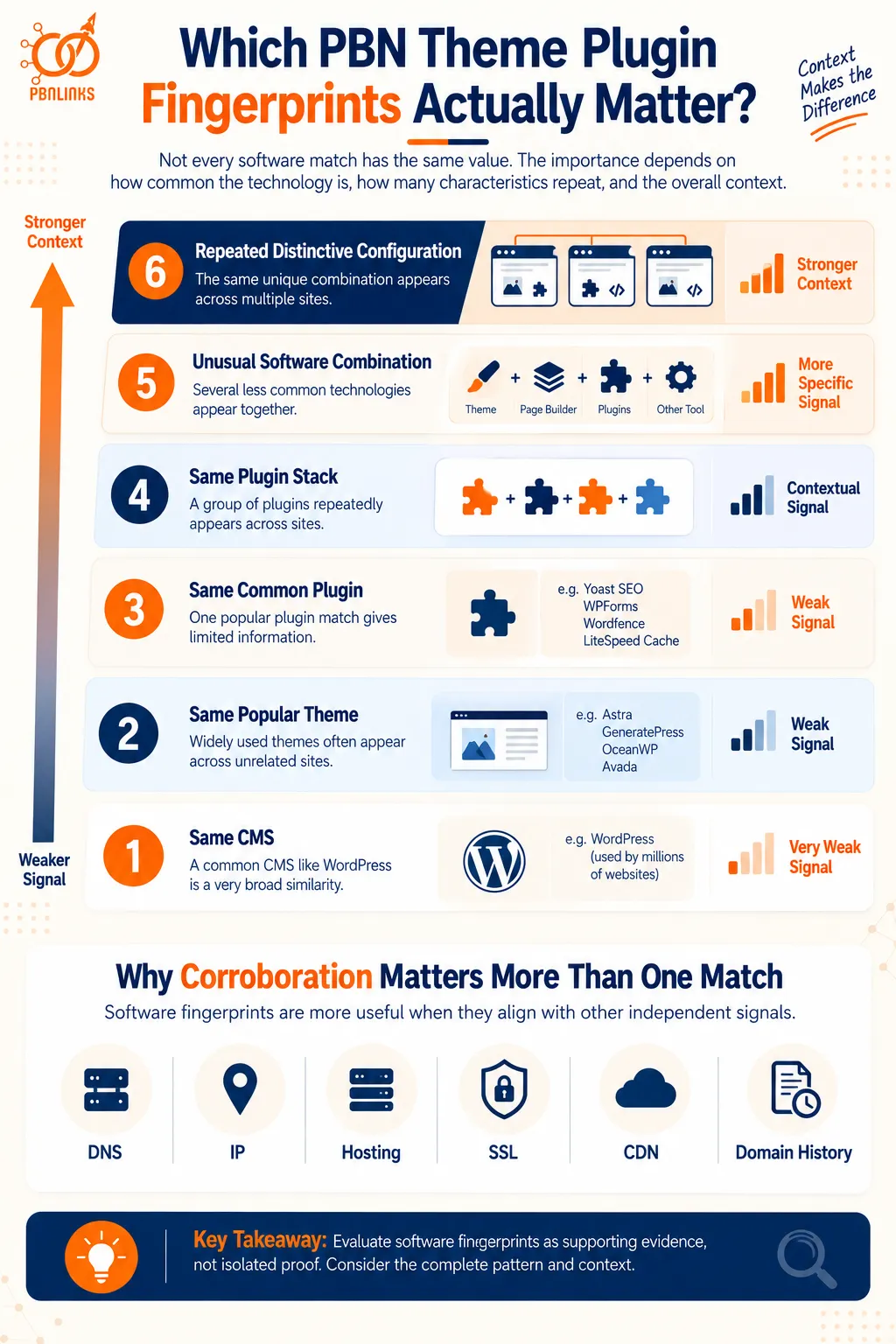
Not every software match deserves the same attention. A useful analysis looks at how common the technology is, how many characteristics repeat together, and whether the same pattern appears across multiple sites.
A simple way to think about the progression is:
Same CMS → Same Popular Theme or Plugin → Same Stack → Unusual Combination → Distinctive Repeated Configuration
This is an analytical hierarchy for comparing software similarities. It is not a documented Google detection formula or scoring system.
Same CMS: Very Weak Signal
Finding that several sites use the same CMS is usually a very weak similarity.
WordPress, for example, powers a large portion of the web. Two or even many websites using WordPress does not provide meaningful evidence that they are connected.
CMS detection is therefore better used as a starting point for deeper comparison rather than as a significant footprint on its own.
Same Popular Theme: Weak Signal
A shared WordPress theme can provide slightly more information, but context still matters.
If several sites use the same widely adopted theme, the overlap may occur naturally across unrelated websites. The theme becomes more interesting when it is less common or when additional software characteristics repeatedly match alongside it.
Same Common Plugin: Weak Signal
The same applies to individual plugins. Popular SEO, caching, security, form, and page builder plugins are used across large numbers of websites.
Finding one common plugin across several domains therefore says very little by itself. A plugin match becomes more useful when it forms part of a larger recurring software pattern.
Same Plugin Stack: Contextual Signal
If several sites expose the same group of plugins rather than one individual plugin, the comparison becomes more specific.
The significance still depends on the plugins involved. A stack made entirely from extremely popular WordPress plugins may occur naturally, while a less common combination can be more distinctive.
Detection limitations also matter because externally detected plugins may represent only part of each site’s actual plugin stack.
Unusual Software Combination: More Specific Signal
A software combination becomes more interesting when several less common characteristics appear together.
For example, the same less common theme combined with the same page builder, several matching plugins, and another identifiable technology creates a more specific pattern than any of those matches individually.
The key factor is specificity. The less likely a complete combination is to occur commonly across unrelated websites, the more useful it can become for further investigation.
Repeated Distinctive Configuration: Stronger Context
The strongest software context comes from distinctive characteristics that repeatedly appear across the same group of domains.
This could involve a recognizable combination of themes, plugins, custom assets, front end output, or other implementation characteristics. Historical records showing similar patterns over time can add further context.
Even a distinctive repeated configuration should not automatically be treated as proof of common ownership. There may still be legitimate explanations, such as websites created by the same developer or agency.
Why Corroboration Matters More Than One Match
Software fingerprints become much more useful when they align with independent technical relationships.
For example, a distinctive theme and plugin pattern may deserve closer attention if the same domains also share meaningful relationships in DNS records, hosting infrastructure, SSL certificate history, CDN configuration, or domain registration data.
This is why PBN theme plugin fingerprints should be evaluated as supporting evidence rather than isolated proof. The strongest analysis considers the specificity of the software pattern and then checks whether independent signals point toward the same relationship.
How Do Software Fingerprints Fit Into the Bigger PBN Footprint Picture?
Theme, plugin, and CMS similarities are only one part of a broader technical picture. A software match becomes more useful when independent signals from other parts of the websites also point toward the same relationship.
This is why PBN analysis should not stop after finding the same theme or plugin stack. DNS, hosting, certificates, CDN infrastructure, and domain history can provide additional context that helps determine whether a software pattern is ordinary or more significant.
DNS and IP Relationships
DNS records can reveal how a domain connects to the infrastructure behind it. IP addresses, nameservers, and historical DNS records may provide additional relationships between sites.
A shared IP or similar DNS setup does not automatically prove a connection because many unrelated websites use shared hosting and common DNS providers. More specific or repeated infrastructure relationships can provide stronger context when they appear alongside distinctive software fingerprints.
Hosting Provider and ASN Data
Hosting information can help show whether several domains operate within the same provider or network infrastructure. ASN data can provide broader information about the networks associated with the IP addresses serving those sites.
A common hosting company or ASN is usually not meaningful on its own, particularly when the provider serves large numbers of customers. Its value increases when more specific hosting relationships repeatedly align with other technical similarities.
SSL Certificates and Certificate Transparency
SSL certificates and Certificate Transparency records can provide another source of publicly available technical information. Depending on the certificate and available records, they can reveal details such as certificate history, validity periods, issuers, and domain relationships included in certificates.
Using the same popular Certificate Authority is a broad similarity. More direct certificate relationships or recurring historical patterns can provide stronger context when combined with matching software characteristics.
Cloudflare and CDN Infrastructure
CDNs and reverse proxies such as Cloudflare can change what infrastructure is directly visible to visitors. For example, a proxied domain may expose CDN addresses instead of the origin server’s IP address.
However, CDN use does not make every other technical characteristic disappear. Software output, DNS configuration, historical infrastructure data, and other observable signals may still provide information that can be compared across sites.
Domain Registration and Historical WHOIS
Current domain registration data may reveal limited ownership information when privacy or proxy services are used. Historical WHOIS records, where lawfully available from third party datasets, may sometimes provide additional context about previous registration details or changes over time.
As with software fingerprints, one matching domain or infrastructure characteristic should not be treated as proof of common ownership. The more reliable approach is to compare independent signals and determine whether several distinct types of evidence consistently point toward the same group of sites.
In practice, PBN footprint analysis becomes more useful when software patterns are corroborated rather than evaluated in isolation.
Common PBN Theme and Plugin Fingerprint Mistakes
Software fingerprints are easy to misinterpret. A common mistake is giving too much weight to ordinary technology matches while overlooking the limitations of detection tools and the importance of corroborating evidence. The following mistakes can lead to inaccurate conclusions when evaluating PBN theme plugin fingerprints.
Mistake 1: Treating Every WordPress Site as a Meaningful PBN Footprint
WordPress leaves recognizable CMS characteristics, but those characteristics are shared by a huge number of unrelated websites.
Using WordPress across several sites is therefore a very weak similarity. It should not be treated as meaningful evidence that the sites belong to the same network.
Mistake 2: Assuming the Same Theme Proves Websites Are Connected
Two websites using the same WordPress theme are not necessarily related. Popular themes can appear across many independently operated websites.
A theme match becomes more useful when the theme is less common or when it appears alongside other recurring software and technical similarities.
Mistake 3: Assuming a Plugin Detector Can Identify Every Installed Plugin
Plugin detection tools can identify software only when enough recognizable information is publicly exposed.
Some installed plugins may leave little or no detectable front end evidence. Therefore, a detected plugin list should not be treated as a complete inventory of everything installed on a WordPress site.
Mistake 4: Thinking Different Themes Remove All Software Similarities
Using different themes may remove one obvious similarity, but websites can still share plugins, page builders, scripts, custom assets, CMS characteristics, and other recurring software patterns.
This is why software fingerprint analysis should consider the broader technology setup rather than focusing only on the theme.
Mistake 5: Assuming Custom Themes Cannot Be Fingerprinted
Custom software may not have a recognizable public product name, but it can still expose distinctive code, assets, paths, markup, or other technical characteristics.
If the same custom theme or plugin is reused across several sites, those recurring characteristics can themselves become a recognizable software pattern.
Mistake 6: Assuming Theme or Plugin Changes Erase Historical Technology Data
Changing a theme or removing a plugin affects what a website exposes today, but it does not necessarily erase information that was previously recorded.
Technology databases and web archives may preserve earlier observations. Historical coverage is not always complete, but available records can still reveal previous software patterns.
Mistake 7: Treating BuiltWith or Wappalyzer Results as Proof of Common Ownership
BuiltWith and Wappalyzer can reveal observable technology similarities between websites, but matching results do not prove that the domains have the same owner.
Their findings are more useful for identifying patterns that can be evaluated for specificity and then compared with independent technical evidence.
The main mistake across all seven examples is treating a single software similarity as a conclusion. PBN theme plugin fingerprints become more useful when the pattern is repeated, distinctive, historically consistent, and supported by other independent signals.
How to Evaluate Theme, Plugin and CMS Fingerprints Across PBN Sites
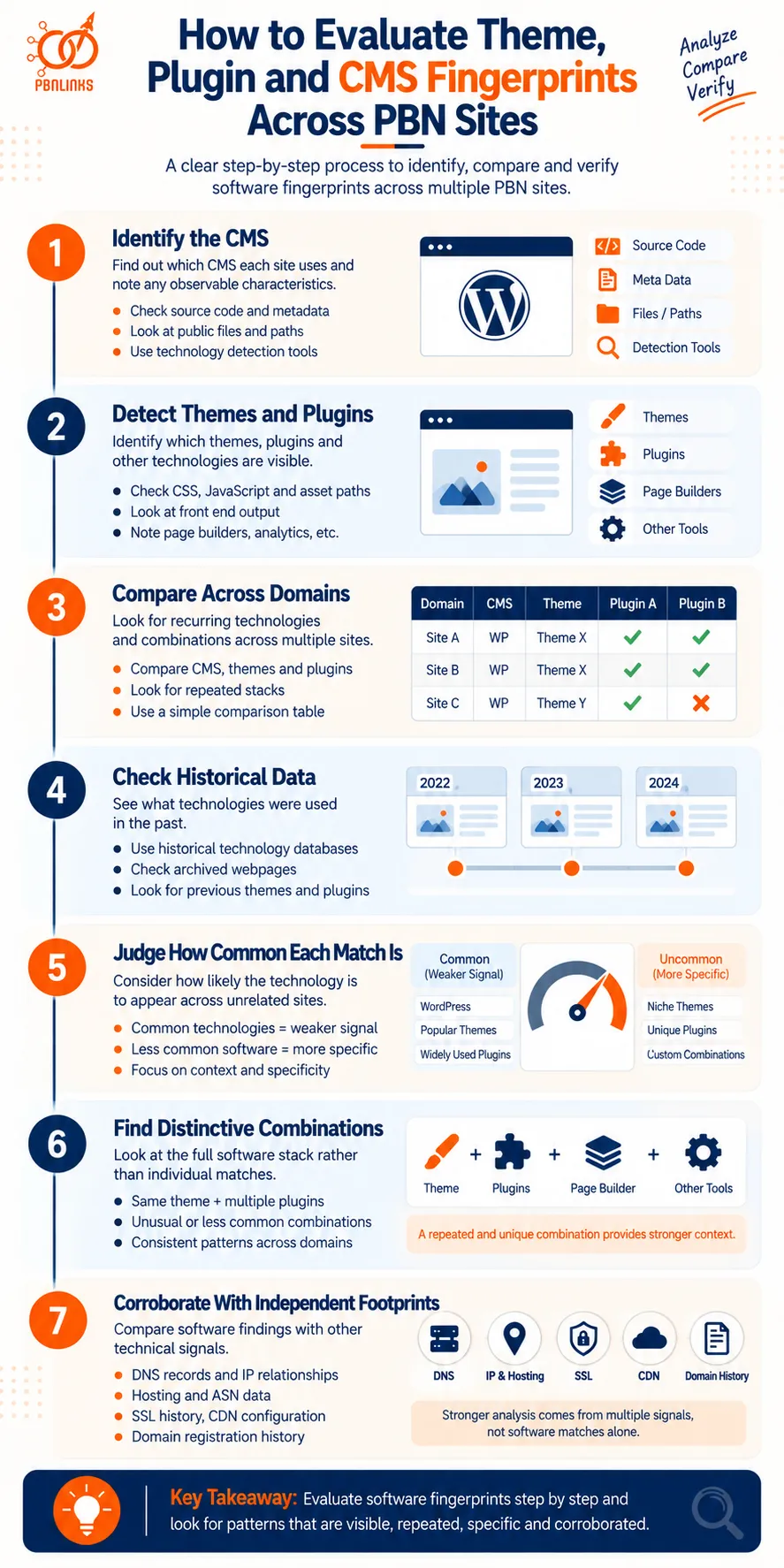
Evaluating PBN theme plugin fingerprints requires more than checking whether several websites use the same WordPress theme or plugins. A useful analysis moves from basic identification to comparison, historical research, and finally corroboration with independent technical signals.
A practical process is:
Identify → Compare → Check History → Judge Specificity → Find Patterns → Corroborate
Step 1: Identify the CMS
Start by determining which CMS each website uses. WordPress may be recognizable through source code, public resources, file paths, metadata, or technology detection tools.
At this stage, simply record the CMS and any clearly observable CMS related characteristics. If multiple sites use different platforms, that difference can also provide useful context when comparing their overall technology setups.
Do not treat several sites using WordPress as a meaningful connection by itself. WordPress is extremely common across unrelated websites, so CMS similarity should serve as the starting point for deeper software analysis rather than the conclusion.
Step 2: Identify Observable Themes and Plugins
Next, examine which themes and plugins can be identified from publicly available information. Source code, CSS and JavaScript resources, asset paths, front end output, and technology detection tools can provide useful clues.
Record the theme where it can be identified, along with plugins and other software that leave recognizable public signals. It can also be useful to note whether the same page builder, optimization tool, analytics technology, or other detectable component appears across multiple domains.
Focus only on what can actually be observed. Do not assume that a list of detected plugins represents every plugin installed on the site. Some plugins may operate without leaving enough public evidence to be identified reliably.
Step 3: Compare Software Across Domains
Once the observable technologies have been identified, compare them across the domains being evaluated.
Look beyond individual matches. Check whether several sites repeatedly share the same theme, plugins, page builder, or broader technology stack. Also consider whether the same combinations appear across many of the domains rather than on only two isolated sites.
A simple comparison table can make recurring patterns easier to identify:
| Domain | CMS | Theme | Plugin A | Plugin B | Other Technology |
| Site A | WordPress | Theme X | ✓ | ✓ | Tool X |
| Site B | WordPress | Theme X | ✓ | ✓ | Tool X |
| Site C | WordPress | Theme Y | ✓ | ✗ | Tool Y |
The goal is to identify recurring patterns, not simply count isolated similarities. A single matching plugin may reveal little, while several technologies consistently appearing together deserve closer examination.
Step 4: Check Historical Technology Data
Current software provides only a snapshot of a website. Where historical information is available, check whether the domains previously used the same themes, plugins, CMS technologies, or other identifiable software.
Historical technology databases and archived webpages can sometimes reveal earlier software patterns that are no longer visible on the live sites. For example, sites that currently use different themes may have previously exposed the same theme or technology combination.
Timing can also provide useful context. If similar software appears, disappears, or changes across several domains during comparable periods, that pattern may be worth examining further.
Historical coverage may be incomplete, so the absence of a historical record should not automatically be interpreted as evidence that a technology was never used.
Step 5: Judge How Common Each Match Is
Not every match deserves equal weight. Ask how likely the same technology would be to appear naturally across unrelated websites.
A shared WordPress installation, popular theme, or widely used SEO plugin is common. These technologies have large user bases, making accidental overlap much more likely.
A less widely used theme, uncommon plugin, custom component, or unusual combination can be more specific. The useful question is not simply “Does this match?” but “How distinctive is this match compared with normal website usage?”
This step helps separate ordinary software overlap from similarities that deserve closer investigation.
Step 6: Look for Distinctive Combinations
Now examine the technologies as a group rather than as separate findings.
Several sites repeatedly showing the same theme, plugin stack, page builder, custom assets, and implementation characteristics can form a more distinctive pattern than any single match. The combination becomes particularly interesting when some of those components are relatively uncommon.
For example, several unrelated sites using WordPress and a popular SEO plugin would be unsurprising. Several sites repeatedly exposing the same less common theme, the same group of plugins, similar custom assets, and comparable front end output would create a much more specific software pattern.
Pay particular attention to combinations that are both unusual and consistently repeated across the same domains. Repetition and specificity together provide more context than either factor alone.
Step 7: Corroborate With Independent Footprints
Finally, compare the software findings with independent technical information.
DNS records, IP relationships, hosting and ASN data, SSL certificate history, CDN infrastructure, and available domain registration history can provide additional context. These signals come from different parts of a site’s technical setup, making them useful for testing whether an apparent software relationship extends beyond themes and plugins.
For example, a repeated software stack becomes more interesting if the same group of domains also shows distinctive historical infrastructure relationships. In contrast, a shared theme combined with completely unrelated infrastructure may have a much simpler explanation.
A software match alone should not determine the conclusion. The analysis becomes more meaningful when distinctive software patterns and independent technical signals repeatedly point toward the same relationship.
This process keeps PBN theme plugin fingerprint analysis focused on evidence rather than assumptions. The objective is not to treat every shared technology as a footprint, but to determine how visible, repeated, specific, historically consistent, and corroborated the overall pattern is.
Conclusion
In conclusion, PBN theme plugin fingerprints can reveal recurring software similarities across multiple sites, but a single CMS, theme, or plugin match rarely provides meaningful evidence on its own. Common technologies such as WordPress and widely used themes or plugins naturally appear across many unrelated websites.
The more important signals are repeated and distinctive software combinations. Matching theme and plugin stacks, unusual configurations, custom code patterns, and historical technology records can provide stronger context when the same characteristics consistently appear across several domains.
Tools such as BuiltWith and Wappalyzer can help identify observable technologies, but their results are not a complete inventory of everything installed on a website. Software fingerprints should therefore be evaluated according to their visibility, repetition, specificity, and history, then corroborated with independent signals such as DNS, hosting, IP, ASN, SSL, CDN, and domain history.
Need stronger, more relevant backlinks without managing the technical complexity of your own network? Explore PBNLinks.agency to find niche relevant PBN link building solutions designed to support your SEO strategy.
Frequently Asked Questions About PBN Theme Plugin Fingerprints
What are PBN theme plugin fingerprints?
PBN theme plugin fingerprints are recurring CMS, theme, plugin, or software characteristics visible across multiple PBN sites. They become more useful when the same distinctive patterns repeat across domains and are supported by other technical evidence.
Can you detect what WordPress theme a website uses?
Yes, a WordPress theme can often be detected if it leaves recognizable public signals. Theme files, stylesheets, asset paths, and other website output may reveal the theme, although customization can make identification more difficult.
Can you see which plugins a WordPress website uses?
Yes, some WordPress plugins can be detected from publicly visible website data. Plugin paths, scripts, stylesheets, HTML, and other output may reveal them, but plugins without recognizable public signals can remain undetected.
Can a plugin detector find every installed WordPress plugin?
No, a plugin detector cannot reliably identify every installed WordPress plugin. Detection depends on publicly observable fingerprints, so plugins that do not expose recognizable front end signals may not appear in the results.
Does using the same WordPress theme across PBN sites create a footprint?
Yes, using the same detectable theme creates a technical similarity, but it does not prove the sites are connected. A popular theme is usually a weak signal, while a less common theme combined with other repeated technologies provides more context.
Does using the same plugins across PBN sites create a footprint?
Yes, repeated detectable plugins can create software similarities across PBN sites. One common plugin is usually weak evidence, while an unusual combination of several matching technologies can form a more distinctive pattern.
Can BuiltWith detect WordPress plugins and historical technologies?
Yes, BuiltWith detects supported WordPress plugins and provides historical technology data for technologies it has observed. Its datasets include detection history with first and last detected dates, but its findings should not be treated as a complete inventory of installed software.
Can Wappalyzer detect WordPress themes and plugins?
Yes, Wappalyzer tracks supported WordPress themes and plugins when recognizable fingerprints are publicly visible. It detects technologies using signals such as HTML, scripts, headers, cookies, and other website characteristics.
Can custom WordPress themes and plugins be fingerprinted?
Yes, custom WordPress software can still create fingerprints. Repeated code, assets, paths, markup, scripts, or other distinctive output can create comparable patterns even when a tool cannot identify the custom software by name.
Can changing themes or plugins remove old software fingerprints?
Changing software can remove current fingerprints, but it may not erase historical observations. BuiltWith maintains historical technology detection data, while previously archived website material may also preserve evidence of earlier software configurations.