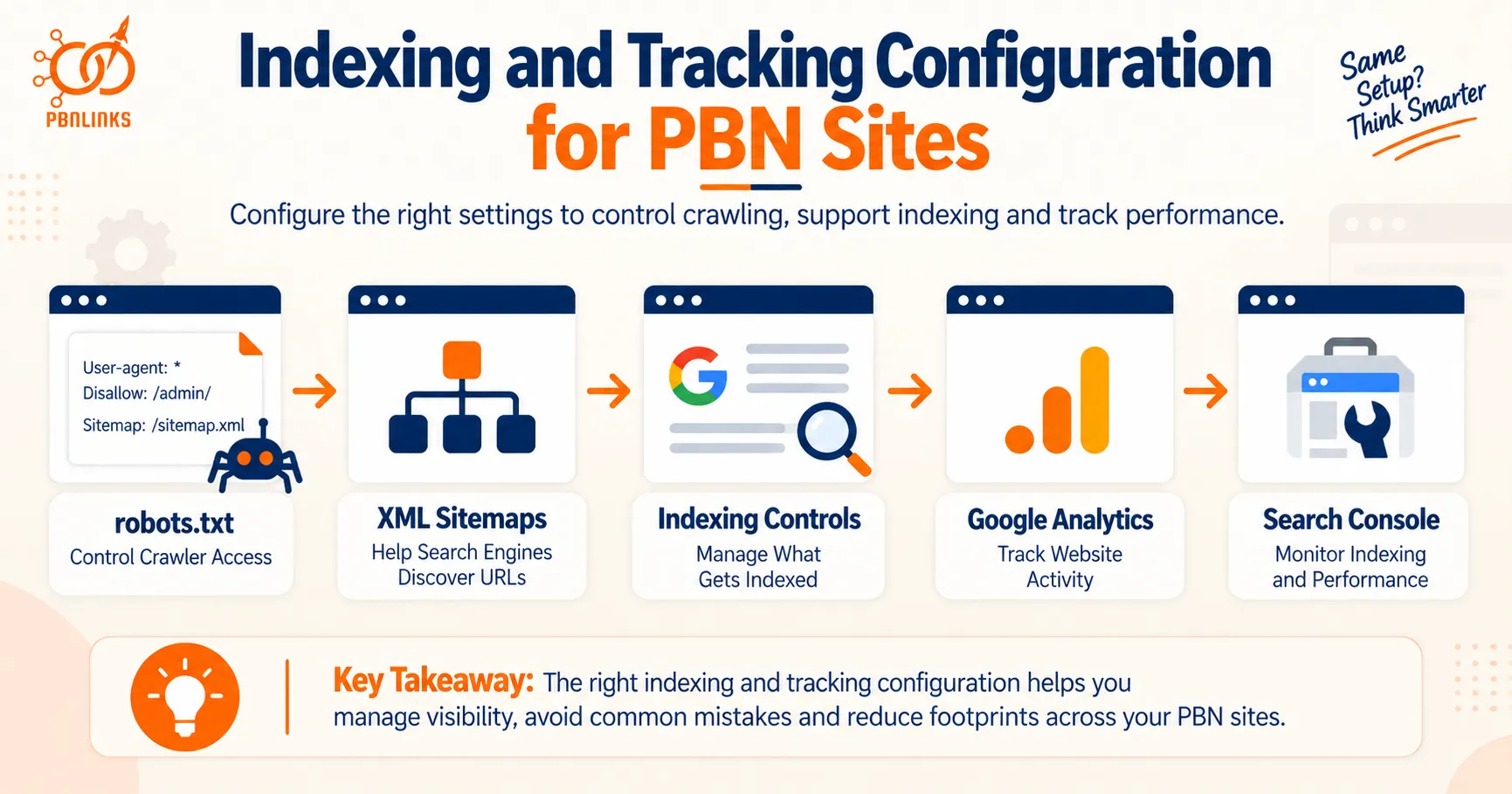
Indexing and Tracking Configuration for PBN Sites: robots.txt, Sitemaps, Analytics and Search Console
Setting up a PBN site involves more than publishing content and waiting for Google to find it. The way you configure robots.txt, XML sitemaps, indexing controls, Analytics, and Search Console can affect how the site is crawled, indexed, monitored, and tracked.
These settings also matter when several PBN sites are managed together. A common robots.txt file or standard sitemap may mean very little because thousands of unrelated websites use similar setups. But repeated tracking IDs, verification methods, or other specific configurations can create clearer connections between sites.
This is why PBN indexing tracking configuration needs to be understood properly. Crawling is not the same as indexing, and indexing is not the same as tracking. In the same way, using Google Analytics on several websites is very different from using the same specific tracking identifier across those sites.
Understanding these differences helps you separate normal website settings from patterns that deserve closer attention. It also prevents common mistakes, such as assuming robots.txt can reliably keep a page out of Google or that submitting an XML sitemap guarantees indexing.
In this guide, you’ll learn how robots.txt, XML sitemaps, indexing directives, Google Search Console, Google Analytics, Tag Manager, and verification methods work across PBN sites. We’ll also look at which configurations are common, which can create more specific connections, and how to evaluate them alongside other PBN footprints.
What Is PBN Indexing Tracking Configuration?
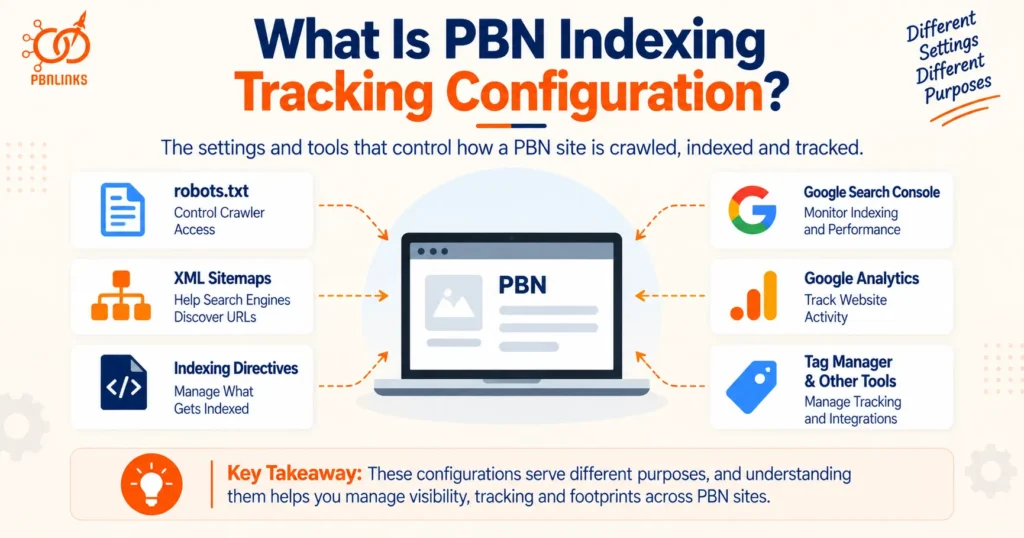
PBN indexing tracking configuration refers to the settings and tools that control how search engines crawl and discover a PBN site, how its pages are prepared for indexing, and how activity on the site is tracked or monitored. This includes robots.txt, XML sitemaps, indexing directives, Google Search Console, Google Analytics, and other tracking tools.
These configurations do not all serve the same purpose. Some affect how search engines access pages, while others help with URL discovery, indexing management, or visitor tracking. Understanding each role makes it easier to compare configurations across PBN sites without treating every similarity as a meaningful footprint.
Crawling and Indexing Configuration
Crawling starts when a search engine visits URLs and follows pages or links it can access. Indexing is a separate process in which Google evaluates discovered content and may add it to its search index.
The robots.txt file can control crawler access to certain parts of a site, while robots meta directives such as noindex can tell supported search engines not to index a page. These controls should not be confused. Blocking crawling with robots.txt does not work the same way as telling a search engine not to index a page.
Across multiple PBN sites, standard crawl and indexing settings are common. They become more useful for comparison when the same less common rules or configurations repeatedly appear across the same group of domains.
Sitemap Configuration
An XML sitemap provides search engines with a list of URLs that a site owner wants them to know about. Larger sites can also use sitemap indexes to organize multiple sitemap files.
Sitemaps can be referenced in robots.txt or submitted through Google Search Console, but submitting a URL in a sitemap does not guarantee that Google will index it. Google still decides whether and when a discovered URL is crawled and indexed.
For PBN analysis, a standard sitemap generated by WordPress or a popular SEO plugin usually tells you little on its own. A more distinctive sitemap structure repeated across several sites may provide additional context when other similarities are present.
Tracking and Account Configuration
Tracking configuration covers tools used to collect website data and manage site information. Common examples include Google Analytics, Google Tag Manager, and Google Search Console.
These services can involve accounts, properties, data streams, tracking identifiers, verification methods, and user permissions. Some parts of the setup may be visible from the website, while other information exists only inside the platform.
This distinction matters across PBN sites. Simply using Google Analytics on several domains is a broad similarity. Sharing the same specific tracking identifier or repeatedly exposing the same distinctive configuration represents a different and more direct technical relationship.
The key is therefore not to treat every matching setting as a footprint. Common configurations are widespread across unrelated websites. Repetition becomes more useful when the configuration is specific, unusual, and supported by other technical similarities.
How Do robots.txt and XML Sitemaps Affect PBN Indexing?
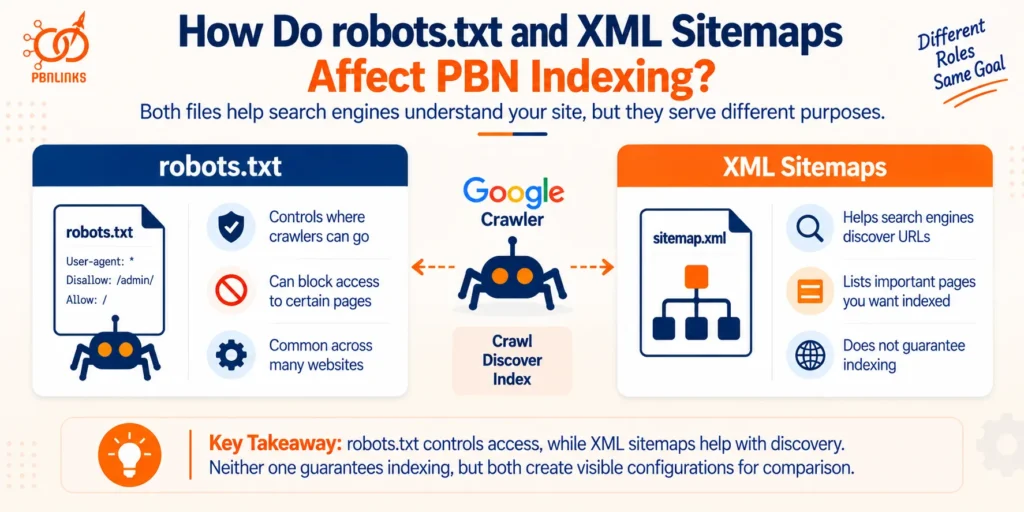
robots.txt and XML sitemaps both help search engines understand a website, but they serve different purposes. robots.txt controls where supported crawlers can go, while an XML sitemap helps search engines discover URLs you want them to know about. Neither one guarantees that a page will appear in Google’s index.
For PBN sites, these files also create visible configurations that can be compared across domains. The important question is whether a similarity comes from a common CMS or plugin, or whether the same less common setup repeatedly appears across several sites.
What robots.txt Actually Controls
A robots.txt file tells supported search engine crawlers which parts of a website they are allowed or not allowed to crawl. For example, a site can use Disallow rules to restrict crawler access to specific directories or URL paths.
One important point is that blocking a URL in robots.txt does not guarantee that the URL will stay out of Google’s index. If Google discovers the blocked URL through links or other sources, the URL may still appear in search results even though Google cannot crawl its content.
If the goal is to prevent a page from being indexed, an appropriate indexing directive such as noindex is normally more relevant. Google must be able to crawl the page to see that directive.
How XML Sitemaps Help Search Engines Discover URLs
An XML sitemap gives search engines information about URLs available on a website. It can help Google discover important pages, particularly when those pages are new or not well connected through internal or external links.
A website can have a single sitemap or use a sitemap index that points to multiple sitemap files. WordPress and popular SEO plugins can also generate sitemaps automatically, which means similar sitemap formats can appear naturally across many unrelated websites.
Sitemap locations can also be listed in robots.txt and submitted directly through Google Search Console. Both methods make the sitemap easier for search engines to find.
Why Sitemap Submission Does Not Guarantee Indexing
Adding a URL to an XML sitemap or submitting the sitemap through Search Console does not guarantee that Google will index the page. A sitemap tells Google about a URL, but Google still decides whether to crawl and index it.
This distinction matters when diagnosing PBN indexing problems. If a page appears in the sitemap but remains unindexed, the sitemap itself may not be the problem. Crawl access, indexing directives, canonicalization, page quality, duplicate content, and other factors can also affect whether Google indexes a URL.
A useful way to remember the process is:
Sitemap discovery → Crawling → Evaluation → Possible indexing
Being present at the first stage does not guarantee the final result.
Repeated robots.txt and Sitemap Patterns Across Sites
A matching robots.txt file or sitemap structure is not automatically a meaningful PBN footprint. Many websites use WordPress, the same SEO plugins, and similar default configurations, so some overlap is expected.
The pattern becomes more useful when several sites repeatedly share details that are less likely to occur by default. Examples can include the same unusual crawl rules, matching custom sitemap locations, or a distinctive combination of robots.txt and sitemap settings.
Even then, the configuration should be treated as context rather than proof of common ownership. Its value depends on how common the setup is, how consistently it appears across the sites, and whether other technical relationships support the same connection.
Which Indexing Controls Matter Beyond robots.txt?
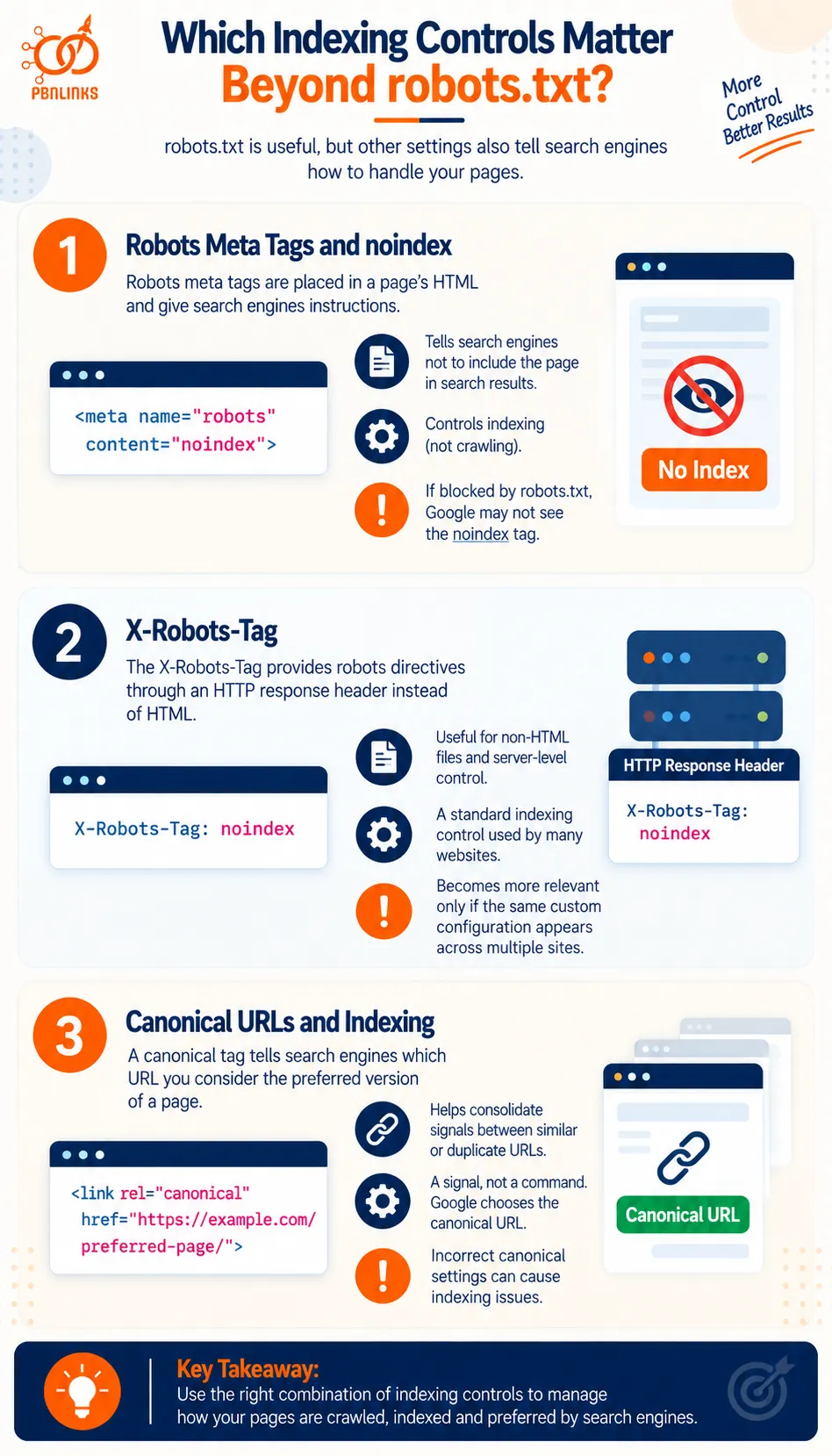
robots.txt is useful for controlling crawler access, but it is not the only setting that affects how search engines handle a page. Website owners can also use robots meta tags, HTTP headers, and canonical tags to provide information about indexing and preferred URLs.
For PBN sites, understanding these controls is important for two reasons. Incorrect settings can prevent important pages from being indexed, while repeated configurations across several sites can also create recognizable patterns.
Robots Meta Tags and noindex
A robots meta tag is placed in the HTML of a page and gives search engines instructions about how that page should be handled. One of the most important directives is noindex.
For example:
<meta name=”robots” content=”noindex”>
This tells supported search engines not to include the page in their search results.
The key difference from robots.txt is simple. robots.txt controls crawling, while noindex controls indexing. If a page is blocked by robots.txt, Google may not be able to crawl the page and see its noindex directive.
This is why using both controls incorrectly can cause confusion when troubleshooting indexing problems.
X-Robots-Tag
The X-Robots-Tag provides robots directives through an HTTP response header instead of placing them in the HTML of a webpage.
For example, a server can return:
X-Robots-Tag: noindex
This can be useful for resources where an HTML meta tag is not practical, including certain non HTML files.
For PBN sites, the important point is not that using an X-Robots-Tag is unusual. It is a standard indexing control. A repeated custom header configuration becomes more relevant only when the same distinctive setup appears across several domains.
Canonical URLs and Indexing
A canonical tag tells search engines which URL you consider the preferred version when the same or very similar content can be reached through multiple URLs.
For example:
<link rel=”canonical” href=”https://example.com/preferred-page/”>
Canonicalization can help Google consolidate signals between duplicate or similar URLs, but a canonical tag is not the same as a noindex directive. Google treats canonical declarations as signals when selecting a canonical URL rather than as an absolute command that guarantees a particular URL will or will not be indexed.
Incorrect canonical settings can therefore create indexing problems. A PBN page may be crawlable and otherwise indexable but point its canonical tag toward another URL, giving Google a conflicting signal about which version should appear in search.
Crawlability vs Indexability
Crawlability and indexability are closely related, but they answer different questions.
Crawlability asks: Can the search engine access and retrieve this page?
Indexability asks: Is the page allowed and suitable to be considered for the search index?
A page can be crawlable but contain a noindex directive. A URL can also be blocked from crawling while still being known to Google through links or other discovery methods.
For PBN sites, checking both is important when a page fails to appear in search. Instead of assuming the sitemap or robots.txt file is responsible, review the complete setup, including crawler access, robots directives, canonicalization, and the page itself.
The same principle applies when comparing multiple sites. A standard indexing setting is usually not meaningful on its own. What deserves closer attention is a specific configuration that repeatedly appears across the same group of domains.
How Does Google Search Console Work Across PBN Sites?
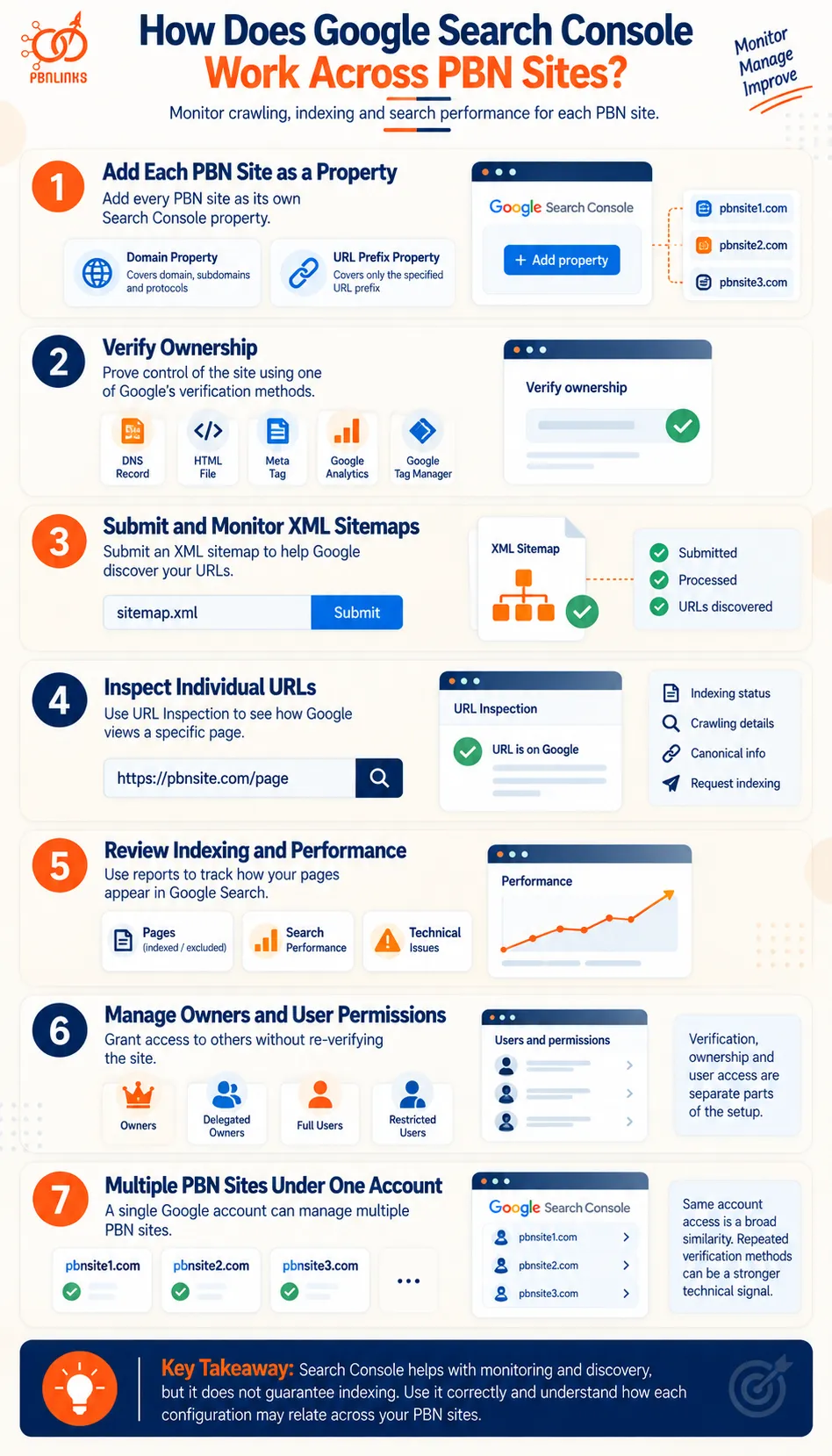
Google Search Console helps site owners monitor how Google crawls, indexes, and displays their websites in search. For PBN sites, it can be used to submit XML sitemaps, inspect URLs, review indexing information, identify technical issues, and monitor search performance.
The easiest way to understand how Google Search Console works across multiple PBN sites is to follow the process from adding a property to managing access and comparing configurations across domains.
Step 1: Add Each PBN Site as a Search Console Property
A website is managed in Google Search Console as a property. Google provides two main property types: Domain properties and URL prefix properties.
A Domain property covers the domain across protocols and subdomains, while a URL prefix property covers only URLs beginning with the specified prefix.
Each PBN site can therefore be managed as its own Search Console property. The property provides access to information about indexing, sitemaps, search performance, and other Google Search data for that site.
Adding a site to Search Console does not guarantee indexing, and Search Console is not required for a website to appear in Google Search.
Step 2: Verify Ownership of the Property
Before receiving owner level access to a Search Console property, control of the website or domain must be verified.
Depending on the property type and setup, Google supports verification methods such as:
- DNS records
- HTML verification files
- HTML meta tags
- Google Analytics
- Google Tag Manager
The verification method matters when discussing multiple PBN sites because these methods work differently. Some can leave information observable on the website or in DNS, while the broader Search Console account structure is not exposed in the same way.
Verification should therefore be understood as a separate part of the configuration rather than being confused with indexing itself.
Step 3: Submit and Monitor XML Sitemaps
After the property is available in Search Console, an XML sitemap can be submitted to help Google discover URLs on the site.
Search Console can report whether Google was able to process the submitted sitemap and provide information about discovered URLs. This can make it easier to identify sitemap problems across individual PBN sites.
However, submitting a sitemap through Search Console does not guarantee indexing. It helps with discovery, while Google still decides whether individual URLs are crawled and indexed.
Step 4: Inspect Individual PBN URLs
The URL Inspection tool provides information about how Google sees a particular URL.
For example, it can help determine whether Google has indexed the URL and provide information about crawling, indexing, canonicalization, and other processing details.
This is useful when a newly published PBN page does not appear in Google. Instead of assuming that robots.txt or the XML sitemap is responsible, URL Inspection can provide more specific information about the URL’s status.
Search Console can also allow an indexing request for an eligible URL, but requesting indexing does not guarantee inclusion in Google’s index.
Step 5: Review Indexing and Search Performance
Search Console provides reports that can help site owners monitor how pages are being handled in Google Search.
For PBN sites, this can help identify pages that are indexed, excluded, or affected by technical problems. Search performance data can also show information such as queries, clicks, impressions, and positions reported for the property.
This makes Search Console useful for both technical monitoring and search performance analysis, but it should not be confused with Google Analytics. Search Console reports on Google Search activity, while Analytics measures website activity through its own tracking implementation.
Step 6: Manage Owners and User Permissions
Search Console separates property ownership from user access.
A property can include verified owners, delegated owners, full users, and restricted users. This means the person who originally verifies a property does not need to be the only person who can later access it.
For example, an existing owner can grant another user access without that user independently adding a new verification method.
This distinction matters across multiple PBN sites because verification, ownership, and user permissions are related but separate parts of Search Console management.
Step 7: Understand How Multiple PBN Sites Relate Inside Search Console
A Google account can have access to multiple Search Console properties, so several PBN sites can technically be managed through the same Google account.
However, this should not be confused with sharing a GA4 measurement ID or GTM container ID.
Search Console does not place a universal public property tracking ID on a website in the same way that a GA4 or GTM implementation can expose a specific identifier. Some Search Console verification methods may leave observable website or DNS information, while owners and user permissions exist within the platform.
The key distinction is:
Same Google service → Broad similarity
Multiple properties under account access → Account relationship
Repeated observable verification configuration → Website or DNS level technical similarity
These are different types of relationships and should not be treated as equal evidence of a PBN connection.
Overall, Google Search Console should be understood as a property verification, search monitoring, and diagnostic platform, not as a requirement for indexing. Across PBN sites, the important distinction is between ordinary Search Console use, account level relationships, and specific verification configurations that may be observable across multiple domains.
How Do Google Analytics and Tag Manager Work Across PBN Sites?
Google Analytics and Google Tag Manager can both be used to measure activity across PBN sites, but they do different jobs. Google Analytics collects and reports website data, while Google Tag Manager provides a way to manage Analytics and other tracking tags.
The easiest way to understand their role across multiple PBN sites is to follow the setup from the Google account level to the tracking identifier that appears on a website.
Step 1: Create or Use a Google Analytics Account
A Google Analytics account sits at the top of the Analytics structure. One account can contain multiple properties, which means several websites can be managed within the same Analytics account without using exactly the same tracking setup.
For PBN sites, this creates an important distinction from the beginning. Using the same Analytics account for multiple websites is not the same as placing the same Analytics identifier on those websites.
Step 2: Set Up a GA4 Property
Inside the Analytics account, website data is organized through GA4 properties. A property is the reporting environment where Analytics processes and reports the data it receives.
Different PBN sites can use separate properties even when those properties are managed through the same Analytics account. This allows the websites to have separate reporting setups rather than sending all activity into one property.
The structure at this stage is:
Analytics Account → GA4 Property
Step 3: Connect the Website Through a Web Data Stream
Within a GA4 property, a web data stream is created to collect data from a website.
The web data stream connects website activity with the GA4 property where that information will be processed. It also provides the measurement information needed to implement Analytics on the site.
The structure now becomes:
Analytics Account → GA4 Property → Web Data Stream
This matters when comparing PBN sites because account level management and website level tracking are not the same relationship.
Step 4: Add the GA4 Measurement ID to the Site
A GA4 web data stream has a measurement ID, typically beginning with:
G-XXXXXXXXXX
The measurement ID identifies the destination for the website’s Analytics data. Depending on how Analytics is implemented, this identifier can be present in the site’s tracking code or related resources.
This is where the distinction becomes particularly important for PBN analysis.
Finding Google Analytics on several websites is common. Finding the same specific measurement ID across multiple domains shows a much more specific shared tracking configuration.
That relationship should still be interpreted carefully. A matching identifier establishes a connection in the tracking setup, but it does not by itself prove that the websites form a PBN.
Step 5: Use Google Tag Manager to Manage Tracking Tags
Google Tag Manager provides another way to deploy and manage website tags. Instead of manually placing each tracking script throughout the site, tags can be configured through a Tag Manager container.
A web container uses an identifier such as:
GTM-XXXXXXX
The container can then deploy Google Analytics and other supported tags according to its configuration.
One Tag Manager account can contain multiple containers. This means several PBN sites can be managed from the same Tag Manager account while still using different container IDs.
Step 6: Compare Account Sharing With Identifier Sharing
Once the structure is clear, PBN tracking configurations become much easier to compare.
There are three different relationships to consider:
Same service: Several sites use Google Analytics or Google Tag Manager.
Same account structure: Several sites are administered through the same Analytics or Tag Manager account but can use separate properties, streams, or containers.
Same specific identifier: The same GA4 measurement ID or GTM container ID appears across multiple websites.
These should not be given equal weight. Google Analytics and Tag Manager are widely used, so simply finding the same service across several sites tells you very little. A repeated specific identifier creates a more direct connection between their tracking configurations.
The key is to understand the setup before judging the similarity. Account → Property → Data Stream → Measurement ID explains the GA4 side, while Account → Container → Tags explains the basic Tag Manager side. Once those relationships are clear, we can examine whether repeated indexing and tracking configurations can create meaningful PBN footprints.
Can Indexing and Tracking Configurations Create PBN Footprints?
Yes, indexing and tracking configurations can create similarities across PBN sites, but not every matching setting is a meaningful footprint. Standard robots.txt rules, WordPress sitemaps, Google Analytics, and other widely used tools naturally appear across millions of unrelated websites.
The more useful question is how specific the match is. A common configuration may provide little information, while the same tracking identifier, verification setup, or unusual combination of settings repeated across several domains can show a clearer technical relationship.
Common robots.txt and Sitemap Patterns
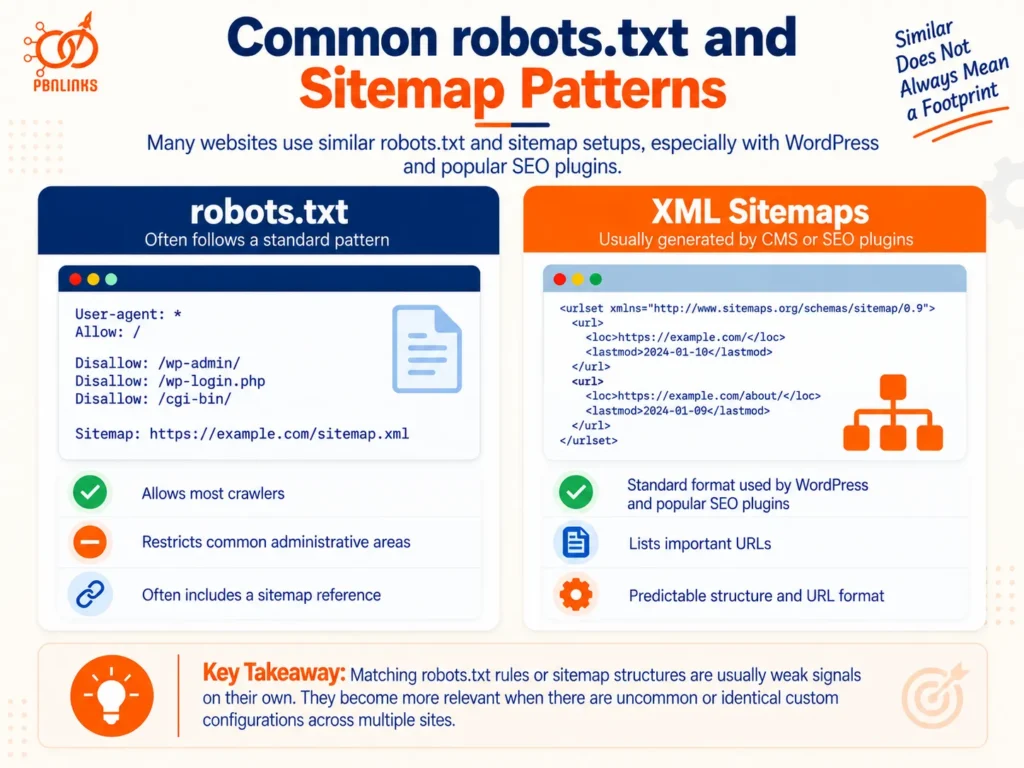
robots.txt files often look similar across unrelated websites. Many sites allow most crawlers, restrict access to common administrative areas, and include a reference to an XML sitemap.
Sitemaps can be even more standardized. WordPress itself and popular SEO plugins can automatically generate predictable sitemap URLs and structures. Two sites using the same sitemap format may simply be running similar software.
For this reason, matching robots.txt rules or sitemap structures are usually weak on their own. They become more useful when the configuration contains less common details, such as matching custom rules, unusual excluded paths, or the same custom sitemap setup across several domains.
Repeated Verification and Tracking Configurations
Verification and tracking can provide more specific information because some implementations introduce identifiers or settings tied to a particular configuration.
For example, Search Console ownership can be verified using methods such as HTML tags, HTML files, or DNS records. Analytics and Tag Manager also require website level implementations that may expose identifying information.
The presence of the same tool is not the important part. What deserves closer attention is repetition of the same specific configuration across multiple sites, especially when it is unlikely to result from a common CMS, plugin, or default setup.
Shared Analytics and Tag Manager Identifiers
Tracking identifiers provide a useful example of why specificity matters.
Suppose three sites contain Google Analytics:
site-a.com → G-ABC123
site-b.com → G-DEF456
site-c.com → G-GHI789
The sites use the same tracking platform, but each has a different measurement ID. That similarity is broad.
Now consider:
site-a.com → G-ABC123
site-b.com → G-ABC123
site-c.com → G-ABC123
Here, the relationship is more specific because the websites are configured to send measurement data to the same GA4 web data stream.
The same principle applies to a repeated Google Tag Manager container ID. Sharing a specific identifier creates a more direct technical connection than simply using GA4 or GTM on several sites.
However, that connection should not automatically be treated as proof that the domains belong to a PBN. The reason for the shared implementation and other available evidence still matter.
Public Signals vs Google Account Relationships
Another important distinction is what can be observed from the website and what exists inside a Google account.
A GA4 measurement ID, GTM container ID, HTML verification tag, or other implementation detail may be visible through website code or related resources. These are public technical signals when the implementation exposes them.
Account relationships are different. A visitor cannot normally inspect a website and see the complete list of people who have access to its Google Analytics or Search Console property.
This means shared account access and shared public identifiers should not be treated as the same type of footprint. One describes how sites are managed within a platform, while the other can create an observable relationship between their technical configurations.
Historical Indexing and Tracking Configurations
Current settings show only how a website is configured today. Tracking codes, robots.txt rules, sitemap locations, and verification methods can all change over time.
Historical website archives and other datasets may preserve some previous public configurations. For example, an archived version of a page may contain an older Analytics or Tag Manager implementation, while archived robots.txt files may reveal crawl rules that are no longer active.
Historical evidence is especially useful when several sites shared a configuration in the past but no longer do so today. However, historical coverage is incomplete. If an old configuration cannot be found, that does not prove it was never present.
The practical lesson is to look beyond a single matching setting. A PBN footprint becomes more useful for analysis when the relationship is specific, repeatedly appears across the same sites, persists or appears historically, and is supported by other technical evidence.
Which PBN Indexing and Tracking Configuration Patterns Actually Matter?
Not every matching indexing or tracking setting carries the same weight. Two PBN sites using Google Analytics or a standard WordPress sitemap is very different from several sites sharing the same specific tracking identifier.
A useful way to evaluate PBN indexing tracking configuration is to look at how common the match is, how specific it is, and whether other technical evidence supports the same connection. As the configuration becomes more distinctive and repeated, it can provide more useful information.
Same Common Platform or Default: Very Weak Signal
Using the same common service or default configuration is usually one of the weakest similarities.
For example:
site-a.com → Google Analytics
site-b.com → Google Analytics
site-c.com → Google Analytics
All three sites use the same analytics platform, but that alone says very little about whether they are connected. The same applies when several sites use Google Search Console, WordPress generated sitemaps, or standard robots.txt rules.
These tools and configurations are widely used across unrelated websites. A common platform becomes useful only when more specific similarities appear alongside it.
Similar robots.txt or Sitemap Structure: Weak Signal
Matching robots.txt rules or sitemap structures can provide additional information, but the source of the similarity matters.
For example, several WordPress sites may expose similar sitemap URLs because they use the same SEO plugin. They may also contain similar robots.txt rules because the CMS or plugin created them automatically.
The match becomes more interesting when the configuration is less common. Repeated custom crawl rules, unusual excluded directories, or matching custom sitemap locations can provide more context than a standard setup.
Even then, similar structure should normally be treated as supporting information rather than proof that the sites are connected.
Similar Tracking or Verification Setup: Contextual Signal
Tracking and verification configurations can become more useful when several sites follow the same less common setup.
For example, a group of domains might use similar Analytics implementations, the same type of Search Console verification, or matching combinations of tracking and verification tools.
One similarity may simply reflect a common setup method. If several configuration choices repeatedly appear across the same domains, however, the pattern becomes more useful for comparison.
The key question is not simply whether the sites use the same tools. It is how closely their actual configurations match.
Same Specific Tracking Identifier: More Direct Relationship
A shared specific identifier creates a more direct technical relationship than simply using the same tracking platform.
Consider these sites:
site-a.com → G-ABC123
site-b.com → G-ABC123
site-c.com → G-ABC123
If the same GA4 measurement ID is implemented across all three domains, their Analytics implementations are sending measurement data to the same web data stream.
The same principle applies when multiple websites expose the same Google Tag Manager container ID.
This type of match is more specific because it connects the sites through a particular tracking configuration rather than a widely used service. It shows a shared technical relationship, but it should not automatically be treated as proof of common ownership or as a documented Google PBN detection signal.
Multiple Independent Matches: Stronger Evidence
Indexing and tracking patterns become more meaningful when they appear alongside other independent similarities.
Suppose several domains share:
- the same specific tracking identifier
- unusual robots.txt rules
- similar historical configurations
- related DNS or IP patterns
- overlapping hosting or ASN data
- matching SSL or software fingerprints
No single similarity needs to provide the entire answer. Instead, several independent relationships can support the same conclusion and make coincidence less likely.
This gives us a practical progression:
Common Default → Similar Configuration → Repeated Setup → Shared Specific Identifier → Multiple Corroborated Relationships
This progression helps compare the specificity of technical relationships. It is not a documented Google scoring system or a confirmed formula Google uses to detect PBNs.
The main principle is simple: the more common a configuration is, the less it usually tells you. The more specific, repeated, and independently supported the relationship becomes, the more useful it is for PBN footprint analysis.
Common PBN Indexing and Tracking Configuration Mistakes
Many indexing and tracking problems come from treating different tools as if they perform the same job. robots.txt, XML sitemaps, Search Console, Google Analytics, and Tag Manager all serve different purposes. Understanding those differences helps avoid indexing problems and makes technical similarities across PBN sites easier to evaluate correctly.
Mistake 1: Treating robots.txt as a Guaranteed Noindex Method
A common mistake is using robots.txt when the real goal is to keep a page out of Google’s index.
robots.txt primarily controls crawler access. Blocking Googlebot from crawling a URL does not necessarily prevent Google from knowing that the URL exists or showing the URL in search results if it is discovered elsewhere.
When the goal is to prevent indexing, an appropriate noindex directive is more relevant. The page must remain crawlable long enough for Google to access and process that directive.
Mistake 2: Assuming Sitemap Submission Guarantees Indexing
Adding a URL to an XML sitemap does not guarantee that Google will index it. The same applies when a sitemap is submitted through Google Search Console.
A sitemap helps Google discover URLs and provides information about pages you want search engines to know about. Google still decides whether a particular URL is crawled and ultimately indexed.
If a PBN page remains unindexed, repeatedly submitting the same sitemap does not address every possible cause. Crawl access, indexing directives, canonicalization, content quality, duplication, and other factors may need to be checked.
Mistake 3: Confusing Crawling With Indexing
Crawling and indexing are separate stages.
Crawling occurs when Googlebot accesses and retrieves a page. Indexing occurs when Google processes a page and decides whether it should be stored in its search index.
A page can therefore be accessible to crawlers without appearing in search. Keeping this distinction clear makes robots.txt, noindex, sitemaps, and Search Console reports much easier to understand.
Mistake 4: Assuming Google Analytics or Search Console Is Required for Indexing
A website does not need Google Analytics installed or a Search Console property created before Google can index it.
Google Analytics is primarily a measurement platform. Search Console provides tools and reports that help site owners understand how Google Search interacts with their sites.
Google can discover URLs through links, sitemaps, and normal crawling without Analytics being installed or the website being registered in Search Console.
Mistake 5: Confusing a Shared Analytics Account With a Shared Measurement ID
Managing several websites through one Analytics account does not mean those websites use the same measurement ID.
An Analytics account can contain multiple properties and data streams. Separate sites can therefore have their own measurement IDs while still being administered within the same account structure.
A repeated GA4 measurement ID is a different technical relationship because the implementations point to the same web data stream. Account sharing and identifier sharing should not be treated as interchangeable.
Mistake 6: Treating Every Similar robots.txt or Sitemap as a Meaningful Footprint
Similar robots.txt files and XML sitemaps are common across unrelated websites.
WordPress, SEO plugins, CMS defaults, and standard technical practices can produce very similar configurations without the sites having any relationship.
Before treating a match as useful, consider how common the configuration is. Matching default settings carry much less weight than the same unusual custom rules or distinctive configuration appearing repeatedly across several domains.
Mistake 7: Ignoring Observable Tracking and Verification Signals
Looking only at hosting, DNS, or website design can overlook other technical relationships.
Depending on the implementation, websites can expose GA4 measurement IDs, GTM container IDs, verification tags, and other configuration details. These can provide useful information when comparing multiple domains.
The important point is not to assume that every exposed identifier is suspicious. Instead, check whether the same specific identifier or distinctive configuration repeats across the sites being compared.
Mistake 8: Treating One Shared Configuration as Proof of Common Ownership
Even a specific technical match should be interpreted in context.
A shared tracking identifier can demonstrate a relationship between tracking configurations, but that alone does not establish why the relationship exists or prove that the domains belong to a PBN.
A stronger analysis compares the finding with independent evidence such as DNS, IP addresses, hosting and ASN data, SSL certificates, CMS fingerprints, CDN configuration, and historical records.
The main mistake is drawing a conclusion from one similarity. PBN indexing and tracking patterns become more useful when they are specific, repeated, and supported by independent technical evidence.
How to Evaluate Indexing and Tracking Configuration Across PBN Sites
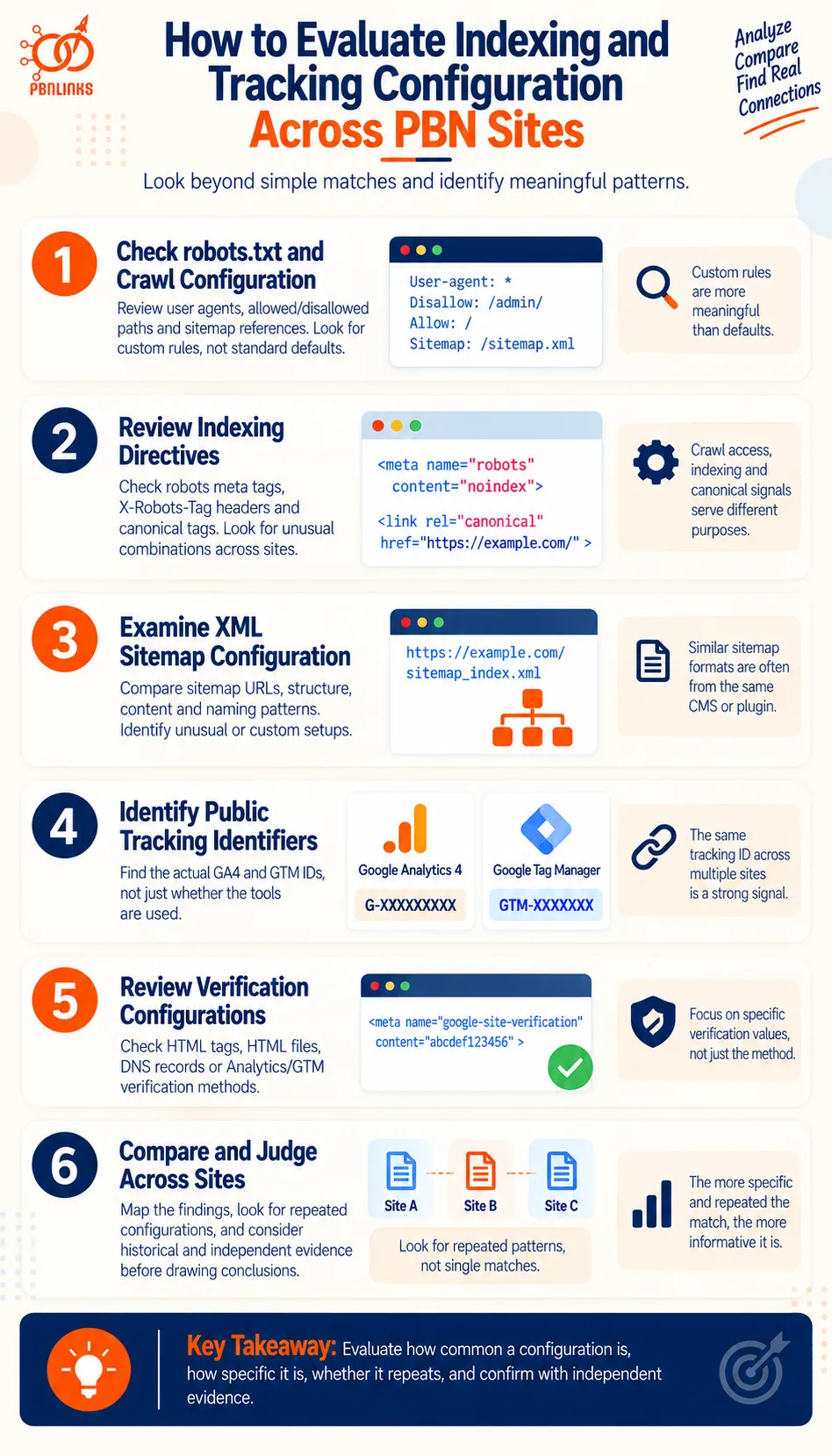
Evaluating PBN indexing tracking configuration is not simply a matter of finding settings that match. The real task is to determine whether those similarities are common website defaults or specific technical relationships that repeatedly connect the same domains.
A useful audit therefore starts with crawl and indexing controls, moves into sitemaps and publicly observable tracking configurations, and then tests the findings against history and independent technical evidence. This prevents a standard WordPress setting or widely used Google tool from being mistaken for a meaningful PBN footprint.
Step 1: Check robots.txt and Crawl Configuration
Start with the robots.txt file for every domain being reviewed.
Check which user agents are addressed, which directories or URL patterns are allowed or disallowed, and whether the file references an XML sitemap. Pay particular attention to custom rules rather than standard directives produced by a CMS or plugin.
For example, three WordPress sites blocking the same common administrative path may tell you very little. Three sites containing the same unusual Disallow rules for custom directories create a more specific similarity.
Record the configuration first and judge its significance later. At this stage, the goal is to identify whether the crawl setup is:
Default → Commonly customized → Distinctive
This also helps uncover crawl problems that may affect the site’s own indexing.
Step 2: Review Indexing Directives
Next, move from crawlability to indexability.
Check important pages for robots meta directives such as noindex, relevant X-Robots-Tag HTTP headers, and canonical tags. Look for conflicts between these controls and the site’s robots.txt configuration.
For example, a page may be crawlable but contain noindex, or it may be accessible and indexable while declaring another URL as canonical. A page blocked through robots.txt can create a different problem because Google may be unable to crawl it and process page level indexing directives.
When comparing several PBN sites, look beyond whether the same directive exists. Ask whether the same unusual combination of indexing settings repeatedly appears across the domains.
This distinction is essential:
robots.txt → Crawl access
noindex → Indexing instruction
canonical → Preferred URL signal
They should not be evaluated as if they perform the same function.
Step 3: Examine XML Sitemap Configuration
Locate the XML sitemap or sitemap index for each site and compare how it is configured.
Review:
- sitemap URL and location
- sitemap index structure
- individual sitemap types
- content included or excluded
- sitemap references in robots.txt
- custom naming or paths
- CMS or SEO plugin patterns
The source of the similarity matters.
If several sites use /sitemap_index.xml because they run the same popular SEO plugin, the match may be expected. If the same domains use an unusual custom sitemap path, similar exclusions, and matching nonstandard organization, the combined pattern deserves more attention.
Also remember that sitemap presence is about URL discovery, not guaranteed indexing. A URL appearing in a sitemap does not mean Google has indexed it.
Step 4: Identify Public Tracking Identifiers
Tracking configurations can provide more specific relationships than standard crawl settings, so identify the actual implementations rather than simply recording which services are present.
For Google Analytics, look for the GA4 measurement ID associated with the site’s web data stream, commonly formatted like:
G-XXXXXXXXXX
For Google Tag Manager, identify the web container ID, commonly formatted like:
GTM-XXXXXXX
The distinction between platform and identifier is critical.
Consider:
Site A → Google Analytics → G-ABC123
Site B → Google Analytics → G-DEF456
Site C → Google Analytics → G-GHI789
All three use Analytics, but their implementations point to different measurement IDs.
Now compare:
Site A → Google Analytics → G-ABC123
Site B → Google Analytics → G-ABC123
Site C → Google Analytics → G-ABC123
The second pattern creates a much more specific technical relationship because the same measurement ID is implemented across the domains.
Apply the same reasoning to GTM container IDs. Do not treat “uses Google Analytics” and “uses the same GA4 measurement ID” as equivalent findings.
Step 5: Review Verification Configurations
Next, examine verification information that is publicly observable.
Depending on how a site has been configured, this may include an HTML verification meta tag, an HTML verification file, or a relevant DNS verification record. Analytics and Tag Manager can also be used as supported Search Console verification methods when the necessary conditions are met.
The important distinction is between the verification method and the specific verification value or implementation.
Two websites using HTML tag verification is not particularly distinctive. A more specific repeated verification configuration across several domains can provide additional context.
Also avoid assuming that publicly visible verification data reveals the complete Search Console account structure. Property owners, delegated users, and permissions are different from the technical verification information that may be observable from outside the account.
Step 6: Build a Cross-Site Configuration Map
Once the individual sites have been checked, compare the findings side by side rather than evaluating each domain in isolation.
A basic audit might look like this:
| Configuration | Site A | Site B | Site C |
| robots.txt | Custom rules | Same custom rules | Default |
| Sitemap | Custom path | Same custom path | Default |
| GA4 ID | G-ABC123 | G-ABC123 | G-XYZ789 |
| GTM ID | GTM-ABC12 | GTM-ABC12 | Different |
| Verification | Similar setup | Similar setup | Different |
| Canonical setup | Custom | Same custom setup | Standard |
This makes clustering much easier to see.
For example, Site A and Site B do not merely share one setting. They repeatedly match across crawl, sitemap, tracking, and other configurations, while Site C mostly follows common defaults.
The purpose of the map is not to count matches mechanically. It is to reveal whether the same domains repeatedly cluster around the more specific similarities.
Step 7: Judge Each Match by Specificity and Repetition
Now classify the findings according to how informative they actually are.
A practical hierarchy is:
Common Default → Similar Configuration → Repeated Custom Setup → Shared Specific Identifier → Multiple Corroborated Relationships
For example, the following should not receive equal weight:
Same Google Analytics platform: very broad similarity.
Similar Analytics implementation: more context, but may still be common.
Same GA4 measurement ID: specific shared tracking relationship.
Same GA4 ID + same unusual robots.txt rules + matching historical configuration: a much stronger cluster of relationships.
Repetition also matters. An unusual configuration appearing on two sites may be worth checking. The same distinctive configuration appearing across a larger group becomes increasingly useful for identifying a recurring pattern.
This hierarchy is an analytical framework for comparing technical relationships. It is not a documented Google scoring system or a confirmed formula for PBN detection.
Step 8: Check Current and Historical Configurations
Do not limit the analysis to what exists on the websites today.
Tracking implementations, verification tags, robots.txt files, sitemap locations, plugins, and other settings can change. Where reliable historical records are available, check whether previous versions of the sites exposed configurations that are no longer present.
This can reveal relationships that a current audit misses.
For example:
Current configuration
Site A → G-ABC123
Site B → G-XYZ789
Historical configuration
Site A → G-OLD456
Site B → G-OLD456
The current implementations appear separate, but the historical configuration shows that both domains previously used the same measurement ID.
Historical evidence should still be handled carefully. Web archives and third party datasets do not capture every page, file, or point in time. Failure to find an old configuration does not prove that it never existed.
Step 9: Corroborate With Independent Technical Footprints
The final step is the most important: do not make the conclusion depend entirely on indexing or tracking configuration.
Compare the strongest findings with independent technical relationships such as:
- DNS and nameserver history
- IP addresses and hosting infrastructure
- ASN relationships
- SSL certificates and Certificate Transparency data
- CDN configurations
- CMS, theme, and plugin fingerprints
- domain and website history
Consider two different situations.
Scenario A
Same WordPress sitemap
Same common robots.txt rules
Both use Google Analytics
Different tracking IDs
Different infrastructure
Most of these similarities are common and provide limited evidence of a relationship.
Scenario B
Same GA4 measurement ID
Same GTM container ID
Same unusual robots.txt rules
Matching historical tracking configuration
Related infrastructure signals
Here, several more specific and partly independent relationships point toward the same cluster of sites. That makes the overall connection much more informative than any single match alone.
The complete evaluation process can therefore be summarized as:
Check Crawl Controls → Review Indexing → Examine Sitemaps → Identify Tracking IDs → Review Verification → Map Sites → Judge Specificity → Check History → Corroborate
The central rule is simple: do not ask only whether two PBN sites have matching configurations. Ask how common the match is, how specific it is, whether it repeatedly connects the same domains, whether it existed historically, and whether independent technical evidence supports the relationship.
That approach turns a list of technical similarities into a much more reliable PBN indexing and tracking configuration audit.
Conclusion
In conclusion, PBN indexing tracking configuration involves several separate parts that need to be understood correctly. robots.txt controls crawler access, XML sitemaps help search engines discover URLs, and indexing directives such as noindex provide instructions about whether pages should appear in search. None of these should be treated as interchangeable.
Google Search Console helps monitor indexing, inspect URLs, submit sitemaps, and manage verified properties, while Google Analytics and Google Tag Manager handle measurement and tracking. Across multiple PBN sites, the important distinction is between using the same common tools and sharing specific identifiers or configurations.
For PBN footprint analysis, common robots.txt rules, standard sitemap structures, or simply using Analytics are usually weak similarities. Repeated custom settings, shared GA4 measurement IDs, GTM container IDs, verification patterns, and historical configurations can create more specific relationships, especially when supported by independent technical evidence.
If you want relevant, carefully managed PBN links without handling the technical complexity yourself, explore PBNLinks.agency for professional PBN link-building solutions focused on quality, relevance, and responsible network management.
Frequently Asked Questions About PBN Indexing Tracking Configuration
What is PBN indexing tracking configuration?
PBN indexing tracking configuration covers how PBN sites are crawled, indexed, discovered, monitored, and tracked. It includes robots.txt, XML sitemaps, indexing directives, Google Search Console, Google Analytics, Tag Manager, and related verification settings.
Does robots.txt prevent Google from indexing a page?
No, robots.txt does not guarantee that a page stays out of Google’s index. It controls crawler access, and Google may still index a blocked URL if it discovers it elsewhere. Use noindex when the goal is to prevent indexing.
What is the difference between robots.txt and noindex?
robots.txt controls crawling, while noindex controls indexing. Google must be allowed to crawl a page to see its noindex directive, so blocking the same URL in robots.txt can prevent Google from processing that directive.
Does submitting an XML sitemap guarantee indexing?
No, submitting an XML sitemap does not guarantee indexing. A sitemap helps Google discover URLs, but Google still decides whether and when those URLs are crawled and indexed.
Is Google Search Console required for a PBN site to be indexed?
No, Google Search Console is not required for a site to be discovered or indexed. Google can find pages through links and sitemaps. Search Console mainly helps site owners monitor indexing, submit sitemaps, inspect URLs, and troubleshoot problems.
Can multiple websites use the same Google Analytics account?
Yes, one Google Analytics account can contain multiple properties used for different websites. Sharing an Analytics account is therefore different from multiple websites using the same GA4 measurement ID.
What is a GA4 measurement ID?
A GA4 measurement ID is the unique identifier for a web data stream in Google Analytics 4. It typically begins with G- and connects website measurement data to the corresponding Analytics data stream.
Can the same GA4 measurement ID be used on multiple websites?
Yes, a single GA4 web data stream can measure activity across multiple domains. Google specifically supports a single web data stream for cross-domain measurement, so a shared measurement ID indicates a shared tracking configuration but does not by itself prove PBN ownership.
Can multiple websites use the same Google Tag Manager container?
Yes, the same Google Tag Manager container can be used across multiple domains. Google generally recommends separate containers per domain, but a single container can be appropriate when tags and user journeys span multiple domains.
Does the same tracking ID prove that websites belong to the same PBN?
No, a shared tracking identifier does not by itself prove that websites belong to the same PBN. It establishes a specific relationship in their tracking configuration, but the reason for that relationship requires context and should be evaluated alongside independent technical evidence.